TrustRadius: an HG Insights company

Save this comparison

Save this comparison

Add Product

Recommended Comparisons

    Overview
    ProductRatingMost Used ByProduct SummaryStarting Price

    Google Classroom

    Score8 out of 10
    N/AN/A

    $0

    per month

    Pointerpro

    Score7.8 out of 10
    N/APointerpro is an assessment platform designed for professionals who want to turn their expertise into personalized, scalable guidance. Instead of stopping at data collection, Pointerpro transforms each completed assessment into an automatically generated, fully branded PDF or PowerPoint report containing personalized results and recommendations. This enables organizations to deliver insights instantly, without manual analysis. The platform supports advanced scoring…

    $828

    per year

    Pricing
    Google ClassroomPointerpro
    Editions & Modules
    Education Fundamentals
    $0
    per license/per month
    Google Workspace for Education Standard
    $3
    per student/per year
    Teaching and Learning Upgrade
    $4
    per license/per month
    Google Workspace for Education Plus
    $5
    per student/per year
    Professional Plan
    $69
    per month 2000 monthly responses
    Enterprise
    On Request
    5000+ monthly responses
    ReportR
    On Request
    10000+ monthly responses
    DistributR
    On Request
    15000+ monthly responses
    Offerings
    Pricing Offerings
    Google ClassroomPointerpro
    Free Trial
    YesYes
    Free/Freemium Version
    NoNo
    Premium Consulting/Integration Services
    NoYes
    Entry-level Setup FeeNo setup feeNo setup fee
    Additional DetailsEducation Fundamentals Version - 30-day free trial for qualifying institutions.Professional Plan Price: $69 per month (billed annually) Unlimited questionnaires & questions Large variety of question types Removable Pointerpro branding Advanced question logic & piping Offline functionality Zapier and Make integration Emails with customizable content Questionnaire in multiple languages Custom scoring Variable end messages & outcomes Show dynamic final screen messages based on scores and answers. Email invitations with unique tracking link Enterprise Plan Custom pricing available upon request Professional features plus: Custom formulas for advanced calculations Response upload Use formulas in question logic & piping Payment processing Before, during or after completing a survey or assessment. Extended design options with custom CSS Integration via WebHooks A Webhook is a notification sent over the web, which transfers data from one app to another. Questionnaire campaigns (on request) A campaign shows a group of questionnaires all in one screen which can be accessed with just a single link. Full white labeling URL and email domain white labeling. Multiple users and team management (on request) Dashboard Builder (on request) ReportR Plan Custom pricing available upon request Enterprise features plus: Drag & drop PDF report builder with preview Large variety of report widgets Use logic to show and hide report widgets based on responses and scores Individual, aggregated & team PDF reports Generate a PDF right after taking the questionnaire PDF distribution via email & download Extended design options with custom CSS Integrate with external databases Multiple users and team management (on request) Dashboard Builder (on request) Aggregate Reports (on request) optional AI prompt widget to scale report content faster DistributR Plan Custom pricing available upon request ReportR features plus: Distribution Portal to leverage assessment distribution Respondent base feeding by customers/co-workers Respondent invitation templates with unique links You create the templates for customers/co-workers. Unique respondent links are generated. Real-time response collection and result view Real-time response collection and result view Your customers/co-workers collect responses. You view overall results. Email campaign template creation Created by your customers/co-workers Optional: charge for assessment/report access Overview of to-do assessments for respondents Overview of responses and reports for respondents Dashboard Builder Multiple users and team management (on request) Aggregate Reports (on request)
    More Pricing Information
    Community Pulse
    Google ClassroomPointerpro
    Considered Both Products
    Google
    No answer on this topic
    Pointerpro
    No answer on this topic
    Key User Insights
    Would buy again
    97%
    Would buy again
    37 Answers
    92%
    Would buy again
    11 Answers
    Delivers good value for the price
    100%
    Delivers good value for the price
    37 Answers
    83%
    Delivers good value for the price
    10 Answers
    Happy with the feature set
    89%
    Happy with the feature set
    34 Answers
    100%
    Happy with the feature set
    12 Answers
    Lived up to sales and marketing promises
    95%
    Lived up to sales and marketing promises
    19 Answers
    83%
    Lived up to sales and marketing promises
    10 Answers
    Implementation went as expected
    100%
    Implementation went as expected
    29 Answers
    92%
    Implementation went as expected
    11 Answers
    Features
    Google ClassroomPointerpro
    Learning Management
    Comparison of Learning Management features of Google Classroom and Pointerpro
    Feature
    Google Classroom
    7.4
    60 Ratings
    8% below category average
    Pointerpro
    -
    Ratings
    Course authoring8.752 Ratings00 Ratings
    Course catalog or library7.639 Ratings00 Ratings
    Player/Portal6.538 Ratings00 Ratings
    Learning content8.141 Ratings00 Ratings
    Mobile friendly7.757 Ratings00 Ratings
    Progress tracking & certifications7.144 Ratings00 Ratings
    Assignments7.158 Ratings00 Ratings
    Compliance management6.934 Ratings00 Ratings
    Learning administration7.346 Ratings00 Ratings
    Learning reporting & analytics6.842 Ratings00 Ratings
    Social learning8.751 Ratings00 Ratings
    Gamification3.98 Ratings00 Ratings
    Single Sign On (SSO) Enabled Learning9.812 Ratings00 Ratings
    Best Alternatives
    Google ClassroomPointerpro
    Small Businesses
    Teachable
    Score9.5 out of 10
    Renaissance Accelerated Reader
    Score9.9 out of 10
    Medium-sized Companies
    Schoology Learning
    Score8 out of 10
    Renaissance Accelerated Reader
    Score9.9 out of 10
    Enterprises
    D2L Brightspace
    Score7.8 out of 10
    Renaissance Accelerated Reader
    Score9.9 out of 10
    All AlternativesView all alternativesView all alternatives
    User Ratings
    Google ClassroomPointerpro
    Likelihood to Recommend
    8.1
    (80 ratings)
    7.7
    (30 ratings)
    Likelihood to Renew
    10.0
    (4 ratings)
    -
    (0 ratings)
    Usability
    8.1
    (11 ratings)
    7.3
    (12 ratings)
    Availability
    9.0
    (1 ratings)
    -
    (0 ratings)
    Performance
    9.0
    (1 ratings)
    -
    (0 ratings)
    Support Rating
    1.9
    (14 ratings)
    7.8
    (11 ratings)
    Implementation Rating
    2.0
    (2 ratings)
    -
    (0 ratings)
    Product Scalability
    10.0
    (1 ratings)
    -
    (0 ratings)
    User Testimonials
    Google ClassroomPointerpro
    Likelihood to Recommend
    Google
    Google Classroom allows teachers to post for daily lessons and assignments. It also allows teachers to be able to communicate with students easily outside of class. Students are able to stay connected and know where to find all information and resources easily in a streamlined manner for all of their classes.
    Incentivized
    Read full review
    Pointerpro
    They get the job done. We were able to do everything that our client wanted and needed. Its a free quiz on their website, so having to pay $1,500 a year for this service is hurting our bank. My only complaint is the price. If you are able to lower your price or offer promotions, then I would have no problem staying. We are currently looking for cheaper alternatives.
    Incentivized
    Read full review
    Pros
    Google
    • Student-teacher communication - I love using Classroom for this because my students can always go back and check what was on Classroom by looking through the stream. This way they don't have to go dig through emails to find what they're looking for.
    • Posting to multiple classes - I can post the same announcement or assignment to multiple classes at once without having to repeat the process or send separate emails.
    • Streamlining grading - when students turn work in on Classroom, it all goes to one place and then when I'm grading I can open their documents directly from Classroom or my Drive folder. This way, I'm not looking through emails and Google Doc shared files for their assignment.
    Incentivized
    Read full review
    Pointerpro
    • Intuitive branching logic mechanics. Survey Anyplace offers a nicely pipeline/process map format to visually see the branching logic for more robust question sets.
    • Reliable results. Survey Anyplace offers important tracking data to evaluate and hold respondents accountable to completing the surveys.
    • Users can save progress and come back. This allows busy respondents time to think about deeper questions, specifically when the surveys are being used in an interviewing approach.
    Incentivized
    Read full review
    Cons
    Google
    • The content management of the Classroom is not that good. The sub-section for notes, syllabus, or discussion is missing.
    • It doesn't have parental control feature.
    • It converts the excel output into a normal file. All the formulas and pivots got changed into plain text.
    Read full review
    Pointerpro
    • Creating something highly customized at the ReportR level means you will need to have some savvy with CSS if you want to do it yourself. But it also means you can create something truly incredible and they do not have the same limitations as other similar software.
    Read full review
    Likelihood to Renew
    Google
    Testing is particularly important in online learning, and Google Classroom falls far short of other learning management systems in this regard. Security is also a concern: while account control is reasonable for the account used with Google Classroom, the person controlling a particular account is often able to, for example, forward or download proprietary materials.
    Read full review
    Pointerpro
    No answers on this topic
    Usability
    Google
    Simple design and seamless integration with Google tools and drive, but missing some key features. However, since it is limited in overall functions and ability to truly personalize / customize, it is quite user friendly and easy to set up and get going, other than sending out the code to your course or dropping students in via their gmail account. Users of Google Forms and sites will find the layout similar in design.
    Incentivized
    Read full review
    Pointerpro
    This is a great platform. The ease of use and ability to generate instant reports is killer. I highly recommend this platform for those who want to showcase a professional survey to impress their clients and employees. For us, this helps expand our product offering greatly, which also supplements our other services. [Survey Anyplace is a] great product and platform!
    Incentivized
    Read full review
    Reliability and Availability
    Google
    We have had very little trouble in accessing Google Classroom. Our issues, if any, have risen from our server and not the Google servers.
    Incentivized
    Read full review
    Pointerpro
    No answers on this topic
    Support Rating
    Google
    Since this platform is provided by Google, the technical support is better than any others, and we are not required to bother about the space constraints for adding the contents. If we have a good uninterrupted internet facility we can access Google Classroom without any delay or lag. They have app support in both Android and iPhone.
    Read full review
    Pointerpro
    I wish there was a better live chat feature. Seems like I have to wait 30-60 every time I need to talk to someone. Though once I am able to speak with someone via the chat in my account, they have been very helpful in answering my questions or pointing me in the right direction.
    Incentivized
    Read full review
    Implementation Rating
    Google
    It was relatively easy to implement due to the simplicity of the platform. Even our more technology challenged teachers found it easy to get started with Google Classroom.
    Incentivized
    Read full review
    Pointerpro
    No answers on this topic
    Alternatives Considered
    Google
    I haven't tested or evaluated another digital classroom website or application. I feel like Google Classroom is convenient for many reasons such as compatibility to Google docs, slides, etc. I also love the ability to link to YouTube and other sites. I don't know if there would be a site that is easier to maneuver.
    Incentivized
    Read full review
    Pointerpro
    Survey Anyplace is an excellent piece of software.
    It can create in depth surveys and has a huge functional capability! I would highly recommend using Survey Anyplace for any business as it is so adaptable!
    The support team are fabulous and always on hand to answer any queries and set up Zoom calls for more tailored help! Mark has been brilliant in helping me to create a complex survey!
    Incentivized
    Read full review
    Scalability
    Google
    It is very easy to push out this program across our buildings. Teachers are able to use it without much trouble.
    Incentivized
    Read full review
    Pointerpro
    No answers on this topic
    Return on Investment
    Google
    • Students are able to continue learning in a remote environment
    • Parents have a single, consistent organization structure to make it easy to track assignments and progress for multiple children
    • Much better solution than the quickly assembled Zoom-and-gloom of the previous spring when school abruptly went remote with no planning
    Incentivized
    Read full review
    Pointerpro
    • As a publisher, the quizzes provide us with compelling type of "advertising" product to engage our clients' audiences.
    • We use the quizzes to direct respondents to thought leadership content for lead gen. The "correct response" feature in the quizzes provide the most interesting sample of our clients' content.
    Incentivized
    Read full review
    ScreenShots

    Pointerpro Screenshots

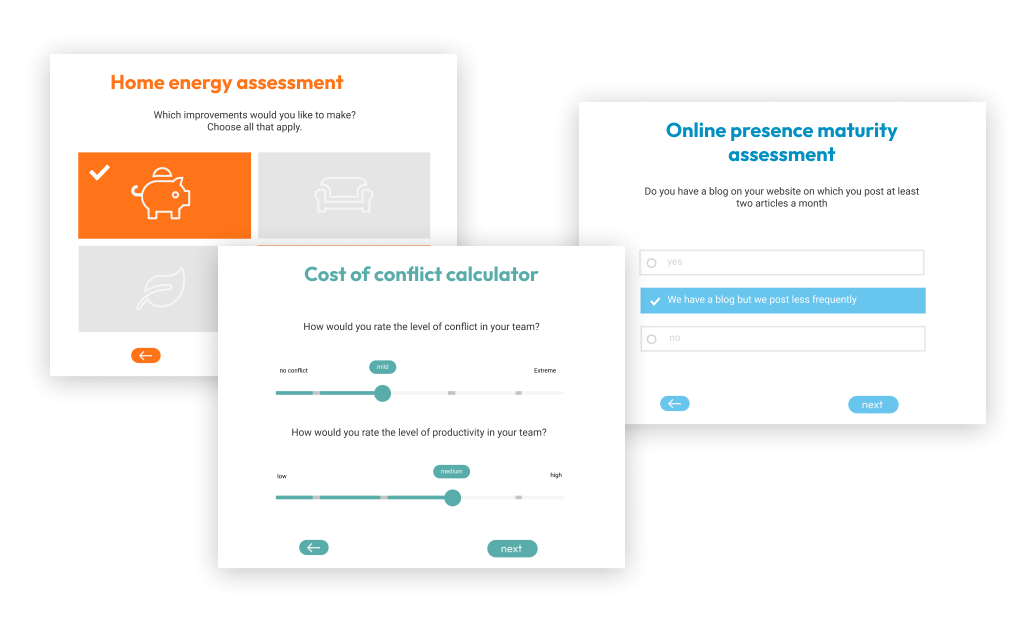
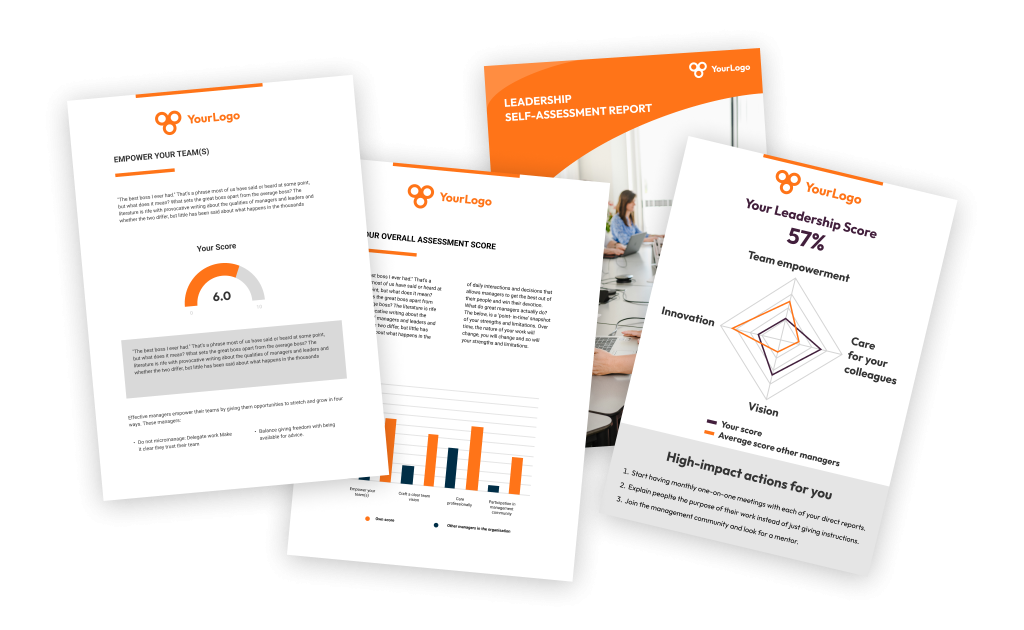
    Screenshot of the Pointerpro assessment app, used to build maturity assessments, personality tests, 360 assessments, competency quizzes, self-assessments, or quote calculators.Screenshot of how respondents can immediately receive their personalized report after they complete their assessment. Of course the tool also offers the possibility of giving postponed feedback.Screenshot of the tool's no-code assessment builder.Screenshot of how Pointerpro allows respondents to download their personalized PDF with a download button at the end of the assessment.Screenshot of some examples of Pointerpro's branded assessments.