Hubstaff vs. MonitUp

Overview
ProductRatingMost Used ByProduct SummaryStarting Price
Hubstaff
Score 9.4 out of 10
Small Businesses (1-50 employees)
Hubstaff is a workforce analytics software tailored to boost productivity in remote, hybrid, and in-house teams while fostering a positive employee experience. Integrating with over 30 apps, Hubstaff's key features include time tracking, screenshots, activity tracking, URL and app monitoring, workforce analytics, automatic payroll and invoicing, scheduling, GPS and location monitoring, and timesheets. Hubstaff is compatible with Mac, Windows, Linux, Chrome, iOS, and…
$14
per month 2 seats (minimum)
MonitUp
Score 0.0 out of 10
N/A
Employee monitoring platform designed to help businesses with monitoring employee website access, computer performance, and time tracking. Features of the platform include an activity dashboard with an overview of all employees' activity, login and logout tracking, visibility into which websites employees are accessing, a list of all online and offline computers, customization, and user-specific data.
$2
per month per user
Pricing
HubstaffMonitUp
Editions & Modules
Starter
$7
per month per user (2 seat minimum)
Grow
$9
per month per user (2 seat minimum)
Team
$12
per month per user (2 seat minimum)
Enterprise
$300
per year per seat
No answers on this topic
Offerings
Pricing Offerings
HubstaffMonitUp
Free Trial
YesYes
Free/Freemium Version
YesNo
Premium Consulting/Integration Services
YesNo
Entry-level Setup FeeNo setup feeOptional
Additional DetailsDiscount available for annual pricing.
More Pricing Information
Community Pulse
HubstaffMonitUp
User Ratings
HubstaffMonitUp
Likelihood to Recommend
9.6
(24 ratings)
-
(0 ratings)
Likelihood to Renew
10.0
(1 ratings)
-
(0 ratings)
Usability
8.9
(3 ratings)
-
(0 ratings)
Availability
10.0
(1 ratings)
-
(0 ratings)
Performance
10.0
(1 ratings)
-
(0 ratings)
Support Rating
10.0
(5 ratings)
-
(0 ratings)
Configurability
10.0
(1 ratings)
-
(0 ratings)
Vendor post-sale
10.0
(1 ratings)
-
(0 ratings)
Vendor pre-sale
10.0
(1 ratings)
-
(0 ratings)
User Testimonials
HubstaffMonitUp
Likelihood to Recommend
Hubstaff
It enables you to monitor workers' time on every project. It monitors productivity even if an internet connection is not available. It provides a customizable interface. Every task is customizable to suit project requirements. It allows you to track time from anywhere in the world. In this way, it provides powerful insights to determine how many hours are required to do a project.
Read full review
MonitUp
No answers on this topic
Pros
Hubstaff
  • Its interface is also quite easy to handle and is designed in a user friendly way.
  • Overall, I feel that Hubstaff is a very useful invention that has the ability to attract and fascinate users.
  • Hubstaff offers a customizable and easily tailored according to your requirements user interface where with the help of just one click you can start or even stop tracking your daily project activities.
Read full review
MonitUp
No answers on this topic
Cons
Hubstaff
  • I am having a problem with its customer support. [I feel it is] one of the worst customer service I have gone through for the longest time. They did not even know about their own platform, response time is late and there is no such name of help from their side what so ever which makes it a very difficult platform to use.
  • [I believe it] needs a lot of upgrades in customer support system.
Read full review
MonitUp
No answers on this topic
Likelihood to Renew
Hubstaff
Because it's easy to implement and use. It does not disrupt your work.
Read full review
MonitUp
No answers on this topic
Usability
Hubstaff
I give it 9 because it is really good for time tracking and managing remote teams. It helps me to manage my team very efficiently. Still, prices are high, so don't give 10. I need more discounts to add more team. Also need more accuracy as users are now fooling the tools with various cheats. Overall it is good and helfull
Read full review
MonitUp
No answers on this topic
Reliability and Availability
Hubstaff
I've never had any issues and always received proper support. They let you know in advance when they'll be in maintenance and it's always in odd hours, so it's good. You still can use it when they are maintaining it.
Read full review
MonitUp
No answers on this topic
Performance
Hubstaff
I've never had any issues. It loads correctly and works like a charm.
Read full review
MonitUp
No answers on this topic
Support Rating
Hubstaff
Hubstaff has always responded to support requests in a timely manner and has kept me in the loop of changes. When contacting them about future changes/features they've always been upfront on whether that is a change they are looking to make and when that change may occur. Finally, if the person I have communicated with was unable to resolve, they always escalated to the next best person who can answer/resolve.
Read full review
MonitUp
No answers on this topic
Implementation Rating
Hubstaff
None, everything went smoothly.
Read full review
MonitUp
No answers on this topic
Alternatives Considered
Hubstaff
Hubstaff keeps interesting and smart features and functions. The most interesting feature is the reporting feature that has brought much convenience
to me. It is no doubt a great tool for planning budgets, managing workflows,
tracking time, and best supervision capabilities.
Read full review
MonitUp
No answers on this topic
Contract Terms and Pricing Model
Hubstaff
I didn't help purchase this product. We just implement it.
Read full review
MonitUp
No answers on this topic
Professional Services
Hubstaff
Not sure we used the professional service.
Read full review
MonitUp
No answers on this topic
Return on Investment
Hubstaff
  • Hubstaff has enabled us to identify the most productive workers which enables us to maximize profitability.
  • Hubstaff has enabled us to quickly identify drops in engagement or output, or just poor performance due to not caring so we can move on instead of trying to fit a square peg into a round hole.
  • HubStaff lets us actively measure retainers vs delivered hours and adjust contracts to what we really need based on our time expenditures.
Read full review
MonitUp
No answers on this topic
ScreenShots

Hubstaff Screenshots

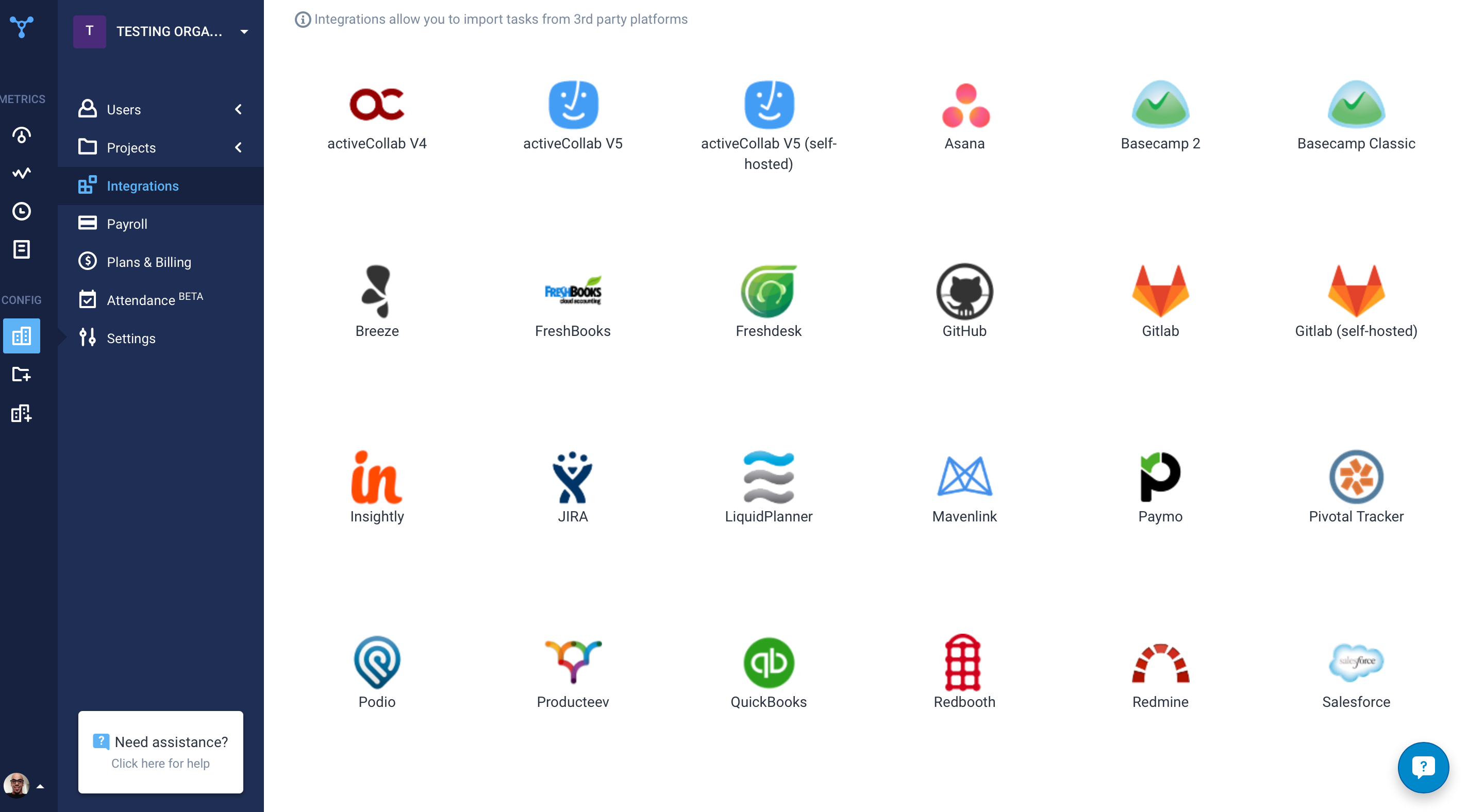
Screenshot of the time tracking interface, with screenshotsScreenshot of the remote work dashboardScreenshot of Hubstaff's 30 project management integrations

MonitUp Screenshots

Screenshot of User Dashboard
It gives you information about users, when he turned on his computer, how long he was away from his computer, when he shut down his computer in the evening. You can see the pie chart of the most used applications. The list at the bottom will show you the details of all the transactions of the user in the date range you have specified. In this way, you can have an idea about the efficiency of the user.Screenshot of Dashboard
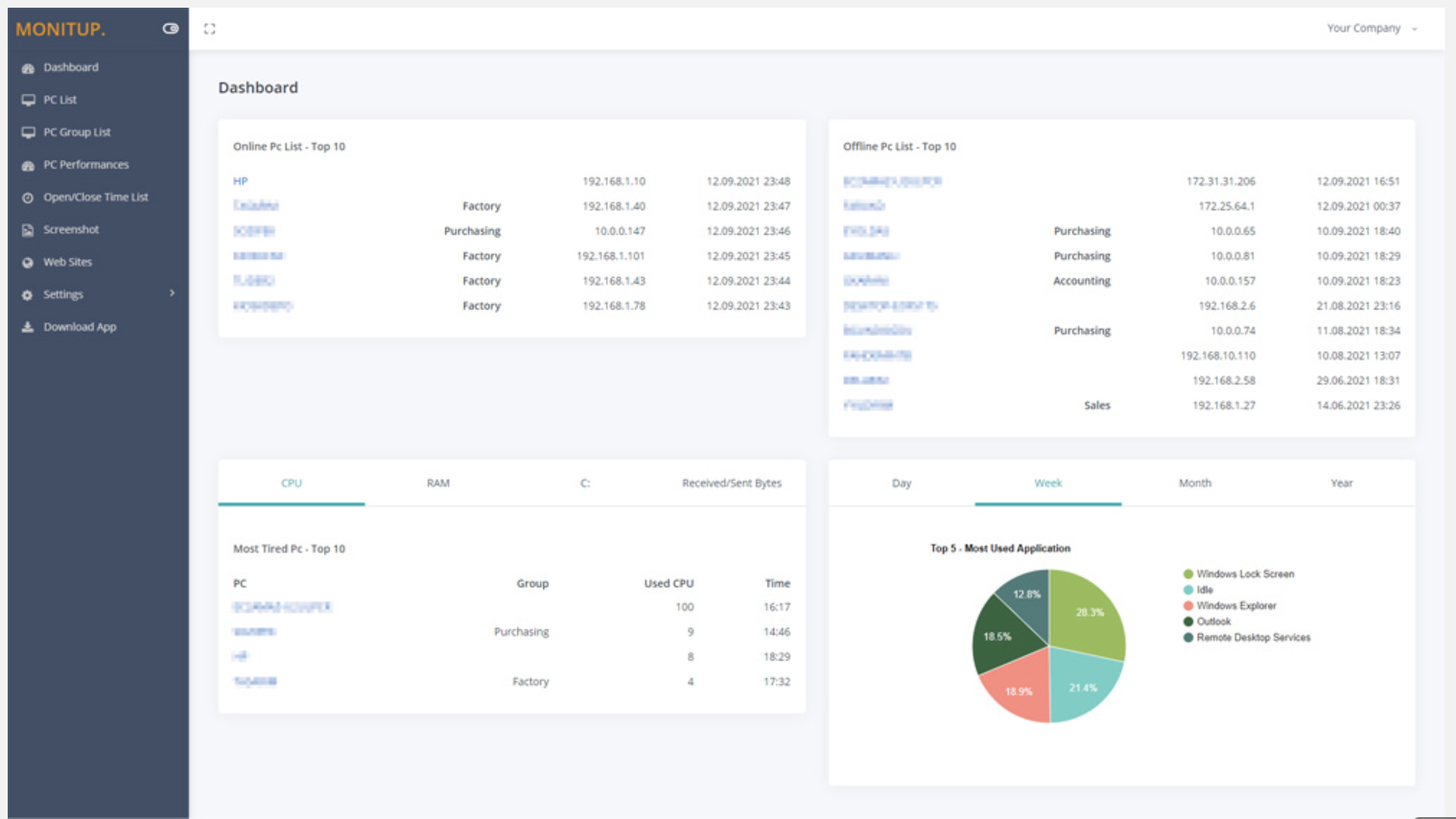
You can see the summary of the movements of the company employees on this screen. Online Computers, Offline Computers, IP Addresses, latest trading hours and pie chart of the most used programs in your company.Screenshot of Employee entrance and exit control
You can see when all employees turned on and off their computers. It helps you to distinguish missing or overwork easily.Screenshot of Websites are under control
You can see which websites employees browse and keep them under control. It is important information to increase employee productivity.Screenshot of Screenshot
Screenshots of the users you specify are taken every 5 minutes. In this way, you will have more data at hand to increase efficiency.Screenshot of Application Categories
All applications are divided into 3 categories. You can set the desired application as Productive, Unproductive Neutral. Thus, you can see the transactions on the graph and instantly analyze the efficiency of the user.