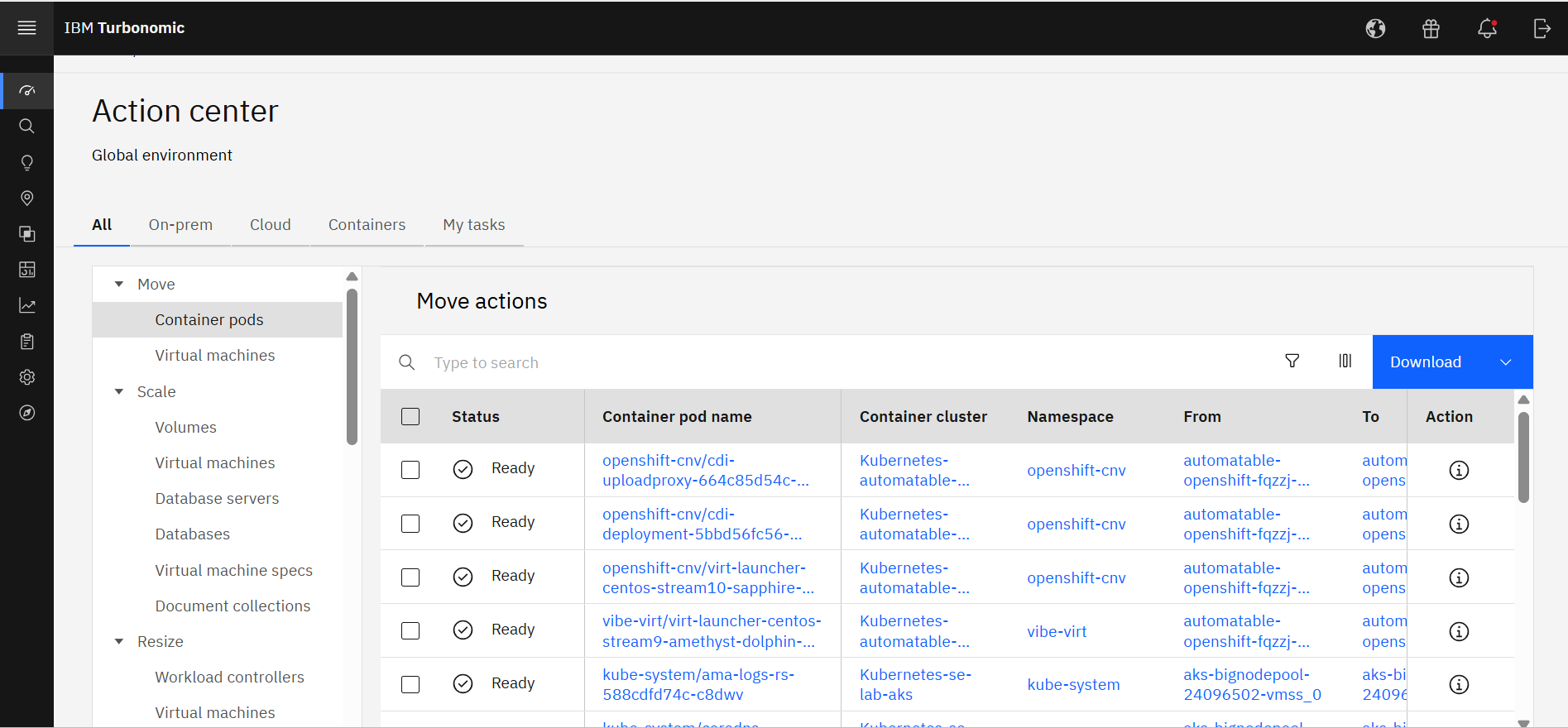
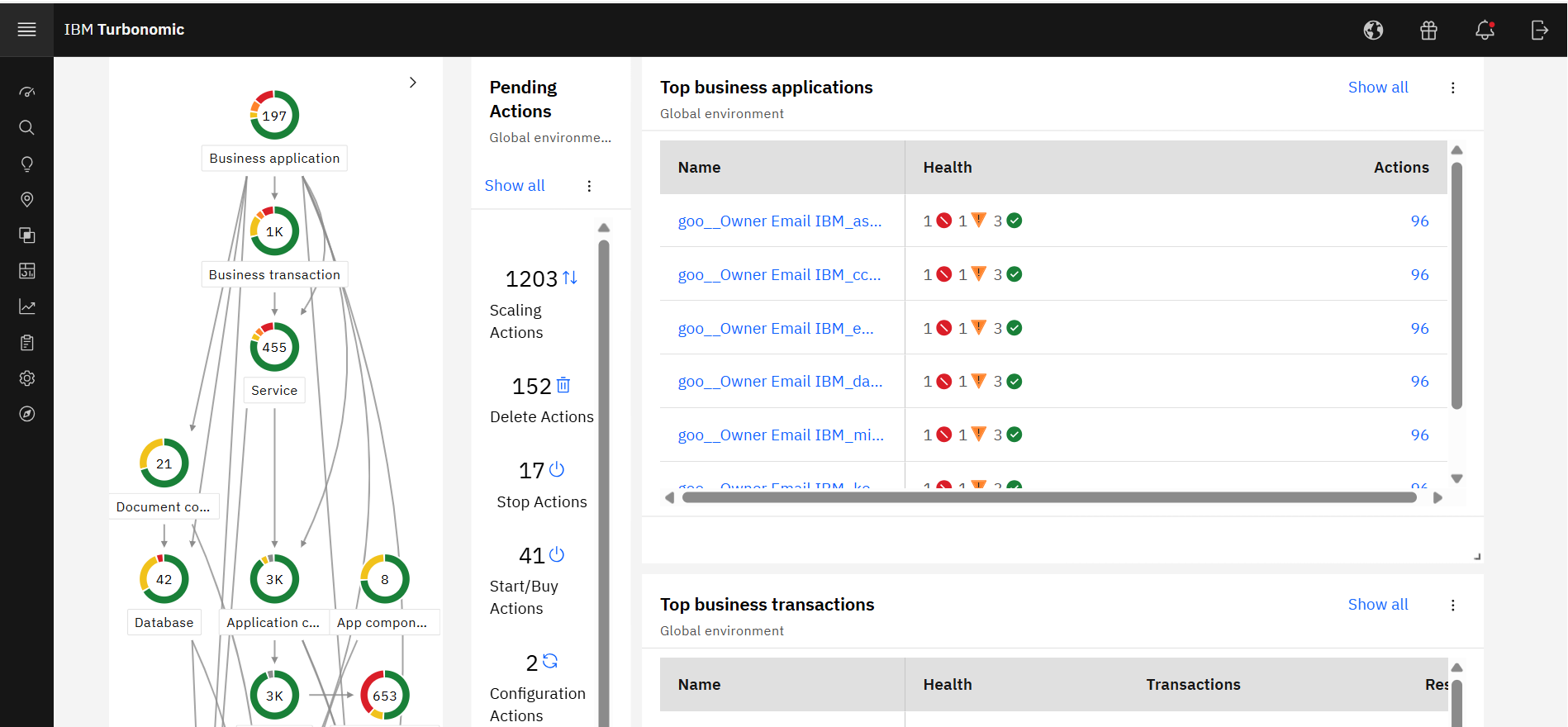
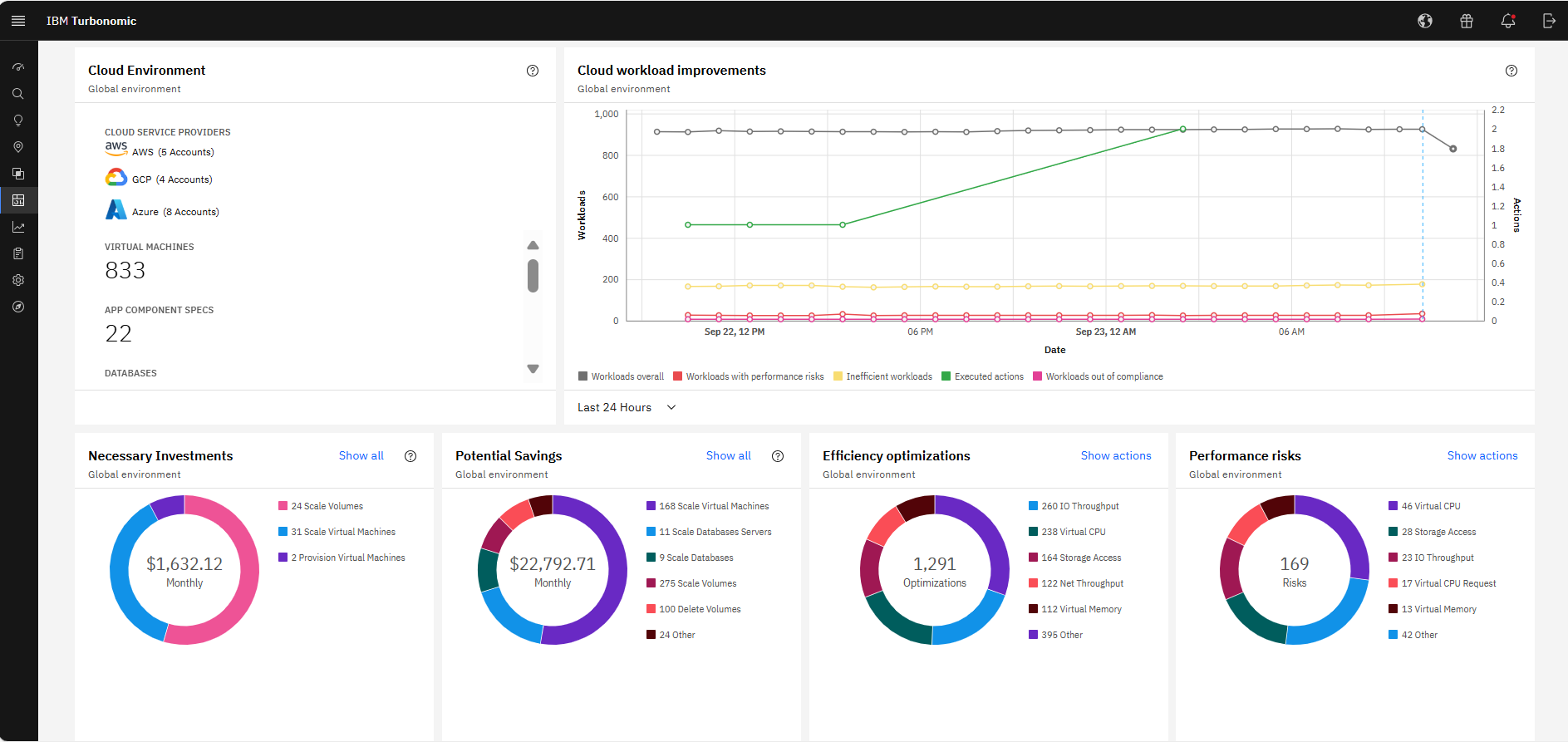
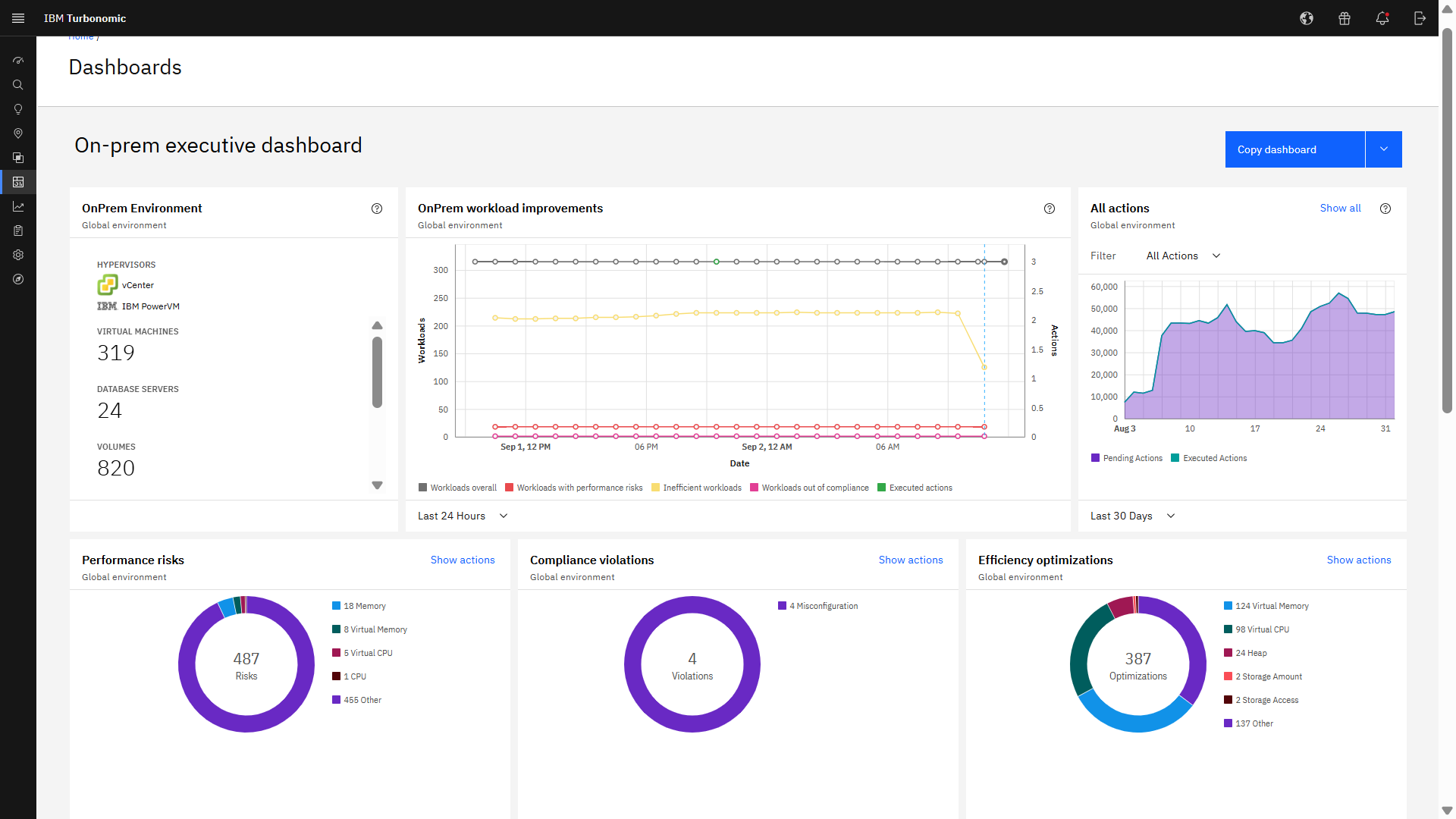
IBM Turbonomic, now part of the Concert platform, is a performance and cost optimization platform for public, private, and hybrid clouds used by cloud, infrastructure operations, and architecture to assure application performance while eliminating inefficiencies by dynamically resourcing applications through automated actions. One of the key features of IBM Turbonomic is its ability to continuously adjust…
N/A
Pricing
Hyper-V
IBM Turbonomic
Editions & Modules
Developer
$24.95
per month
Bronze
$49.00
per month
Silver
$89.00
per month
Gold
$135.00
per month
Platinum
$199.00
per month
IBM® Turbonomic On-Prem
Varies - Request a Quote
per month IBM Turbonomic On-prem optimizes data center resources in real time, ensuring app performance at the lowest cost by aligning infrastructure supply with dynamic application demand.
IBM® Turbonomic Cloud Standard
Varies - Request a Quote
per month For customers with more than USD 1.6 million in annual cloud spend or 50 Managed Virtual Servers (MVS) or greater
IBM® Turbonomic Hybrid Standard
Varies - Request a Quote
per month Advanced hybrid cloud optimization capabilities for customers with 200 managed virtual servers (MVS) or more
IT Servers & Infrastructure Leader in Information Technology at AXION energy (Utilities, 1001-5000 employees)
Chose IBM Turbonomic
Turbonomic was the unique platform to manage virtual infrastructure and make decisions to put the Application VMs where the resources are available/free, working with vsphere, xenserver and hyperV. Other applications aren't multi Hypervisor and we will have to install several …
A de minimis incentive was given to thank the reviewer for their time. The incentive was not used to bias or drive a particular response, nor was the incentive contingent on a positive endorsement. More Info
Systems Engineer in Information Technology at BarBell Barbies (Information Technology and Services, 1001-5000 employees)
Chose IBM Turbonomic
Oher products were costly and much harder to use and implement. This has a great GUI and reporting tools and it was an amazing addition to our environment. It is especially helpful to show why certain requests didn't need as much space and utilization.
A de minimis incentive was given to thank the reviewer for their time. The incentive was not used to bias or drive a particular response, nor was the incentive contingent on a positive endorsement. TR verified that a representative sample of customers was invited. More Info
Technical Architect in Information Technology at CGI (Information Technology and Services, 10,001+ employees)
Chose IBM Turbonomic
VMTurbo has a smaller computing and storage footprint than the other tools tested. It was very easy to set up and within 2 hours it was already highlighting areas of interest. There was no requirement to get any professional services involved, and no other products are required …
A de minimis incentive was given to thank the reviewer for their time. The incentive was not used to bias or drive a particular response, nor was the incentive contingent on a positive endorsement. TR verified that a representative sample of customers was invited. More Info
Server Administrator in Information Technology at Charlotte Pipe and Foundry Company (Building Materials, 1001-5000 employees)
Chose IBM Turbonomic
Unlike VMware Operations Manager, Turbonomic has the ability to monitor and manage other virtual environments. This provides the support team a central management point for each environment. It also provides planning capability for each one of these based on the average virtual …
A de minimis incentive was given to thank the reviewer for their time. The incentive was not used to bias or drive a particular response, nor was the incentive contingent on a positive endorsement. TR verified that a representative sample of customers was invited. More Info
A de minimis incentive was given to thank the reviewer for their time. The incentive was not used to bias or drive a particular response, nor was the incentive contingent on a positive endorsement. TR verified that a representative sample of customers was invited. More Info
Verified User
Chose IBM Turbonomic
My organization looked at VCOPS, but it’s not really a monitoring tool. VMTurbo Operations Manager was the best product around a few years ago. However, since we changed over storage from block to NFS storage, I don’t really see how the product can be as great a benefit as …
A de minimis incentive was given to thank the reviewer for their time. The incentive was not used to bias or drive a particular response, nor was the incentive contingent on a positive endorsement. TR verified that a representative sample of customers was invited. More Info
Hyper-V makes a lot of sense in scenarios that will support several Windows Server-based OS virtual machines. The only limitation of those licensed VMs is the hardware that hosts the Hyper-V role. If you need to deploy many servers running Windows Server OS, it is worth the price. Hyper-V also does a great job of managing the server host's computational resources, including memory, CPU, network, and storage.
A de minimis incentive was given to thank the reviewer for their time. The incentive was not used to bias or drive a particular response, nor was the incentive contingent on a positive endorsement. More Info
Datacenter Consolidation and Hardware Optimization: This scenario is relevant to you as a hardware manager. It applies when you have physical servers (like Power or System z) and want to maximize virtual machine density. Why it works: IBM Turbonomic analyzes the peak usage times of each VM. If VM "A" is active during the day and VM "B" at night, it places them on the same physical host. Ideal scenario: Data migration projects or when you're told, "[...], there's no budget for more servers this year, make everything fit on what we have." Consolidación de Datacenters y Optimización de Hardware,Este escenario te toca de cerca como encargado de Hardware. Cuando tienes servidores físicos (como los Power o System z) y quieres maximizar la densidad de máquinas virtuales.Por qué funciona: IBM Turbonomic analiza las horas pico de cada VM. Si la VM "A" es activa de día y la VM "B" de noche, las coloca en el mismo host físico.Escenario ideal: Proyectos de migración de datos o cuando te dicen: "[...], no hay presupuesto para más servidores este año, haz que quepa todo en lo que tenemos". This review was originally written in Spanish and has been translated into English using a third-party translation tool. While we strive for accuracy, some nuances or meanings may not be perfectly captured.
A de minimis incentive was given to thank the reviewer for their time. The incentive was not used to bias or drive a particular response, nor was the incentive contingent on a positive endorsement. More Info
Easy to use GUI - very easy for someone with sufficient Windows experience - not necessarily a system administrator.
Provisioning VMs with different OSes - we mostly rely on different flavors of Windows Server, but having a few *nix distributions was not that difficult.
Managing virtual networks - we usually have 1 or 2 VLANs for our business purposes, but we are happy with the outcomes.
A de minimis incentive was given to thank the reviewer for their time. The incentive was not used to bias or drive a particular response, nor was the incentive contingent on a positive endorsement. More Info
A de minimis incentive was given to thank the reviewer for their time. The incentive was not used to bias or drive a particular response, nor was the incentive contingent on a positive endorsement. More Info
We manage Hyper-V using both System Center Virtual Machine Manager (SCVMM) and the in-build Hyper-V administration tool, the former being the main product we use as the built-in tool is very light on functionality, unlike VMware ESXi.
Management of storage is not great and quite a shift away from how VMware does it with ESXi; there is no separate panel/blade/window for LUNs/data stores, which means there is a lot of back and forth when trying to manage storage.
A dedicated client with all functionality in one place would be awesome.
Having the equivalent of ESXi's virtual console is something which is absolutely needed.
A de minimis incentive was given to thank the reviewer for their time. The incentive was not used to bias or drive a particular response, nor was the incentive contingent on a positive endorsement. More Info
It would be nice if the UI included a break-down of features that are both licensed as well as un-licensed. That way, you could not only see what you have, but what you don't.
The right-sizing recommendations are great, but very little info is given about why the recommendation is being made. More info would not only increase understanding, but would also help drive decision-making.
A de minimis incentive was given to thank the reviewer for their time. The incentive was not used to bias or drive a particular response, nor was the incentive contingent on a positive endorsement. More Info
Cheap and easy is the name of the game. It has great support, it doesn't require additional licenses, it works the same if it is a cluster or stand-alone, and all the servers can be centrally managed from a system center virtual machine manager server, even when located at remote sites.
A de minimis incentive was given to thank the reviewer for their time. The incentive was not used to bias or drive a particular response, nor was the incentive contingent on a positive endorsement. More Info
We are certainly happy with Turbonomic as a whole and have invested quite a bit of time and effort into learning the ins and outs of the product. We have our reporting setup the way we want it and have gained definite value from these features. I will say though that many products nowadays are offering more native monitoring, reporting, and alerting features which may eventually steer us away from this product
A de minimis incentive was given to thank the reviewer for their time. The incentive was not used to bias or drive a particular response, nor was the incentive contingent on a positive endorsement. More Info
It is quite intuitive. Junior techs are able to provision and administrate Hyper-V virtual server infrastructure with little to no additional training. Documentation from Microsoft is easily avaliable and decently well written. Hyper-V is reliable and does what it is supposed to. Can be admin from an intuitive gui, or aoutmated with extensive powershell.
A de minimis incentive was given to thank the reviewer for their time. The incentive was not used to bias or drive a particular response, nor was the incentive contingent on a positive endorsement. More Info
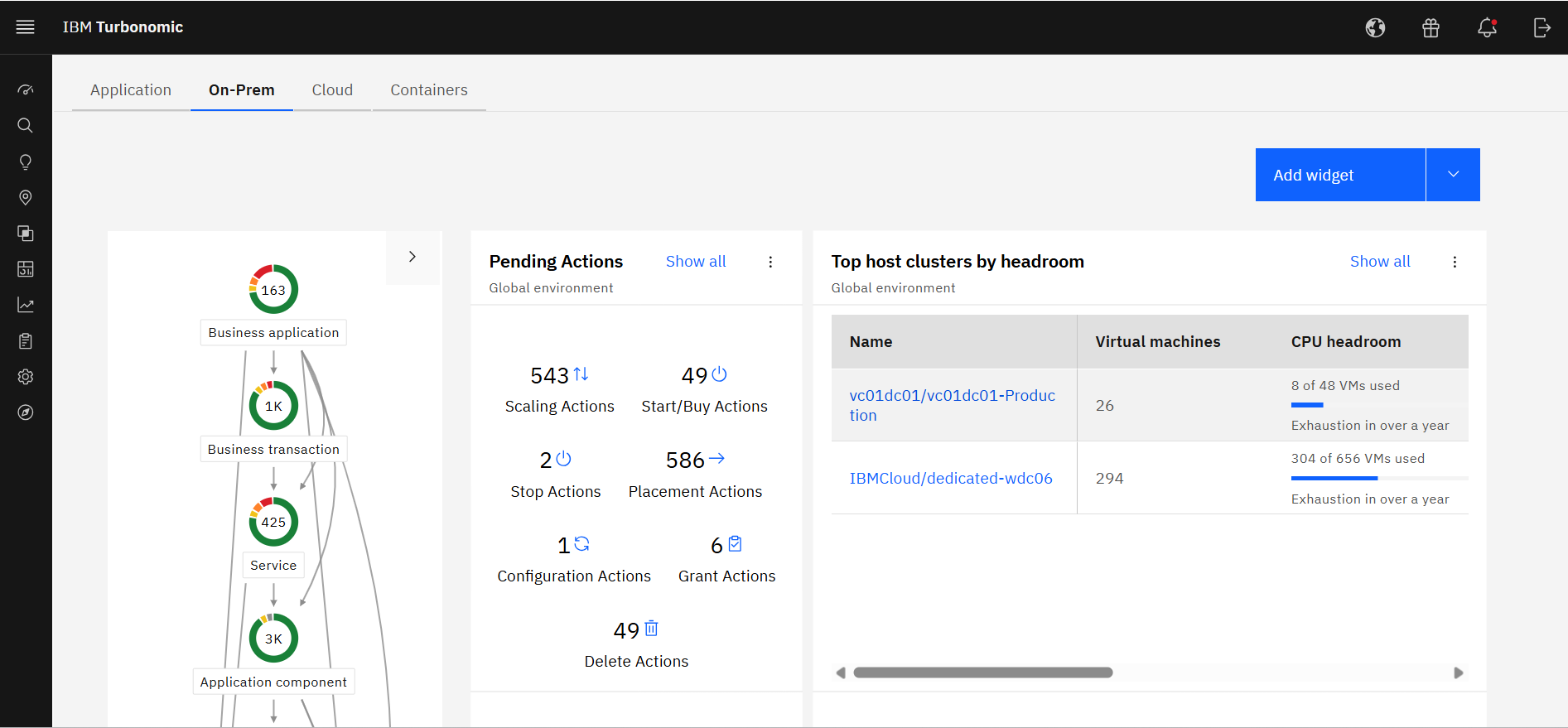
Excellent approach to larger VM organizational management. They have an very clean integrated dashboard that allows us to see everything in our environment and what that is doing in real-time. It works on multiple hyper-visors really well and integrates capacity planning on my local site as well as my cloud locations.
A de minimis incentive was given to thank the reviewer for their time. The incentive was not used to bias or drive a particular response, nor was the incentive contingent on a positive endorsement. TR verified that a representative sample of customers was invited. More Info
In the past 2 years our Hyper-V servers have only had a handful of instances where the VM's on them were unreachable and the physical Hyper-V server had to be restarted. One time this was due to a RAM issue with the physical box and was resolved when we stopped using dynamic memory in Hyper-V. The other times were after updates were installed and the physical box was not restarted after the updates were installed.
A de minimis incentive was given to thank the reviewer for their time. The incentive was not used to bias or drive a particular response, nor was the incentive contingent on a positive endorsement. More Info
A de minimis incentive was given to thank the reviewer for their time. The incentive was not used to bias or drive a particular response, nor was the incentive contingent on a positive endorsement. TR verified that a representative sample of customers was invited. More Info
Hyper-V itself works quickly and rarely gave performance issues but this can be more attributed to the physical server specifications that the actual Hyper-V software in my opinion as Hyper-V technically just utilizes config files such as xml, and a data drive file (VHD, VHDX, etc) to perform its' duties.
A de minimis incentive was given to thank the reviewer for their time. The incentive was not used to bias or drive a particular response, nor was the incentive contingent on a positive endorsement. More Info
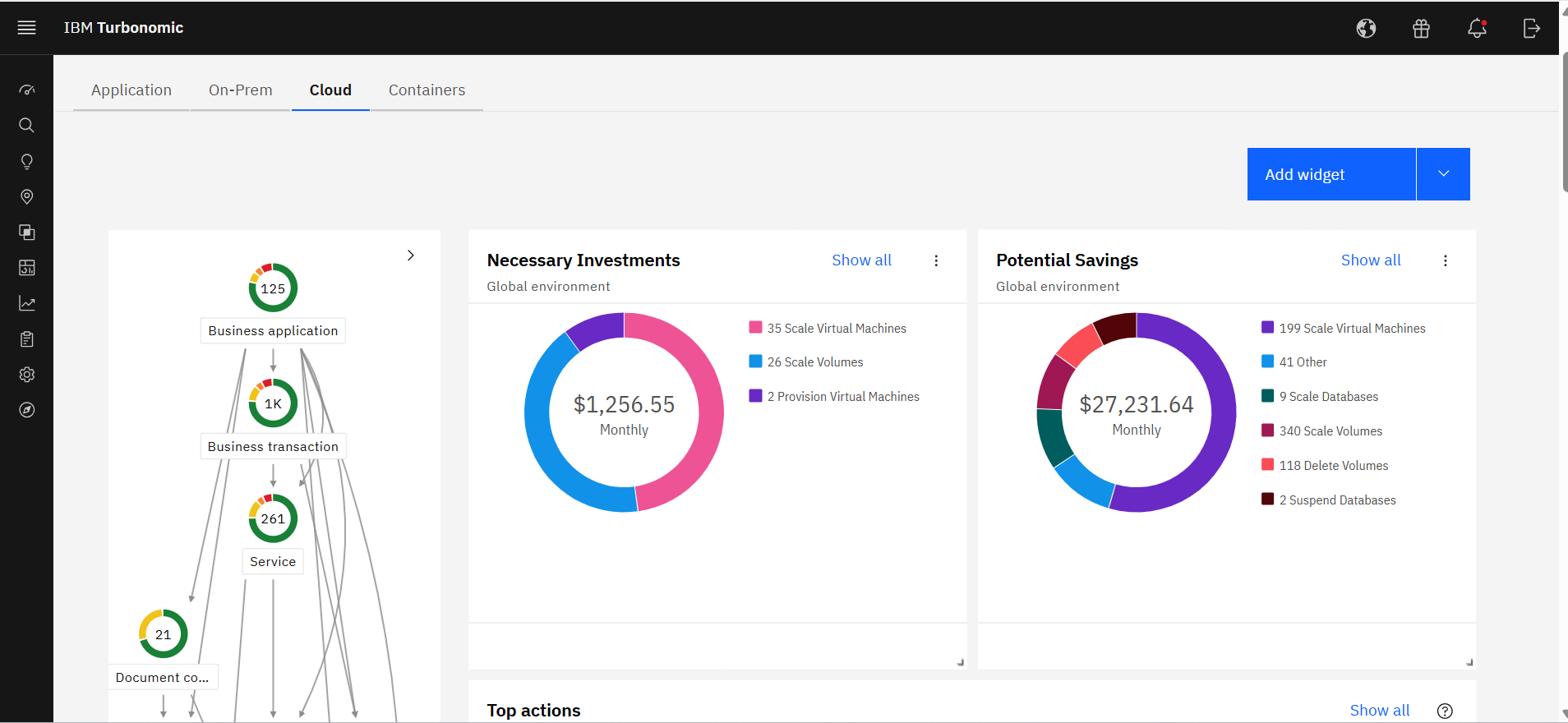
It allocates resources among applications by showing more on the cost breakdown by cloud service, with metrics on cloud provider information like Azure Management, Identity, Networking, Storage with costs per day, and total services costs. This then could facilitate and show the corresponding actions thereafter upon scaling.
A de minimis incentive was given to thank the reviewer for their time. The incentive was not used to bias or drive a particular response, nor was the incentive contingent on a positive endorsement. More Info
I gave it a middle of the road rating - as far as getting direct help from Microsoft this never seems to happen. (Good luck getting ahold of them.) Getting help from online support forums is pretty much where I get all my help from. Hyper-V is used quite widely and anything you could need help with is out there and easily searched for on your favorite search engine.
A de minimis incentive was given to thank the reviewer for their time. The incentive was not used to bias or drive a particular response, nor was the incentive contingent on a positive endorsement. More Info
When I contact support I get a quick response and they are able to solve my problem quickly. I also get a sense that they want to make sure that we are getting value from the product and walk me through whatever steps are needed to accomplish my goals.
A de minimis incentive was given to thank the reviewer for their time. The incentive was not used to bias or drive a particular response, nor was the incentive contingent on a positive endorsement. TR verified that a representative sample of customers was invited. More Info
We had in person training from a third party and while it was very in depth it was at a beginner's level and by the time we received the training we had advanced past this level so it was monotonous and redundant at that point. It was good training though and would have provided a solid foundation for learning the rest of Hyper-V had I had it from the beginning.
A de minimis incentive was given to thank the reviewer for their time. The incentive was not used to bias or drive a particular response, nor was the incentive contingent on a positive endorsement. More Info
Alex (from VMTurbo) has worked with the product for years and helped develop the product. He was very knowledgeable and was able to provide our support team with details knowledge on how to get our deployment configured correctly as well as help with another VMTurbo POC within another customers environment.
A de minimis incentive was given to thank the reviewer for their time. The incentive was not used to bias or drive a particular response, nor was the incentive contingent on a positive endorsement. TR verified that a representative sample of customers was invited. More Info
The training was easy to read and find. There were good examples in the training and it is plentiful if you use third party resources also. It is not perfect as sometimes you may have a specific question and have to spend time learning or in the rare case you get an error you might have to research that error code which could have multiple causes.
A de minimis incentive was given to thank the reviewer for their time. The incentive was not used to bias or drive a particular response, nor was the incentive contingent on a positive endorsement. More Info
After buying VMTurbo Operations Manager, I was invited to an online user training event. I felt this training was effective and dug just deep enough to be informative yet still keep my attention. Additionally, the webinar was free.
A de minimis incentive was given to thank the reviewer for their time. The incentive was not used to bias or drive a particular response, nor was the incentive contingent on a positive endorsement. TR verified that a representative sample of customers was invited. More Info
initial configuration of hyper-v is intuitive to anyone familiar with windows and roles for basic items like single server deployments, storage and basic networking. the majority of the problems were with implementing advanced features like high availability and more complex networking. There is a lot of documentation on how to do it but it is not seamless, even to experienced virtualization professionals.
A de minimis incentive was given to thank the reviewer for their time. The incentive was not used to bias or drive a particular response, nor was the incentive contingent on a positive endorsement. More Info
The implementation was very simple. Just upload an OVA file and power on the VM. Once it comes up enter some networking information and you can then access the web interface. From there, just begin configuring the system for your environment by adding you license and the various virtual environments and storage through the inventory tab
A de minimis incentive was given to thank the reviewer for their time. The incentive was not used to bias or drive a particular response, nor was the incentive contingent on a positive endorsement. TR verified that a representative sample of customers was invited. More Info
VMware is the pioneer of virtualization but when you compare it with Hyper-V, VMware lacks the flexibility of hardware customization and configuration options Hyper-V has also GPU virtualization still not adequate for both platforms. VMware has better graphical interface and control options for virtual machines. Another advantage VMware has is it does not need a dedicated os GUI base installation only needs small resources and can easily install on any host.
A de minimis incentive was given to thank the reviewer for their time. The incentive was not used to bias or drive a particular response, nor was the incentive contingent on a positive endorsement. More Info
As the organization had experience of years in using IBM products, we had the confidence that they will provide us with great support. And we needed a reliable solution as a financial institute to ensure continuous operations. Even though the price was very high, we made the correct decision to go ahead with IBM Turbonomic as the feedback from existing users in the region was very positive. We needed a solution which was capable of handling our automation requirements. All these were green in IBM Turbonomic.
A de minimis incentive was given to thank the reviewer for their time. The incentive was not used to bias or drive a particular response, nor was the incentive contingent on a positive endorsement. More Info
Nothing is perfect but Hyper-V does a great job of showing the necessary data to users to ensure that there is enough resources to perform essential functions. You can also select what fields show on the management console which is helpful for a quick glance. There are notifications that can be set up and if things go unnoticed and a Hyper-V server runs out of a resource it will safely and quickly shut down the VM's it needs to in order to ensure no Hardware failure or unnecessary data loss.
A de minimis incentive was given to thank the reviewer for their time. The incentive was not used to bias or drive a particular response, nor was the incentive contingent on a positive endorsement. More Info
A de minimis incentive was given to thank the reviewer for their time. The incentive was not used to bias or drive a particular response, nor was the incentive contingent on a positive endorsement. More Info
Professional services were always there to guide us in our transformation to the cloud. They understood our business model and then were able to provide guidance on what we needed from the tool.
A de minimis incentive was given to thank the reviewer for their time. The incentive was not used to bias or drive a particular response, nor was the incentive contingent on a positive endorsement. More Info
Massively positive impact on expenses in my company by reducing our storage needs drastically. We were able to reallocate the budget to upgrading our primary Hyper-V server with pure enterprise SSD's as we reduced the storage needs by over 50% and by this we increased performance by over 400%.
We have deployed more than 8 servers with EXTREMELY minimal cost using Hyper-V and not requiring another hardware server to host it. We have leveraged our hardware resources in our 2 servers so well that we were able to add many new services, not in place prior, as we did not have the servers to host them. Now with Hyper-V, we deployed many more servers in VM's, purchased OS's & CAL's, but did not need any hardware, which is the greatest expense of all.
With Hyper-V, our ROI was reduced from 36-40 months on our primary server, down to only 13 months by reducing costs of storage and adding so many more servers, by calculating the "would-be" cost of those servers that was avoided by creating them in Hyper-V.
A de minimis incentive was given to thank the reviewer for their time. The incentive was not used to bias or drive a particular response, nor was the incentive contingent on a positive endorsement. More Info
Application performance has been a big one. With Turbonomic keeping everything running at top performance, it can make changes when extra resources are need, quicker than somebody being notified and then making the necessary changes.
Turbonomic has been a great cost savings for us on multiple occasions. We use it every time we are improving servers.
With the planning feature we get the best performance form new hardware purchases
A de minimis incentive was given to thank the reviewer for their time. The incentive was not used to bias or drive a particular response, nor was the incentive contingent on a positive endorsement. More Info