IBM SevOne vs. NetBrain Technologies

Overview
ProductRatingMost Used ByProduct SummaryStarting Price
IBM SevOne
Score 8.2 out of 10
N/A
IBM SevOne’s app-centric, hybrid network observability empowers NetOps teams with ML-driven insights, enabling proactive issue prevention and resolution. With a single source of truth for network performance, it delivers visibility to optimize operations and support agility in complex, multi-cloud environments.N/A
NetBrain Technologies
Score 9.2 out of 10
N/A
NetBrain, founded in 2004, provides a no-code automation platform for hybrid network observability, allowing organizations to enhance their operational efficiency through automated workflows. The platform applies automation across three key workflows: troubleshooting, change management, and assessment.N/A
Pricing
IBM SevOneNetBrain Technologies
Editions & Modules
No answers on this topic
Offerings
Pricing Offerings
IBM SevOneNetBrain Technologies
Free Trial
NoYes
Free/Freemium Version
NoNo
Premium Consulting/Integration Services
YesYes
Entry-level Setup FeeNo setup feeNo setup fee
Additional DetailsIBM® SevOne® uses Managed Device (MD) and Managed Client Device (MCD) as pricing metrics. These can be mapped to managed devices for physical, virtualized and containerized functions in the managed environment.
More Pricing Information
Community Pulse
IBM SevOneNetBrain Technologies
Features
IBM SevOneNetBrain Technologies
Network Performance Monitoring
Comparison of Network Performance Monitoring features of Product A and Product B
IBM SevOne
7.5
13 Ratings
7% below category average
NetBrain Technologies
-
Ratings
Automated network device discovery7.913 Ratings00 Ratings
Network monitoring7.113 Ratings00 Ratings
Baseline threshold calculation7.413 Ratings00 Ratings
Alerts6.912 Ratings00 Ratings
Network capacity planning7.613 Ratings00 Ratings
Packet capture analysis7.57 Ratings00 Ratings
Network mapping7.413 Ratings00 Ratings
Customizable reports7.713 Ratings00 Ratings
Wireless infrastructure monitoring7.311 Ratings00 Ratings
Hardware health monitoring8.28 Ratings00 Ratings
Best Alternatives
IBM SevOneNetBrain Technologies
Small Businesses
NinjaOne
NinjaOne
Score 9.1 out of 10
InfluxDB
InfluxDB
Score 8.8 out of 10
Medium-sized Companies
SolarWinds NetFlow Traffic Analyzer (NTA)
Score 9.4 out of 10
Sumo Logic
Sumo Logic
Score 9.3 out of 10
Enterprises
SolarWinds NetFlow Traffic Analyzer (NTA)
Score 9.4 out of 10
Sumo Logic
Sumo Logic
Score 9.3 out of 10
All AlternativesView all alternativesView all alternatives
User Ratings
IBM SevOneNetBrain Technologies
Likelihood to Recommend
7.7
(13 ratings)
9.5
(5 ratings)
Usability
-
(0 ratings)
10.0
(1 ratings)
User Testimonials
IBM SevOneNetBrain Technologies
Likelihood to Recommend
IBM
The software is handy and really helps us track all the issues that may occur in our network, allowing us to rectify them before any significant problems with our server can arise. It also enhances the overall performance of all our servers and networks, but, as I mentioned earlier, it will take considerable time for a beginner to become familiar with every feature of the software.
Read full review
NetBrain Technologies
Great for our large global environment. Works well with our legacy and newer equipment. Ease of install was exciting compared to other products we POC'd. Less of a learning curve when training Teams on how to monitor and troubleshoot while in production. Service desk were able to capture the logs and load into our ticketing system with ease.
Read full review
Pros
IBM
  • To see trends in network usage, identify upgrade switches, increase bandwidth and cabling
  • Provide dashboards to operations, logistics for both warehouse and production managers
  • Can integrate into incident systems to auto create tickets when issues happen
Read full review
NetBrain Technologies
  • Network Issues Troubleshooting
  • Visualizing the root cause using color coding
  • out of the box runbooks available
Read full review
Cons
IBM
  • Documentation for the embedded help pages in NMS and more. In my opinion, these do not provide anything of any depth or maybe anything helpful at all. If anything it just seems to be a guide of what actually exists on the page. It is nicely searchable documentation though.
  • It is very surprising and disappointing for us to learn that it isn't until the latest version of IBM SevOne that bulk editing was introduced. I think this is such a basic and foundational feature that should have been a part of the original rollout. My team is still trying to configure the REST API.
  • It was disappointing for the webinar to start with a speaker who had a thick accent and simply read from slides. To me, it felt hopeless until the second speaker, who was engaging and easy to understand. It's as if this fact wasn't considered. I'm sure the first speaker lost a lot of viewers who didn't stick around to discover the 2nd speaker.
  • I asked three different questions during the webinar and none were answered.
Read full review
NetBrain Technologies
  • Not all devices are integrated with the same quality.
  • Not all steps are self-explaining.
  • The updates were difficult (but thanks to the help of support no real problem).
Read full review
Usability
IBM
No answers on this topic
NetBrain Technologies
This is a easly tool that i've worked.
Read full review
Alternatives Considered
IBM
IBM SevOne was selected instead of Datadog because it is perfect for large insurance networks and also connects trouble-free between the on-premise and cloud environments. Its alerts are in real-time, it offers comprehensive dashboards and it allows to gain a better grip on the network issues, thus helping to keep the downtime small and the operations well managed thanks to the good communication.
Read full review
NetBrain Technologies
Best part of NetBrain is that it is customisable ,you can create apps based on your requirement and run them in your environment. Lot of flexibility
Read full review
Return on Investment
IBM
  • The software has minimal downtime, which helps us connect with our customers quickly and resolve their issues.
  • Automated networks reports that it gives saves a lot of time and resources.
  • Setting up and completing the configuration will take more than three months, which is a significant expense at the outset.
Read full review
NetBrain Technologies
  • Time it takes for Service Desk to identify issues has been cut into 1/2
  • Able to present maps to management for circuit throughput issues and why we need a larger circuit
  • The logs are clear and easy to understand
Read full review
ScreenShots

IBM SevOne Screenshots

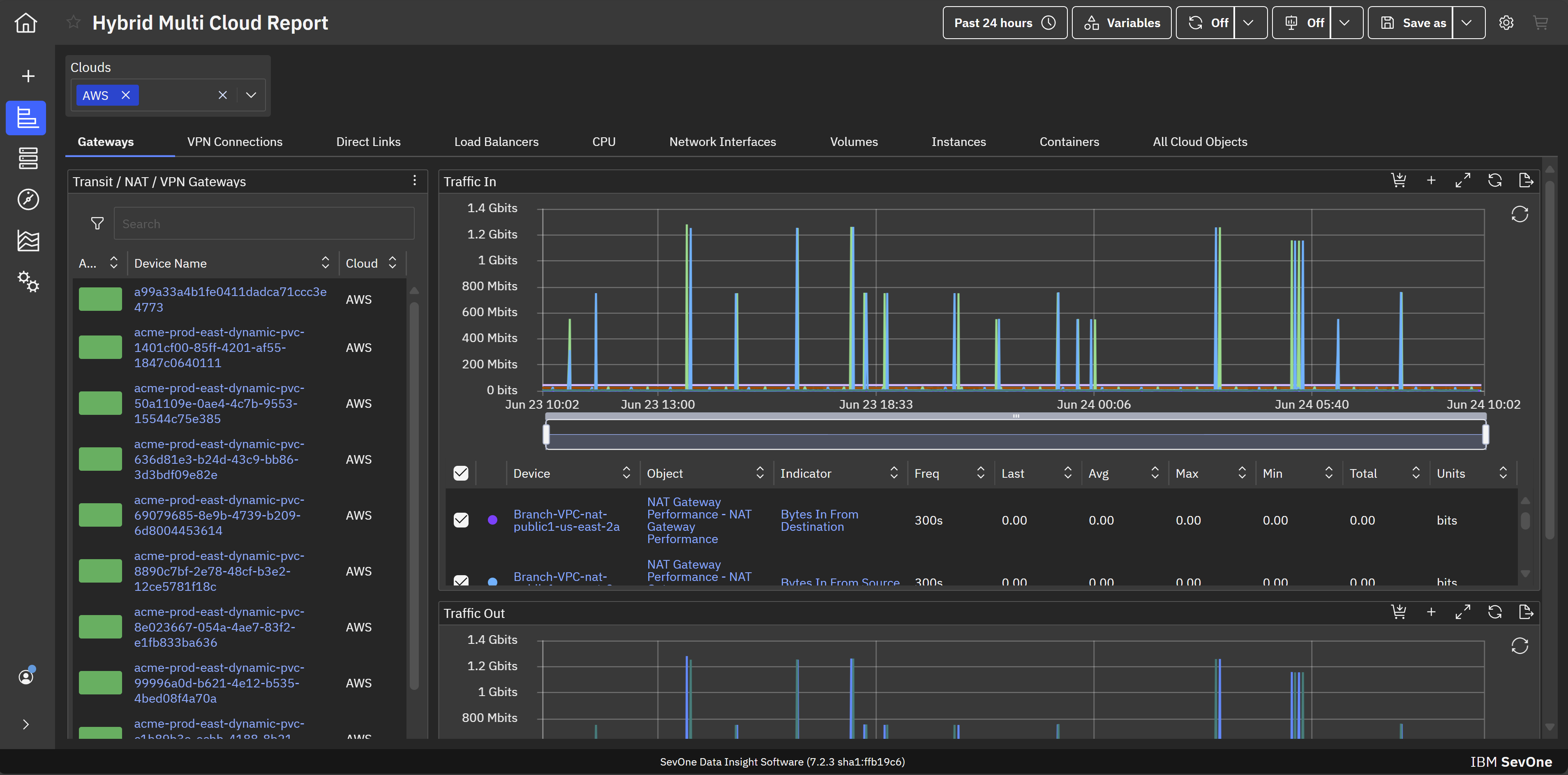
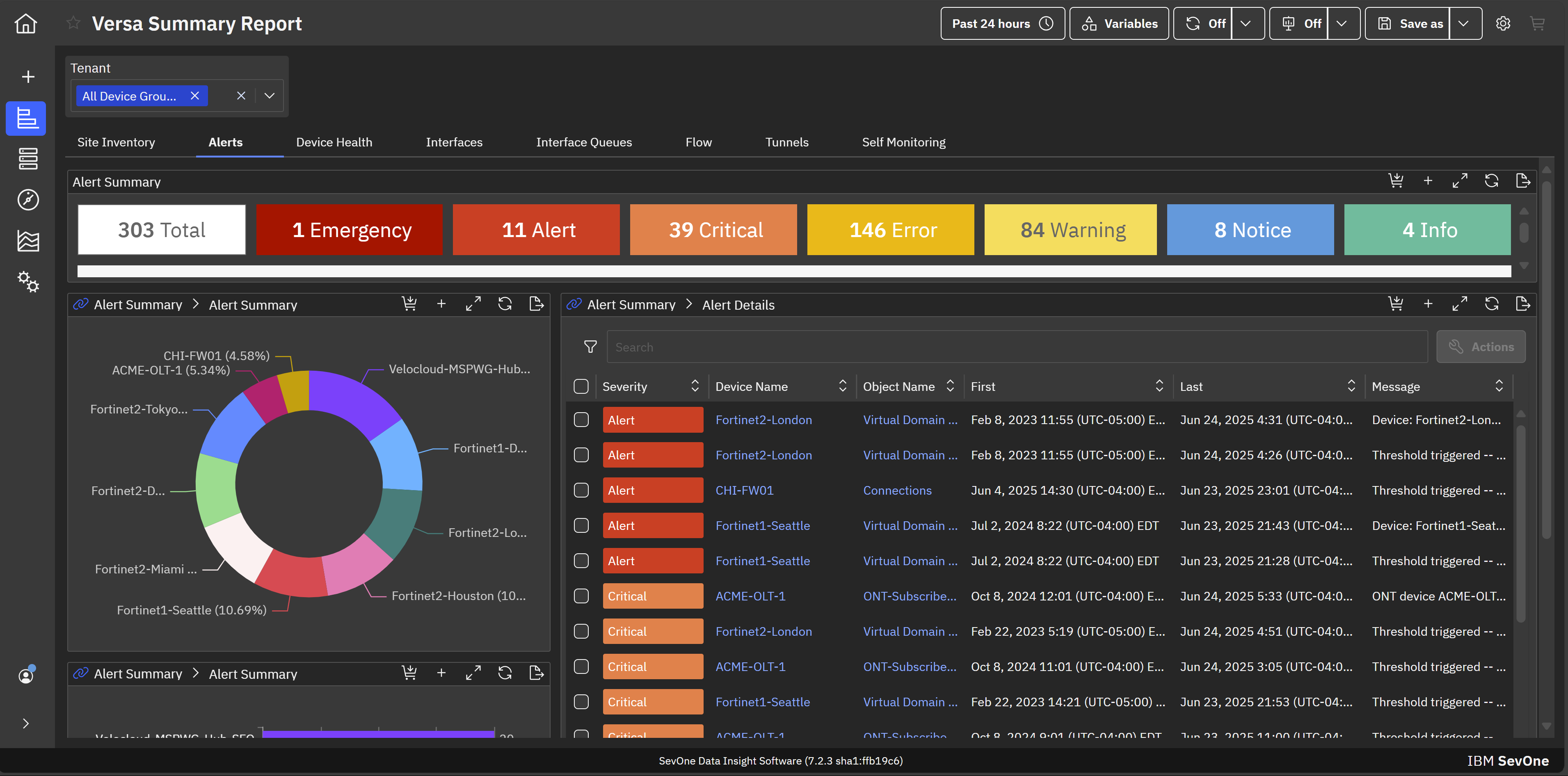
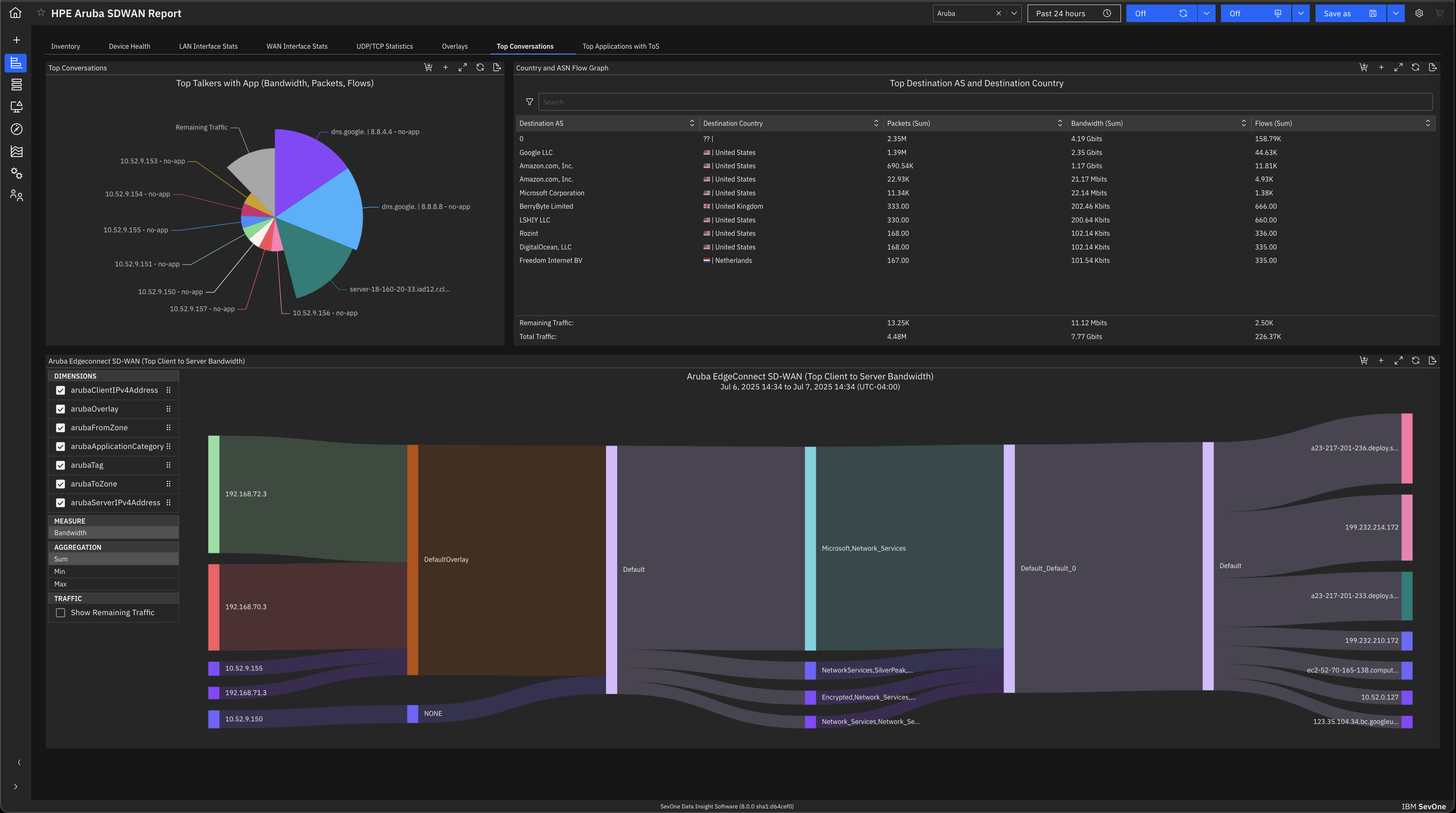
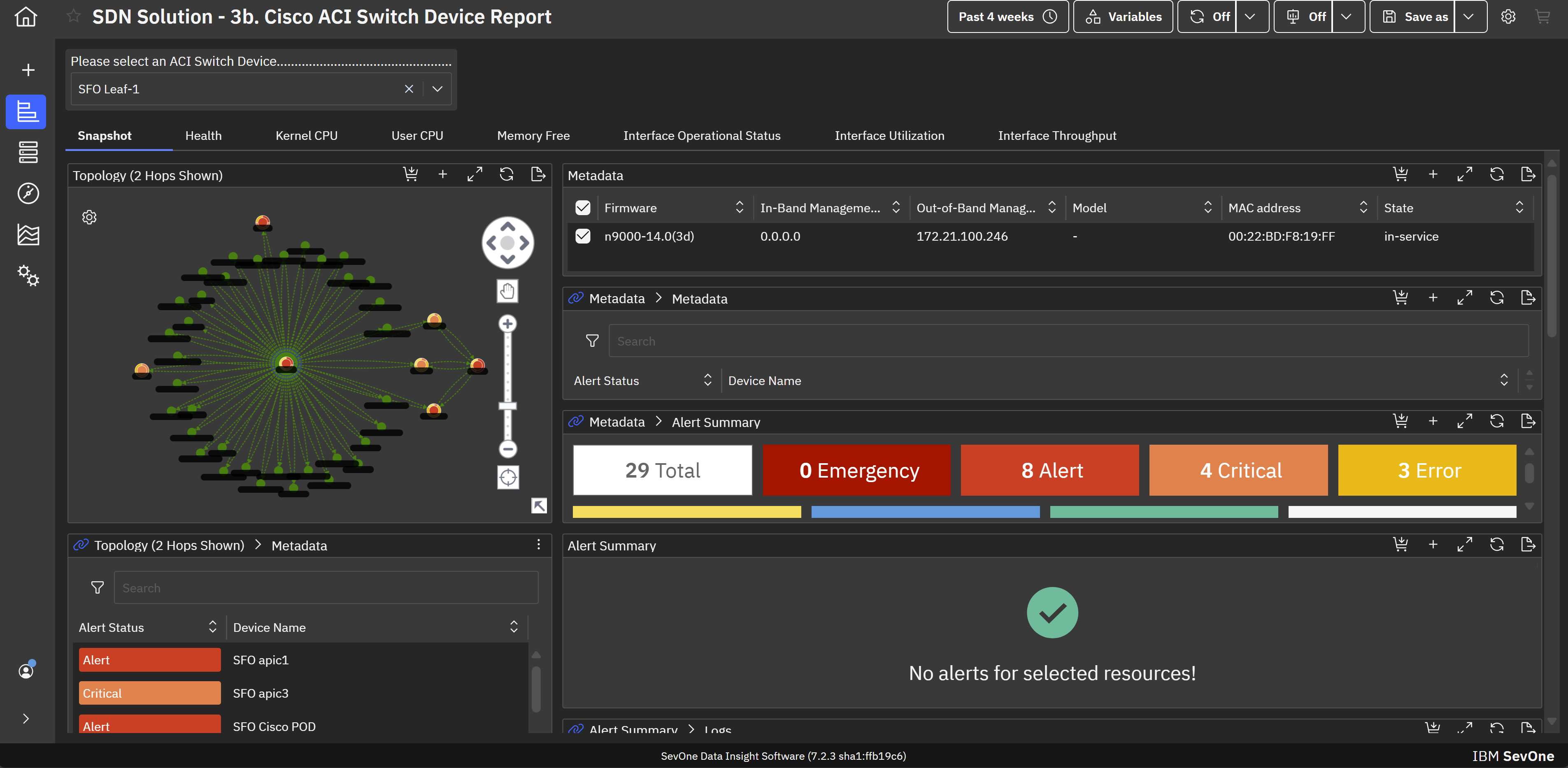
Screenshot of hybrid cloud network monitoring. This view helps achieve application-centric observability in hybrid cloud environments for maintaining optimal performance across infrastructure.Screenshot of MSP network monitoring. This provides comprehensive network monitoring and observability that empower MSPs to support enterprise clients on their hybrid multicloud journeys.Screenshot of SD-WAN monitoring. This helps mitigate the transitional risk of moving from traditional WANs to fast and dynamic SD-WAN links.Screenshot of SDN monitoring. This helps maximize the performance and value of Cisco ACI infrastructure with built-in support for monitoring Cisco ACI-based software-defined networks (SDNs).Screenshot of Enterprise wifi monitoring. This creates visibility across wifi infrastructures to assure consistent high-quality services with modern wifi monitoring and management capabilities.Screenshot of a view of the default machine learning analytics and visualizations that aid in troubleshooting, anomaly detection, and forecasting. This allows for proactive identification and troubleshooting of issues before they impact end-users.

NetBrain Technologies Screenshots

Screenshot of how NetBrain defines what can be assessed in a network, how often it can be assessed, and how it scales through no-code automation.Screenshot of what a Golden Path through a hybrid cloud looks likeScreenshot of how using no-code network automation can cover all aspects of a network.