IBM webMethods Hybrid Integration vs. OpenText BizManager vs. SolarWinds Serv-U

Overview
ProductRatingMost Used ByProduct SummaryStarting Price
IBM webMethods Hybrid Integration
Score 8.0 out of 10
N/A
IBM® webMethods offers a hybrid, enterprise-grade integration platform as a service (iPaaS) that allows users to securely control applications, APIs, B2B and files across environments and locations.
$2,500
per month
OpenText BizManager
Score 8.5 out of 10
N/A
The OpenText™ BizManager™ family of products offer a platform for managed file transfers (MFT), messaging, mapping, translation, tracking and auditing B2B transactions. Using OpenText™ Trading Grid™, the B2B network, BizManager incorporates and simplifies industry standards to ensure the uninterrupted flow of information and the direct, secure transport of all types of data and documents.N/A
SolarWinds Serv-U
Score 9.0 out of 10
N/A
SolarWinds® Serv-U® is presented by the vendor as an easy-to-use FTP or MFT server software designed to deliver security, automation, and centralized control for file transfers in an organization. Deployed within a data center, Serv-U FTP or MFT Server can help users safely exchange files within your organization and with your business partners. Do not risk file transfer data getting exposed in the cloud and compromise security. Serv-U software is built to be an effective self-hosted…N/A
Pricing
IBM webMethods Hybrid IntegrationOpenText BizManagerSolarWinds Serv-U
Editions & Modules
IBM webMethods Hybrid Integration Standard Tier
$2,500
per month
No answers on this topic
Offerings
Pricing Offerings
IBM webMethods Hybrid IntegrationOpenText BizManagerSolarWinds Serv-U
Free Trial
YesNoYes
Free/Freemium Version
NoNoNo
Premium Consulting/Integration Services
NoNoNo
Entry-level Setup FeeNo setup feeNo setup feeNo setup fee
Additional Details
More Pricing Information
Community Pulse
IBM webMethods Hybrid IntegrationOpenText BizManagerSolarWinds Serv-U
Considered Multiple Products
IBM webMethods Hybrid Integration
Chose IBM webMethods Hybrid Integration
IBM webMethods Hybrid Integration is what we utilize
Chose IBM webMethods Hybrid Integration
IBM webMethods was selected vs WSo2 for the reachness of the correspondign features
regarding Mulesoft, the flexibility of IBM webMethods compared to the other platform, in relation to the existing architectural landscape was preferred
Chose IBM webMethods Hybrid Integration
The two branches of the IBM integration portfolio are coming together nicely, and it's more a question of fully mapping the specific implementation requirements to the respective platform of choice when selecting between IBM Cloud Pak for Integration and IBM webMethods. …
Chose IBM webMethods Hybrid Integration
We have mulesoft also for some clients but I am not well aware of it so I am not confident to differentiate both
Chose IBM webMethods Hybrid Integration
The Boomi product lags in the B2B IBM webMethods experience. The way IBM webMethods handles the EDI standards are unmatchable.
Chose IBM webMethods Hybrid Integration
I have seen that other products have different UI to address various business problems like messaging, EDA, MFT. IBM webMethods has unified platform and can also support hybrid Integration. I think it is all rounded iPaaS tool with ease of development and ease of operation.
The …
Chose IBM webMethods Hybrid Integration
IBM webMethods lags in terms of iPass offering as compared to mulesoft and dell Boomi. In terms of api management Apigee is much better than webMethods.
Chose IBM webMethods Hybrid Integration
IBM webMethods is far superior when compared to competition like Microsoft Azure. In functionality and capabilities. Better visibility, uptime, efficiency, etc.
Chose IBM webMethods Hybrid Integration
webMethods does better for end to end integrations whereas Azure is more focused on APIs. We selected webMethods because we felt their integrations, especially to mainframe environments, were much better than the others. IBM has been in this space for a long time and know it …
Chose IBM webMethods Hybrid Integration
The webMethods platform ranks higher in our ranking because it has more features and has proven itself in many CAC 40 companies in particular.The key elements are robustness, ease of use, a clear business model, and a wide range of features covering all types of enterprise …
Chose IBM webMethods Hybrid Integration
Apigee Edge and Oracle Integration (OIC)
Chose IBM webMethods Hybrid Integration
Oracle Integration Cloud vs IBM webMethods, hands down IBM webMethods is way better. Lots of features and ease of doing webMethods and super stable stack.
Chose IBM webMethods Hybrid Integration
IBM webMethods combines all the essential functions for information system integration in its platform. All products are interconnected to facilitate implementation (ESB, API, BPM, message bus). All tools are easy to use.
Chose IBM webMethods Hybrid Integration
webMethods.io IntegrationDescriptionWe uses webMethods.io Integration to solve some of our application to applications and business to business integration needs. It is the Integration Platform as a Service solution that we use in a mix with our continued use of webMethods …
Chose IBM webMethods Hybrid Integration
Ease of use and robustness of the product.
OpenText BizManager

No answer on this topic

SolarWinds Serv-U
Chose SolarWinds Serv-U
Serv-U supports a highly configurable FTPS server over HTTPS, something OpenSSH does not.
Chose SolarWinds Serv-U
The overall interface of SolarWinds Serv-U was better in my opinion than that of Cerberus. We had several outside users demo both and the SolarWinds desktop client was the selling point for them. Both had an option, but SolarWinds was more user friendly, which was a big plus. …
Chose SolarWinds Serv-U
Previously we have used FileZilla and Microsoft FTP services, but neither out-performed Serv-U. although it was easy to use, FileZilla required constant attention from IT staff and did not live up to security protocol in place. The Windows Server FTP was difficult to configure …
Features
IBM webMethods Hybrid IntegrationOpenText BizManagerSolarWinds Serv-U
Cloud Data Integration
Comparison of Cloud Data Integration features of Product A and Product B
IBM webMethods Hybrid Integration
7.4
Ratings
7% below category average
OpenText BizManager
-
Ratings
SolarWinds Serv-U
-
Ratings
Pre-built connectors7.70 Ratings00 Ratings00 Ratings
Connector modification6.70 Ratings00 Ratings00 Ratings
Support for real-time and batch integration7.50 Ratings00 Ratings00 Ratings
Data quality services7.50 Ratings00 Ratings00 Ratings
Data security features7.40 Ratings00 Ratings00 Ratings
Monitoring console7.40 Ratings00 Ratings00 Ratings
Best Alternatives
IBM webMethods Hybrid IntegrationOpenText BizManagerSolarWinds Serv-U
Small Businesses
Make
Make
Score 9.3 out of 10
DataMotion
DataMotion
Score 9.4 out of 10
DataMotion
DataMotion
Score 9.4 out of 10
Medium-sized Companies
IBM App Connect
IBM App Connect
Score 9.2 out of 10
DataMotion
DataMotion
Score 9.4 out of 10
DataMotion
DataMotion
Score 9.4 out of 10
Enterprises
IBM App Connect
IBM App Connect
Score 9.2 out of 10
Fortra's GoAnywhere MFT
Score 7.6 out of 10
Fortra's GoAnywhere MFT
Score 7.6 out of 10
All AlternativesView all alternativesView all alternativesView all alternatives
User Ratings
IBM webMethods Hybrid IntegrationOpenText BizManagerSolarWinds Serv-U
Likelihood to Recommend
7.9
(0 ratings)
-
(0 ratings)
8.2
(0 ratings)
Likelihood to Renew
8.2
(0 ratings)
-
(0 ratings)
-
(0 ratings)
Usability
7.9
(0 ratings)
-
(0 ratings)
-
(0 ratings)
Availability
8.2
(0 ratings)
-
(0 ratings)
-
(0 ratings)
Performance
9.1
(0 ratings)
-
(0 ratings)
-
(0 ratings)
Support Rating
7.3
(0 ratings)
-
(0 ratings)
7.4
(0 ratings)
In-Person Training
7.3
(0 ratings)
-
(0 ratings)
-
(0 ratings)
Online Training
8.2
(0 ratings)
-
(0 ratings)
-
(0 ratings)
Implementation Rating
7.3
(0 ratings)
-
(0 ratings)
-
(0 ratings)
Configurability
7.3
(0 ratings)
-
(0 ratings)
-
(0 ratings)
Ease of integration
8.2
(0 ratings)
-
(0 ratings)
-
(0 ratings)
Product Scalability
1.0
(0 ratings)
-
(0 ratings)
-
(0 ratings)
Vendor post-sale
7.3
(0 ratings)
-
(0 ratings)
-
(0 ratings)
Vendor pre-sale
7.3
(0 ratings)
-
(0 ratings)
-
(0 ratings)
User Testimonials
IBM webMethods Hybrid IntegrationOpenText BizManagerSolarWinds Serv-U
Likelihood to Recommend
With its world-class proven technology, the IBM webMethods products are best suited for solving integration needs, including application connectivity, data aggregation, and data synchronization. The business use cases expand across Healthcare, Aviation, Banking, Insurance, etc., and many other mission-critical systems. Though I feel there is room for improvement where webMethods products are utilized in a containerized platform, especially with the API Management suite of products.
Read full review
No answers on this topic
I believe that SolarWinds Serv-U is well suited for small to medium businesses that do not require an expensive high-end FTP server. Also, once the server is configured the daily administration can be handled by less experienced IT personnel. In my opinion this product may not be the right solution a large enterprise with heavy FTP traffic.
Read full review
Pros
  • Translate the data into required format based on system
  • Handles good amount of load and tranefer data into chunks and very much accurate
  • Administration is very easy and easily understable and it has goos secuity features
  • Schedulers works well for pub/sub message pulling and pushing
Read full review
No answers on this topic
  • The Wizard allows us to create new user accounts very easily and quickly. We do not have a formal IT department so those of us "mere mortals" can use this easily.
  • Using the Web Client has made it very simple to set up and instruct our customers on getting to the server from any device with a minimum of fuss. We have many customers with ESL, and school students including middle and high school. Most of them are not computer experts, just regular users so the simplicity allows to do the whole setup over the phone in minutes.
  • The newer version of Serv-U does not appear to be very resource-hungry so our computer runs nice and fast, without having to be a top of the range powerbox. We concentrated on large storage to cope with the file sizes we receive daily.
Read full review
Cons
  • Clarifying the ongoing and near future roadmap developments in terms of capabilities and architecture
  • Merging features, patterns and platform tooling with the rest of the Cloud Pak for integration toolkit
  • Adding additional support for AI-driven development, low-/no-code features, and code assistant features
Read full review
No answers on this topic
  • The user interface on large screens becomes tiny and nearly unreadable without the aid of Windows Magnifier.
  • Active Directory integration is either absent or not straightforward.
  • Settings and configuration aren't always intuitive.
Read full review
Likelihood to Renew
The webMethods platform is a fantastic tool for modernizing information systems. It's easy to use and delivers rapid results.The platform is focused on innovation and is accelerating its improvement with the acquisition by IBM.
Read full review
No answers on this topic
Usability
The webMethods product has a very user-friendly and easy-to-use interface.A weak point is the My webMethods Server portal (administration and monitoring portal for the on-premise platform). This weakness has been addressed thanks to the control plane on the hybrid version of the product. This version should be highlighted and used to ensure a very fluid and functional interface.
Read full review
No answers on this topic
Reliability and Availability
The webMethods platform is very stable and does not cause incidents: if it is well configured and tailored at the base. Infrastructure incidents represent 20% of incidents (full disk, memory peaks, etc.) 80% of incidents come from the implementation of the code in the platform. If a code is not optimized and a high volume is observed in production, this can cause incidents. Similarly, if all error cases or conditions are not handled in the code, this can cause errors. Finally, there can be common errors if the applications connected to the platform do not return quality data or are unavailable.
Read full review
No answers on this topic
Performance
The webMethods platform is designed to handle a high volume of small messages. It's a tool for continuous processing.The incidents I've seen involving application performance declines are caused by: - ​​Code optimization issues - File size issues or fragmentation of the transmitted file - Misuse of the platform (batch processing) - Monitoring data was not purged, and the user was working with millions of data points
Read full review
No answers on this topic
Support Rating
In the majority of the tickets I've created, support has been very responsive and provided the right solutions or solutions.Resolving a ticket also depends on the information provided by the creator. It's important to provide the technical context and information about the environment, as well as information to help the support team reproduce the incident.
Read full review
No answers on this topic
Support was the biggest hurdle for us. It definitely needs improvement, but not to the point of being a deal breaker.
Read full review
In-Person Training
We received in-person training from the webMethods team. We received standard training from the vendor and custom training on specific security topics.The training sessions went well but remained very standard and did not adapt to the client's specific business. In-person training is more suitable for rapid skill development. It is necessary to practice for a few weeks to ensure familiarity with the tool.
Read full review
No answers on this topic
Online Training
I found clear and easy-to-follow training with realistic use cases for quick understanding and a 360° view of the features. The lesson format allows you to progress and learn by breaking down the allocated time.The technical courses are described step by step, allowing you to quickly get to grips with the products
Read full review
No answers on this topic
Implementation Rating
When implementing webMethods, it's essential to have the right support and guidance.It's important to map out the interactions, document them, prepare test cases, and implement them while making maximum use of the product's native features.Additional tools must also be planned to automate deployments, visualize logs, and monitor the platform.
Read full review
No answers on this topic
Alternatives Considered
The two branches of the IBM integration portfolio are coming together nicely, and it's more a question of fully mapping the specific implementation requirements to the respective platform of choice when selecting between IBM Cloud Pak for Integration and IBM webMethods. Pricing and licensing model, cloud strategy, and level of distributed responsibilities and ownership of integration in the organisation can be deciding factors.
Read full review
No answers on this topic
The overall interface of SolarWinds Serv-U was better in my opinion than that of Cerberus. We had several outside users demo both and the SolarWinds desktop client was the selling point for them. Both had an option, but SolarWinds was more user friendly, which was a big plus. Everything else was pretty close between the two.
Read full review
Scalability
I don't know this product
Read full review
No answers on this topic
Return on Investment
  • webMethods.io Integration is a cost effective approach to integration in isolation
  • webMethods.io Integration as a supplement to on-premises integration is pointless and redundant and just adds complexity to the environment and additional costs
  • webMethods.io Integration is a tough sell for organizations using Microsoft Azure integration products such as Logic Apps
  • webMethods.io Integration has a faster time to market where the use case means standard provided adapters can be used
Read full review
No answers on this topic
  • Crucial for intercompany file transfers.
  • Trustworthy system that comes up every time after server reboots without fail.
  • Must keep paying yearly maintenance fees.
Read full review
ScreenShots

SolarWinds Serv-U Screenshots

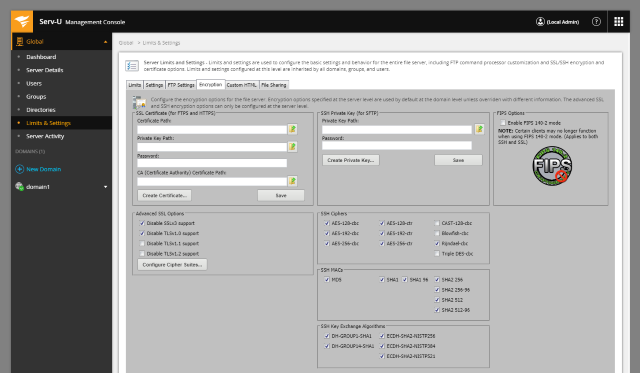
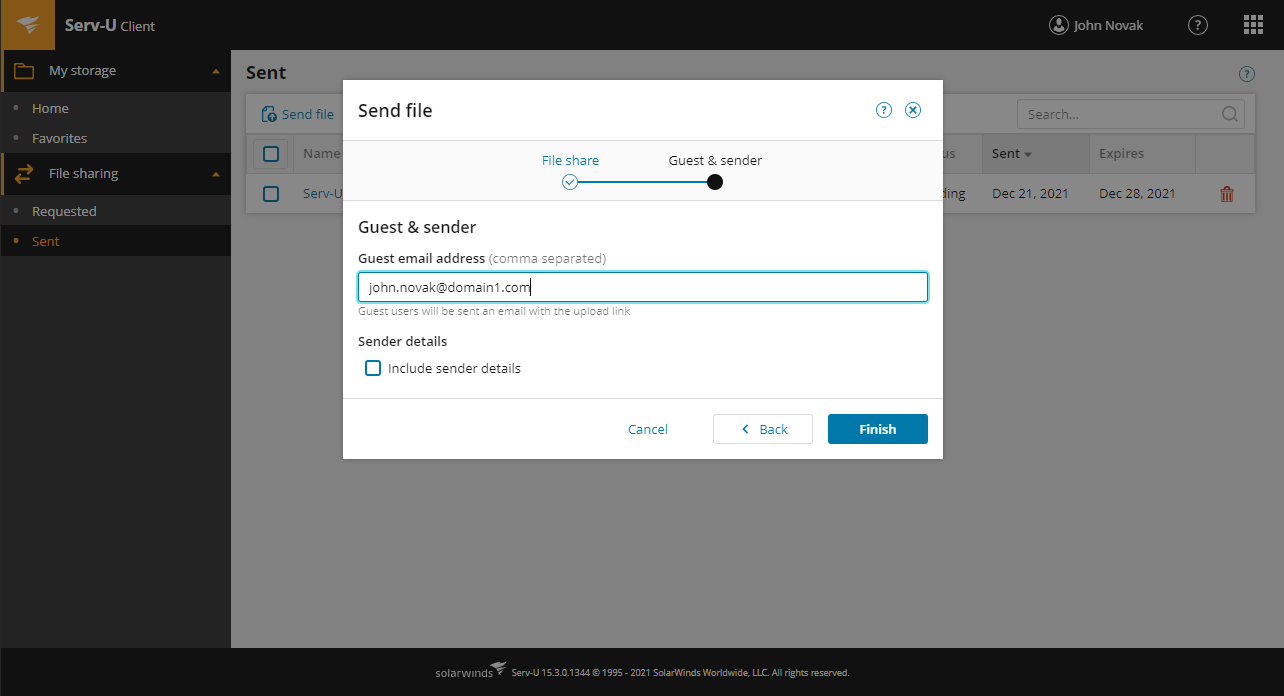
Screenshot of Easily manage file transfer settings and permissionsScreenshot of Enhance security and control over file transfers in and outside your organization with Serv-U MFTScreenshot of Send large files easily from the Web Client