Apple offers iMovie as a video editing platform supporting video creators with high quality effects, support for 4k resolution, audio editing, and other features supporting the creation of videos and movies.
$0
Pinnacle Studio
Score 7.8 out of 10
N/A
Corel Corporation offers the Pinnacle Studio video editing, containing a wide range of features and tools supporting HD and 3D video, split screen, stop motion, and other kinds of video.
$54.95
UiPath Task Capture
Score 9.6 out of 10
N/A
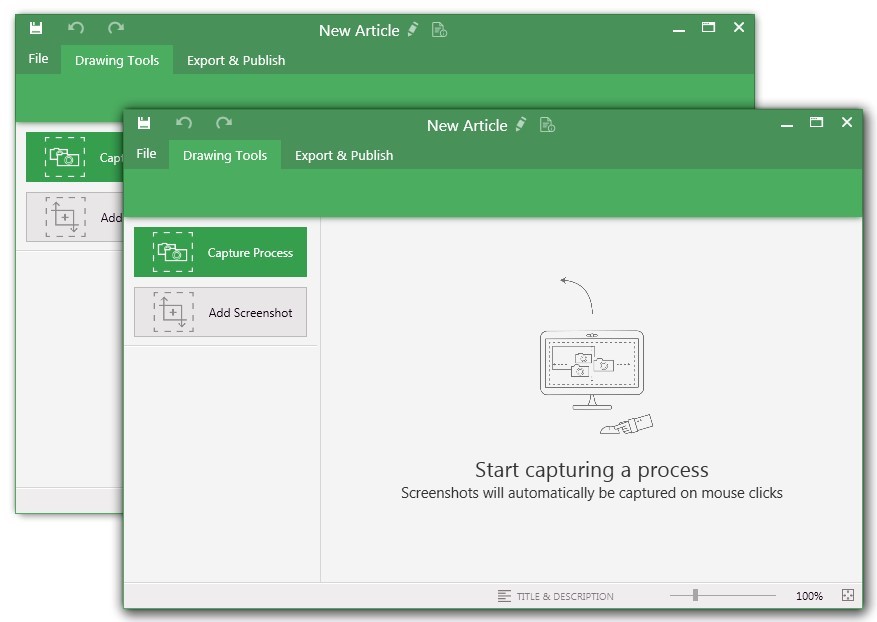
UiPath Task Capture (formerly StepShot, acquired October 2019) is a tool designed for quick and easy step-by-step documentation. During a recording mode, the software creates a separate screenshot on every click, groups them into a manual with automatically added metadata. Users can annotate captured images and structure documents in the way they want them to look.
N/A
Pricing
iMovie
Pinnacle Studio
UiPath Task Capture
Editions & Modules
Free Tier
$0.00
Studio
$54.95
Studio Plus
$89.95
Studio Ultimate
$109.95
No answers on this topic
Offerings
Pricing Offerings
iMovie
Pinnacle Studio
UiPath Task Capture
Free Trial
No
No
Yes
Free/Freemium Version
Yes
No
Yes
Premium Consulting/Integration Services
No
No
Yes
Entry-level Setup Fee
No setup fee
No setup fee
No setup fee
Additional Details
—
—
We have some discounts available all the time depending on the amount of ordered licenses.
Both Pinnacle and iMovie have similar features and capabilities. Most of the pros of iMovie has been posted in my review already but I would say the most positive aspect of iMovie is the fact that it is pre-installed on Apple products so you don't have to buy it, compared to …
iMovie is a great editing tool for beginners and users with little to no experience. If you are looking for a simple, straight forward way to edit your videos without having any training, this is the tool for you. If you are looking for a robust and very advanced editing platform, you may wish to look elsewhere.
StepShot is perfect for showing your audience how they are supposed to navigate a new system you have implemented. You can take them from a login screen all the way through any technical process you want them to follow. The product is not ideal, however, for documenting a process that does not have tangible steps. For example, a process we have created includes some reflective thinking about alignment or outcomes in order to work, this can be articulated in the text area of the screen captures but doesn't really capture our message.
iMovie allows users to upload their own clips and edit them together. You're able to add in more clips as you're working on your project which is great as some film editing software don't allow add ons of video clips once you've begun the editing process.
iMovie continually saves as you're working on your project and syncs with your devices so you can work on your project from other like computers.
iMovie is quick to update changes which allows time to be saved during the editing process. It's very helpful when you need to adjust 1-2 things and don't want to spend hours waiting for the changes to go through.
Audio for video editing is a bit limiting. A pro user would feel limited, but the average person can pretty well do what they need in iMovie and that's what matters for this platform.
The design of the UI could use some updating so it doesn't feel so bubbly. This may purely be an aesthetic concern, and maybe the old style makes it more approachable, but i'd prefer to see a more slick design so you don't feel like you are using a kids program.
If you ever want to share the project or manually manage files, it can be a bit difficult to figure out. Fortunately Apple allows you to import a project from iMovie into FCPX if you ever want to be upwardly mobile.
The "export & publish" button is kind of tiny and tucked away. It should be more prominent. After not using it for a couple weeks, I always forget where it is.
Updates aren't as frequent. Which is fine, since I haven't come across many bugs, it would just be cool to see some added features/functionality a bit more often.
The blur looks fine in the preview mode, but when exported, it's not the best.
Once again, iMovie is a fast application. It's easy to use and navigate through. It has never frozen or glitched. There is an auto-save feature which helps you to easily close and re-open the software and continue from where you left off. Being an Apple product I do believe there is a level of superiority that surpasses Windows as well.
Apple does a great job supporting its products. I have never encountered trouble that could not be solved through chat or email. The knowledgebase section of the website, video tutorials online and various user forums also help with most issues. If after using all of these avenues you still have an issue, it may be time for you to outsource your project to a professional!
I have only run into an issue once, which I believe was due to a newly released feature (cloud storage). I was running into issues with the functionality on my Mac. The team was incredibly helpful in both troubleshooting the issue by jumping on screen sharing sessions, as well as providing multiple releases for me to test to fix the problem!
Not as easy to use as iMovie, and a similar cost structure. iMovie is easier for Apple users / and MS users, to both get proficient at. Movie Maker isn't bad, it just isn't as slick as iMovie. We actually used MovieMaker for a couple of years before migrating most users over to iMovie. We have not regretted the move.
iMovie is a very inexpensive alternative to other video editing software.
It's very easy to train new users on iMovie, so time is saved there.
We started a project where we were tasked to create a new 5 minute video every week. We started with little to no knowledge of video editing, but iMovie was so easy to pick up and use that we were able to start filming and putting together videos right away. If we had to learn a more complex program, like Premiere Pro, it would have pushed our timeline back considerably.
This has saved us MANY HOURS in either walking clients through processes in person or having to create a one-off guide through taking screenshots and creating our own documents with the screenshots hand placed.
Client satisfaction is high when they receive these guides. It is documentation that they can refer to at anytime that is personalized to their use or individual needs.