Inventoryy vs. Lightspeed Restaurant

Overview
ProductRatingMost Used ByProduct SummaryStarting Price
Inventoryy
Score 0.0 out of 10
N/A
Inventoryy is an inventory management software for wholesalers, retailers and online sellers used to manage purchase orders, invoices, and inventory levels, and is designed to bring vendors, customers, and products together. Users can assign bin locations and manage products across multiple warehouses, and create transfer orders and see stock levels based on location. Inventorry will integrate all a store's marketplaces, retail stores, and…
$199
per month 2000 Orders
Lightspeed Restaurant
Score 9.8 out of 10
N/A
The Lightspeed Restaurant POS, from Lightspeed in Montreal, is a restaurant POS and management system designed to enable users to sync the user's menu with major food delivery apps, manage all orders and and reach new customers.
$69
per month 2.6% + 10¢
Pricing
InventoryyLightspeed Restaurant
Editions & Modules
Plus
$199
per month 2000 Orders (1 order = 1 unit sold)
Pro
$299
per month 5000 Orders (1 order = 1 unit sold)
Enterprise
$499
per month 10000 Orders (1 order = 1 unit sold) + $0.01 per additional order
Lightspeed Restaurant Essentials
$69
per month 2.6% + 10¢
Lightspeed Restaurant Plus
$189
per month 2.6% + 10¢
Lightspeed Restaurant Pro
$399
per month custom per purchase rates
Offerings
Pricing Offerings
InventoryyLightspeed Restaurant
Free Trial
NoNo
Free/Freemium Version
NoNo
Premium Consulting/Integration Services
NoYes
Entry-level Setup FeeOptionalNo setup fee
Additional DetailsUsers can save 20% on each plan by subscribing Annually.
More Pricing Information
Best Alternatives
InventoryyLightspeed Restaurant
Small Businesses
Webgility
Webgility
Score 9.7 out of 10
Square POS
Square POS
Score 9.2 out of 10
Medium-sized Companies
SAP S/4HANA Cloud
SAP S/4HANA Cloud
Score 8.5 out of 10
Shopify
Shopify
Score 8.8 out of 10
Enterprises
SAP S/4HANA Cloud
SAP S/4HANA Cloud
Score 8.5 out of 10

No answers on this topic

All AlternativesView all alternativesView all alternatives
User Ratings
InventoryyLightspeed Restaurant
Likelihood to Recommend
-
(0 ratings)
9.0
(25 ratings)
Usability
-
(0 ratings)
8.5
(3 ratings)
Support Rating
-
(0 ratings)
8.9
(9 ratings)
User Testimonials
InventoryyLightspeed Restaurant
Likelihood to Recommend
Inventoryy
No answers on this topic
Lightspeed
One thing Upserve [POS (formerly Breadcrumb)] does well is splitting customer checks is very easy and intuitive. We used to host a lot of groups (pre pandemic) and splitting checks can be a nightmare. But they let you split it evenly by number or by item. You can even split one item (say, an app) across multiple checks.
Read full review
Pros
Inventoryy
No answers on this topic
Lightspeed
  • Reporting: Upserve's backend reporting system is unparalleled in this industry. It's extremely robust and gives us eyes into every nook and cranny of our business.
  • Intuitive: The Upserve POS is nearly as intuitive as Square. The ease of use really helps us provide great service without spending a fortune in training.
  • Extras: A quality POS system is assumed with Upserve. It has all the bells and whistles and it's very effective. What takes Upserve over the top is all the added features. Our online ordering system, loyalty program, delivery platform integration, KDS system, and soon to be inventory management are all provided for free with our system. The other benefit is all these features are seamless and work really well.
Read full review
Cons
Inventoryy
No answers on this topic
Lightspeed
  • On the KDS, the system will re-fire tickets when we split checks and sometimes when simply closing out.
  • On the KDS, when someone adds onto an order that has already been bumped from the screen and doesn't put the new item at the end of the queue. It bumps it to the front and keeps the original time of the original order. This makes it difficult to process the order and determine the priority of which order should be fulfilled.
Read full review
Usability
Inventoryy
No answers on this topic
Lightspeed
Upserve is very intuitive. It utilizes a tab system along the left side of the screen for easy access to menu categories. After choosing the tab you want to view (i.e. Food), all the food items and/or sub categories show up instantly on the screen. once your items are chosen, you are a card swipe away from starting the payment process. Very easy. That said, there are a few minor issues with usability. For example, splitting checks is really quite difficult. You have to create new checks one at a time, then have to go searching for the checks to ring guests up. Really not intuitive on this front. Thankfully, it's not incredibly inhibitive
Read full review
Support Rating
Inventoryy
No answers on this topic
Lightspeed
Seriously, if I could give a 12 rating I would. Upserve support is 24/7 and completely free. No extra fees on evenings or weekends and they are fast. You can actually start a chat support straight from your ipad screen. 90% of our support issues have been solved in just a few minutes from the chat screen. That said, I prefer the phone. Calling into Upserve support is just as easy and everyone is always friendly and fast
Read full review
Alternatives Considered
Inventoryy
No answers on this topic
Lightspeed
Lavu is the worst POS system I have ever encountered. It was the most frustrating part of everyone’s shift. They were never available for customer service, Upserve is. Their system would shut down across regions, Upserve does not. Upserve (at the time Breadcrumb) was highly rated and praised for simplicity.
Read full review
Return on Investment
Inventoryy
No answers on this topic
Lightspeed
  • Bestsellers and slower items rise to the top in reporting features, making analysis quicker.
  • Dramatically reduced server error
  • Posed a challenge to continue face-to-face contact between servers and cooks; the POS tends to end conversations about special orders, special customer requests or restrictions, and generally conveys the nuances that contribute to excellent service. So we have to make a conscious effort to continue talking to each other.
Read full review
ScreenShots

Inventoryy Screenshots

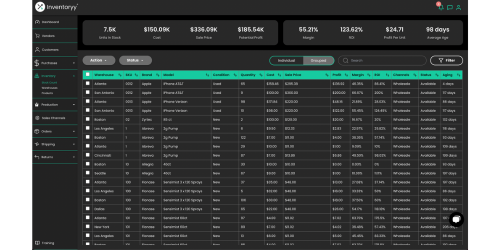
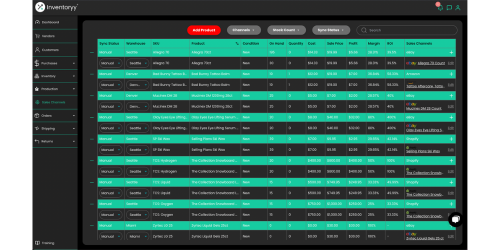
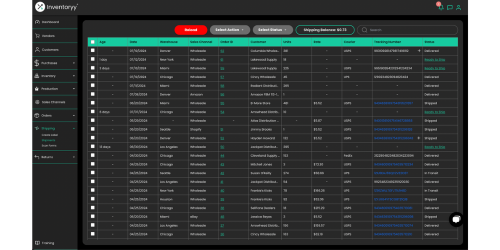
Screenshot of the Inventoryy Dashboard to track product sales. It can be used to view sales data from each sales channel and get in-depth analytics like Days Remaining In Stock, Recommended Reorder Quantity and Monthly Sales Forecast.Screenshot of the Inventoryy Stock Count page used to view all products in stock. This page provides data such as Potential Profit, Margin, ROI, Profit Per Unit and Average Age (which is the average number of days that each product has been in stock).Screenshot of Inventoryy's connections to eCommerce marketplaces like Shopify, eBay, Walmart and Amazon FBM. The application will sync listings to Inventoryy products, import orders and create bulk shipping labels.Screenshot of the Inventoryy Shipments page used to manage shipments. Fulfill the "Ready to Ship" orders by creating bulk shipping labels and track each shipment.