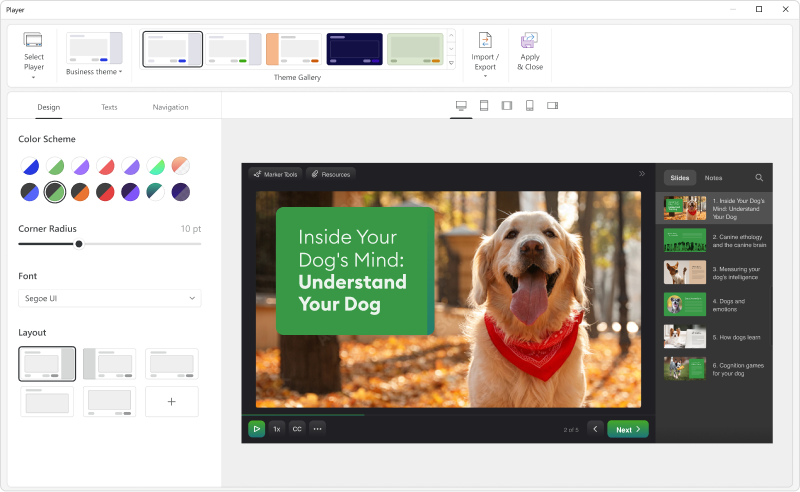
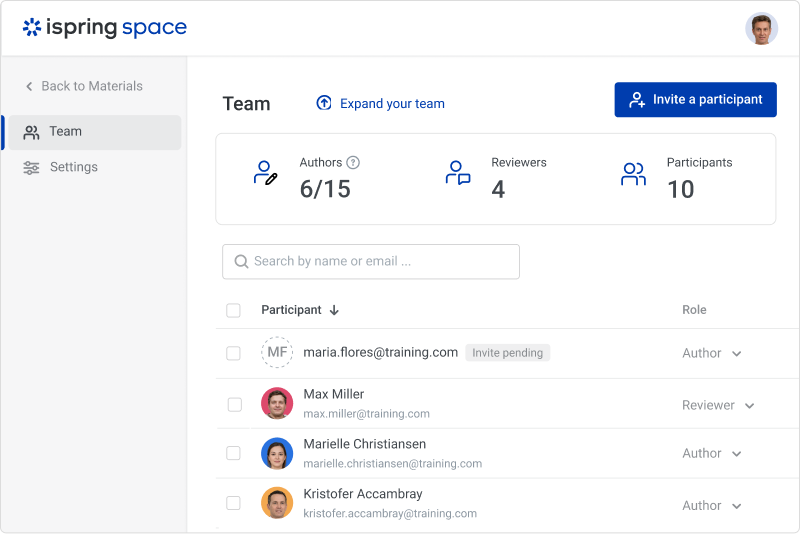
iSpring Suite is an authoring tool with AI-assisted features for creating slide-based online courses, quizzes, and video lessons in Microsoft PowerPoint. Instructional designers, corporate L&D and HR teams, educators, and independent course developers can build training content without relying on multiple specialized tools. iSpring Suite enables users to: Generate a course from a topic. Users can describe what to teach or upload subject…
$970
per year per user
Pluralsight Skills
Score9.2 out of 10
N/A
Pluralsight Skills is a skill development solution that enables employees to build in-demand skills in a way that’s personalized to their current knowledge and preferred way to learn. The course library includes content on software development, DevOps, machine learning, security infrastructure, and cloud, as well as certification practice exams, hands on learning experiences and cloud labs, and skills assessments.
$29
per month
Pricing
iSpring Suite
Pluralsight Skills
Editions & Modules
No answers on this topic
Individual - Standard
$29.00
per month
Individual - Premium
$45.00
per month
Team - Professional
$579.00
per user, per year
Team - Enterprise
$779.00
per user, per year
Offerings
Pricing Offerings
iSpring Suite
Pluralsight Skills
Free Trial
Yes
Yes
Free/Freemium Version
Yes
No
Premium Consulting/Integration Services
No
No
Entry-level Setup Fee
No setup fee
No setup fee
Additional Details
Academic, non-profit, government and volume discounts are available.
iSpring Suite gives me a platform to easily create training courses for any number of subjects, custom-designed to fit my workplace. I can include quizzes that allow me to track both the completion rate of the course and the success rate of the training. Its user-friendliness stands out and makes my role as Training Director much easier on a day-to-day basis.
Awesome tool for teams looking to gain new skills or refine and update existing skills. I love the convenience of using this tool for recertification credits (i.e. PMP). Instead of identifying which classes I need to take, I can identify my interests and have recommendations presented for what paths I should take. It is a really helpful tool to create ladders for my team to transition from one role into the next. I think this is going to be a really beneficial tool.
A de minimis incentive was given to thank the reviewer for their time. The incentive was not used to bias or drive a particular response, nor was the incentive contingent on a positive endorsement. More Info
A de minimis incentive was given to thank the reviewer for their time. The incentive was not used to bias or drive a particular response, nor was the incentive contingent on a positive endorsement. More Info
Pluralsight has hundreds of authors that are constantly producing new content, which is valuable for the tech industry that is constantly moving at a brisk pace.
Many content authors are respected leaders in the topic they're presenting. You are able to trust that their content is thorough and authentic.
Niche expert-level topics are presented in a curated video format which is difficult to find anywhere else.
A de minimis incentive was given to thank the reviewer for their time. The incentive was not used to bias or drive a particular response, nor was the incentive contingent on a positive endorsement. More Info
Add details on what the customized play includes when the mouse hovers over the icon. It took a bit of time to realize that this was where we could select different layouts.
A de minimis incentive was given to thank the reviewer for their time. The incentive was not used to bias or drive a particular response, nor was the incentive contingent on a positive endorsement. More Info
Companies don't change technologies in their products often. For example a product that was built on AngularJS is still viable and the company may have no plans to upgrade it. Pluralsight could do a better job of providing new courses on technology that's still useful, though somewhat dated; like AngularJS for example.
Pluralsight has a bad habit of throwing all their courses in a large bucket. For example, when I log-in and look to see what new I often have to wade through courses on tools that a web artist or designer would use. I wish Pluralsight would categorize course and let us (their customers) flag what types of videos we wanted to see, or better yet exclude from our view.
Years ago, Pluralsight would let its customer download the courseware and that was great. I was disappointed when they stopped this feature.
I'd love to see more course where the goal is to build a particular type of software. For example, lets have one where you build a blog using ASP.NET and deploy it to Azure. Let have one where you build a survey application, etc. Learning technologies is great, but I'd love to see courses where the goal is to build a particular type of application.
A de minimis incentive was given to thank the reviewer for their time. The incentive was not used to bias or drive a particular response, nor was the incentive contingent on a positive endorsement. More Info
A de minimis incentive was given to thank the reviewer for their time. The incentive was not used to bias or drive a particular response, nor was the incentive contingent on a positive endorsement. More Info
iSpring Suite is a perfect tool overall to create contents in collaboration with colleagues. There are some difficulties though in usability but the usability is OK in total. We are fully satisfied with the customer support. There are simple online tutorials and a team of competent support colleagues. The support content is sometimes not simply accessible, you need to search for them longer.
A de minimis incentive was given to thank the reviewer for their time. The incentive was not used to bias or drive a particular response, nor was the incentive contingent on a positive endorsement. More Info
A de minimis incentive was given to thank the reviewer for their time. The incentive was not used to bias or drive a particular response, nor was the incentive contingent on a positive endorsement. More Info
Great software is only exceeded by their fantastic support. Prompt responses, complete with clearly outlined steps to follow, are just the beginning. There are tremendous resources and continual webinars to challenge what we think we know about the iSpring Suite. I often use PowerPoint to lay out marketing slides, add music and narration, then publish them as an MP4 video. I can count on iSpring support to assist me when I need help.
Ultimately, I selected iSpring Suite because of the ease of use and small learning curve. I needed to be able to start creating content immediately, and after doing trial periods with iSpring as well as some of the other options, it was clear that I could be up and running the quickest with iSpring. I don't see any features that are missing for what I need, and it was also the cheapest option.
A de minimis incentive was given to thank the reviewer for their time. The incentive was not used to bias or drive a particular response, nor was the incentive contingent on a positive endorsement. More Info
Before using Pluralsight, staff was using YouTube to help them with developing certain aspects of their knowledge. However, YouTube is much less structured/organized than Pluralsight. Pluralsight has a very wide offering of courses and it has lot of good content. One quick search and we can get started.
A de minimis incentive was given to thank the reviewer for their time. The incentive was not used to bias or drive a particular response, nor was the incentive contingent on a positive endorsement. More Info
It has enhance my reputation personally within the organization. This has led to other departments requesting me by name to head up eLearning development projects, even delaying their own deadlines to ensure that I am involved.
Other than a few duds (I let some inexperienced vocal talent slip thru in the heat of multiple conflicting deadlines), learner feedback has skyrocketed over that developed before I became involved and standardized the effort on iSpring
One positive impact is it has kept our employees engaged in the material they work with every day. Instead of becoming stagnant and complacent, they are actively searching out ways to develop skills and do more with the tools available to them.
It saves money when it comes to offering training and development opportunities company-wide. It would be much more costly to invest in specialized training for that number of employees.
One potential negative is the amount of company time spent on coursework over work responsibilities. A balance must be struck and individuals should be encouraged to explore the training on their own time.
A de minimis incentive was given to thank the reviewer for their time. The incentive was not used to bias or drive a particular response, nor was the incentive contingent on a positive endorsement. More Info