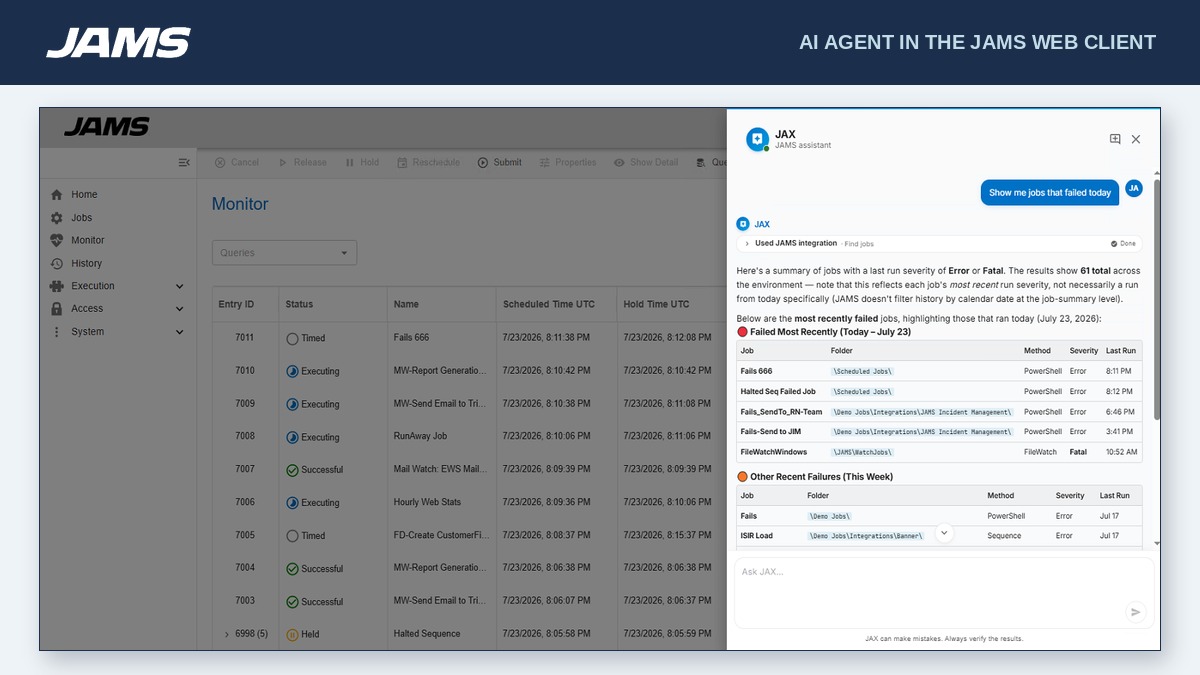
JAMS is a centralized workload automation and job scheduling solution that runs, monitors, and manages jobs and workflows. Reliably orchestrate the critical IT processes that run your business from a single pane of glass.
$9,996
per year
Pricing
JAMS
Editions & Modules
Core
9,996.00
per year
Advanced
Customized Pricing
per year
Offerings
Pricing Offerings
JAMS
Free Trial
Yes
Free/Freemium Version
No
Premium Consulting/Integration Services
Yes
Entry-level Setup Fee
No setup fee
Additional Details
- Core: For small teams getting started with automation. Core Integrations: PowerShell, SQL, Azure Data Factory, Python, 20+ others.
- Advanced: Comprehensive solution for large-scale operations. Core Integrations: SAP, JDE, Ellucian Banner, Informatica, Mainframe and Power Systems.
Lead Support Engineer in Engineering at Worldpay (Financial Services, 10,001+ employees)
Chose JAMS
We had selected Automate (Skybot) for it's simple integration, standup and ease of implementation. The cost was also substantially less, but we were more concerned with functionality than price. Automate had it all.
A de minimis incentive was given to thank the reviewer for their time. The incentive was not used to bias or drive a particular response, nor was the incentive contingent on a positive endorsement. More Info
Verified User
Chose JAMS
Being company is already using Global Scape, another product from the same company, so licensing to start using JAMS was easy.
A de minimis incentive was given to thank the reviewer for their time. The incentive was not used to bias or drive a particular response, nor was the incentive contingent on a positive endorsement. More Info
Verified User
Chose JAMS
We use both in the organization, with JAMS more focused on internal file transfers and Axway MFT used for combination of both internal/external. Key difference I noted is the alerting feature is better in JAMS compared to Axway MFT, however Axway SaaS (cloud platform) allows for …
A de minimis incentive was given to thank the reviewer for their time. The incentive was not used to bias or drive a particular response, nor was the incentive contingent on a positive endorsement. More Info
Verified User
Chose JAMS
JAMS is the legacy product in our
on-premises environment. Accenture has recently implemented MyWizard, the preferred platform for future operations, which is expected to progressively
replace JAMS as part of our broader cloud migration strategy. Given this
A de minimis incentive was given to thank the reviewer for their time. The incentive was not used to bias or drive a particular response, nor was the incentive contingent on a positive endorsement. More Info
Verified User
Chose JAMS
Only used the Task Scheduler on Microsoft servers, which accurately started jobs on time.
A de minimis incentive was given to thank the reviewer for their time. The incentive was not used to bias or drive a particular response, nor was the incentive contingent on a positive endorsement. More Info
A de minimis incentive was given to thank the reviewer for their time. The incentive was not used to bias or drive a particular response, nor was the incentive contingent on a positive endorsement. More Info
A de minimis incentive was given to thank the reviewer for their time. The incentive was not used to bias or drive a particular response, nor was the incentive contingent on a positive endorsement. More Info
Verified User
Chose JAMS
We base usage of JAMS for the particular business use cases.
A de minimis incentive was given to thank the reviewer for their time. The incentive was not used to bias or drive a particular response, nor was the incentive contingent on a positive endorsement. More Info
Sr. Network Administrator in Information Technology at Edcor (Outsourcing/Offshoring, 51-200 employees)
Chose JAMS
JAMS overall costs are significantly lower, and support is better overall. If you have a halfway decent technical team, any small to medium business will benefit from JAMS over the rest of the schedulers out there.
The UI is so much cleaner than every competitor we've sampled.
A de minimis incentive was given to thank the reviewer for their time. The incentive was not used to bias or drive a particular response, nor was the incentive contingent on a positive endorsement. More Info
Verified User
Chose JAMS
We were already experienced with JAMS at a previous company. JAMS was already decided prior to my employment.
A de minimis incentive was given to thank the reviewer for their time. The incentive was not used to bias or drive a particular response, nor was the incentive contingent on a positive endorsement. More Info
A de minimis incentive was given to thank the reviewer for their time. The incentive was not used to bias or drive a particular response, nor was the incentive contingent on a positive endorsement. More Info
Business Application Support Manager in Information Technology at Ruffer LLP (Financial Services, 201-500 employees)
Chose JAMS
We chose JAMS because it was the best solution for our business needs, a major factor being the licensing model and the simplicity of the app. We needed to migrate things fast too and this was simply plug and play without too much headache
A de minimis incentive was given to thank the reviewer for their time. The incentive was not used to bias or drive a particular response, nor was the incentive contingent on a positive endorsement. More Info
Verified User
Chose JAMS
We migrated to JAMS from a previous application that was sunsetted. We were aware that JAMS was more than a like for like replacement for the incumbent application, and in fact was more powerful and flexible. We did consider other solutions, some of which appeared to be more …
A de minimis incentive was given to thank the reviewer for their time. The incentive was not used to bias or drive a particular response, nor was the incentive contingent on a positive endorsement. More Info
A de minimis incentive was given to thank the reviewer for their time. The incentive was not used to bias or drive a particular response, nor was the incentive contingent on a positive endorsement. More Info
A de minimis incentive was given to thank the reviewer for their time. The incentive was not used to bias or drive a particular response, nor was the incentive contingent on a positive endorsement. More Info
Verified User
Chose JAMS
Our developers found it easier to get going with JAMS and there seemed to be better calendar and scheduling options available in JAMS. JAMS also supported legacy OS versions that were unsupported and did not work in Automic. This was a vital requirement in selecting a solution …
A de minimis incentive was given to thank the reviewer for their time. The incentive was not used to bias or drive a particular response, nor was the incentive contingent on a positive endorsement. More Info
Verified User
Chose JAMS
I have not researched other workload automation products.
A de minimis incentive was given to thank the reviewer for their time. The incentive was not used to bias or drive a particular response, nor was the incentive contingent on a positive endorsement. More Info
Server Specialist in Customer Service at HCC (Education Management, 51-200 employees)
Chose JAMS
JAMS is WAY more advanced, it isn't a fair comparison. The history is easy to get through. It is easy to get alerts of complete to failed and with a log. Adding jobs is extremely easy that even my teammates who do not manange the software are able to set them up. With the …
A de minimis incentive was given to thank the reviewer for their time. The incentive was not used to bias or drive a particular response, nor was the incentive contingent on a positive endorsement. More Info
Verified User
Chose JAMS
Tidal is a very good scheduler but very expensive and customers can't budget for this. REvScheduler is a lot cheaper but the interface isn't very aesthetics and functionality is lacking compared to JAMS. Out of all of them I'd recommend JAMS.
A de minimis incentive was given to thank the reviewer for their time. The incentive was not used to bias or drive a particular response, nor was the incentive contingent on a positive endorsement. More Info
A de minimis incentive was given to thank the reviewer for their time. The incentive was not used to bias or drive a particular response, nor was the incentive contingent on a positive endorsement. More Info
Verified User
Chose JAMS
In my opinion, while JAMS is useful for point and click like developers, Astro is more useful for software developers, whole like to see "scheduling as code". in the long run, I think Astro might overtake JAMS in terms of usage and use cases that it satisfies across the tech …
A de minimis incentive was given to thank the reviewer for their time. The incentive was not used to bias or drive a particular response, nor was the incentive contingent on a positive endorsement. More Info
A de minimis incentive was given to thank the reviewer for their time. The incentive was not used to bias or drive a particular response, nor was the incentive contingent on a positive endorsement. More Info
Verified User
Chose JAMS
JAMS was much more cost-effective and easier to use. JAMS allowed us to centralize our job scheduling more fully. Converting from our previous, very limited scheduler to JAMS would be far more accessible than Automox.
A de minimis incentive was given to thank the reviewer for their time. The incentive was not used to bias or drive a particular response, nor was the incentive contingent on a positive endorsement. More Info
Technical Support Engineer in Information Technology at Bridgeway Communication System Inc. (Information Technology & Services, 51-200 employees)
Chose JAMS
N/A. I don't have any experience with different Job Management Software. Since JAMS is capable of doing most of our daily operations, we didn't look for other software. I can say that JAMS perfectly fits with us and with our clients. I've only heard about Direct M, which, based …
A de minimis incentive was given to thank the reviewer for their time. The incentive was not used to bias or drive a particular response, nor was the incentive contingent on a positive endorsement. More Info
There's probably better schedulers out there. JAMS is good for an on-premises/classic IT implementation. JAMS is well-suited for use cases such as collecting a file from a shared location and uploading it to an API, running scripts on servers, and handling middleware tasks that process files or data between handoffs across different locations. JAMS is best suited to environments with IT staff who can develop, test, implement, maintain, and troubleshoot scripts; it does not use natural language processing (so it requires in-depth knowledge of the scripting language in use), and it does not appear to offer native dashboarding or reporting that is easily accessible to all users.
A de minimis incentive was given to thank the reviewer for their time. The incentive was not used to bias or drive a particular response, nor was the incentive contingent on a positive endorsement. More Info
A de minimis incentive was given to thank the reviewer for their time. The incentive was not used to bias or drive a particular response, nor was the incentive contingent on a positive endorsement. More Info
A de minimis incentive was given to thank the reviewer for their time. The incentive was not used to bias or drive a particular response, nor was the incentive contingent on a positive endorsement. More Info
JAMS is a critical resource free up people to do other things and ensuring that processes and tasks are run consistently. We are also confident that procedures are run consistently and on time or as soon as the necessary data is available. With automated job failure notification, we are not required to check that jobs are running correctly.
A de minimis incentive was given to thank the reviewer for their time. The incentive was not used to bias or drive a particular response, nor was the incentive contingent on a positive endorsement. More Info
JAMS is very user friendly; you hardly need to do coding. The only thing that I would say a challenge is setting it up, but that's because you barely know the product yet and, in every processing, setting up is the difficult part. But once you've set it up and you are going to use it, you will really feel that it is worth to invest in this kind of software solution, it really does it job very well.
A de minimis incentive was given to thank the reviewer for their time. The incentive was not used to bias or drive a particular response, nor was the incentive contingent on a positive endorsement. More Info
We didnt really encounter any downtime, no issues encountered during 2 years of use of JAMs also our client barely raise an issue with JAMS, mostly the issues is on the batch jobs that jams executes. So I would gave it a perfect 10, very reliable hardly encounters any error and bug
A de minimis incentive was given to thank the reviewer for their time. The incentive was not used to bias or drive a particular response, nor was the incentive contingent on a positive endorsement. More Info
JAMS performance is very great, there are no issues raised with the performance, it just like nothing happens on the job after integration it gives you this monitoring capability, no reports and bugs raised on the performance, we didnt do integration with other software only database and with use of JAMS agent to different servers
A de minimis incentive was given to thank the reviewer for their time. The incentive was not used to bias or drive a particular response, nor was the incentive contingent on a positive endorsement. More Info
I've never had to wait more than a day for a response to any email queries submitted. We had a very positive experience using support hours during out migration process from v6 to v7. We've also recently had a weeklong group training course where all attendees were positive about the learning outcomes, a shoutout to Jose who did both the migration and the weeklong course!
A de minimis incentive was given to thank the reviewer for their time. The incentive was not used to bias or drive a particular response, nor was the incentive contingent on a positive endorsement. More Info
People that were involved in the POC found the training a lot easier to follow. I think most people would have preferred to just get the training material and run through themselves.
A de minimis incentive was given to thank the reviewer for their time. The incentive was not used to bias or drive a particular response, nor was the incentive contingent on a positive endorsement. More Info
I Was not part of the original Implementation, and the persons did that are no longer with the Organization. But I was part of the recent Upgrade process a year ago and I am the JAMS admin and was very pleased
A de minimis incentive was given to thank the reviewer for their time. The incentive was not used to bias or drive a particular response, nor was the incentive contingent on a positive endorsement. More Info
JAMS is WAY more advanced, it isn't a fair comparison. The history is easy to get through. It is easy to get alerts of complete to failed and with a log. Adding jobs is extremely easy that even my teammates who do not manange the software are able to set them up. With the new web component we are very excited for the future of JAMS advancements.
A de minimis incentive was given to thank the reviewer for their time. The incentive was not used to bias or drive a particular response, nor was the incentive contingent on a positive endorsement. More Info
The product is quite flexible. There are a number of features and functions that we use on a daily basis, and there are many features that are available that we have not yet needed or explored (like setting up jobs with the ability to do FTP or Sftp file transfers).
A de minimis incentive was given to thank the reviewer for their time. The incentive was not used to bias or drive a particular response, nor was the incentive contingent on a positive endorsement. More Info
Our company depends on the JAMS Scheduler in executing a large number of SAP Jobs. In never having had a true Enterprise Scheduler such as JAMS before now, we are very happy with the results.
There a number of features in JAMS for setting up schedules and dependencies on other jobs. This helps our company achieve the necessary workflows for Job execution. This optimization saves on system resources and keeps Jobs flowing smoothly.
We are very happy that JAMS is a robust solution with High Availability. This is necessary for Enterprise products, to reduce downtime, which we have not had as a result. This feature definitely saves our company money by reducing or eliminating unexpected downtime.