TrustRadius: an HG Insights company

Save this comparison

Save this comparison

Add Product

Recommended Comparisons

    Overview
    ProductRatingMost Used ByProduct SummaryStarting Price

    Kantata PSA

    Score8.8 out of 10
    Mid-Size Companies (51-1,000 employees)
    Kantata Cloud (formerly Mavenlink + Kimble) provides project management and collaboration software for small to mid-sized professional services companies. Features include resource management, project dependencies, time and expense tracking, file sharing, versatile user permissions, private messaging, planning and reporting.N/A

    MindMap AI

    N/AN/AMindMap AI is a visual information organization and knowledge synthesis platform. The solution is designed to ingest unstructured data from various media formats and convert it into structured, editable visual models such as mind maps, logic charts, and outlines. Key Capabilities Multi-Modal Data Ingestion: The platform supports the ingestion of PDF files, documents, webpages, images, and CSV data. It also features the ability to process audio and video files,…

    $9.99

    per month per user

    Pricing
    Kantata PSAMindMap AI
    Editions & Modules
    Premier
    Contact Sales Team
    per month per seat
    Enterprise
    Contact Sales Team
    Basic
    $9.99
    per month per user
    Pro
    $14.99
    per month per user
    Lite Lifetime
    $157
    one-time fee per user
    Plus Lifetime
    $237
    one-time fee per user
    Ultimate Lifetime
    $397
    one-time fee per user
    Offerings
    Pricing Offerings
    Kantata PSAMindMap AI
    Free Trial
    NoNo
    Free/Freemium Version
    NoYes
    Premium Consulting/Integration Services
    YesNo
    Entry-level Setup FeeRequiredNo setup fee
    Additional Details—MindMap AI offers a Free plan as well as paid yearly and lifetime options. The Free plan includes 50 AI credits per month, unlimited projects, AI-assisted mind mapping, manual edits, 25+ language support, multiple layouts, themes, sharing, and exports to project file, PNG, and PDF. Yearly paid plans are discounted compared with monthly billing. Basic is priced at $4.99 per user per month, billed yearly, and includes 2,000 AI credits per month, file summarization, private sharing by email, additional export formats, and basic email support. Pro is priced at $7.99 per user per month, billed yearly, and includes 5,000 AI credits per month, higher file-size limits for PDF, audio, and video summarization, professional exports, priority access to new features, and priority email support. Add-on credits are available for paid plans. Basic users can purchase 2,000 additional credits for $4.99, and Pro users can purchase 5,000 additional credits for $4.99. MindMap AI also offers lifetime plans as one-time purchases, with pricing and availability varying by promotion.
    More Pricing Information
    Community Pulse
    Kantata PSAMindMap AI
    Considered Both Products
    Kantata (Kimble + Mavenlink)
    No answer on this topic
    MindMap AI
    No answer on this topic
    Key User Insights
    Would buy again
    94%
    Would buy again
    17 Answers
    No answers on this topic
    Delivers good value for the price
    94%
    Delivers good value for the price
    15 Answers
    No answers on this topic
    Happy with the feature set
    89%
    Happy with the feature set
    16 Answers
    No answers on this topic
    Lived up to sales and marketing promises
    92%
    Lived up to sales and marketing promises
    11 Answers
    No answers on this topic
    Implementation went as expected
    100%
    Implementation went as expected
    12 Answers
    No answers on this topic
    Best Alternatives
    Kantata PSAMindMap AI
    Small Businesses
    Autotask PSA
    Score7.7 out of 10
    Xmind
    Score8.8 out of 10
    Medium-sized Companies
    Workday Professional Services Automation
    Score8.2 out of 10
    MindManager
    Score8.4 out of 10
    Enterprises
    Planview AdaptiveWork
    Score9 out of 10
    MindManager
    Score8.4 out of 10
    All AlternativesView all alternativesView all alternatives
    User Ratings
    Kantata PSAMindMap AI
    Likelihood to Recommend
    9.1
    (50 ratings)
    -
    (0 ratings)
    Likelihood to Renew
    9.0
    (6 ratings)
    -
    (0 ratings)
    Usability
    8.0
    (8 ratings)
    -
    (0 ratings)
    Availability
    9.0
    (2 ratings)
    -
    (0 ratings)
    Performance
    7.0
    (3 ratings)
    -
    (0 ratings)
    Support Rating
    9.0
    (8 ratings)
    -
    (0 ratings)
    In-Person Training
    9.0
    (2 ratings)
    -
    (0 ratings)
    Online Training
    9.0
    (2 ratings)
    -
    (0 ratings)
    Implementation Rating
    9.0
    (5 ratings)
    -
    (0 ratings)
    Configurability
    8.2
    (1 ratings)
    -
    (0 ratings)
    Ease of integration
    8.2
    (1 ratings)
    -
    (0 ratings)
    Product Scalability
    9.0
    (2 ratings)
    -
    (0 ratings)
    Vendor post-sale
    9.0
    (2 ratings)
    -
    (0 ratings)
    Vendor pre-sale
    9.0
    (2 ratings)
    -
    (0 ratings)
    User Testimonials
    Kantata PSAMindMap AI
    Likelihood to Recommend
    Kantata (Kimble + Mavenlink)
    It is appropriate and even exceeds expectations 90% of the time. It makes project tracking very easy and visually accessible for most cases. The only occasion where Mavenlink came slightly short was for a special project that required more interaction options among project members. I am certain there are ways to work around that issue, but we did not find them.
    Incentivized
    Read full review
    MindMap AI
    No answers on this topic
    Pros
    Kantata (Kimble + Mavenlink)
    • With Mavenlink when starting to assign tasks to people, set deadlines and milestones, and add files to our projects we can look at it all from a variety of perspectives, including a task tracker view and a Gantt chart view
    • Through Mavenlink each project also includes an activity stream where we can view all project details as they come up, as well as an activity feed for all the projects it is linked to.
    Incentivized
    Read full review
    MindMap AI
    No answers on this topic
    Cons
    Kantata (Kimble + Mavenlink)
    • The Gantt chart does not allow for baselines to be stored
    • There is no means to upload an excel task tracker and build a plan using an upload
    • The schedule does not allow for planning of holidays
    • The status report functionality needs to be improved
    Incentivized
    Read full review
    MindMap AI
    No answers on this topic
    Likelihood to Renew
    Kantata (Kimble + Mavenlink)
    Although the company I currently work for does not use the product I have recommended that we do switch to Mavenlink. We will be opening some new sites internationally this year and I can see that Mavenlink would be a great product for us to use
    Read full review
    MindMap AI
    No answers on this topic
    Usability
    Kantata (Kimble + Mavenlink)
    I think Kantata is one of the most robust and best project management tools out there for an organization like ours. However, some of our staff feel like it isn't as user-friendly as it could be. From a Director point of view or a Project Manager point of view, Kantata is exceptional. From the point of view of a task-doer, it could be more visually appealing. Also, the mobile version isn't great.
    Incentivized
    Read full review
    MindMap AI
    No answers on this topic
    Reliability and Availability
    Kantata (Kimble + Mavenlink)
    Mavenlink gives advance notice for system upgrades, and they're not during our business day. Mavenlink has always been available when we needed it.
    Read full review
    MindMap AI
    No answers on this topic
    Performance
    Kantata (Kimble + Mavenlink)
    Very good integration with Google apps. Some complexity is called however in the synchronization between Google Tasks and Maven links tasks. This can sometimes lead to duplicate records in Google Tasks. It has been dissolvable that becomes cumbersome if not properly curated.
    Read full review
    MindMap AI
    No answers on this topic
    Support Rating
    Kantata (Kimble + Mavenlink)
    Kantata support is fantastic! Any issues that arise are always handled quickly and efficiently. Granted, we haven't had many issues to report. Typically, my team tends to only reach out to support if they need assistance remembering how to do something or asking about an improvement. We had Kantata build an integration when we first started using the software, and the support team worked hard to listen and improve the integration.
    Incentivized
    Read full review
    MindMap AI
    No answers on this topic
    In-Person Training
    Kantata (Kimble + Mavenlink)
    We prepared questions in advance, and our trainer was an expert in what Mavenlink was and wasn't able to do. We were able to have multiple people trained at once.
    Read full review
    MindMap AI
    No answers on this topic
    Online Training
    Kantata (Kimble + Mavenlink)
    The training was very well-organized. We were able to send questions in advance so the instructor knew what to cover, and the brought up related topics to maximize the usefulness of what they were teaching us.
    Read full review
    MindMap AI
    No answers on this topic
    Implementation Rating
    Kantata (Kimble + Mavenlink)
    Dedicate as much internal time to the implementation effort as possible, even if you're using a 3rd party or Mavenlink services. Your team knows your processes the best
    Read full review
    MindMap AI
    No answers on this topic
    Alternatives Considered
    Kantata (Kimble + Mavenlink)
    We have since switched over to JIRA and let me tell you, it was probably the best decision we have made as a company. We chose Mavenlink based on promises from the sales team about future roadmap work that really never happened. We thought Mavenlink would easily integrate with our billing software but we couldn't have been more wrong. We ended up never utilizing Mavenlink invoices as they don't even allow you to fully customize your invoices that go out to clients!
    Incentivized
    Read full review
    MindMap AI
    No answers on this topic
    Scalability
    Kantata (Kimble + Mavenlink)
    It's very easy to add users and contractors into Mavenlink. There's also an option that let's you manage access for teams in multiple locations.
    Read full review
    MindMap AI
    No answers on this topic
    Return on Investment
    Kantata (Kimble + Mavenlink)
    • Manvenlink is perfect for showing expenses and income over time and across people.
    • Manvenlink is adaptable for the integration and automation of the processes of each of our projects in order to optimize resources and improve operational performance.
    • Mavenlink allows us to determine if our projects are profitable or not, as well as save significant time by automating components such as recurring tasks and having templates, among other things.
    • Manvenlink is advantageous for our operations due to its simple portfolio management of our projects: manage several projects at once and receive a complete perspective of the development of each one at a glance.
    • Manvenlink kindly provides us with robust discussion threads, access restrictions, and built-in document management, allowing us to contextualize communications.
    Incentivized
    Read full review
    MindMap AI
    No answers on this topic
    ScreenShots

    Kantata PSA Screenshots

    Screenshot of real-time project status tracking.Screenshot of visualizations that help track resources with confidence.Screenshot of at a glance capacity and staffing monitoring.Screenshot of financials and project margin monitoring.Screenshot of revenue tracking, to scale a business with confidence.

    MindMap AI Screenshots

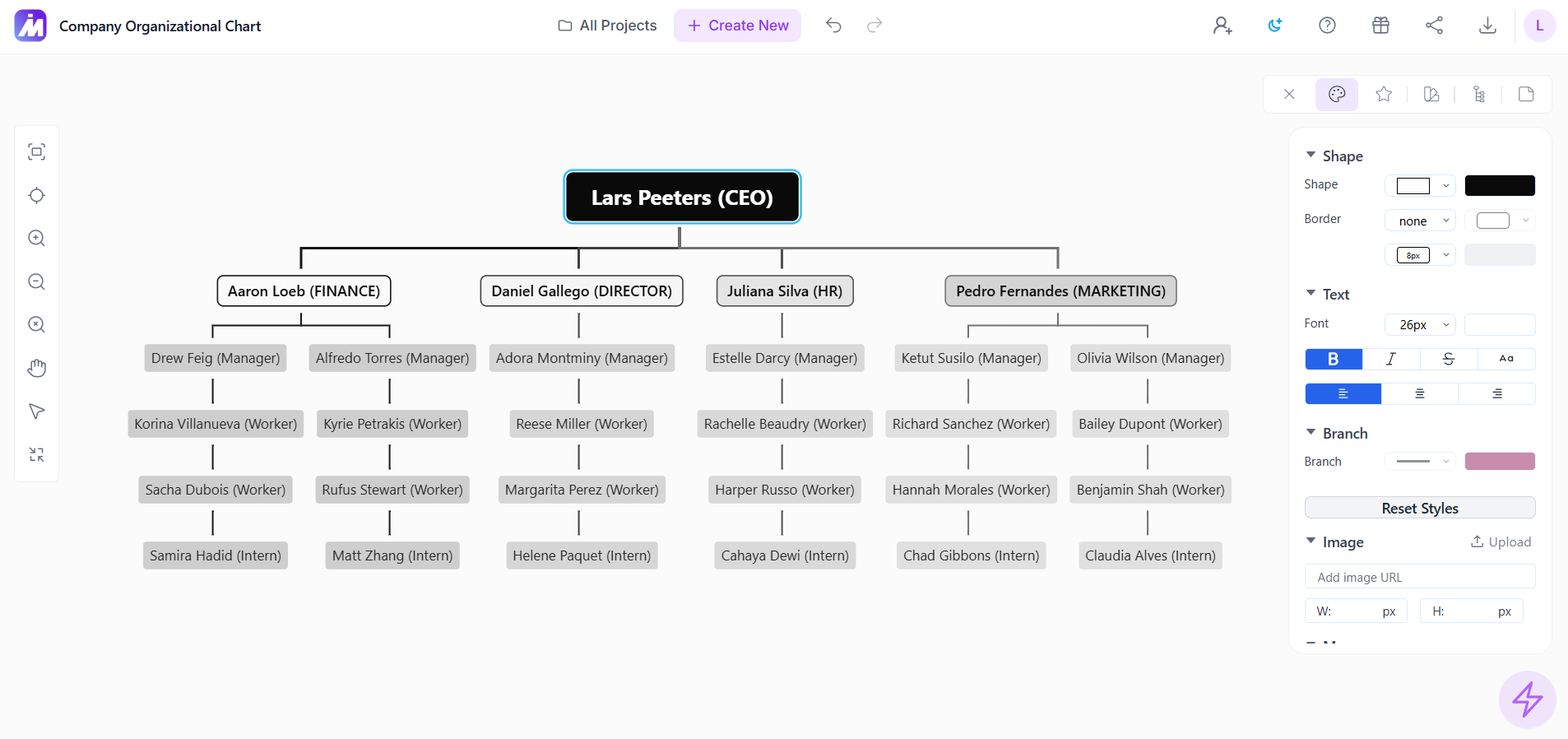
    Screenshot of MindMap AI editor in dark mode showing an AI-generated mind map with expandable branches, a formatting toolbar, color options, and node styling controls for customizing the visual layout.Screenshot of an AI-generated mind map created from source content, shown in the MindMap AI editor with connected topic branches, an embedded image, and editing tools for refining map structure and design.Screenshot of a Dark mode mind map workspace showing a central topic with multiple color-coded branches, demonstrating MindMap AI’s visual brainstorming and topic organization interface.Screenshot of MindMap AI light mode editor showing a colorful generated mind map with branch customization controls, layout tools, and manual editing options in the side panel.Screenshot of MindMap AI org chart layout showing structured information arranged in a hierarchy, with editing and styling controls available from the right-side toolbar.Screenshot of MindMap AI light mode workspace displaying a multi-branch mind map with color-coded topics, relationship lines, and sidebar controls for layout, styling, and map customization.