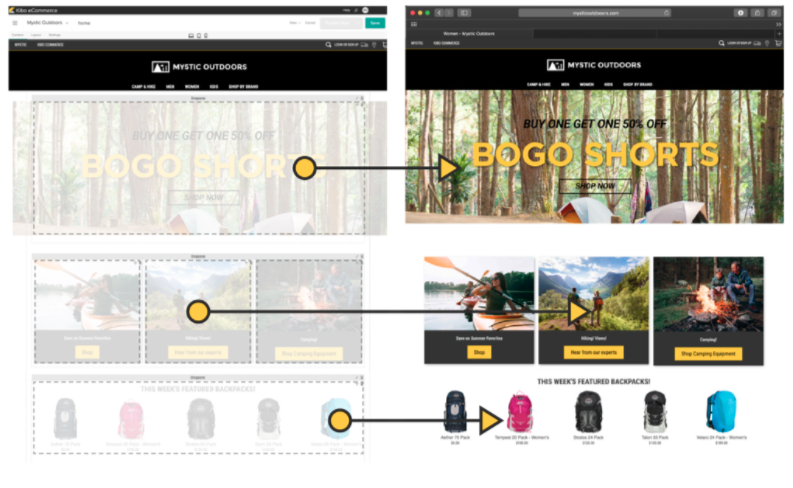
Kibo Software offers Kibo eCommerce (formerly Mozu), designed to support retailers with online offer creation and deployment, content publishing and landing pages, and many tools and widgets out of the box with a retail-oriented ecommerce solution.
Mozu was acquired by Kibo Software from Volusion in October 2016.
N/A
Optimizely Commerce Connect
Score6.6 out of 10
N/A
Optimizely Commerce Connect is a PaaS e-commerce backend solution coupled with Optimizely's PaaS CMS to help e-commerce organizations, of any type, create highly customized websites and buying experiences with a two-in-one content and commerce solution.
The platform has flexibility at its core and we have made full use of that capability. Even if Kibo [eCommerce] hasn't been ready to provide features and functions we need, we have the opportunity to build them ourselves. The platform started as Mozu and while it was relatively well-developed for DTC, it lacked a lot of basic B2B functionality. As a result, when we were ready to move into that arena, we built a lot for ourselves (including a multi-level account system and a tool to manage it). Keep in mind, too, that Kibo eCommerce is part of a larger suite of tools. The company has purchased a mobile Point-of-Sale system, Baynote, Certona, Monetate, and an OMS. If you need a full-scale solution, they can offer a lot. As I mentioned previously, their support and documentation need shoring up. They're not terrible, but they hinder (rather than help) when it comes to fulfilling the platform's promise of letting the customers be self-service in building out their capabilities.
A de minimis incentive was given to thank the reviewer for their time. The incentive was not used to bias or drive a particular response, nor was the incentive contingent on a positive endorsement. More Info
Our experience may be unique because we opted for an Optimizely team to implement our website/console set-up and connection to our PIM and ERP. The experience may have been different with a 3rd party or it may not have. That said, we have been live with our primary website for almost 2 years and I still do not consider it was ever "done". We have been going back and forth on functionality issues and bugs since launch. I have low confidence that changes made the previous day will 100% be online the next - so my team rechecks the work they did the previous day to ensure everything is online. The addition of a second channel and enhancement requests have compounded the issues. I feel this product would work fine with singular or less complex market SKU offerings.
A de minimis incentive was given to thank the reviewer for their time. The incentive was not used to bias or drive a particular response, nor was the incentive contingent on a positive endorsement. TR verified that a representative sample of customers was invited. More Info
Episerver has a robust discount engine. This engine, combined with "visitor groups" allow our marketing department to categorize customers and offer a variety of discounts to targeted customers at specific times.
Episerver has a full-featured, storefront experience that can handle everything you might want for an e-commerce website.
Episerver offers A/B testing that can be helpful for trying out new content ideas and tracking the results.
A de minimis incentive was given to thank the reviewer for their time. The incentive was not used to bias or drive a particular response, nor was the incentive contingent on a positive endorsement. More Info
Prebuilt Integration - There is not currently a large number of preexisting integrations, but custom integrations are fairly quick
Time to Deploy - Don't get me wrong, We have deployed in the timeline we expected, but if you are trying to get something off the ground fast, Kibo might not be right for you. It is a robust platform that take some time to get up and running.
Complicated Shipping - if you have a complicated shipped process, you might want to look for a tool to help, Kibo does not have very robust out of the box shipping capabilities.
Support. Episerver used to have direct support and access to the tech team to discuss and resolve issues. The new support portal is not enough for developer needs.
Quality Assurance. We find issues in the Episerver code that should have been resolved in QA before release.
Sales. Episervers sells the framework as a solution while showing Alloy. While it helps Episerver sell more, it puts the implementation partner into trouble as the client thinks they bought the solution. Episerver does not provide a solution. It provides a framework that you can build a solution on.
A de minimis incentive was given to thank the reviewer for their time. The incentive was not used to bias or drive a particular response, nor was the incentive contingent on a positive endorsement. More Info
Really want to be able to spend more time and resources on rolling out new things with Episerver but at the moment we seem to be fixing alot of issues and pain points with the way our system was setup.
A de minimis incentive was given to thank the reviewer for their time. The incentive was not used to bias or drive a particular response, nor was the incentive contingent on a positive endorsement. More Info
The administrative interface is largely intuitive and relatively easy to use. The complexity of business needs and ability to customize can affect this (i.e. you have to set up and develop with the user in mind), but the basic structure is largely solid. There are some areas of redundancy (such as Commerce Manager overlapping with other administrative areas) that can sometimes cause confusion or offer some functions in one place, whereas other related functions are managed on a completely different page.
A de minimis incentive was given to thank the reviewer for their time. The incentive was not used to bias or drive a particular response, nor was the incentive contingent on a positive endorsement. More Info
One positive note is that I have always been able to get someone on the phone in support whenever I have called, even at 1 AM. Getting someone on the phone is only half the battle though. In the first few months of using Mozu it often seemed that support didn’t know anymore about Mozu than we did. This has slowly started to change, but as a daily user you are likely to be on par with support in terms of knowing what to do when you encounter a problem. The support phone number is really most useful for having them put in a support ticket for you rather than typing it all out yourself and emailing it. It is very rare that the support reps are actually empowered to solve the problem at hand. Unless the issue you are having is user error, they will just take your information and pass it on the proper department. Your request or problem will then be ignored for months on end. Some day, it might actually get fixed but you are unlikely to be notified that this has happened. Most of these issues are assigned an internal ID that they use for tracking. Support is more than happy to pass this ID along, but it is useless. There is no way to actually see where the issue lies in the endless queue of similar issues.
We had an incredible team at Episerver Supporting us with the go live, reviewing our integration, and pushing our integration partner to deliver a quality product
A de minimis incentive was given to thank the reviewer for their time. The incentive was not used to bias or drive a particular response, nor was the incentive contingent on a positive endorsement. More Info
At the time of our implementation Mozu did not have any processes or procedures set up around going live. We basically were forced to just wing it and hope for the best
Fully understand what is OOTB feature of the platform before proceeding to develop. Then implement a customization of key features once you can prove they are working as OOTB to make them more user friendly and productive for the business. Eg pre order and e gift card
A de minimis incentive was given to thank the reviewer for their time. The incentive was not used to bias or drive a particular response, nor was the incentive contingent on a positive endorsement. More Info
We had a custom, in-house ecommerce website before moving to Kibo. It was brittle, slow, and wasn't going to scale nearly well enough or fast enough to keep up with our requirements
A de minimis incentive was given to thank the reviewer for their time. The incentive was not used to bias or drive a particular response, nor was the incentive contingent on a positive endorsement. More Info
Optimizely Commerce Connect offers a very wide range of features for admin users. There is less a need for an IT specialist or programmer to be involved when changes need to be made.
A de minimis incentive was given to thank the reviewer for their time. The incentive was not used to bias or drive a particular response, nor was the incentive contingent on a positive endorsement. TR verified that a representative sample of customers was invited. More Info
A de minimis incentive was given to thank the reviewer for their time. The incentive was not used to bias or drive a particular response, nor was the incentive contingent on a positive endorsement. TR verified that a representative sample of customers was invited. More Info