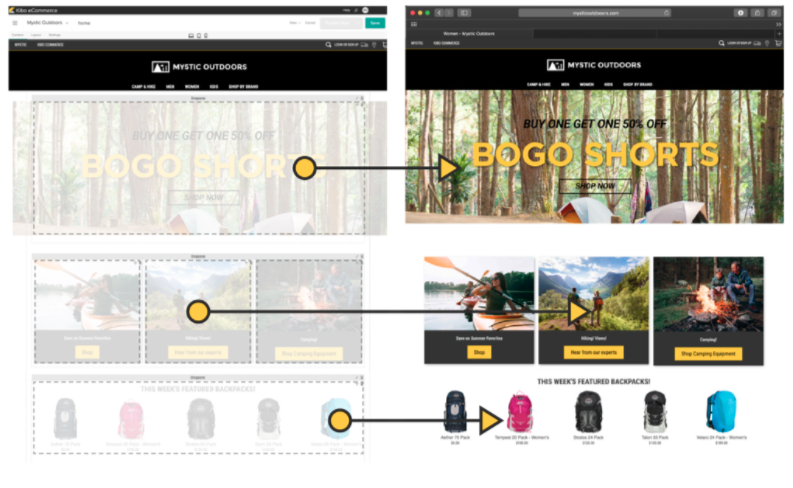
Kibo Software offers Kibo eCommerce (formerly Mozu), designed to support retailers with online offer creation and deployment, content publishing and landing pages, and many tools and widgets out of the box with a retail-oriented ecommerce solution.
Mozu was acquired by Kibo Software from Volusion in October 2016.
N/A
Square Online
Score7.7 out of 10
N/A
Square Online (formerly Weebly) is a basic content management system with blogging and eCommerce features. It can be utilized for building standard websites or specialized webpages for online stores.
$13
per month
Pricing
Kibo eCommerce
Square Online
Editions & Modules
No answers on this topic
Personal
$13
per month
Professional
$16
per month
Performance
$29
per month
Free
Free
Free
Offerings
Pricing Offerings
Kibo eCommerce
Square Online
Free Trial
No
No
Free/Freemium Version
No
Yes
Premium Consulting/Integration Services
No
No
Entry-level Setup Fee
No setup fee
No setup fee
Additional Details
—
Pricing decreases when paid annually:
Personal - $10/Month
Professional - $12/Month
Performance - $26/Month
More Pricing Information
Features
Kibo eCommerce
Square Online
Online Storefront
Comparison of Online Storefront features of Kibo eCommerce and Square Online
Feature
Kibo eCommerce
8.3
6 Ratings
6% above category average
Square Online
-
Ratings
Product catalog & listings
8.46 Ratings
00 Ratings
Product management
8.26 Ratings
00 Ratings
Bulk product upload
7.65 Ratings
00 Ratings
Branding
8.26 Ratings
00 Ratings
Mobile storefront
8.56 Ratings
00 Ratings
Product variations
8.55 Ratings
00 Ratings
Website integration
8.04 Ratings
00 Ratings
Visual customization
8.16 Ratings
00 Ratings
CMS
8.74 Ratings
00 Ratings
Online Shopping Cart
Comparison of Online Shopping Cart features of Kibo eCommerce and Square Online
Feature
Kibo eCommerce
9.0
2 Ratings
16% above category average
Square Online
-
Ratings
Checkout user experience
9.02 Ratings
00 Ratings
Online Payment System
Comparison of Online Payment System features of Kibo eCommerce and Square Online
Feature
Kibo eCommerce
8.4
6 Ratings
0% above category average
Square Online
-
Ratings
eCommerce security
8.46 Ratings
00 Ratings
eCommerce Marketing
Comparison of eCommerce Marketing features of Kibo eCommerce and Square Online
Feature
Kibo eCommerce
7.7
6 Ratings
0% above category average
Square Online
-
Ratings
Promotions & discounts
8.56 Ratings
00 Ratings
SEO
7.02 Ratings
00 Ratings
eCommerce Business Management
Comparison of eCommerce Business Management features of Kibo eCommerce and Square Online
Feature
Kibo eCommerce
7.6
6 Ratings
6% below category average
Square Online
-
Ratings
Multi-site management
8.26 Ratings
00 Ratings
Order processing
9.02 Ratings
00 Ratings
Inventory management
9.01 Ratings
00 Ratings
Shipping
9.01 Ratings
00 Ratings
Custom functionality
3.01 Ratings
00 Ratings
Security
Comparison of Security features of Kibo eCommerce and Square Online
Feature
Kibo eCommerce
-
Ratings
Square Online
7.6
31 Ratings
8% below category average
Role-based user permissions
00 Ratings
7.631 Ratings
Platform & Infrastructure
Comparison of Platform & Infrastructure features of Kibo eCommerce and Square Online
Feature
Kibo eCommerce
-
Ratings
Square Online
9.4
22 Ratings
19% above category average
API
00 Ratings
9.417 Ratings
Internationalization / multi-language
00 Ratings
9.418 Ratings
Web Content Creation
Comparison of Web Content Creation features of Kibo eCommerce and Square Online
Feature
Kibo eCommerce
-
Ratings
Square Online
6.6
43 Ratings
17% below category average
WYSIWYG editor
00 Ratings
5.636 Ratings
Code quality / cleanliness
00 Ratings
5.339 Ratings
Admin section
00 Ratings
8.739 Ratings
Page templates
00 Ratings
6.143 Ratings
Library of website themes
00 Ratings
6.243 Ratings
Mobile optimization / responsive design
00 Ratings
8.242 Ratings
Publishing workflow
00 Ratings
5.435 Ratings
Form generator
00 Ratings
7.136 Ratings
Web Content Management
Comparison of Web Content Management features of Kibo eCommerce and Square Online
The platform has flexibility at its core and we have made full use of that capability. Even if Kibo [eCommerce] hasn't been ready to provide features and functions we need, we have the opportunity to build them ourselves. The platform started as Mozu and while it was relatively well-developed for DTC, it lacked a lot of basic B2B functionality. As a result, when we were ready to move into that arena, we built a lot for ourselves (including a multi-level account system and a tool to manage it). Keep in mind, too, that Kibo eCommerce is part of a larger suite of tools. The company has purchased a mobile Point-of-Sale system, Baynote, Certona, Monetate, and an OMS. If you need a full-scale solution, they can offer a lot. As I mentioned previously, their support and documentation need shoring up. They're not terrible, but they hinder (rather than help) when it comes to fulfilling the platform's promise of letting the customers be self-service in building out their capabilities.
A de minimis incentive was given to thank the reviewer for their time. The incentive was not used to bias or drive a particular response, nor was the incentive contingent on a positive endorsement. More Info
If you are having students create websites or information pages about something they are studying in class, this is a great option. The fact that students can spend less time getting situated and learning the app and get right to work researching and creating their pages is great. For middle to high school, this is a fantastic app to use. However, if you want more nuanced analytics or want students to focus on blogging more than webpage building, this is limited.
A de minimis incentive was given to thank the reviewer for their time. The incentive was not used to bias or drive a particular response, nor was the incentive contingent on a positive endorsement. More Info
Drag and drop interface makes it very easy to add all types of content, including images, text, video (and YouTube videos), embeddable applications and more.
It's very easy to set up navigation features like cascading menus and sticky navigation (where the menu stays put - may depend on the template chosen though).
A technical backend is fairly straight-forward for setting up a fav icon, 301 redirects, SEO, Google Analytics, etc.
A de minimis incentive was given to thank the reviewer for their time. The incentive was not used to bias or drive a particular response, nor was the incentive contingent on a positive endorsement. More Info
Prebuilt Integration - There is not currently a large number of preexisting integrations, but custom integrations are fairly quick
Time to Deploy - Don't get me wrong, We have deployed in the timeline we expected, but if you are trying to get something off the ground fast, Kibo might not be right for you. It is a robust platform that take some time to get up and running.
Complicated Shipping - if you have a complicated shipped process, you might want to look for a tool to help, Kibo does not have very robust out of the box shipping capabilities.
Weebly doesn't have a lot of templates to choose from, so if you don't have any experience with CSS or HTML, it's hard to customize your site to an extent.
Weebly isn't fully SEO friendly. They don't allow you to add H1 tags to pages out of the box.
You can't create folder structures when it comes to web page URLs. You can put web pages under a main menu dropdown, but they don't allow you to put all sub-menu items in a structured folder (like site.com/folder/page-1 and site.com/folder/page-2).
A de minimis incentive was given to thank the reviewer for their time. The incentive was not used to bias or drive a particular response, nor was the incentive contingent on a positive endorsement. More Info
Weebly is consistently adding features that line up with our needs. The ease of use makes it the perfect program for us since we have users of multiple age brackets and knowledge of web design. We love that we can give users access to only the pages they are affiliated with
A de minimis incentive was given to thank the reviewer for their time. The incentive was not used to bias or drive a particular response, nor was the incentive contingent on a positive endorsement. More Info
Very easy to use and intuitive to design after all of our business needs. From the website and POS system to how we represent ourselves internally and to our customers... Square is second-to-none in helping our business and others in our same boat become the kind of businesses we want to be when it comes to our inventory and sales of these kinds of products.
A de minimis incentive was given to thank the reviewer for their time. The incentive was not used to bias or drive a particular response, nor was the incentive contingent on a positive endorsement. More Info
One positive note is that I have always been able to get someone on the phone in support whenever I have called, even at 1 AM. Getting someone on the phone is only half the battle though. In the first few months of using Mozu it often seemed that support didn’t know anymore about Mozu than we did. This has slowly started to change, but as a daily user you are likely to be on par with support in terms of knowing what to do when you encounter a problem. The support phone number is really most useful for having them put in a support ticket for you rather than typing it all out yourself and emailing it. It is very rare that the support reps are actually empowered to solve the problem at hand. Unless the issue you are having is user error, they will just take your information and pass it on the proper department. Your request or problem will then be ignored for months on end. Some day, it might actually get fixed but you are unlikely to be notified that this has happened. Most of these issues are assigned an internal ID that they use for tracking. Support is more than happy to pass this ID along, but it is useless. There is no way to actually see where the issue lies in the endless queue of similar issues.
At the time of our implementation Mozu did not have any processes or procedures set up around going live. We basically were forced to just wing it and hope for the best
We had a custom, in-house ecommerce website before moving to Kibo. It was brittle, slow, and wasn't going to scale nearly well enough or fast enough to keep up with our requirements
A de minimis incentive was given to thank the reviewer for their time. The incentive was not used to bias or drive a particular response, nor was the incentive contingent on a positive endorsement. More Info
Weebly's designs, plugins, and customization options are a little more advanced in some cases than other similar programs. WordPress requires a different level of expertise and knowledge of code, keywording, and plugins, so I wouldn't even compare them. Wix is a little more user-friendly because you can drag and drop your design, which was very convenient for customizing your site. I didn't personally select Weebly, but it is user-friendly and nearly anyone comfortable with a computer could figure it out. Weebly support is also pretty good.
A de minimis incentive was given to thank the reviewer for their time. The incentive was not used to bias or drive a particular response, nor was the incentive contingent on a positive endorsement. More Info
Weebly has allowed our business to create a connection with our customers by offering home decor, cooking and styling tips.
Weebly gives us the chance to relay information to customers regarding merchandise, current sales and promotions, store hours and locations etc. Which has helped increase business.
Weebly has given our not very tech savvy business the opportunity to have a website and stay relevant with our competitors.
A de minimis incentive was given to thank the reviewer for their time. The incentive was not used to bias or drive a particular response, nor was the incentive contingent on a positive endorsement. More Info