TrustRadius: an HG Insights company

Lightning Tools Data Viewer vs. Salesforce Agentforce Marketing

Save this comparison

Save this comparison

Add Product

Recommended Comparisons

    Overview
    ProductRatingMost Used ByProduct SummaryStarting Price

    Lightning Tools Data Viewer

    Score9.1 out of 10
    Mid-Size Companies (51-1,000 employees)
    The Data Viewer provides data visualization in the form of reports or charts that can be created and customized to suit a business's needs. Silos of data exist in most organizations and yet contain valuable insights into how well the organization is performing and where action is needed. Those silos often include Microsoft Excel workbooks, Microsoft SQL Azure databases, On-Premises data sources accessible through OData or Business Connectivity Services and even SharePoint Lists. These data…

    $2,200

    per year per installation

    Agentforce Marketing

    Score7.6 out of 10
    N/AMarketing Cloud is a cloud-based digital marketing platform, used by marketers can segment their audience, deliver personalized messages, track campaign performance, engage leads and accounts, and optimize strategies based on real-time insights.

    $1,250

    per month per installation

    Pricing
    Lightning Tools Data ViewerAgentforce Marketing
    Editions & Modules
    Data Viewer OnPrem
    $1,000
    per year Per installation, 1 x WFE
    Data Viewer Online
    $2,200
    per year per installation
    Data Viewer OnPrem Enterprise Edition
    POA
    per year Per installation, 4+ WFE
    Data Viewer Online Enterprise Edition
    POA
    per year per installation
    Account Engagement
    $1,250
    per month
    Engagement
    $1,250
    per month
    Intelligence
    $3,000
    per month
    Loyalty Management
    $20,000
    per month
    Personalization
    $100,000
    per year
    Data Cloud for Marketing
    $108,000
    per year
    Offerings
    Pricing Offerings
    Lightning Tools Data ViewerAgentforce Marketing
    Free Trial
    YesYes
    Free/Freemium Version
    NoNo
    Premium Consulting/Integration Services
    YesYes
    Entry-level Setup FeeNo setup feeNo setup fee
    Additional DetailsPrices stated are minimum per installation for "stock" products. $2.20 per user / year on top of base price. Enterprise editions can be amended to suit business needs if deemed necessary, additional costs incurred and TBD. All packages include free technical support. Free upgrades available to latest versions of tool as they are released. (online version)—
    More Pricing Information
    Community Pulse
    Lightning Tools Data ViewerAgentforce Marketing
    Considered Both Products
    Lightning Tools
    No answer on this topic
    Salesforce
    No answer on this topic
    Key User Insights
    Would buy again
    No answers on this topic
    88%
    Would buy again
    84 Answers
    Delivers good value for the price
    No answers on this topic
    89%
    Delivers good value for the price
    72 Answers
    Happy with the feature set
    No answers on this topic
    93%
    Happy with the feature set
    89 Answers
    Lived up to sales and marketing promises
    No answers on this topic
    88%
    Lived up to sales and marketing promises
    58 Answers
    Implementation went as expected
    No answers on this topic
    84%
    Implementation went as expected
    54 Answers
    Features
    Lightning Tools Data ViewerAgentforce Marketing
    BI Standard Reporting
    Comparison of BI Standard Reporting features of Lightning Tools Data Viewer and Salesforce Agentforce Marketing
    Feature
    Lightning Tools Data Viewer
    9.1
    1 Ratings
    12% above category average
    Salesforce Agentforce Marketing
    -
    Ratings
    Customizable dashboards9.11 Ratings00 Ratings
    Report Formatting Templates9.11 Ratings00 Ratings
    Ad-hoc Reporting
    Comparison of Ad-hoc Reporting features of Lightning Tools Data Viewer and Salesforce Agentforce Marketing
    Feature
    Lightning Tools Data Viewer
    8.2
    1 Ratings
    5% above category average
    Salesforce Agentforce Marketing
    -
    Ratings
    Drill-down analysis6.41 Ratings00 Ratings
    Formatting capabilities9.11 Ratings00 Ratings
    Report sharing and collaboration9.11 Ratings00 Ratings
    Data Discovery and Visualization
    Comparison of Data Discovery and Visualization features of Lightning Tools Data Viewer and Salesforce Agentforce Marketing
    Feature
    Lightning Tools Data Viewer
    3.6
    1 Ratings
    73% below category average
    Salesforce Agentforce Marketing
    -
    Ratings
    Pre-built visualization formats (heatmaps, scatter plots etc.)3.61 Ratings00 Ratings
    Email & Online Marketing
    Comparison of Email & Online Marketing features of Lightning Tools Data Viewer and Salesforce Agentforce Marketing
    Feature
    Lightning Tools Data Viewer
    -
    Ratings
    Salesforce Agentforce Marketing
    7.3
    171 Ratings
    6% below category average
    WYSIWYG email editor00 Ratings7.4122 Ratings
    Dynamic content00 Ratings8.1153 Ratings
    Ability to test dynamic content00 Ratings6.3112 Ratings
    Landing pages00 Ratings7.6121 Ratings
    A/B testing00 Ratings7.0151 Ratings
    Mobile optimization00 Ratings6.7111 Ratings
    Email deliverability reporting00 Ratings7.3132 Ratings
    List management00 Ratings8.1129 Ratings
    Triggered drip sequences00 Ratings7.295 Ratings
    Lead Management
    Comparison of Lead Management features of Lightning Tools Data Viewer and Salesforce Agentforce Marketing
    Feature
    Lightning Tools Data Viewer
    -
    Ratings
    Salesforce Agentforce Marketing
    8.1
    124 Ratings
    2% above category average
    Lead nurturing automation00 Ratings8.8109 Ratings
    Lead scoring and grading00 Ratings8.1110 Ratings
    Data quality management00 Ratings7.3116 Ratings
    Automated sales alerts and tasks00 Ratings8.2101 Ratings
    Campaign Management
    Comparison of Campaign Management features of Lightning Tools Data Viewer and Salesforce Agentforce Marketing
    Feature
    Lightning Tools Data Viewer
    -
    Ratings
    Salesforce Agentforce Marketing
    7.3
    114 Ratings
    3% below category average
    Calendaring00 Ratings7.3103 Ratings
    Event/webinar marketing00 Ratings7.497 Ratings
    Social Media Marketing
    Comparison of Social Media Marketing features of Lightning Tools Data Viewer and Salesforce Agentforce Marketing
    Feature
    Lightning Tools Data Viewer
    -
    Ratings
    Salesforce Agentforce Marketing
    7.4
    88 Ratings
    2% below category average
    Social sharing and campaigns00 Ratings7.283 Ratings
    Social profile integration00 Ratings7.539 Ratings
    Reporting & Analytics
    Comparison of Reporting & Analytics features of Lightning Tools Data Viewer and Salesforce Agentforce Marketing
    Feature
    Lightning Tools Data Viewer
    -
    Ratings
    Salesforce Agentforce Marketing
    7.6
    124 Ratings
    1% above category average
    Dashboards00 Ratings8.1118 Ratings
    Standard reports00 Ratings7.3123 Ratings
    Custom reports00 Ratings7.3100 Ratings
    Platform & Infrastructure
    Comparison of Platform & Infrastructure features of Lightning Tools Data Viewer and Salesforce Agentforce Marketing
    Feature
    Lightning Tools Data Viewer
    -
    Ratings
    Salesforce Agentforce Marketing
    7.5
    124 Ratings
    2% below category average
    API00 Ratings6.790 Ratings
    Role-based workflow & approvals00 Ratings6.689 Ratings
    Customizability00 Ratings6.9111 Ratings
    Integration with Salesforce.com00 Ratings7.6113 Ratings
    Integration with Microsoft Dynamics CRM00 Ratings8.914 Ratings
    Integration with SugarCRM00 Ratings8.611 Ratings
    Third-party software integrations00 Ratings7.524 Ratings
    Best Alternatives
    Lightning Tools Data ViewerAgentforce Marketing
    Small Businesses
    Chartio (discontinued)
    Score7.5 out of 10
    Vbout
    Score9.9 out of 10
    Medium-sized Companies
    Jet Reports
    Score9.5 out of 10
    Bloomreach
    Score9.2 out of 10
    Enterprises
    Kibana
    Score8.4 out of 10
    Iterable
    Score8.2 out of 10
    All AlternativesView all alternativesView all alternatives
    User Ratings
    Lightning Tools Data ViewerAgentforce Marketing
    Likelihood to Recommend
    9.1
    (1 ratings)
    8.2
    (329 ratings)
    Likelihood to Renew
    -
    (0 ratings)
    8.1
    (114 ratings)
    Usability
    -
    (0 ratings)
    8.5
    (37 ratings)
    Availability
    -
    (0 ratings)
    10.0
    (11 ratings)
    Performance
    -
    (0 ratings)
    9.6
    (9 ratings)
    Support Rating
    -
    (0 ratings)
    7.0
    (36 ratings)
    In-Person Training
    -
    (0 ratings)
    5.0
    (4 ratings)
    Online Training
    -
    (0 ratings)
    8.1
    (7 ratings)
    Implementation Rating
    -
    (0 ratings)
    3.0
    (17 ratings)
    Contract Terms and Pricing Model
    -
    (0 ratings)
    5.0
    (1 ratings)
    Ease of integration
    -
    (0 ratings)
    7.0
    (2 ratings)
    Product Scalability
    -
    (0 ratings)
    7.5
    (40 ratings)
    Vendor post-sale
    -
    (0 ratings)
    8.0
    (3 ratings)
    Vendor pre-sale
    -
    (0 ratings)
    7.0
    (3 ratings)
    User Testimonials
    Lightning Tools Data ViewerAgentforce Marketing
    Likelihood to Recommend
    Lightning Tools
    Lightning Tools Data Viewer is well suited for re-surfacing data and customizing its look and feel.
    Read full review
    Salesforce
    I think the product, by definition, is meant for marketing — and we use it exactly for that, for running campaigns. That’s the best-suited use case for the product. I don’t think it’s really meant to be used for anything else — that’s just not how it’s designed.
    Incentivized
    Read full review
    Pros
    Lightning Tools
    • Shows Lists created on different sites to be seen and controlled on another site in a Tenant
    • Allows selection of layouts and coloring way beyond what other programs do.
    • Easy to learn and very functional.
    Read full review
    Salesforce
    • Filter relevant content so you can priorize those that are more relevant and resolve it first
    • Measure the traffic in the different social networks, as well as the response rate, average response time and other relevant metrics
    • Configure automation rules to order the work of those who must interact with the customer
    Incentivized
    Read full review
    Cons
    Lightning Tools
    • Data Viewer has a graph feature that is old school flat design. We loved the In House real 3D graph Lightning Tools program.
    Read full review
    Salesforce
    • The email builder does not offer any way to catch/check bugs across different email service providers
    • Creating SQL is not as easy as drag-and-drop; a lot of technical knowledge is required
    • Salesforce Marketing Cloud is sold as a marketing tool, but to be honest, you need a LOT of technical IT support to run the tool
    • Einstein metrics are across the board; if you have multiple audiences in one instance of Salesforce Marketing Cloud you can't segment the data.
    Incentivized
    Read full review
    Likelihood to Renew
    Lightning Tools
    No answers on this topic
    Salesforce
    As of right now we have not seen any other program that integrates as seamlessly into our Salesforce platform. We have barely scratched the surface of all the features and use cases. It would be irresponsible to make a move to another platform in the near future. We have not come up against any limitations that would prompt a need to switch
    Read full review
    Usability
    Lightning Tools
    No answers on this topic
    Salesforce
    You won't find another solution that has as many features as Salesforce Marketing Cloud Interaction Studio. We all know Salesforce, we all know how big they are and it's not for nothing... Their tools do most of the things you want, need and even imagine. Using it is complicated, but the usability is infinite.
    Incentivized
    Read full review
    Reliability and Availability
    Lightning Tools
    No answers on this topic
    Salesforce
    Upgrades and timing of the upgrades were communicated well and planned during off hours for our work. If we did have a campaign scheduled during that time, it would kick-off after the system was back active. There were a few unplanned system down times, but it was a rare occurrence and those times were also short in duration.
    Read full review
    Performance
    Lightning Tools
    No answers on this topic
    Salesforce
    Though the make up of MA apps is not built this way today, it would be nice to see them become more real-time. The integration between Salesforce and Pardot is not a true real-time integration. If I modify something in Salesforce, those changes are not automatically reflected in Pardot immediately. There is a delay of about 15 minutes before the systems sync. This delay, although not long, is less than ideal We would love the systems to be integrated real time such that changes are propagated from one system to the other immediately.
    Read full review
    Support Rating
    Lightning Tools
    No answers on this topic
    Salesforce
    They are really responsive and more than not solve the problem or give you insight to how you can manage the solution yourself. I do find however sometimes a long delay on the more complex issues when they need to loop in other departments. but overall a good experience with support
    Incentivized
    Read full review
    In-Person Training
    Lightning Tools
    No answers on this topic
    Salesforce
    The trainers at the Pardot user conference (Elevate and Connections) were very knowledgeable and presented the material well. Again, the content was targeted to more of a new user audience, and was not really relevant for folks who had been using the product for 2+ years.
    Read full review
    Online Training
    Lightning Tools
    No answers on this topic
    Salesforce
    Pardot's online training touches on all topics briefly and vaguely without much indepth exploration into how a final outcome could look, such as Nurturing Campaigns, Email templates, landing page templates, etc... The only true way to uncover Pardot's full capabilities is to have Front End design and coding experience. Without this key skill set, I would not recommend Pardot to another business.
    Read full review
    Implementation Rating
    Lightning Tools
    No answers on this topic
    Salesforce
    From an IT perspective, once you set up the Javascript beacon and start collecting data there is a waiting game. During this time you can start labeling your site actions which can be labor intensive for a single person, but you don't really have the final end-users on the platform yet. We did a lot of training so users were experienced, but it wasn't until they had their first tasks to accomplish that they started using the system and had questions. I'd recommend setting up some immediate goals for an end-user to start segmenting for the purpose of displaying message campaigns so you can jump start end-user action.
    Read full review
    Alternatives Considered
    Lightning Tools
    Lightning Tools Data Viewer is much easier and more powerful than Infowise similar viewer in their lineup. In this case, we use Data Viewer over the one offered by Infowise.
    Read full review
    Salesforce
    We use Salesforce Marketing Cloud for lead management, generating reports, tracking customer and dealer information, inputting orders, and more. I prefer HubSpot for email marketing and automation because it is easier to use and the emails are designed much better. We currently use Salesforce and HubSpot, and we are very happy to have both, as they have different pros/cons.
    Incentivized
    Read full review
    Contract Terms and Pricing Model
    Lightning Tools
    No answers on this topic
    Salesforce
    was not involved with this part but i have not heard about clompaints
    Incentivized
    Read full review
    Scalability
    Lightning Tools
    No answers on this topic
    Salesforce
    Prior to this, we had no solution and literally were doing things on paper in a world where technology is outpacing paper. Having this process optimized has made it easier for the sales and marketing people to change information. From the training perspective, it has allowed us to see holes in where we could create additional support training, so the ROI here has been a lot more than just the optimization of a process.
    Incentivized
    Read full review
    Return on Investment
    Lightning Tools
    • It allows us to do things that would take a great deal more time to duplicate in SharePoint
    • It cuts down on ugly looking built in SP list layouts
    • Users find it easy to access, thus this product is more productive
    Read full review
    Salesforce
    • Salesforce Marketing Cloud allows us to more efficiently reach out to a higher number of prospects.
    • Salesforce Marketing Cloud allows us to nimbly communicate important messages in a timely fashion to facilitate conversion.
    • Salesforce Marketing Cloud allows us to track who is opening our messages so that we can stop sending to those not interested and focus on the most engaged audiences.
    Incentivized
    Read full review
    ScreenShots

    Lightning Tools Data Viewer Screenshots
    Screenshot of DISPLAYING EXTERNAL DATA WITHIN SHAREPOINT OR MICROSOFT TEAMS
The Data Viewer Client Side Web Part can be configured by Business Users within a few minutes to display Line of Business Data from Data Sources such as Excel,  SQL Azure, Business Connectivity Services, OData and SharePoint Lists.  Connections to an organizations data such as Customer Relationship Management Systems, Accounting Systems, or Custom Databases can be connected, giving business users a live up-to-date view of business information within the context of their SharePoint Team Sites or Microsoft Teams Tabs.Screenshot of HIGHLIGHTING KEY BUSINESS DATA (NO CODE)
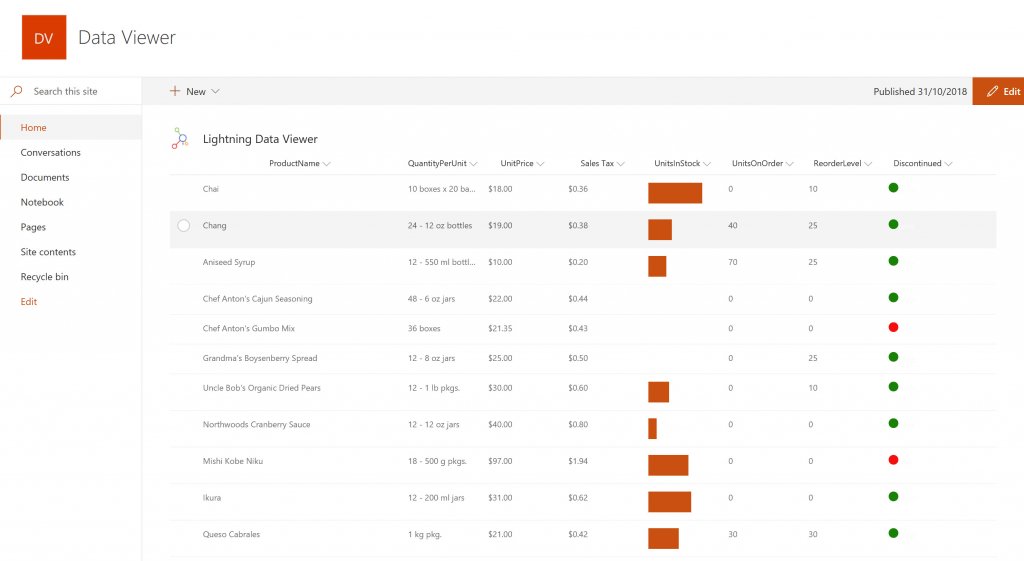
Conditional formatting can be used to highlight key business data. Overdue Tasks, Low Stock, Currency Exchange Rates, Sales Revenue are examples of data to highlight visually allowing for a quick reaction time. Key Financial Indicators and Key Performance Indicators can be configured with a simple dialog and no need to write any code. Choose colours, icons or data bars to highlight key data.Screenshot of SELECTING AND STYLING ICONS
Icons can be chosen as part of the conditional formatting to make data stand out. The Office 365 Fabric icons can be selected and styled and applied to cell values. Pepper pots, Smileys, Envelopes and more icons are available. There are hundreds of options to choose from to highlight data that needs to be acted upon.Screenshot of DATA VIEWER CAN BE A GRID OF DATA OR A CHART IN SHAREPOINT OR MICROSOFT TEAMS
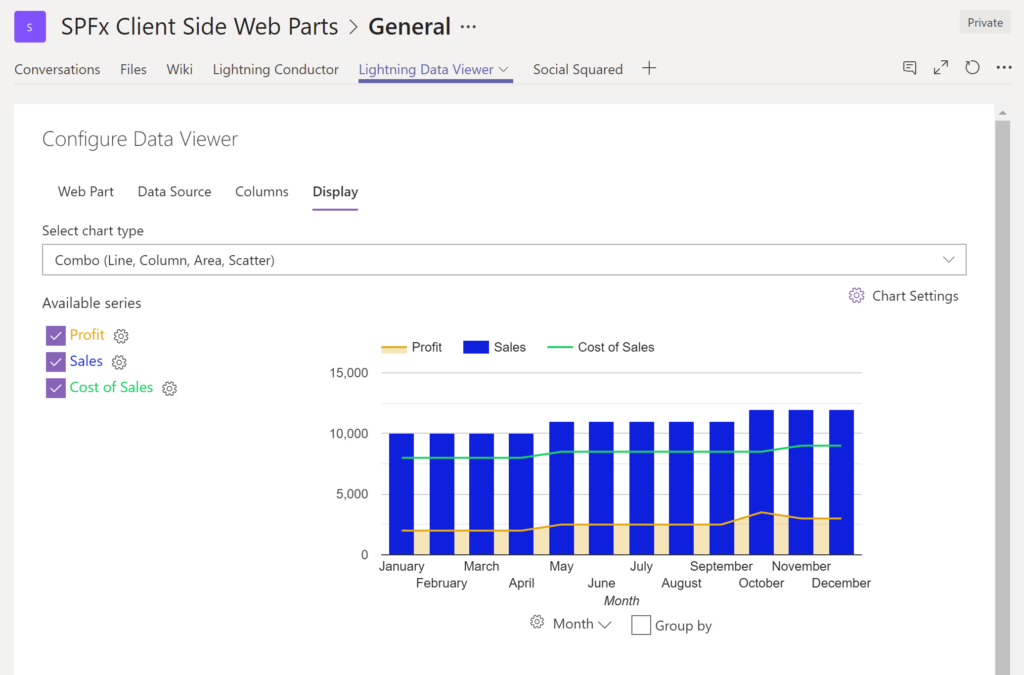
The Data Viewer can be used within Microsoft SharePoint Modern Sites or Microsoft Teams Tabs as a Grid of Data with styling or as a Chart which can be configured. The Charting Feature allows for Pie, Donut, Column, Line, Area, and Scatter Charts which can all be configured and displayed in 2D or 3D.Screenshot of TREEMAPS
summary information can be displayed within a TreeMap next to the detail. Users will be able to see trends, and how the business is performing  using the TreeMap view of data.Screenshot of CHARTS AND GAUGES
The Data Viewer is used to represent data in multiple ways using Gauges, TreeMaps, Multiple Series Charts, and Pie Charts.

    Agentforce Marketing Screenshots

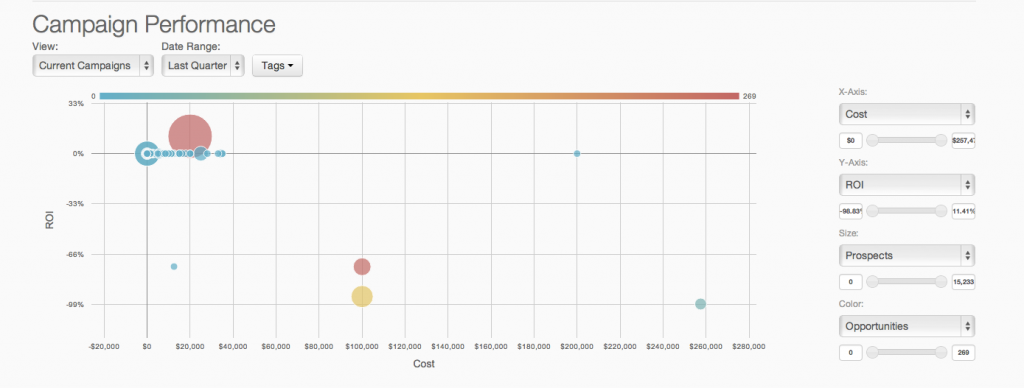
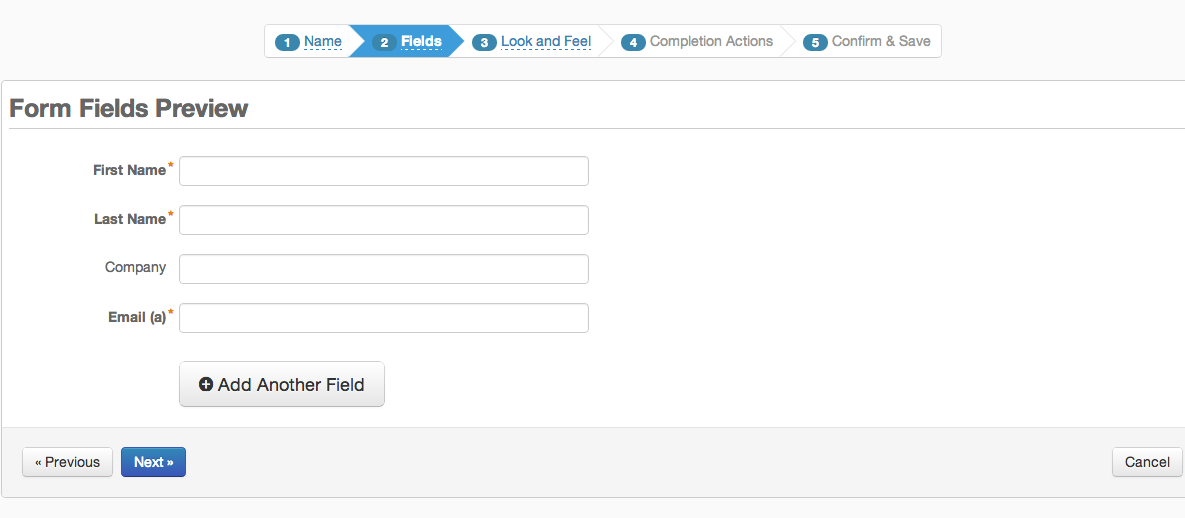
    Screenshot of Pardot Analytics - Pardot's reporting and analytics can be used to perform true revenue impact analysis and closed-loop reporting.Screenshot of Pardot Email Analytics - The reach and impact of  email marketing efforts are displayed in real-time with advanced reporting and analytics by device, and email client.Screenshot of Pardot Forms and Landing Pages - Pardot's form and landing page builders are used to turn online traffic to leads with targeted offers and content marketing.Screenshot of Pardot Email Marketing - Lead nurturing flows are defined via an interface that enables definition of the simplest or most complex segmented and targeted campaigns.