Lightning Tools DeliverPoint vs. Rippling

Overview
ProductRatingMost Used ByProduct SummaryStarting Price
Lightning Tools DeliverPoint
Score 8.2 out of 10
Enterprise companies (1,001+ employees)
DeliverPoint supports reporting and managing SharePoint permissions. Site Owners, Site Collection Administrators, and SharePoint Administrators can run permission reports that reflect the permissions of every user. Site collections, Teams Channels, Hub Sites, SharePoint Sites, OneDrive, Lists, Folders and Items can all be reported on individually or in bulk. Permissions can be modified, transferred, copied or deleted between accounts as staff changes occur.
$2,500
per year per installation
Rippling
Score 8.9 out of 10
N/A
Rippling’s platform for HR, IT, payroll, and spend management automates the entire employee lifecycle, ensures compliance, supports device management, and provides real-time financial visibility from a central dashboard.
$8
per month per user
Pricing
Lightning Tools DeliverPointRippling
Editions & Modules
DeliverPoint OnPrem
From $1950
per year per installation
DeliverPoint OnPrem Enterprise Edition
POA
per year per installation
DeliverPoint Online
From $2500
per year per installation
DeliverPoint Online Enterprise Edition (>10,000 users)
POA
per year per installation
Recommended
$8.00
starting price per user, per month
Offerings
Pricing Offerings
Lightning Tools DeliverPointRippling
Free Trial
YesNo
Free/Freemium Version
NoNo
Premium Consulting/Integration Services
YesYes
Entry-level Setup FeeNo setup feeNo setup fee
Additional DetailsPrices listed are starting prices for "stock" product. $2.50 per user/year on top of base price Enterprise product is designed for 10,000+ users, and can be customised if required to meet business needs. Prices are based on 12 month contract from 1st purchase month. Installation included in price. Full technical support available. Online versions will have access to free product updates during contract period.For additional pricing details visit the Rippling pricing page.
More Pricing Information
Community Pulse
Lightning Tools DeliverPointRippling
Features
Lightning Tools DeliverPointRippling
Identity Management
Comparison of Identity Management features of Product A and Product B
Lightning Tools DeliverPoint
7.7
1 Ratings
7% below category average
Rippling
-
Ratings
ID-Management Access Control7.31 Ratings00 Ratings
Account Provisioning and De-provisioning8.21 Ratings00 Ratings
Human Resource Management
Comparison of Human Resource Management features of Product A and Product B
Lightning Tools DeliverPoint
-
Ratings
Rippling
9.1
1093 Ratings
12% above category average
Employee demographic data00 Ratings8.9776 Ratings
Employment history00 Ratings8.9801 Ratings
Job profiles and administration00 Ratings9.1913 Ratings
Workflow for transfers, promotions, pay raises, etc.00 Ratings9.2811 Ratings
Organizational charting00 Ratings9.2946 Ratings
Organization and location management00 Ratings9.2841 Ratings
Compliance data (COBRA, OSHA, etc.)00 Ratings9.0648 Ratings
Payroll Management
Comparison of Payroll Management features of Product A and Product B
Lightning Tools DeliverPoint
-
Ratings
Rippling
9.3
1141 Ratings
13% above category average
Pay calculation00 Ratings9.31027 Ratings
Off-cycle/On-Demand payment00 Ratings9.0717 Ratings
Benefit plan administration00 Ratings9.0998 Ratings
Direct deposit files00 Ratings9.51001 Ratings
Salary revision and increment management00 Ratings9.4769 Ratings
Reimbursement management00 Ratings9.3674 Ratings
Leave and Attendance Management
Comparison of Leave and Attendance Management features of Product A and Product B
Lightning Tools DeliverPoint
-
Ratings
Rippling
9.3
1023 Ratings
13% above category average
Approval workflow00 Ratings9.4987 Ratings
Balance details00 Ratings9.3940 Ratings
Annual carry-forward and encashment00 Ratings9.3696 Ratings
Employee Self Service
Comparison of Employee Self Service features of Product A and Product B
Lightning Tools DeliverPoint
-
Ratings
Rippling
9.2
1188 Ratings
12% above category average
View and generate pay and benefit information00 Ratings9.41125 Ratings
Update personal information00 Ratings9.51174 Ratings
View company policy documentation00 Ratings9.4975 Ratings
Employee recognition00 Ratings8.6652 Ratings
View job history00 Ratings9.0841 Ratings
Asset Management
Comparison of Asset Management features of Product A and Product B
Lightning Tools DeliverPoint
-
Ratings
Rippling
8.9
507 Ratings
10% above category average
Tracking of all physical assets00 Ratings8.9507 Ratings
HR Reporting
Comparison of HR Reporting features of Product A and Product B
Lightning Tools DeliverPoint
-
Ratings
Rippling
9.0
617 Ratings
18% above category average
Report builder00 Ratings8.8597 Ratings
Pre-built reports00 Ratings9.1564 Ratings
Ability to combine HR data with external data00 Ratings9.2511 Ratings
Onboarding
Comparison of Onboarding features of Product A and Product B
Lightning Tools DeliverPoint
-
Ratings
Rippling
9.4
846 Ratings
16% above category average
New hire portal00 Ratings9.5823 Ratings
Manager tracking tools00 Ratings9.3642 Ratings
Performance and Goals
Comparison of Performance and Goals features of Product A and Product B
Lightning Tools DeliverPoint
-
Ratings
Rippling
9.0
498 Ratings
11% above category average
Corporate goal setting00 Ratings9.2428 Ratings
Individual goal setting00 Ratings9.0458 Ratings
Line-of sight-visibility00 Ratings9.1424 Ratings
Performance tracking00 Ratings8.9453 Ratings
Performance Management
Comparison of Performance Management features of Product A and Product B
Lightning Tools DeliverPoint
-
Ratings
Rippling
9.3
572 Ratings
17% above category average
Performance plans00 Ratings9.2504 Ratings
Performance improvement plans00 Ratings9.2478 Ratings
Review status tracking00 Ratings9.2509 Ratings
Review reminders00 Ratings9.4537 Ratings
Multiple review frequency00 Ratings9.3467 Ratings
Succession Planning
Comparison of Succession Planning features of Product A and Product B
Lightning Tools DeliverPoint
-
Ratings
Rippling
9.1
423 Ratings
15% above category average
Create succession plans/pools00 Ratings9.1350 Ratings
Candidate ranking00 Ratings9.2361 Ratings
Candidate search00 Ratings9.2378 Ratings
Candidate development00 Ratings9.0360 Ratings
Recruiting / ATS
Comparison of Recruiting / ATS features of Product A and Product B
Lightning Tools DeliverPoint
-
Ratings
Rippling
9.0
483 Ratings
15% above category average
Job Requisition Management00 Ratings9.0384 Ratings
Company Website Posting00 Ratings9.0369 Ratings
Publish to Social Media00 Ratings9.2326 Ratings
Job Search Site Posting00 Ratings8.9337 Ratings
Duplicate Candidate Prevention00 Ratings9.1337 Ratings
Applicant Tracking00 Ratings8.9370 Ratings
Notifications and Alerts00 Ratings9.1453 Ratings
Best Alternatives
Lightning Tools DeliverPointRippling
Small Businesses
WatchGuard AuthPoint
Score 9.1 out of 10
Dayforce Powerpay
Dayforce Powerpay
Score 9.3 out of 10
Medium-sized Companies
OneLogin by One Identity
Score 9.7 out of 10
Paypro Workforce Management
Score 9.1 out of 10
Enterprises
OneLogin by One Identity
Score 9.7 out of 10
PeopleStrong
PeopleStrong
Score 10.0 out of 10
All AlternativesView all alternativesView all alternatives
User Ratings
Lightning Tools DeliverPointRippling
Likelihood to Recommend
8.2
(1 ratings)
9.2
(1162 ratings)
Likelihood to Renew
-
(0 ratings)
8.9
(20 ratings)
Usability
-
(0 ratings)
9.4
(1161 ratings)
Availability
-
(0 ratings)
9.1
(4 ratings)
Performance
-
(0 ratings)
8.7
(4 ratings)
Support Rating
-
(0 ratings)
9.2
(877 ratings)
In-Person Training
-
(0 ratings)
8.6
(2 ratings)
Implementation Rating
-
(0 ratings)
7.8
(9 ratings)
Configurability
-
(0 ratings)
6.8
(3 ratings)
Ease of integration
-
(0 ratings)
9.1
(2 ratings)
Product Scalability
-
(0 ratings)
9.1
(3 ratings)
Vendor post-sale
-
(0 ratings)
9.1
(2 ratings)
Vendor pre-sale
-
(0 ratings)
8.6
(2 ratings)
User Testimonials
Lightning Tools DeliverPointRippling
Likelihood to Recommend
Lightning Tools
Copy user permissions through the whole sites of SharePoint farm
Read full review
Rippling
Rippling is extremely user friendly an allows our employees to help themselves in a lot of areas that previously required HR team assistance. Three areas I feel are not well suited for our organization is the inability to reset passwords manually, allocation of hours, and the software's inability to spot a rehire with a new application. We have several associates who moonlight/pick up shifts at other locations. This is infrequent so it woudn't make sense to allocate a percentage of their time to the properties where they're moonlighting. When we manually allocate those hours to the receiving property, the allocations do not take effect on the back end for our accounting department. It's creating a lot of journal entries and back-end corrections in our Accounting software. When it comes to applications, we have a new Director of Talent Acquisition who is not familiar with every previously-hired associate. This has caused duplication of profiles when we rehire an associate. If the DoTA isn't familiar with the associate and hires them in the "talent" portion of the website, it creates a new profile for them rather than recognizing their duplicated information (such as SSN or passport number). This has caused us to end up with dupliate profiles for several rehires. The system is very tech-y it should allow us to either merge the profiles or cause a notification/error to alert the hiring person that this associate/new hire is a rehire. Our previous software (UKG) was able to do this.
Read full review
Pros
Lightning Tools
  • Discover Site Permisions
  • Sheduled reports of required lists, libraries, sites...
  • Compact set of commands which works with user permissions
Read full review
Rippling
  • Keeping track of and entering time off and watching time of approvals
  • Providing fast links to access accounts for health/retirement benefits
  • Extremely convenient access to see how much money is left in my flexible savings account and reordering a new card if I need one
Read full review
Cons
Lightning Tools
  • Linking basic information to the object selected in the left panel (site structure view)
Read full review
Rippling
  • The overall look and feel of Rippling is dated; it looks like it's straight out of the 00's.
  • The could be more functionality in the LMS, expanded features, more options, it works, and it's basic, but it could be really great with a few added features.
  • The shift from using people's personal email to log in to their work email, not everyone wants to use their personal information to log into a work system.
Read full review
Likelihood to Renew
Lightning Tools
No answers on this topic
Rippling
The AI assistant has always been able to direct me to the correct solution to any question i have about Rippling. Payroll is so easy, it takes about 10 minutes to go through the process.
Read full review
Usability
Lightning Tools
No answers on this topic
Rippling
Very intuitive, user-friendly, and modern interface that doesn't make you cringe when you have to access it for anything. The admin navigation is easier compared to our previous system, and doesn't feel like a maze of complicated jargon. On the user side, the benefits enrollment process was a breeze, and felt so much more informative and efficient. Accessing the benefits post-enrollment is also very straightforward.
Read full review
Reliability and Availability
Lightning Tools
No answers on this topic
Rippling
I like that the availability in using Rippling at any given time is useful to me. Getting on the site freely when I need gives me security of knowing that I can be in control of viewing health insurance and hours information. I have yet to get any errors in using the Rippling app.
Read full review
Performance
Lightning Tools
No answers on this topic
Rippling
Rippling's performance has been great, no errors or glitches yet so far. I am confident that Going from one page to the next and all its complexity usage does not lag or times out, it works effectively and efficiently. While using Rippling and other apps it does not tend to slow it down, works great. No complaints.
Read full review
Support Rating
Lightning Tools
No answers on this topic
Rippling
The highlight of my customer support experience was my first interaction with them: I had a small issue with my birthdate, and it was fixed very quickly—on the same day. It's pretty incredible to have things like that sorted out in the same day, which is a rare thing to see lately.
Read full review
In-Person Training
Lightning Tools
No answers on this topic
Rippling
The trainer went slow and and answered our questions.
Read full review
Implementation Rating
Lightning Tools
No answers on this topic
Rippling
It's really easy to implement in comparison to other tools or applications. Different key points are easily configured and implemented as per need, having different configurations in systems. Implementation is something which binds the different parameters of an organization in a single row. Implementation of rippling is much easier, quicker, and error free than any other software. I recommend it strongly!
Read full review
Alternatives Considered
Lightning Tools
No answers on this topic
Rippling
We chose Rippling primarily based on cost and feature set available. As a small organization, budget is a high priority. Rippling gave us enterprise-level features at an affordable cost for an early stage start up. We appreciate that we have the opportunity to expand our feature set within Rippling as our business and workforce grow.
Read full review
Scalability
Lightning Tools
No answers on this topic
Rippling
I can go on here and see all my hours and pto plus health benefits. I like to have the work handbook handy to refer to legal things. How to work my role within it's limits. Being able to put in my hours and view when they are approved is a huge benefit for me.
Read full review
Return on Investment
Lightning Tools
  • Speeds up the management of user permissions
  • Provides a comprehensive overview of permissions and settings of individual security levels across areas of company informations
Read full review
Rippling
  • Our HR team used to spend almost three days doing payroll calculations before Rippling. This platform has cut that time down by 75%! Now they can devote the time they would've spent on payroll to other important tasks.
  • Rippling saves employees time by making time-tracking less of a headache.
  • Rippling has so many so many services that it's essentially a one-stop-shop for centralized HR solutions!
Read full review
ScreenShots

Lightning Tools DeliverPoint Screenshots
Screenshot of CONTEXTUAL SHAREPOINT PERMISSION REPORTING
SharePoint Permissions are not just the responsibility of IT. Business Users (Content Owners) can create sites, lists, libraries and of course list and library content. The business user is capable of sharing the content with internal users, but perhaps also external users. Sharing such content can result in users gaining permissions to sites or content not intended to be shared. For example, if a site is shared, the user who the site is shared with becomes a member of the members group by default. That members group may have Edit permissions to other sites or content elsewhere within the site collection. DeliverPoint gives visibility of such permissions to support better SharePoint permission decisions from within the Site, List or Library itself.Screenshot of GRANULAR SHAREPOINT CONTENT PERMISSION REPORTS
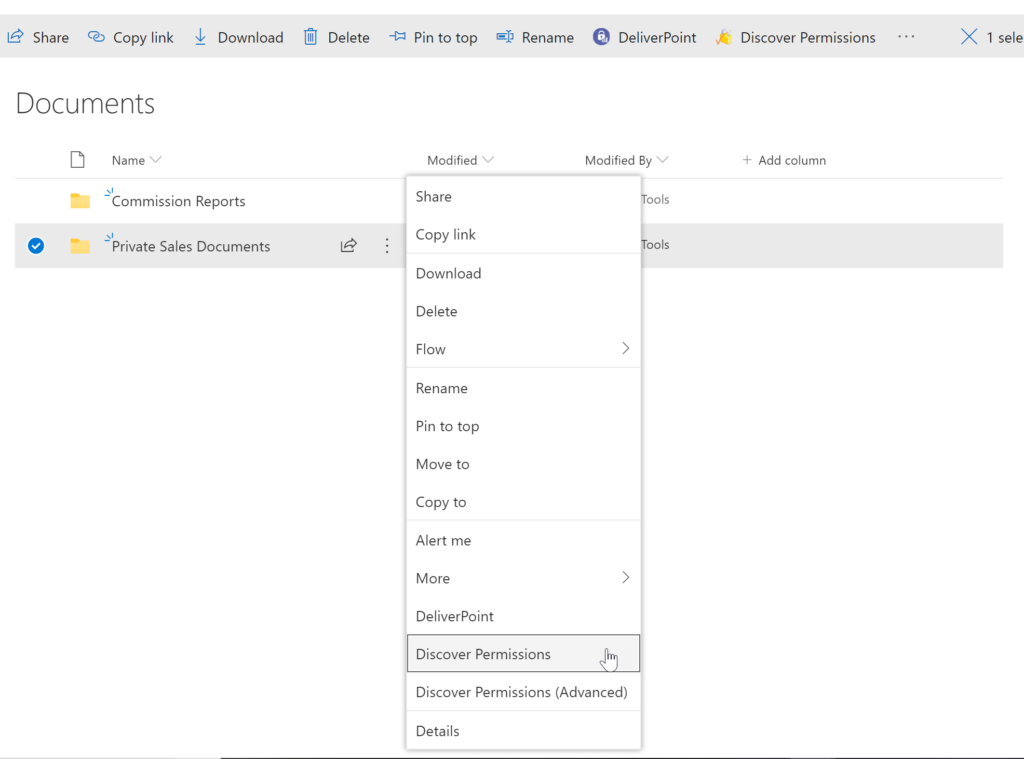
The DeliverPoint Discover Permissions report displays a full transparent report of all users that have permissions to the site, list/library or item. This displays what permissions each account has to the selected object, as well as how the permissions were assigned. Filter can be used for each user to check for duplicate permissions, filter by Permission Level to see which users are granted each permission level, and also filter by the ‘Permissioned Via’ column to see who has received permissions via a particular SharePoint, Microsoft 365 Group, or Azure AD Security group. The Discover Permissions report can be executed against multiple documents or items, lists and within the site or subsites.Screenshot of EXTERNAL SHARING LINKS REPORTING AND MANAGEMENT
Within SharePoint, users can share links with anyone, internal users and external users. DeliverPoint provides an External Sharing Links report that can be used within a site or across sites. The user can see who shared the link, when they shared the link, and optionally remove the link if it’s required.Screenshot of REPORT AND MANAGE PERMISSIONS FROM WITHIN MICROSOFT TEAMS
DeliverPoint is also available within Microsoft Teams. Team Owners can produce Microsoft Teams Permission reports within their Teams Channels and across Private Channels. The reports provide confidence and assurance that permissions are set correctly and that sharing isn’t out of control. Changes to permissions can be made contextually within a Team or centrally across multiple Teams should permissions need to be removed or managed.Screenshot of MANAGE SHAREPOINT PERMISSIONS
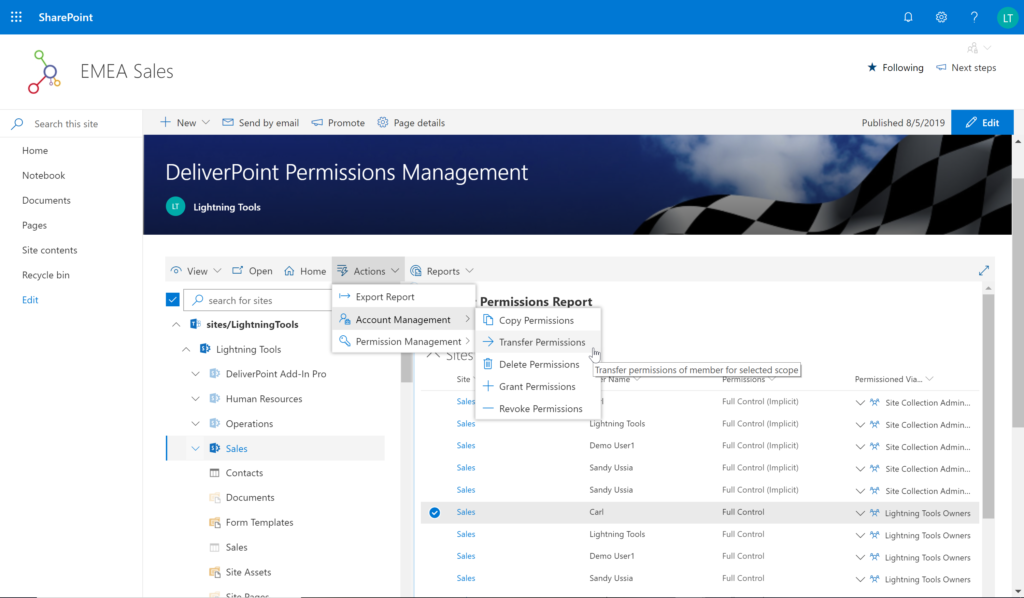
Using DeliverPoint, Site Owners, Site Collection Administrators and Tenant Administrators can manage permissions across the objects that they have Full Control to. Within organizations, users change roles, leave organizations, or join organizations. Making permission changes to accounts to reflect these changes is time consuming. DeliverPoint can be used to simply select the scope to change, and perform the change as one operation. The operations include Transfer, Delete, Copy or Revoke Permissions.Screenshot of UNIQUE PERMISSION REPORTING
The DeliverPoint Unique Permissions Report enables Site Collection Administrators or SharePoint Administrators to view the permissions assigned to a specific user account or group throughout site collections. The report includes all Microsoft 365 Groups, SharePoint Groups and Active Directory Security Groups that the user is a member of. A list of Site Permissions, List Permissions and Item Permissions that the user has been assigned permissions to are listed, allowing  the permissions to be removed or transferred if they are incorrect.

Rippling Screenshots

Screenshot of the Rippling Dashboard: Employees' home for their payroll, benefits, documents, devices, expenses, and apps.Screenshot of Rippling Payroll: Runs payroll in 90 seconds. Pays employees and contractors around the world. Automatic tax filing.Screenshot of Rippling Benefits Administration: For the management of employees' Medical, Dental, Vision, 401K, FSA, HSA, and commuter benefits.Screenshot of Rippling Single Sign-On: Employees can access all of their SaaS apps in one click from their Rippling dashboard.Screenshot of Rippling’s Time & Attendance platform. This integrates with the rest of the product suite so that when employees clock in, their approved hours automatically synced with payroll and accounting systems.Screenshot of Rippling Mobile Device Management: To manage employees' computers and devices 100% remotely.