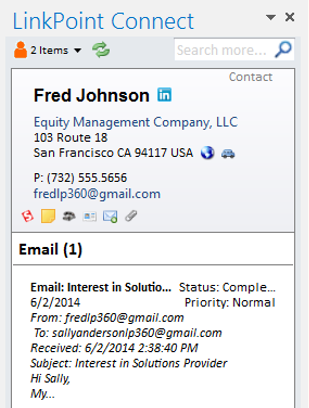
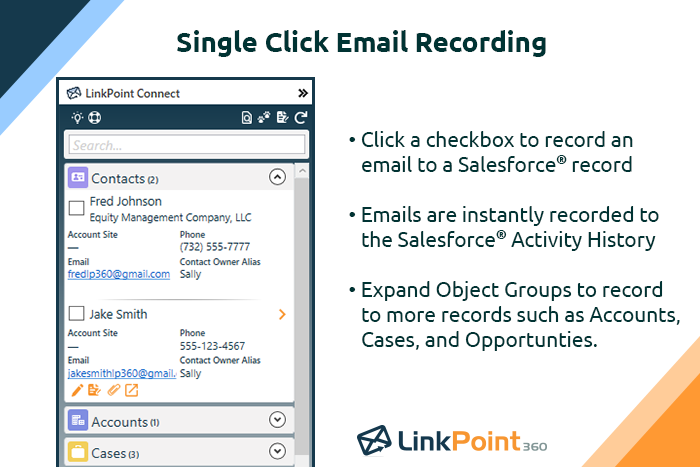
LinkPoint Connect promises to streamline data entry and access by enabling users to instantly view CRM data within their email client. This sales intelligence solution integrates Salesforce and Microsoft Dynamics CRM data in Outlook or IBM Notes. According to the vendor, key capabilities include: View real-time Salesforce data without ever leaving your email. Click on an email, and the LinkPoint Connect Side Panel instantly displays that contact’s information directly from…
The Salesforce Platform is designed for building and deploying scalable cloud applications with managed hardware provisioning and app stacks. Lightning Web Components are used by developers to build reusable UI components.
Subscriptions are billed annually. Discounts available for non-profits. Volume discounts available. LinkPoint Connect Solutions are available for Outlook and IBM Notes users. These include preconfigured implementations for Advologix, Apto, Apttus, FinancialForce.com, Jobscience, Navatar, Pardot, Salesforce Shield, and TaskRay.
Prior to our move to LinkPoint, we used the Salesforce add-in for Outlook. This required manual syncing of email and calendar items and no easy to use interface between the two programs. It was very cumbersome for me to use, to the point where I quit using it altogether some …
Cirrus insight was a huge fail for us as it searched and pulled in matching records looking at all custom and standard email fields. We have a lot of emails fields that contained employee email addresses (for notifications) so it pulled in records that didn’t match making the …
I've used SharePoint a lot. We've used a handful of other bespoke previous, like jula based clients for talking to customers, Jula based platform, some other open source ones, but most of the companies I work for already have a footprint in Salesforce, so it's usually the, …
This fits into the mold with the other Salesforce services. Once you get used to the suite and the nuances of each platform, things become easy. Just read any documentation first, as jumping in will only get you so far, and the more connections with the other apps, the more …
Hubspot CSM is a bit easier to use, but not as strong for bigger markets like enterprise. Also, it's a bit annoying having to log into different platforms. Being able to do everything directly in Salesforce is pretty nice.
We have always been a Salesforce shop, but have grown with the App Cloud platform as it's evolved. We eventually moved to lightning based on the streamlined interface and increased ease of use for our employees. So far we are happy with the results. Would definitely recommend …
Salesforce, while more expensive, provides faster support, higher scalability options, and an increased opportunity to change any details whether it's about user permissions management, custom field or object creation, or an integration of another application. What really sets …
We were previously using an older version prior to it becoming Salesforce Lightning Platform so we were well adverse on the advantages of using a CRM, to begin with. It made sense to convert to Salesforce Lightning Platform after we were given a free trial of the platform. …
I think Salesforce has the most powerful developer engine - I have yet to need a module that I couldn't create (maybe with help). I probably could have made the others work but Salesforce, in my opinion, made it the easiest. Salesforce is reliable and established as well so …
I would love to switch back to Service Cloud as it was much, much more intuitive and fast. I would even take Salesforce Classic over Lightning. It at least wasn't this slow.
I used a program formerly known as "CP." I considered it somewhat outdated, and it does not have any of the modern features that the Salesforce Lightning Platform (formerly Salesforce App Cloud) has. I consider the Salesforce Lightning Platform (formerly Salesforce App Cloud) …
I use both. SF is the constant through the organization and I receive leads into SF and pass on opportunities through SF. SL is better for internal processes within business dev.
Salesforce is the premeire product. Period. The others are cheaper and less capable, they may fulfill your organisation's needs but you will always be looking at Salesforce with wishful eyes. If you are a company that needs to bootstrap then spend the time to evaluate your …
Microsoft is pretty limited in functionality compared to Salesforce. Most folks coming into your organization are going to have some level of Salesforce experience but will most likely not have experience with Dynamics. Dynamics doesn't connect as well to other platforms.
I believe the only reason we didn't choose Monday.com is because we're just a bit bigger (company size- 75 people) than what Monday.com handles. We also are in San Francisco, and Salesforce pretty much owns this entire city. I was also not part of the selection process of the …
There is a reason why the Salesforce Lightning Platform is the market leader for all things related to customer relationship management. While Close is somewhat user-friendly, it pales in comparison to all the features, bells, and whistles that the Salesforce Lightning Platform …
We originally used spreadsheets when we first started. That worked fine until we started growing by over 100% year over year. We were able to upload all of our previous accounts in Salesforce Classic once it was called for. However, Salesforce Classic soon became redundant and …
We needed a product that would allow for easy and dynamic reports for potential and new clients. Account Managers use other products as well to monitor the client's success and Salesforce allows for seamless integration to other platforms. This serves as a one-stop-shop for all …
We currently use the two together, along with Hubspot sales. Salesforce is our primary CRM and where we track and manage account and contact information. Salesforce is much more flexible and intuitive - everything is where you would expect it to be. Hubspot reporting is …
I think that the Lightning platform is not as clean and doesn't integrate that well. Whenever I was logged out, it was such a treck to have to log back in and I never actually knew if my activity was being saved or actually being tracked. Personally, Lightning is not my …
Close and Salesforce are two very different beasts. Close is much more user friendly but lacks the ability to serve complex infrastructures and hierarchies provided by Salesforce. Close is much simpler and faster--great for high volume but will not provide you with rich, …
Salesforce App Cloud provides a very easy way for you to install apps as well as deploy your own apps. You are, however, limited to the Salesforce marketplace and the requirements that they have for apps to be published in their marketplace. Even so, it's still fairly easy to …
We haven't used anything exactly like Salesforce App Cloud, but in the end we decided to use our own development environment/process and deploy via Heroku. Therefore, I can't speak to how App Cloud compares to other more integrated solutions, but for our needs it was easier to …
LinkPoint is great for people who spend a lot of time working inside outlook. It allows you to update and add records directly from outlook and it has some built-in duplicate prevention which is nice if you don’t have duplicate prevention measures in place. It’s fast and stable. A lot of our users were unable to use SFO due to it crashing outlook.
Salesforce CMS is well suited for those companies which are already using Salesforce. If you want to provide personalized content according to individual customer. If you want to share the content across multiple channels. Salesforce CMS is not typically suited for companies not using salesforce. Simple blogging does not require a Salesforce CMS.
Setup is pretty seamless, at least from an end-user point of view. Essentially you open both Outlook and Salesforce, and then click on the LinkPoint Connect button in Outlook. You are then asked to sign in (provide username/password) to Salesforce. That's all--once my login information was accepted it was set up and syncing emails and calendar items from Outlook to Salesforce. Pretty painless!
Recording/syncing emails to client records is, from my standpoint at least, the core functionality, and LinkPoint does this pretty much flawlessly and with little to no effort or input on my part. This is incredibly important to me as it creates the documentation record I need in Salesforce to provide excellent service to my clients as well as for compliance reasons.
The LinkPoint interface also makes it very easy and efficient to perform additional actions in Salesforce without ever leaving Outlook. New Salesforce tasks, events, follow up reminders, etc. are all easy to set up from the LinkPoint sidebar directly in Outlook with just a few clicks of the mouse. And, in those cases where you need to go a little deeper there is a link in the sidebar that will open up the client record directly in Salesforce in a single action, bypassing the multi-step process normally required (i.e. open the program, search for the client, select and open the record, etc.). This ease of interaction between the two programs has removed barriers and has helped me be more consistent in fully utilizing what Salesforce has to offer. No longer do I move on to the next item on my to-do list with scribbled note that will hopefully remind me to update Salesforce later, when I have a chance...
Reporting and Dashboards are thorough and can show a wealth of important data to inform and scale processes. It's helpful in a high volume sales cycle to be able to quickly identify weak points in performance and productivity so that adjustments can be made.
Highly customizable. We are able to customize just about everything which allows us to track very specific things and in theory create better efficiency.
Parent/Child account hierarchy exists which is helpful.
Contact records can be associated with multiple accounts and opportunities. This, in theory, should minimize duplicates and mismanagement of contacts.
Console helps a lot with data nesting. Having a fairly comprehensive look at an account without searching through various tabs and sections speeds up an otherwise cumbersome platform.
It's very good, but it's still living in a little bit in an older design aspect, but I think a lot of it is about to come out, just hasn't quite gotten there yet. Still a little clunky from a you have to know it to know it or you know it to use it. It takes a little bit of training to get into it. It's not quite the, anybody can come in and start using it immediately, type feel.
Salesforce's support is top-notch. They have subject-matter experts that are accessible at all times to address needs as they come up. They let you know in advance when there are system updates and enhancements so that you are prepared for upcoming changes. I've never had an issue that wasn't addressed immediately when reaching out for support.
Prior to our move to LinkPoint, we used the Salesforce add-in for Outlook. This required manual syncing of email and calendar items and no easy to use interface between the two programs. It was very cumbersome for me to use, to the point where I quit using it altogether some time ago. I found it far less frustrating to just switch back and forth between Outlook and Salesforce and manually perform the requisite actions, create tasks or other items, enter the required data, etc.
This fits into the mold with the other Salesforce services. Once you get used to the suite and the nuances of each platform, things become easy. Just read any documentation first, as jumping in will only get you so far, and the more connections with the other apps, the more complex it gets.