
Microsoft BI (MSBI) vs. Screenful
Microsoft BI (MSBI) vs. Screenful
| Product | Rating | Most Used By | Product Summary | Starting Price |
|---|---|---|---|---|
 Microsoft BI (MSBI) | N/A | Microsoft BI is a business intelligence product used for data analysis and generating reports on server-based data. It features unlimited data analysis capacity with its reporting engine, SQL Server Reporting Services alongside ETL, master data management, and data cleansing. | $14 per month per user | |
 Screenful | Mid-Size Companies (51-1,000 employees) | Screenful is a business intelligence solution that is targeted towards agile teams. The solution focuses on large visible screens and the content is designed to meet a specific use case. | N/A |
| Microsoft BI (MSBI) | Screenful | |||||||||||||||
|---|---|---|---|---|---|---|---|---|---|---|---|---|---|---|---|---|
| Editions & Modules |
| No answers on this topic | ||||||||||||||
| Offerings |
| |||||||||||||||
| Entry-level Setup Fee | No setup fee | No setup fee | ||||||||||||||
| Additional Details | — | — | ||||||||||||||
| More Pricing Information | ||||||||||||||||
| Microsoft BI (MSBI) | Screenful |
|---|
| Microsoft BI (MSBI) | Screenful | |||||||||||||||||||||
|---|---|---|---|---|---|---|---|---|---|---|---|---|---|---|---|---|---|---|---|---|---|---|
| BI Standard Reporting |
| |||||||||||||||||||||
| Ad-hoc Reporting |
| |||||||||||||||||||||
| Report Output and Scheduling |
| |||||||||||||||||||||
| Data Discovery and Visualization |
| |||||||||||||||||||||
| Access Control and Security |
| |||||||||||||||||||||
| Mobile Capabilities |
| |||||||||||||||||||||
| Application Program Interfaces (APIs) / Embedding |
|
| Microsoft BI (MSBI) | Screenful | |
|---|---|---|
| Small Businesses |  GoodData.AI Score 8.8 out of 10 |  GitLab Score 8.9 out of 10 |
| Medium-sized Companies |  Reveal Score 10.0 out of 10 |  Planview AgilePlace Score 7.6 out of 10 |
| Enterprises |  Kyvos Semantic Layer Score 9.5 out of 10 | Planview AgilePlace Score 7.6 out of 10 |
| All Alternatives | View all alternatives | View all alternatives |
| Microsoft BI (MSBI) | Screenful | |
|---|---|---|
| Likelihood to Recommend | 8.9 (77 ratings) | 8.5 (2 ratings) |
| Likelihood to Renew | 8.0 (25 ratings) | - (0 ratings) |
| Usability | 8.9 (19 ratings) | - (0 ratings) |
| Availability | 9.5 (2 ratings) | - (0 ratings) |
| Performance | 7.0 (2 ratings) | - (0 ratings) |
| Support Rating | 8.9 (15 ratings) | - (0 ratings) |
| In-Person Training | 6.9 (3 ratings) | - (0 ratings) |
| Online Training | 8.5 (2 ratings) | - (0 ratings) |
| Implementation Rating | 9.6 (7 ratings) | - (0 ratings) |
| Configurability | 10.0 (2 ratings) | - (0 ratings) |
| Microsoft BI (MSBI) | Screenful | |
|---|---|---|
| Likelihood to Recommend |  Microsoft
 Adam Montgomery Partnership Manager |  Screenful Oy
 Mithil Patel Digital Marketing |
| Pros | Microsoft
 Nilufa Hossain IT Specialist | Screenful Oy
|
| Cons | Microsoft
| Screenful Oy
Mithil Patel Digital Marketing |
| Likelihood to Renew | Microsoft
 Lee Cullom President | Screenful Oy No answers on this topic |
| Usability | Microsoft
| Screenful Oy No answers on this topic |
| Reliability and Availability | Microsoft
 Robert Goodman Director, Business Intelligence & Analytics | Screenful Oy No answers on this topic |
| Performance | Microsoft
Robert Goodman Director, Business Intelligence & Analytics | Screenful Oy No answers on this topic |
| Support Rating | Microsoft
| Screenful Oy No answers on this topic |
| In-Person Training | Microsoft
 Stephanie Grice Business Intelligence Analyst | Screenful Oy No answers on this topic |
| Online Training | Microsoft
 Sean Brady Business Intelligence Architect | Screenful Oy No answers on this topic |
| Implementation Rating | Microsoft
 Jacob Saunders National Practice Director - Business Intelligence | Screenful Oy No answers on this topic |
| Alternatives Considered | Microsoft
| Screenful Oy
|
| Return on Investment | Microsoft
 Haibo Yang BI Reporting Specialist | Screenful Oy
Mithil Patel Digital Marketing |
| ScreenShots | Screenful Screenshots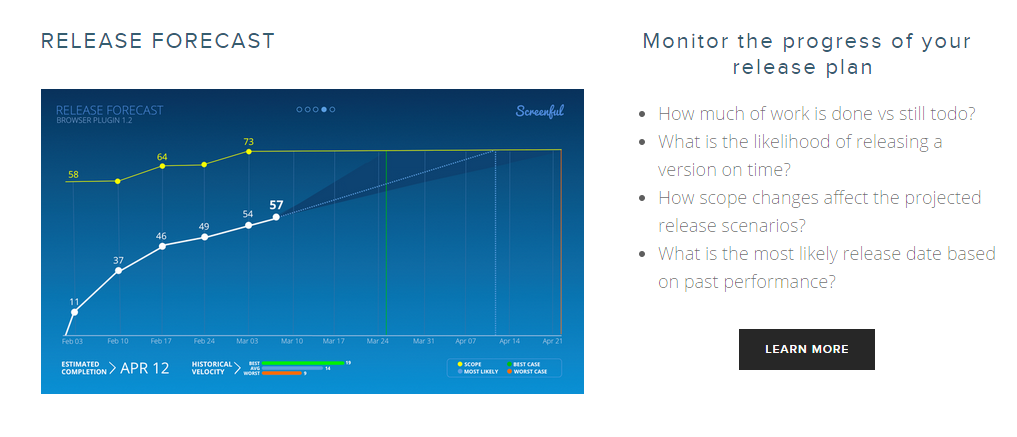 |