Chose Brightcove
YouTube, Vimeo, they are not on list, but still Brightcove Video is the best so far and we have been using it for a long time.

| Product | Rating | Most Used By | Product Summary | Starting Price |
|---|---|---|---|---|
 Brightcove | N/A | Brightcove Video is a video hosting and publishing solution. The company also provides a cloud media processing product called Zencoder. | N/A | |
 Microsoft Stream | N/A | Microsoft Stream is an enterprise video option available to users of Microsoft 365 as part of the Office 365 E1 edition tier. Users can create explainer videos and send videos to Teams channels, SharePoint sites, Microsoft Viva Engage posts, Microsoft Viva Connections, and Microsoft365.com to inform and align with colleagues in the flow of work. | N/A |
| Brightcove | Microsoft Stream | |||||||||||||||
|---|---|---|---|---|---|---|---|---|---|---|---|---|---|---|---|---|
| Editions & Modules | No answers on this topic | No answers on this topic | ||||||||||||||
| Offerings |
| |||||||||||||||
| Entry-level Setup Fee | No setup fee | No setup fee | ||||||||||||||
| Additional Details | — | — | ||||||||||||||
| More Pricing Information | ||||||||||||||||
| Brightcove | Microsoft Stream | |
|---|---|---|
| Considered Both Products |  Brightcove  Chloe Sayers Social Media Specialist Chose Brightcove Brightcove is a more secure option than Youtube and has better file management than Vimeo.  Ramin Sultanov Digital Instructor Chose Brightcove Well, we are on the new age of web and that means we have to adapt and be upgraded every day. It requires us to be modern and this is the main difference between them. Being customizable feels very good. It's fun and no price for trying. And it completely deserves a try.  Samantha Brady Director, Digital Operations Chose Brightcove Brightcove is more user-friendly and allows for more opportunity when publishing content.  Ashley Buley Web Administrator Chose Brightcove The decision to migrate from Kyte to Brightcove was made before I came on-board. However, I've worked with both systems and I am extremely happy we went with Brightcove. The user-friendly interface and mobile app. made it a great choice for event and sponsorship streaming.  Scott Gale Sr. Instructional Designer E-Learning Chose Brightcove We looked hard at Kaltura and thought it was a good product. We were attracted to being able to download a version of the video from the player. In test we had technical questions concerning captions and languages and could not get adequate answers with many attempts. Over time … | Microsoft Stream |
| Brightcove | Microsoft Stream | ||||||||||||||||||
|---|---|---|---|---|---|---|---|---|---|---|---|---|---|---|---|---|---|---|---|
| Video Security |
| ||||||||||||||||||
| Video Player |
|
| Brightcove | Microsoft Stream | |
|---|---|---|
| Small Businesses |  IBM Video Streaming Score 8.8 out of 10 |  Wistia Score 9.6 out of 10 |
| Medium-sized Companies | IBM Video Streaming Score 8.8 out of 10 |  Flipgrid Score 1.0 out of 10 |
| Enterprises | IBM Video Streaming Score 8.8 out of 10 |  Panopto Score 7.5 out of 10 |
| All Alternatives | View all alternatives | View all alternatives |
| Brightcove | Microsoft Stream | |
|---|---|---|
| Likelihood to Recommend | 9.0 (0 ratings) | 7.0 (0 ratings) |
| Likelihood to Renew | 9.0 (0 ratings) | - (0 ratings) |
| Usability | 9.0 (0 ratings) | 7.0 (0 ratings) |
| Support Rating | 4.0 (0 ratings) | - (0 ratings) |
| Brightcove | Microsoft Stream | |
|---|---|---|
| Likelihood to Recommend |
|
|
| Pros |
|
|
| Cons |
|
|
| Likelihood to Renew |
 Colby Iannazzo Senior Digital Designer | No answers on this topic |
| Usability |
|
|
| Support Rating |
| No answers on this topic |
| Alternatives Considered |
|
|
| Return on Investment |
 Grant Benatar Director of Digital Media |
|
| ScreenShots | Brightcove Screenshots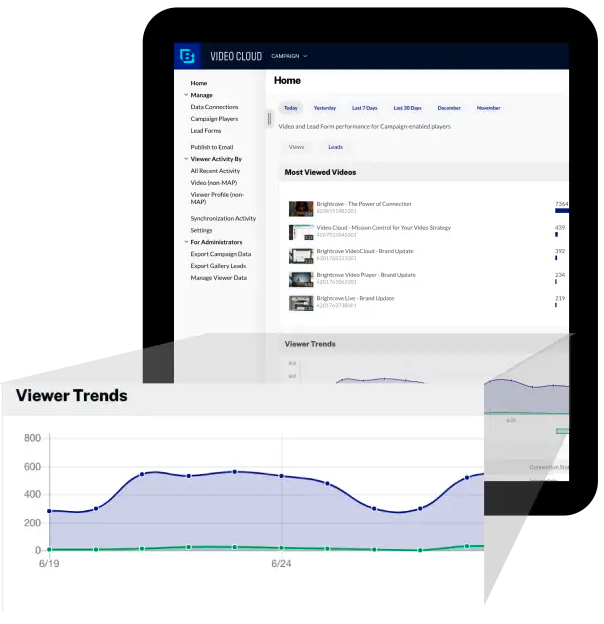     |