OpenText Universal Discovery and Universal CMDB vs. Progress Test Studio

Overview
ProductRatingMost Used ByProduct SummaryStarting Price
OpenText Universal Discovery and Universal CMDB
Score 9.3 out of 10
N/A
Formerly from Micro Focus, OpenText™ Universal Discovery and Universal CMDB discovers, maps, and manages IT configurations and can be deployed on-premises or via SaaS. It is used to increase IT visibility and reduce IT service disruptions with robust discovery, service dependency mapping, and proactive impact analysis.N/A
Progress Test Studio
Score 9.0 out of 10
N/A
Progress Test Studio aims to be the easiest to use Web Automation tool on the market, widely used by Enterprise QA’s for testing, but easy enough for anyone. The product automates testing for WPF, Silverlight, Web, HTML, Angular, React, KUIB, iOS, Android, Mobile Web, and API’s. Test Studio is ideal for a no-code or low-code approach for: QA Test Automation, Application Monitoring, Performance and Load Testing, Web/Marketing Process Automation, and Mobile App Automation.N/A
Pricing
OpenText Universal Discovery and Universal CMDBProgress Test Studio
Editions & Modules
No answers on this topic
Offerings
Pricing Offerings
OpenText Universal Discovery and Universal CMDBProgress Test Studio
Free Trial
NoYes
Free/Freemium Version
NoNo
Premium Consulting/Integration Services
NoYes
Entry-level Setup FeeNo setup feeOptional
Additional Details
More Pricing Information
Community Pulse
OpenText Universal Discovery and Universal CMDBProgress Test Studio
Best Alternatives
OpenText Universal Discovery and Universal CMDBProgress Test Studio
Small Businesses

No answers on this topic

BrowserStack
BrowserStack
Score 8.5 out of 10
Medium-sized Companies
Freshservice
Freshservice
Score 8.4 out of 10
ReadyAPI
ReadyAPI
Score 6.2 out of 10
Enterprises
ServiceNow Now Platform
Score 8.7 out of 10
SoapUI Open Source
SoapUI Open Source
Score 8.4 out of 10
All AlternativesView all alternativesView all alternatives
User Ratings
OpenText Universal Discovery and Universal CMDBProgress Test Studio
Likelihood to Recommend
8.0
(6 ratings)
9.0
(6 ratings)
Likelihood to Renew
5.0
(1 ratings)
-
(0 ratings)
Usability
7.0
(1 ratings)
-
(0 ratings)
Support Rating
7.0
(1 ratings)
-
(0 ratings)
Implementation Rating
6.0
(1 ratings)
-
(0 ratings)
User Testimonials
OpenText Universal Discovery and Universal CMDBProgress Test Studio
Likelihood to Recommend
OpenText
Micro Focus Universal Discovery and Universal CMDB is well suited for medium to large IT operations after a careful review and strategy definition of all support tools that will be integrated. When it comes to deciding on a set of tools for IT operation management and its different processes like Incident, event, and change management; a good approach would be to create a roadmap with the integrated suite of tools to create a native ecosystem and reduce complexity on the integration and adoption.
Read full review
Progress Software Corporation
It is very good for testers who have little coding experience but are willing to learn. It is very good for regression testing and really helps us identify issues that could have been a detriment to our end users. It is also great to keep track of the performance of pages across time.
Read full review
Pros
OpenText
  • Management and organization of Configuration Items
  • Ensures a single and uniform source of database to avoid any ambiguity between departments.
  • Proper delivery of services
Read full review
Progress Software Corporation
  • Easy to configure.
  • Plugins can be integrated easily with visual studio.
  • Takes less time to run all the test scenarios, [and] also generates graphics report for all the tests.
  • Keeps bugs [out of] the production.
Read full review
Cons
OpenText
  • When getting started the Cloud deployment may be not that easy.
  • To manipulate the system deeply requires a professional operator.
  • Working on large data project.
Read full review
Progress Software Corporation
  • Client start-up time is a bit slow. Application is a bit sluggish, when there is a lot of tests open.
  • Automated scheduling environment is a bit challenging to maintain.
Read full review
Usability
OpenText
Old versions which do not support CMS have a luck of user experience and performance for reports and service modeling.
Read full review
Progress Software Corporation
No answers on this topic
Support Rating
OpenText
Some complex issues regarding performance and platform upgrades have been difficult to address and have short time solutions.
Read full review
Progress Software Corporation
No answers on this topic
Implementation Rating
OpenText
Upgrades from old versions were really hard to handle.
Read full review
Progress Software Corporation
No answers on this topic
Alternatives Considered
OpenText
Quite competing products but short learning curve and fitment in our IT Landscape were main differentiators.
Read full review
Progress Software Corporation
Test Studios had a smaller foot print and allowed us to ease into deploying it in the company. The online help was a great benefit to getting started and the evaluation period allowed us to fully run though the product before purchasing it. Cost difference between the products was a big decision factor as well for the type of deployment we were looking for.
Read full review
Return on Investment
OpenText
  • ensured proper service delivery which helped organizations to grow
  • It was a little expensive for the company.
  • Mainly had a positive impact especially in the cases of risk assessment and analysis.
Read full review
Progress Software Corporation
  • Excellent results, workloads for continuous regresssion testing has been decreased by more than 50 percent.
  • Time window needed for regression tests has decreased more than 50 percent.
Read full review
ScreenShots

Progress Test Studio Screenshots

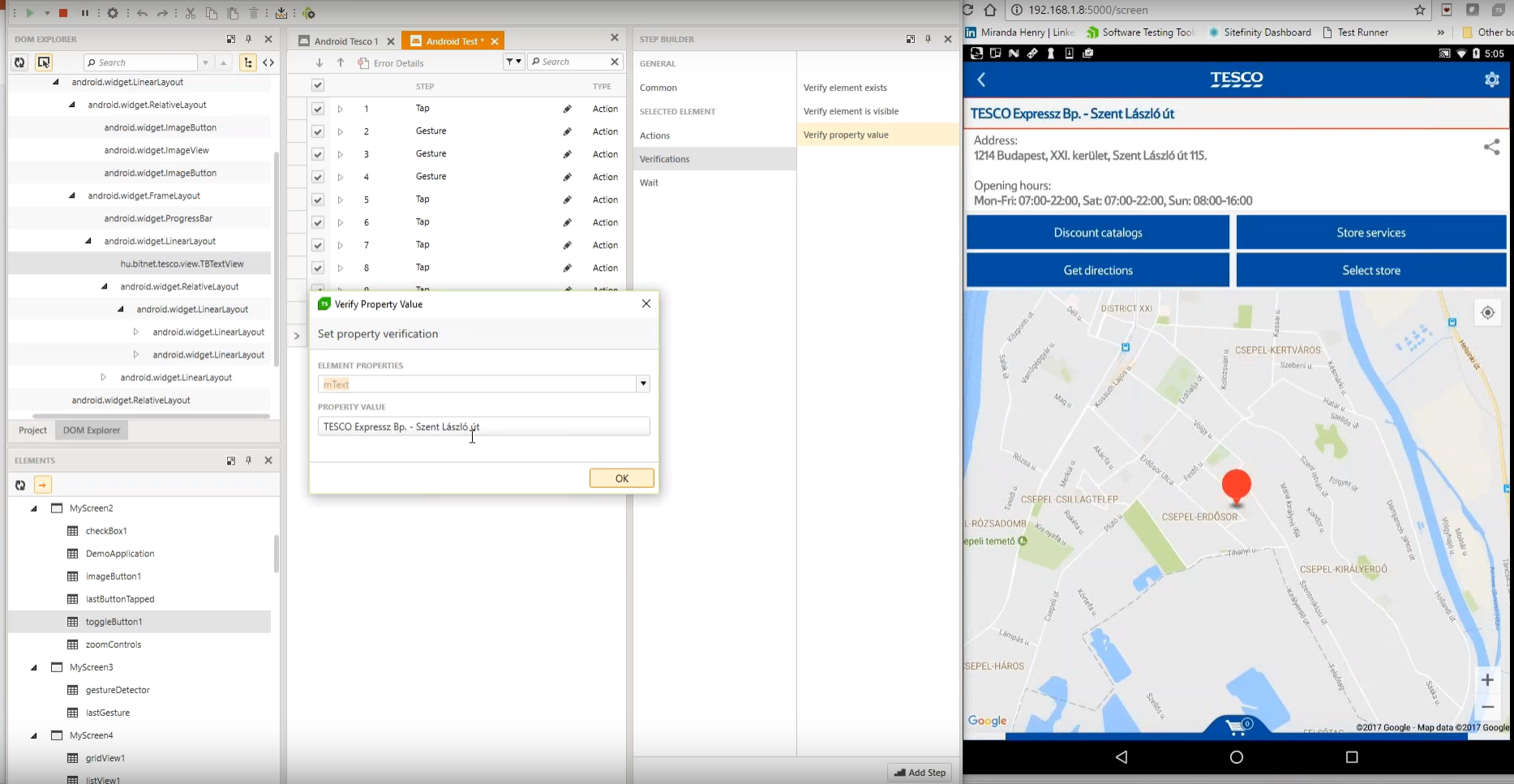
Screenshot of Test Studio Mobile – Codeless Test Automation for iOS and Android: Native, Hybrid, and Mobile Web applications. Including sophisticated find logic for test re-use across multiple devices. The Android Instrumentation Wizard will get you testing in no time.  And codeless maintenance will empower your QA’s.Screenshot of Test Studio Ultimate - makes it easy to reuse your functional tests as Performance tests, and in Load tests. This saves you many hours of extra maintenance. The Test Studio Runtime and Full License include the Profiler for tracking windows performance counter data. Combined this data will help you pinpoint the bottlenecks in your application.Screenshot of Test Studio allows you to customize the element find logic to custom fit each application. With a focus on ease-of-use a tester can quickly record their manual test and execute it back as automation. The Test Studio Element Highlighter will help you quickly add Verifications on-the-fly as you record your test. There are 4 different ways to automate applications with Test Studio, and only 1 way requires code.Screenshot of Test Studio for API’s – Codelessly capture and assemble your api calls into intricate tests with GoTo conditional operations and verifications, and of course it integrates with Fiddler. You can easily integrate Test Studio into your Continuous Integration process as well.