Oracle CRM On Demand vs. Predicte.com

Overview
ProductRatingMost Used ByProduct SummaryStarting Price
Oracle CRM On Demand
Score 10.0 out of 10
N/A
The basis of this offering is the Market2Lead product that Oracle acquired in 2010. It has now been fully integrated with Oracle's On Demand CRM product and is a full-featured marketing automation product with features from lead management and nurturing, to measuring marketing ROI.N/A
Predicte.com
Score 0.0 out of 10
Small Businesses (1-50 employees)
Predicte offers real-time predicive insights from product, sales, and client data. By unifying disparate data sources within its Data Platform (Analytics), Predicte empowers distributors, wholesalers and manufacturers to forecast sales with greater accuracy, detect churn risks before they escalate, and deliver tailored recommendations. The platform’s analytics framework helps teams optimize product usage, enhance sales performance, and continuously improve client outcomes through its…N/A
Pricing
Oracle CRM On DemandPredicte.com
Editions & Modules
No answers on this topic
Offerings
Pricing Offerings
Oracle CRM On DemandPredicte.com
Free Trial
NoNo
Free/Freemium Version
NoNo
Premium Consulting/Integration Services
NoNo
Entry-level Setup FeeNo setup feeRequired
Additional Details
More Pricing Information
Community Pulse
Oracle CRM On DemandPredicte.com
Features
Oracle CRM On DemandPredicte.com
Sales Force Automation
Comparison of Sales Force Automation features of Product A and Product B
Oracle CRM On Demand
8.9
25 Ratings
13% above category average
Predicte.com
-
Ratings
Customer data management / contact management8.025 Ratings00 Ratings
Workflow management9.024 Ratings00 Ratings
Territory management8.024 Ratings00 Ratings
Opportunity management8.025 Ratings00 Ratings
Integration with email client (e.g., Outlook or Gmail)9.022 Ratings00 Ratings
Contract management9.024 Ratings00 Ratings
Quote & order management10.023 Ratings00 Ratings
Interaction tracking9.024 Ratings00 Ratings
Channel / partner relationship management10.023 Ratings00 Ratings
Customer Service & Support
Comparison of Customer Service & Support features of Product A and Product B
Oracle CRM On Demand
9.7
24 Ratings
24% above category average
Predicte.com
-
Ratings
Case management10.024 Ratings00 Ratings
Call center management10.023 Ratings00 Ratings
Help desk management9.024 Ratings00 Ratings
Marketing Automation
Comparison of Marketing Automation features of Product A and Product B
Oracle CRM On Demand
8.5
24 Ratings
10% above category average
Predicte.com
-
Ratings
Lead management8.024 Ratings00 Ratings
Email marketing9.022 Ratings00 Ratings
CRM Project Management
Comparison of CRM Project Management features of Product A and Product B
Oracle CRM On Demand
9.0
24 Ratings
16% above category average
Predicte.com
-
Ratings
Task management9.023 Ratings00 Ratings
Billing and invoicing management9.022 Ratings00 Ratings
Reporting9.023 Ratings00 Ratings
CRM Reporting & Analytics
Comparison of CRM Reporting & Analytics features of Product A and Product B
Oracle CRM On Demand
8.5
24 Ratings
11% above category average
Predicte.com
-
Ratings
Forecasting10.024 Ratings00 Ratings
Pipeline visualization6.623 Ratings00 Ratings
Customizable reports9.024 Ratings00 Ratings
Customization
Comparison of Customization features of Product A and Product B
Oracle CRM On Demand
8.2
24 Ratings
7% above category average
Predicte.com
-
Ratings
Custom fields9.024 Ratings00 Ratings
Custom objects9.024 Ratings00 Ratings
Scripting environment5.820 Ratings00 Ratings
API for custom integration9.023 Ratings00 Ratings
Security
Comparison of Security features of Product A and Product B
Oracle CRM On Demand
9.5
25 Ratings
13% above category average
Predicte.com
-
Ratings
Single sign-on capability10.022 Ratings00 Ratings
Role-based user permissions9.025 Ratings00 Ratings
Social CRM
Comparison of Social CRM features of Product A and Product B
Oracle CRM On Demand
9.0
18 Ratings
19% above category average
Predicte.com
-
Ratings
Social data9.018 Ratings00 Ratings
Social engagement9.018 Ratings00 Ratings
Integrations with 3rd-party Software
Comparison of Integrations with 3rd-party Software features of Product A and Product B
Oracle CRM On Demand
9.0
22 Ratings
19% above category average
Predicte.com
-
Ratings
Marketing automation9.022 Ratings00 Ratings
Compensation management9.020 Ratings00 Ratings
Platform
Comparison of Platform features of Product A and Product B
Oracle CRM On Demand
9.0
18 Ratings
18% above category average
Predicte.com
-
Ratings
Mobile access9.018 Ratings00 Ratings
Best Alternatives
Oracle CRM On DemandPredicte.com
Small Businesses
Salesmate
Salesmate
Score 10.0 out of 10
Mediafly
Mediafly
Score 7.7 out of 10
Medium-sized Companies
Creatio
Creatio
Score 9.1 out of 10
Clari
Clari
Score 8.6 out of 10
Enterprises
Creatio
Creatio
Score 9.1 out of 10
Clari
Clari
Score 8.6 out of 10
All AlternativesView all alternativesView all alternatives
User Ratings
Oracle CRM On DemandPredicte.com
Likelihood to Recommend
10.0
(26 ratings)
-
(0 ratings)
Usability
9.0
(2 ratings)
-
(0 ratings)
Support Rating
9.0
(1 ratings)
-
(0 ratings)
Implementation Rating
10.0
(1 ratings)
-
(0 ratings)
User Testimonials
Oracle CRM On DemandPredicte.com
Likelihood to Recommend
Oracle
I think it is well suited for organizations which are large with a lot of users so as to be able to minimize the cost of operations. Also, the organization which interacts mostly with customers can use Oracle CRM on demand.
Read full review
Predicte.com
No answers on this topic
Pros
Oracle
  • Several of our members were not familiar with various IT functions within CRM prior to working with it and so they were able to develop a working knowledge of IT pretty quickly afterwards.
  • It has a familiar feel to it as it allows users to work the data into a spreadsheet type layout with pivot tables and graphs and so it is quick to adopt.
  • Customization is great with a working knowledge of HTML, which isn't too hard to learn. You can really adapt CRM to any needs stylistically or content wise.
Read full review
Predicte.com
No answers on this topic
Cons
Oracle
  • The ability to schedule and push out reports is missing from this system. If we want to mass deliver a report on a schedule, we must run it, export it and email it out to the group, or purchase a 3rd party system.
  • The ability to trigger workflow events on a schedule is missing this system. Currently, there has to be a trigger initiated by a user and we have situations where we'd like to be able to schedule a work flow routine to go out and check from specific situations and then trigger an action. We'd also like to be able to trigger workflow actions on one object based on something in another object and this capability is very limited.
Read full review
Predicte.com
No answers on this topic
Likelihood to Renew
Oracle
Because am using oracle last 3 years and it’s great
Read full review
Predicte.com
No answers on this topic
Usability
Oracle
Compared to other competitors I find it very easy to use and learn .It has been helpful in our organisation and we have been able to manage our projects and operations well without interference.
Read full review
Predicte.com
No answers on this topic
Support Rating
Oracle
As am using oracle very much satisfy.
Read full review
Predicte.com
No answers on this topic
Implementation Rating
Oracle
With the right partner Oracle CRM On Demand can be implemented very quickly and seamlessly.
Read full review
Predicte.com
No answers on this topic
Alternatives Considered
Oracle
MS Dynamics was easy to integrate to MS Power BI. This BI and reporting aspect is a clear strong point for Microsoft. MS solutions seem easier to integrate and learn, but this depends on the IT landscape and the complexity of integrations in a respective company.
Read full review
Predicte.com
No answers on this topic
Return on Investment
Oracle
  • This software can display in real-time when an order is submitted, received, fulfilled, and shipped out. We are able to know within the week of what new orders came in and how effective we are being from targeting specific regions of the nation.
Read full review
Predicte.com
No answers on this topic
ScreenShots

Predicte.com Screenshots

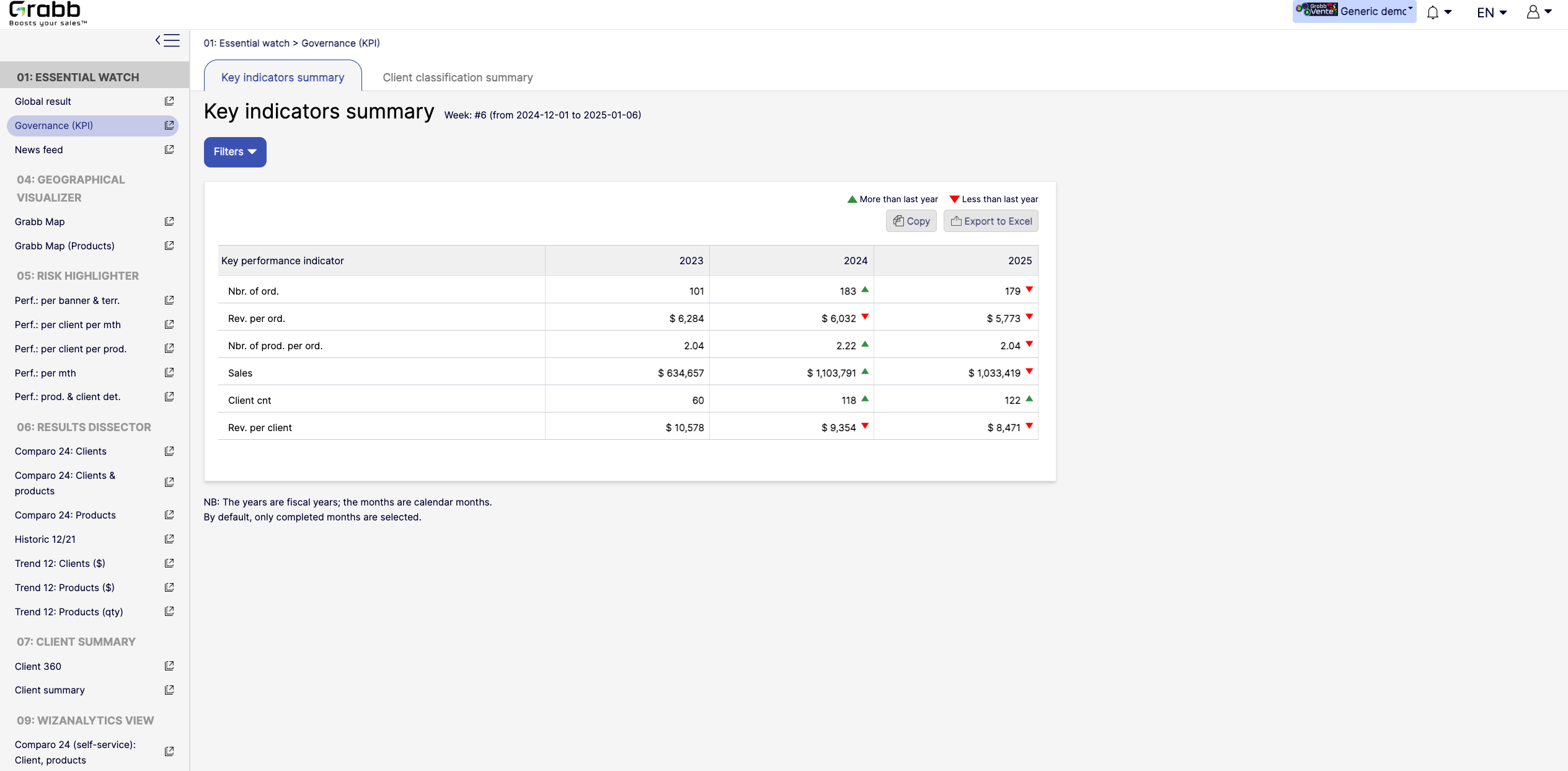
Screenshot of the dashboard for executives and managers, with various performance metrics:

High‐Level KPIs: Summarizes top metrics (e.g., total sales, revenue per client, average products per order) all in one table, making it easier to spot whether the company is trending up or down.
Year‐to‐Year Comparison: Displays data for each fiscal year, with green/red arrows to show improvement or decline since the previous year.
Immediate Visibility of Trends: Simplifies strategic decision‐making by illustrating whether overall performance is improving or if corrective measures are needed.
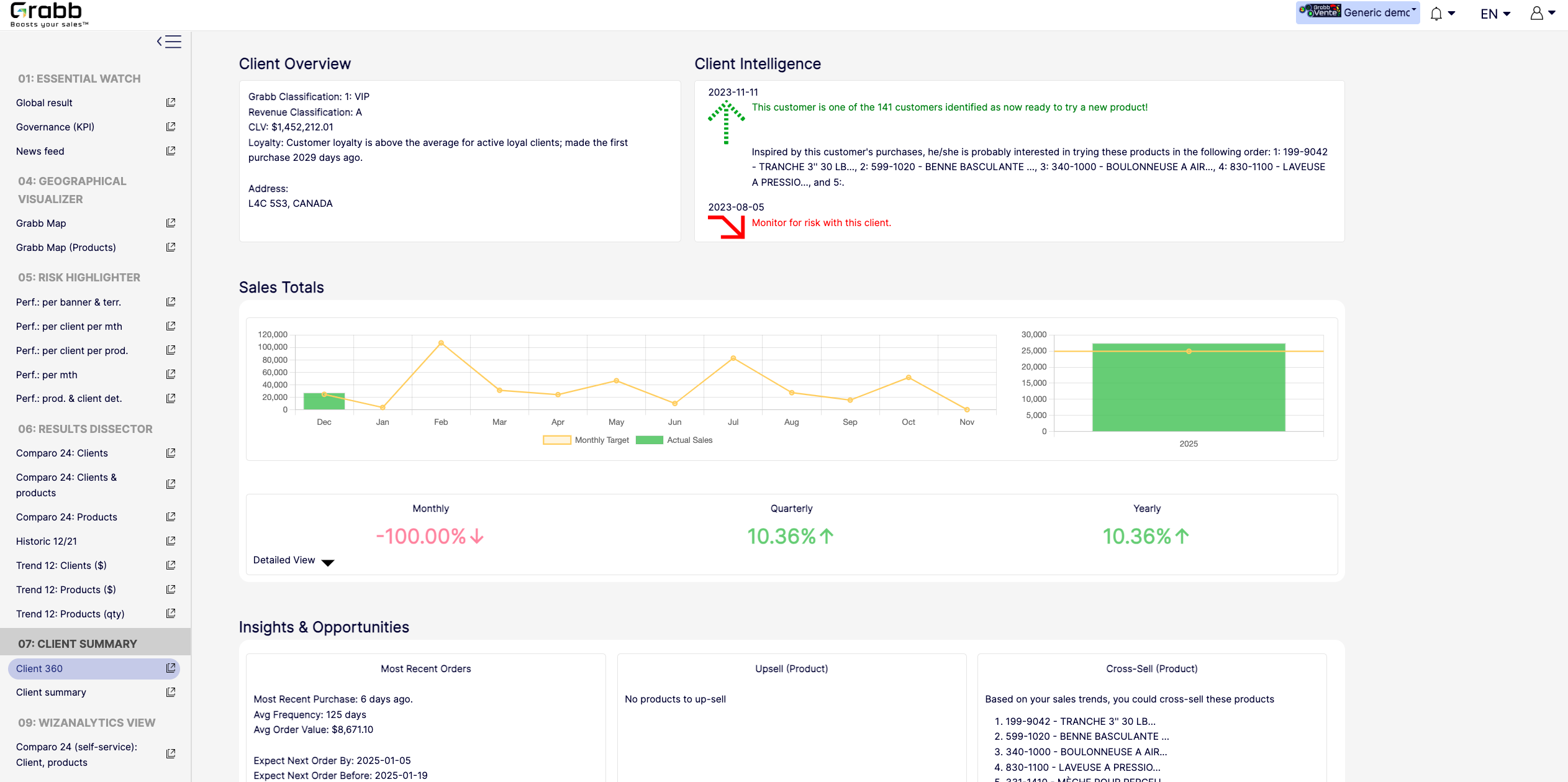
It’s a quick, executive‐friendly scoreboard of the organization’s health, ensuring leaders have the clarity to plan next steps.Screenshot of an at‐a‐glance understanding of a single client’s status, loyalty level, buying behavior, and next best actions that includes data about up‐selling, cross‐selling, and churn risk is often siloed or not immediately visible. This provides:

A Centralized Client Snapshot: Shows the client’s classification (e.g., VIP), revenue category, and CLV, ensuring everyone quickly sees the client’s overall value.
Predictive Intelligence: Highlights whether the client is “ready to try a new product,” or if there’s any “monitor for risk” alert, taking the guesswork out of deciding the next sales move.
Sales Trend & Graphs: Displays monthly, quarterly, and yearly sales to pinpoint performance patterns and quickly identify dips/spikes.
Upsell/Cross‐Sell Suggestions: Automatically suggests which products the client is most likely to buy next, helping reps act on potential revenue opportunities immediately.
Insights & Opportunities: Offers quick reference points such as “Most Recent Purchase,” average order value, frequency, and predicted next order date so you can plan proactive outreach.
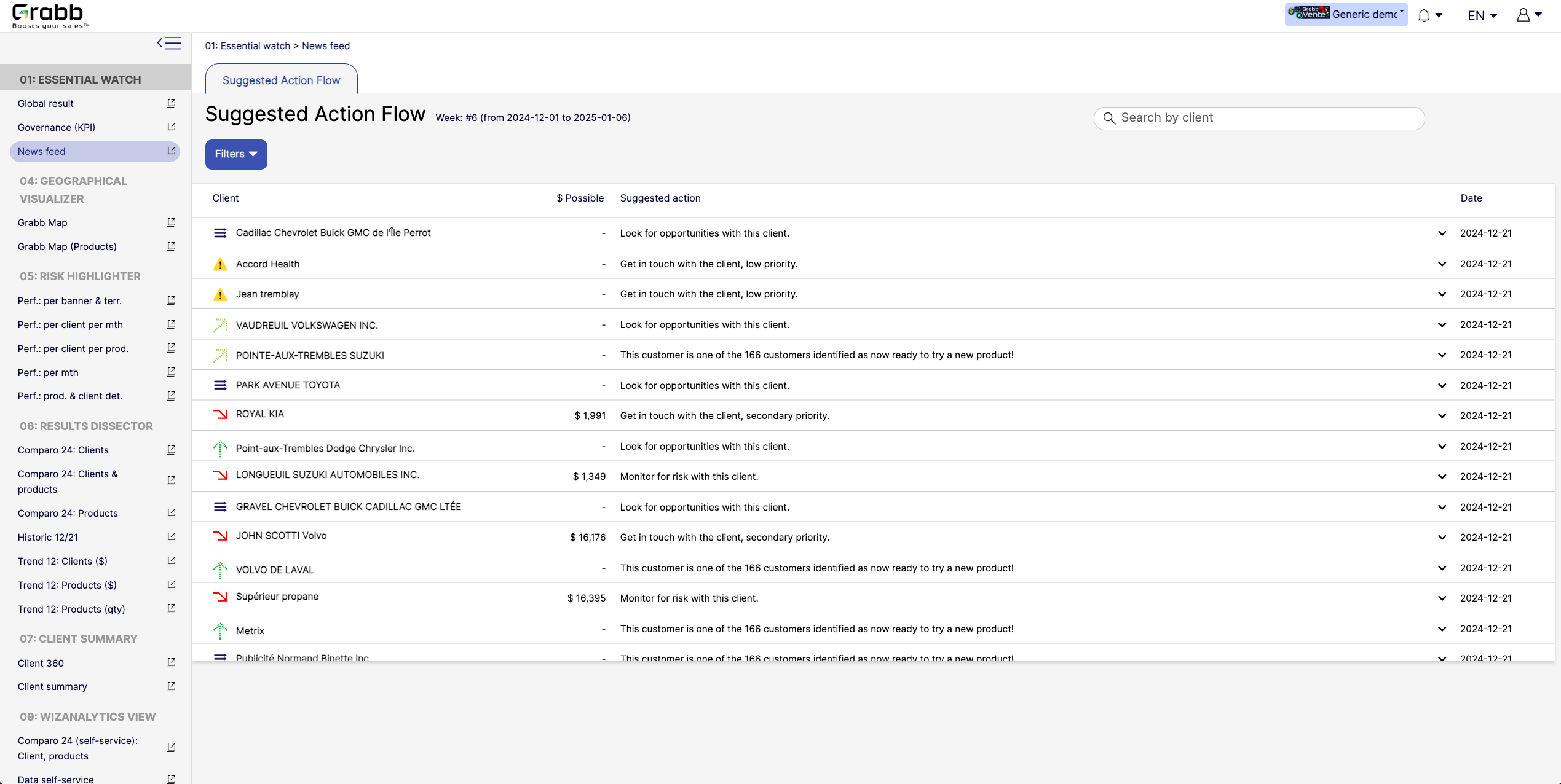
This holistic view enables data‐driven decisions—whether to focus on strengthening loyalty, pitching new products, or preventing churn.Screenshot of A visualization for sales reps and managers, providing:

Prioritized Recommandations: Provides a dynamic feed of next best actions—whether it’s “Look for opportunities with this client” or “Monitor for risk,” ensuring no lead or account slips through the cracks.
Opportunity & Risk Indicators: Quickly flags which clients are “ready to try a new product” versus those at higher risk, so teams can focus their energy where it matters most.
Estimated Upside ($ Possible): In some cases, the screen shows potential revenue if successful, helping reps evaluate the ROI of their outreach efforts.
Search & Filter Capabilities: Salespeople can easily locate a specific client in the list and see suggested actions, which speeds up daily planning and follow‐ups.
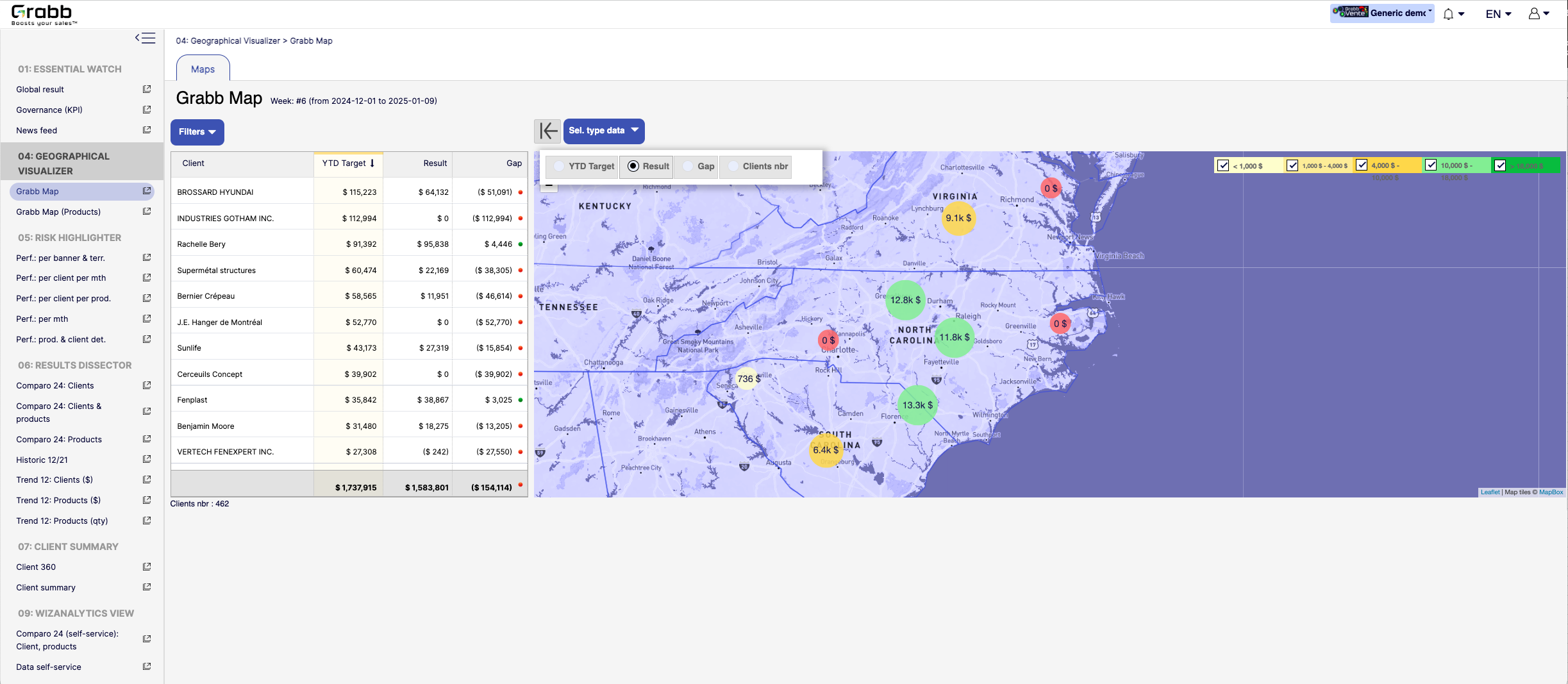
By centralizing these recommended “next steps,” the Suggested Action Flow turns raw data into a practical to‐do list—making each sales call or client interaction more purposeful and timely.Screenshot of a visualization for sales teams that helps them understand how their performance is distributed across different territories or locations. Without geographic context, managers can overlook local trends, regional opportunities, or problem areas.

Solution Provided:

Interactive Territory Overview: Displays each client’s Year‐to‐Date (YTD) target, actual results, and any gap in a color‐coded map, quickly revealing where the biggest mismatches lie.
Client‐Level Details: The list alongside the map allows you to see real‐time data—such as current gap amount or sales performance—sorted by region or client.
Visual Clustering: Bubbles on the map show consolidated sales amounts or gaps for clusters of clients, making it easier to spot hot‐spots or underperforming zones.
Target & Result Comparison: By toggling between metrics (e.g., “YTD Target,” “Result,” “Gap,” “Clients nbr”), managers can instantly pivot the view to see how the team is tracking.
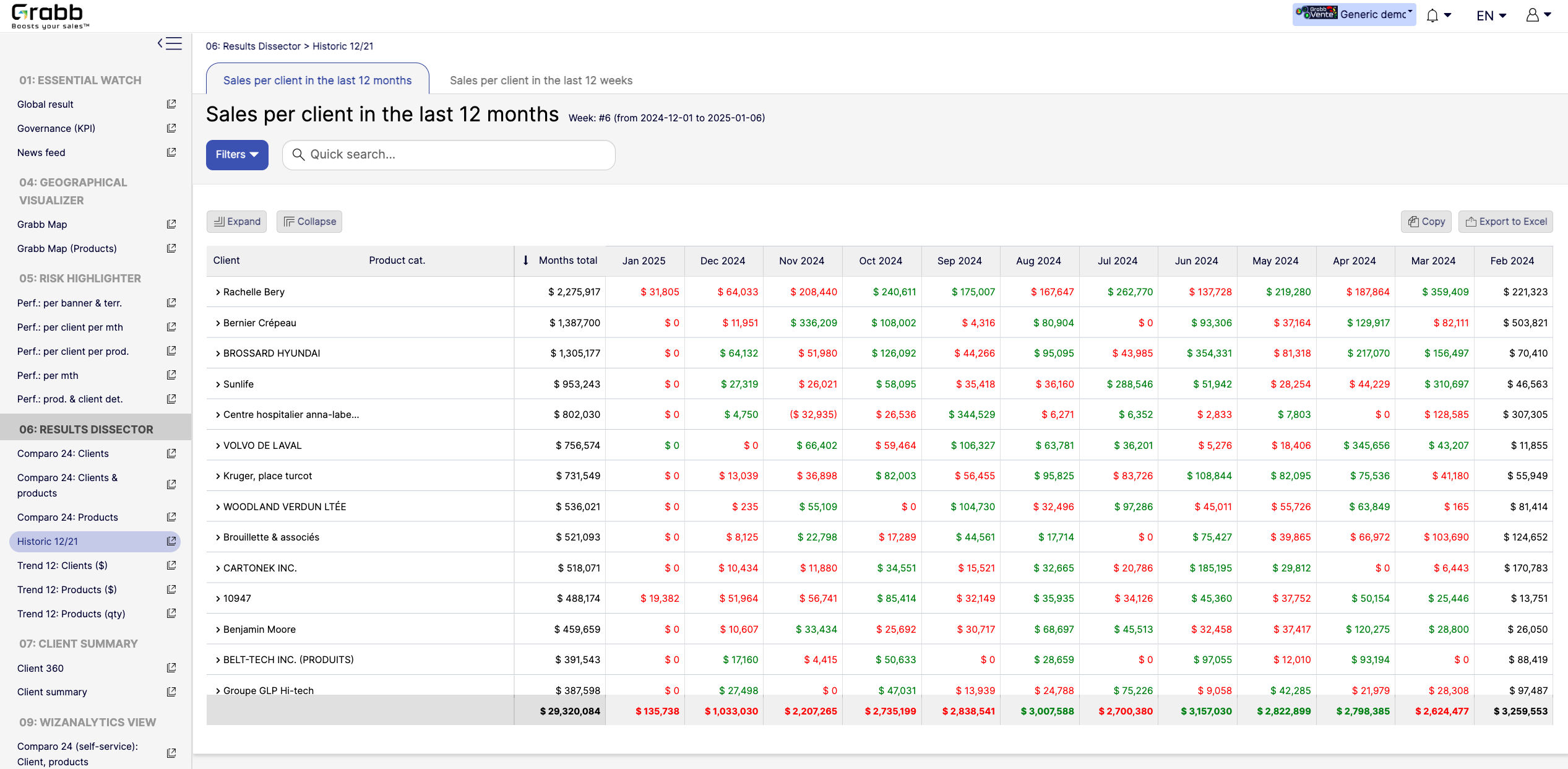
With this map‐based dashboard, leaders can optimize travel routes, allocate resources effectively, and prioritize outreach in areas where the potential impact is greatest.Screenshot of monthly sales trends at the individual‐client level. The visualization provides:

Month‐by‐Month Breakdown: Lists each client with color‐coded monthly sales (green and red), allowing you to see exactly when sales surge or drop off.
Total and Monthly Views: A “Months total” column plus each month’s figure helps you quickly gauge each client’s cumulative performance versus their monthly fluctuations.
Trend Spotting & Seasonality: By laying out 12 consecutive months, it becomes easier to see recurring patterns—helpful for forecasting, inventory planning, and targeted campaigns.
Actionable Insights: Identify which clients need re‐engagement (red cells or big drops) and which clients might be ready for expansion (consistently green or strong increases).
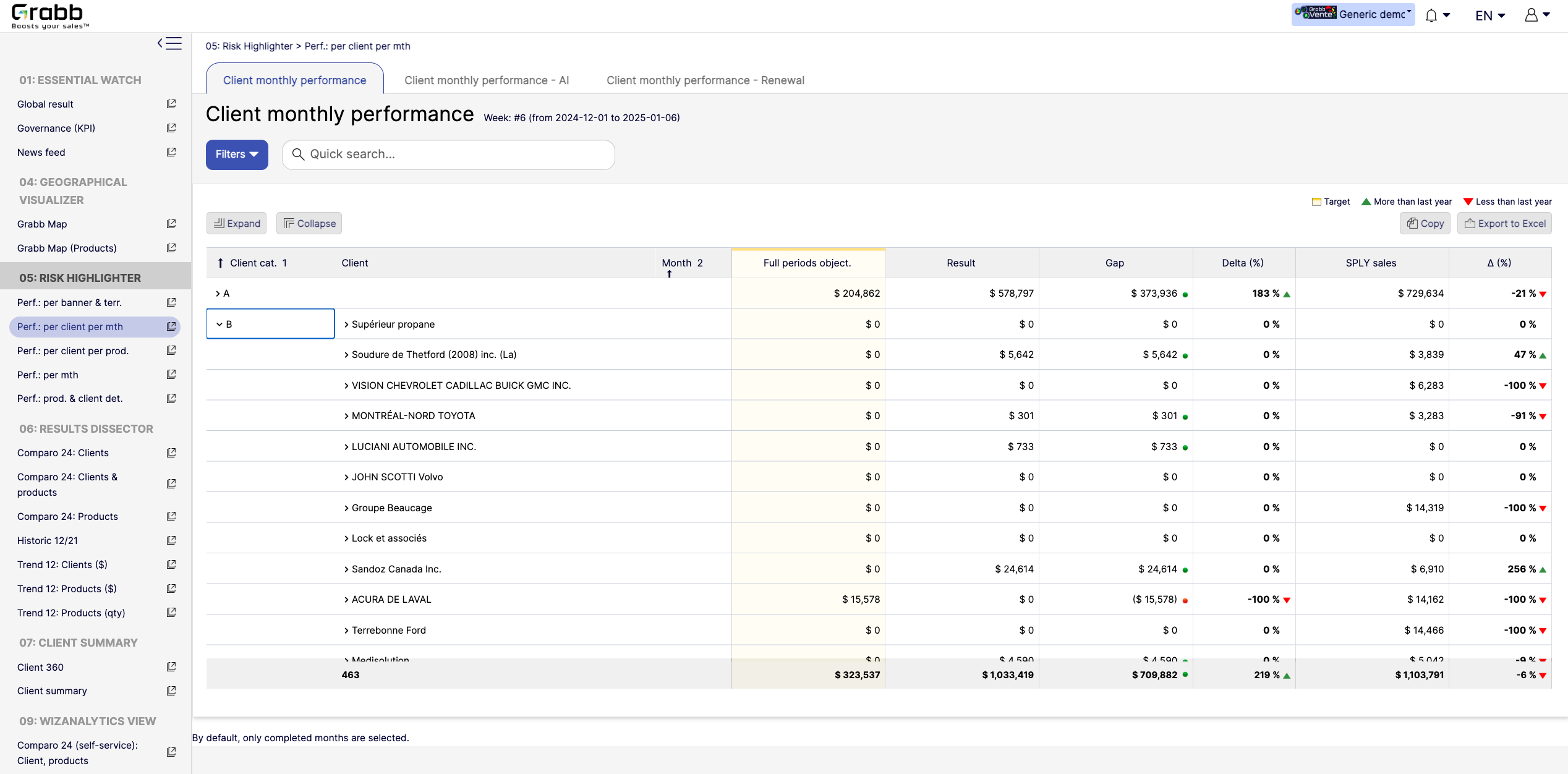
By visualizing an entire year in detail, sales teams can preemptively address potential downturns and capitalize on positive trends.Screenshot of a visualization tracking how each client performs on a month‐to‐month basis, and across accounts. This information provides:

Side‐by‐Side Comparisons: Displays each client’s monthly objectives versus actual results, so sales teams see immediately whether targets are met or missed.
Delta & Gap Analysis: Automatically calculates the variance between the goal and real outcomes—highlighting where shortfalls or over‐performance exist.
Year‐Over‐Year Comparison: “More than last year” or “Less than last year” labels provide quick trend context, guiding strategy for retention or growth.
Easy Filtering & Sorting: Users can filter by client category or name, then expand or collapse details to focus only on accounts that need attention.
With this screen, managers can prioritize which clients need immediate support and which are on track—using precise data rather than guesswork.