PaperCut vs. Zetadocs Delivery

Overview
ProductRatingMost Used ByProduct SummaryStarting Price
PaperCut
Score 9.3 out of 10
N/A
PaperCut Software headquartered in Melbourne offers their suite of print and output management solutions including PaperCut NG as well as embedded software to supply hardware integration.
$425
One Time Fee
Zetadocs Delivery
Score 0.0 out of 10
N/A
Zetadocs Delivery emails batches of personalized documents from within Microsoft Dynamics 365 Business Central or NAV, to save finance team time in sending documents such as orders, invoices and statements, using ready to go templates. Finance processes Zetadocs Delivery helps make more efficient include sales order processing, collections management and remittance advice.N/A
Pricing
PaperCutZetadocs Delivery
Editions & Modules
25 Users
$425.00
One Time Fee
75 Users
$605.00
One Time Fee
150 Users
$840.00
One Time Fee
No answers on this topic
Offerings
Pricing Offerings
PaperCutZetadocs Delivery
Free Trial
NoNo
Free/Freemium Version
NoYes
Premium Consulting/Integration Services
NoYes
Entry-level Setup FeeNo setup feeOptional
Additional Details
More Pricing Information
Community Pulse
PaperCutZetadocs Delivery
User Ratings
PaperCutZetadocs Delivery
Likelihood to Recommend
10.0
(7 ratings)
-
(0 ratings)
Usability
10.0
(2 ratings)
-
(0 ratings)
Support Rating
9.3
(2 ratings)
-
(0 ratings)
User Testimonials
PaperCutZetadocs Delivery
Likelihood to Recommend
PaperCut Software
For environments that have multiple different departments or programs that would like to have printing costs tracked. The exact costs per page printed can be changed within the software - so exact costs can be calculated and billed back appropriately. It also makes printer management easier as you can see toner levels and any issues the printer may have remotely without having to utilize the printers GUI at all. Scan to folder/email options can be done on the admin side, so that it makes things easier for users
Read full review
Equisys
No answers on this topic
Pros
PaperCut Software
  • Centralized printing via virtual hold / release queues.
  • Confidential and secure printing via card authentication.
  • Scan to folder/email integration with Active Directory.
  • Printer specific scripting actions give you a ton of options. The canned scripts are super helpful as they are prebuilt and need very little modification.
  • Overall printing reports are very informative.
  • Mobility Print gives you a great solution for printing from Chromebook devices.
Read full review
Equisys
No answers on this topic
Cons
PaperCut Software
  • Not accounting for jobs that did not release.
  • Ensuring that jobs sent through are processed.
  • Greater description of tree size etc for reference.
Read full review
Equisys
No answers on this topic
Usability
PaperCut Software
PaperCut is simply a solid product. PaperCut has been the ignition our company needed to take control of our budgets and also our carbon footprint. Through software we can manage our printing network with greater efficiency, reduce costs and enable our end users to take responsibility for their printing habits in a controlled way. The software is easy to deploy and integrates well with our windows based systems. We can easily delegate more advanced controls to power users and the controls are compatible with all major MFD hardware vendors.
Read full review
Equisys
No answers on this topic
Support Rating
PaperCut Software
The user community for PaperCut is smaller than other products we use in HR, IT, marketing and project management. We had an account manager assigned to us. Whenever we had any issues we would email him. The account manager was acting as an interface with the developers and other teams. The response times were reasonable.
Read full review
Equisys
No answers on this topic
Alternatives Considered
PaperCut Software
PaperCut was more user friendly for our higher ed situation and had a great sales pitch from the reseller we got it from.
Read full review
Equisys
No answers on this topic
Return on Investment
PaperCut Software
  • Reduction in paper usage due to prints only being printed when a user swipes in
  • Less overhead managing the printer environment, no need to manually update address for scan to email etc
  • One printer that is deployed to all users client computers making deployment really easy.
Read full review
Equisys
No answers on this topic
ScreenShots

Zetadocs Delivery Screenshots

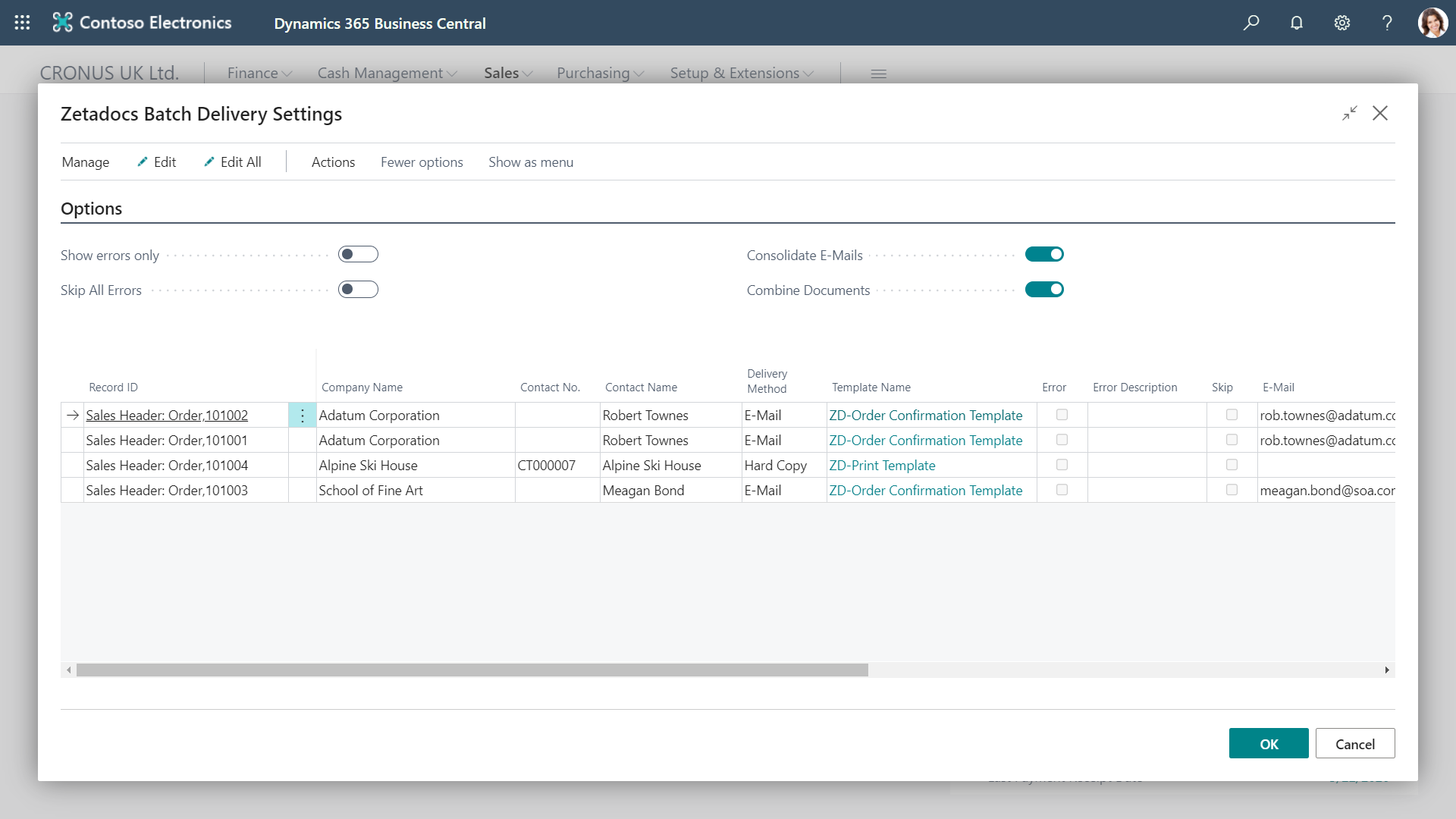
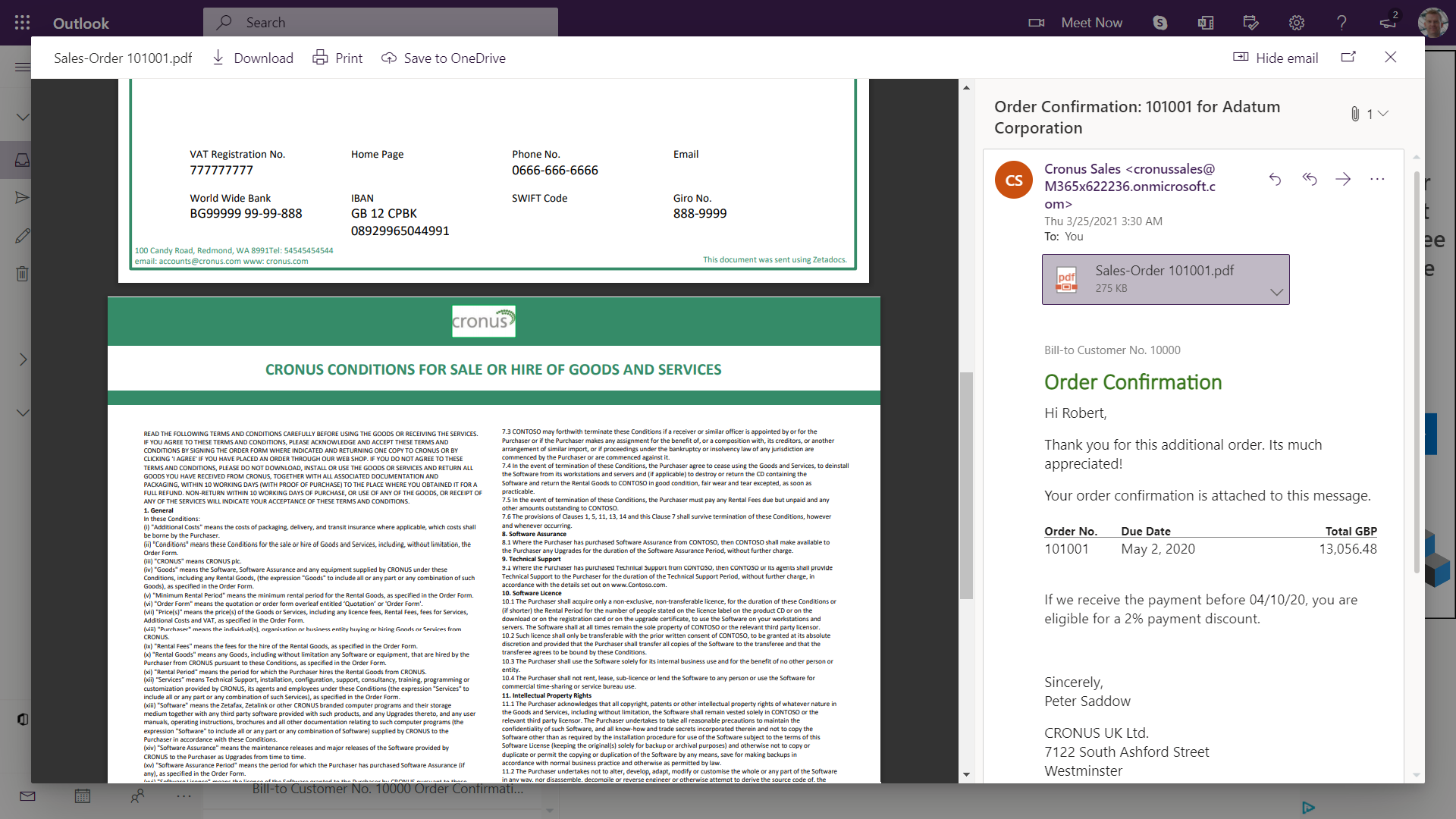
Screenshot of Batch management: Send out documents in batches, setting the sending email address for replies, and including attachments such as standard terms & conditionsScreenshot of Edit before send: Each email is automatically prepared for its recipient using a template, then you can personalize it further at the preview stageScreenshot of Consolidated batches: Multiple emails in a batch to the same person can be combined into a single email to save overloading their inboxScreenshot of Combined attachments: Make your suppliers and customers' lives easier by combining all the attached documents into one, easy-to-consume PDF