PathSolutions TotalView vs. PingPlotter

Overview
ProductRatingMost Used ByProduct SummaryStarting Price
PathSolutions TotalView
Score 7.3 out of 10
N/A
PathSolution’s TotalView is a network performance monitoring tool. PathSolutions emphasizes the platform’s issue diagnostics and recommended remediation assistance as a key differentiator.N/A
PingPlotter
Score 9.2 out of 10
N/A
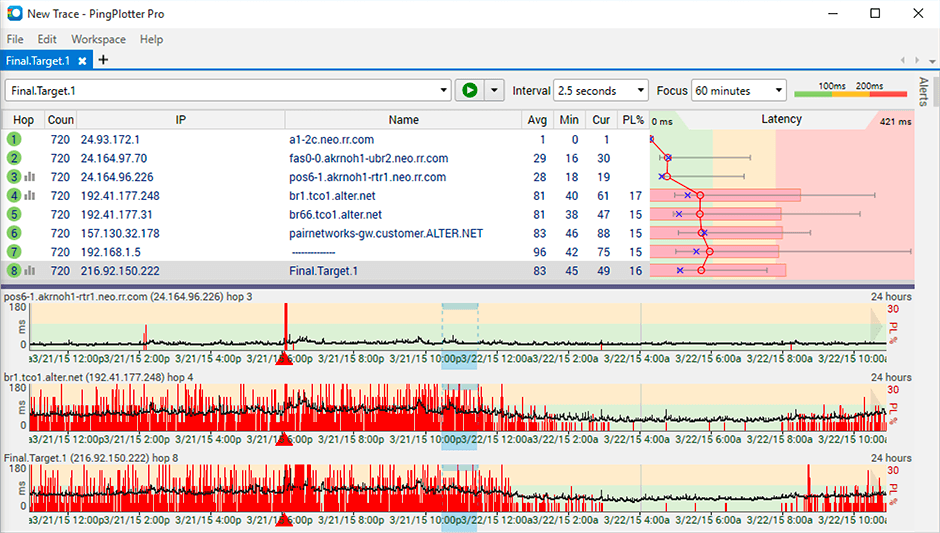
PingPlotter is a graphical traceroute and ping tool that visualizes network performance in a way that makes identifying the source of problems quicker and easier for everyone from online gamers and video streamers to VoIP admins and IT pros. Features for remote deployment, network monitoring, scripting, and a web interface are included along with several additional capabilities.
$0
per user
Pricing
PathSolutions TotalViewPingPlotter
Editions & Modules
No answers on this topic
PingPlotter Free
$0.00
per user
PingPlotter Free
$0.00
per user
PingPlotter Standard
$6.99
per user per month
PingPlotter Professional
$29.00
per user per month
PingPlotter Standard
$39.99
per user
PingPlotter Professional
$349.00
per user
Offerings
Pricing Offerings
PathSolutions TotalViewPingPlotter
Free Trial
NoYes
Free/Freemium Version
NoYes
Premium Consulting/Integration Services
NoNo
Entry-level Setup FeeNo setup feeNo setup fee
Additional Details
More Pricing Information
Community Pulse
PathSolutions TotalViewPingPlotter
Features
PathSolutions TotalViewPingPlotter
Network Performance Monitoring
Comparison of Network Performance Monitoring features of Product A and Product B
PathSolutions TotalView
8.9
3 Ratings
11% above category average
PingPlotter
8.3
29 Ratings
4% above category average
Automated network device discovery9.23 Ratings8.719 Ratings
Network monitoring8.63 Ratings9.029 Ratings
Baseline threshold calculation9.33 Ratings8.520 Ratings
Alerts8.63 Ratings7.916 Ratings
Network capacity planning9.03 Ratings00 Ratings
Packet capture analysis9.11 Ratings00 Ratings
Network mapping9.03 Ratings00 Ratings
Customizable reports8.23 Ratings7.516 Ratings
Wireless infrastructure monitoring9.11 Ratings00 Ratings
Hardware health monitoring8.63 Ratings00 Ratings
Best Alternatives
PathSolutions TotalViewPingPlotter
Small Businesses
NinjaOne
NinjaOne
Score 9.1 out of 10
NinjaOne
NinjaOne
Score 9.1 out of 10
Medium-sized Companies
SolarWinds NetFlow Traffic Analyzer (NTA)
Score 9.3 out of 10
SolarWinds NetFlow Traffic Analyzer (NTA)
Score 9.3 out of 10
Enterprises
SolarWinds NetFlow Traffic Analyzer (NTA)
Score 9.3 out of 10
SolarWinds NetFlow Traffic Analyzer (NTA)
Score 9.3 out of 10
All AlternativesView all alternativesView all alternatives
User Ratings
PathSolutions TotalViewPingPlotter
Likelihood to Recommend
7.3
(4 ratings)
9.3
(29 ratings)
Usability
-
(0 ratings)
9.0
(9 ratings)
Support Rating
-
(0 ratings)
9.0
(1 ratings)
User Testimonials
PathSolutions TotalViewPingPlotter
Likelihood to Recommend
PathSolutions
TotalView is well suited for an infrastructure where you are looking for a cost-effective, additive network management tool for in-depth device diagnostic information. This will not be a one-stop shop application, but it does what is advertised very well. SNMP is required for configuration and adding additional devices is quick and simple. This product also works well with Shoretel VoIP systems and allows for a full overview of connected phones along with being able to view calls on an extension/IP basis.
Read full review
Pingman Tools
It is well suited for performing monitoring and testing from a single device. It is less appropriate if you have to monitor from multiple different endpoints. That type of deployment would be more of an enterprise application. If you are looking for an end user monitoring solution then PingPlotter is the one for you.
Read full review
Pros
PathSolutions
  • The setup is fast and easy - 500 devices in 20 minutes.
  • The ability to go back a day or a week in time allows us to more easily troubleshoot the "what happened at 3 a.m. yesterday" question.
  • It gives us easily accessible stats for checks and balances like device types, counts, models, serial number etc.
Read full review
Pingman Tools
  • Monitor traffic in network
  • Measure stops when contacting network locations such as websites
  • Measures the lag and latency it takes to contact network locations
  • Gives you both induvidual measurements as well as good oversight
  • identifies when network lag or disconnect occurs
Read full review
Cons
PathSolutions
  • If you have some complexities in your network addressing, the network diagram tool will lay everything out automatically, but it will be confusing to look at. There is a way to edit the diagram so it looks more intuitive, but it may require some time to edit everything the right way.
  • TotalView will count virtual interfaces such as voice dial-peers and service modules as "ports," which counts against your license count. However, there is a way to edit each device to remove these "false positives" so it doesn't suck up licenses, but it can take some time to clean those up.
Read full review
Pingman Tools
  • Its a little confusing to see which targets are currently running pings and which ones are displayed in the plots.
  • Starting and stopping pings requires a right click and that would be better with a play/pause button I think.
  • Ability to drag and drop the graphs to reorder them.
  • more columns to show which targets are running and which are displayed. Currently this is done with symbols so you cant sort by just the running targets for example I've found.
Read full review
Usability
PathSolutions
No answers on this topic
Pingman Tools
I installed it and it just started working. I realized I could then tweak it to show what I needed but didn't have to spend a long time configuring it before use, editing YAML files etc. Maybe that's fine for a network professional, but I only need this software if something goes wrong, and then need it to work quickly out of the box.
Read full review
Support Rating
PathSolutions
No answers on this topic
Pingman Tools
I have not had much contact with the PingPlotter support, only one time have I went to them and it was a positive experience. The questions I had were answered quickly and professionally. I have no issue with the experience I had with the Support team. This was from before and after the purchase of the product.
Read full review
Alternatives Considered
PathSolutions
The three tools listed do different things with some similarities. For us the biggest need was data analysis, semi-automatic troubleshooting, and data gathering and topology mapping. TotalView hit the most of these in the price point we were looking for. Each tool has "extras," but we felt that the extras provided by TotalView were good enough and that the other tools didn't justify the cost.
Read full review
Pingman Tools
A balance of a generic tool vs a network equipment product is necessary when investigating network incidents or disruptions. Need to train the engineer to use both tools to perform their analysis and to dive down to the issues as fast as they can. Experience with the tools will continue to play a part if we were to adopt PingPlotter
Read full review
Return on Investment
PathSolutions
  • Wuite possibly the best spent money i have recommended in my 20+ year IT career.
Read full review
Pingman Tools
  • Great ROI, troubleshooting time has been reduced by 90%
  • Network Discoveries used to take 2 to 3 hours and were inconsistent - now it is a matter of minutes
  • lacks integration into our MSP toolkit, and we now use it as a stand alone product
Read full review
ScreenShots

PingPlotter Screenshots

Screenshot of Screenshot of Screenshot of