TrustRadius: an HG Insights company

Save this comparison

Save this comparison

Add Product

Recommended Comparisons

    Overview
    ProductRatingMost Used ByProduct SummaryStarting Price

    Projector PSA

    Score1.1 out of 10
    N/AProjector's cloud-based Professional Services Automation (PSA) software helps project-based services organizations track time and expenses, invoice clients, schedule resources, and manage projects. Its three modules span a more comprehensive set of uses than typical project management software. The Accounting module helps the user track time and expenses and manage invoices and billing. Also it syncs with the company's accounting systems as a sub-ledger. The Resource Scheduling module matches…

    $15

    per user

    StreamWork

    Score8.6 out of 10
    N/AStreamWork is a review and approval platform used by marketing and creative teams to centralize feedback, streamline online proofing, and automate creative approval workflows. By consolidating version control, task management, and stakeholder input, it aims to eliminate bottlenecks and reduces rework. Teams can markup nearly any file type (videos, images, CAD files, documents, slides, etc), route assets through multi-stage approvals with smart deadlines, and share review links without requiring…

    $219

    per month (15 users included)

    Pricing
    Projector PSAStreamWork
    Editions & Modules
    Team Edition
    $15
    per user
    Professional Edition
    $25
    per user
    Enterprise Edition
    $30
    per user
    Free
    $0
    2 users
    Starter
    $219
    per month 15 users
    Team
    $369
    per month 20 users
    Enterprise
    Custom Pricing
    per year 25 users
    Offerings
    Pricing Offerings
    Projector PSAStreamWork
    Free Trial
    YesYes
    Free/Freemium Version
    NoYes
    Premium Consulting/Integration Services
    YesYes
    Entry-level Setup FeeNo setup feeOptional
    Additional Details—StreamWork offers monthly and annual pricing options. Annual plans receive a discount.
    More Pricing Information
    Community Pulse
    Projector PSAStreamWork
    Considered Both Products
    Projector PSA
    No answer on this topic
    StreamWork
    No answer on this topic
    Key User Insights
    Would buy again
    No answers on this topic
    100%
    Would buy again
    7 Answers
    Delivers good value for the price
    No answers on this topic
    No answers on this topic
    Happy with the feature set
    No answers on this topic
    100%
    Happy with the feature set
    7 Answers
    Lived up to sales and marketing promises
    No answers on this topic
    100%
    Lived up to sales and marketing promises
    5 Answers
    Implementation went as expected
    No answers on this topic
    No answers on this topic
    Features
    Projector PSAStreamWork
    Project Management
    Comparison of Project Management features of Projector PSA and StreamWork
    Feature
    Projector PSA
    7.4
    11 Ratings
    4% below category average
    StreamWork
    -
    Ratings
    Task Management9.510 Ratings00 Ratings
    Resource Management9.510 Ratings00 Ratings
    Gantt Charts6.03 Ratings00 Ratings
    Scheduling8.511 Ratings00 Ratings
    Workflow Automation9.07 Ratings00 Ratings
    Team Collaboration7.57 Ratings00 Ratings
    Support for Agile Methodology5.82 Ratings00 Ratings
    Support for Waterfall Methodology5.23 Ratings00 Ratings
    Document Management8.57 Ratings00 Ratings
    Email integration7.65 Ratings00 Ratings
    Mobile Access3.77 Ratings00 Ratings
    Timesheet Tracking9.511 Ratings00 Ratings
    Change request and Case Management5.23 Ratings00 Ratings
    Budget and Expense Management8.19 Ratings00 Ratings
    Professional Services Automation
    Comparison of Professional Services Automation features of Projector PSA and StreamWork
    Feature
    Projector PSA
    7.9
    3 Ratings
    3% above category average
    StreamWork
    -
    Ratings
    Invoicing7.02 Ratings00 Ratings
    Project & financial reporting8.52 Ratings00 Ratings
    Integration with accounting software8.03 Ratings00 Ratings
    Best Alternatives
    Projector PSAStreamWork
    Small Businesses
    Any.do
    Score8 out of 10
    No answers on this topic
    Medium-sized Companies
    KanbanFlow
    Score7.3 out of 10
    No answers on this topic
    Enterprises
    Microsoft To Do
    Score7.9 out of 10
    No answers on this topic
    All AlternativesView all alternativesView all alternatives
    User Ratings
    Projector PSAStreamWork
    Likelihood to Recommend
    7.0
    (12 ratings)
    8.6
    (7 ratings)
    Likelihood to Renew
    10.0
    (2 ratings)
    -
    (0 ratings)
    Usability
    6.4
    (1 ratings)
    8.5
    (7 ratings)
    Availability
    10.0
    (1 ratings)
    -
    (0 ratings)
    Implementation Rating
    8.2
    (1 ratings)
    -
    (0 ratings)
    Product Scalability
    7.0
    (1 ratings)
    -
    (0 ratings)
    User Testimonials
    Projector PSAStreamWork
    Likelihood to Recommend
    Projector PSA
    We think Projector PSA is a great tool to track and manage people in a professional service environment like management consulting. This system is easy to set up, easy to understand and should easily suit the needs of smaller and medium sized firms. It may be less appropriate for firms that rely very heavily on project management through another system (like MS Project) or firms that rely very heavily on a sales pipeline tracking system. While still very much possible to use, you would (I believe) have to do some re-keying between systems
    Read full review
    StreamWork
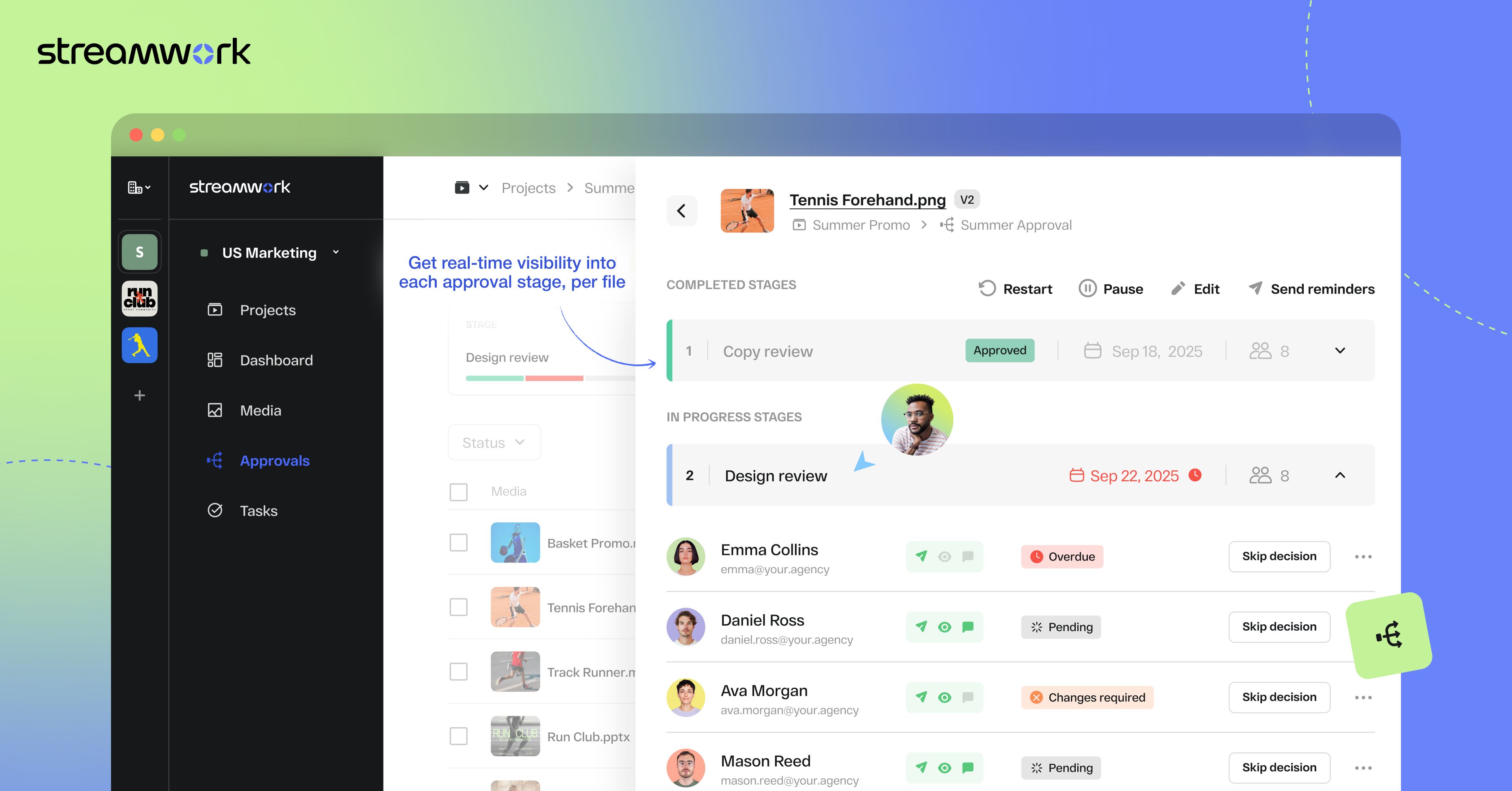
    1) I like that "Approvals" are on the main nav as this expedites my workflow as I'm QA for all our projects. I save time by not delving down into each project workspace 2) The Approval widget on the dashboard is also a time saver! 3) The "Review Approvals" section - I like being able to see the status of each user's approval process so I can send reminders 4) The "Skip Decision" feature is helpful as we're entering holiday season with folks being OOO.... we want to avoid gatekeeping/blockers. 5) While I haven't yet used the split review process, I can see how it will be helpful on my large-scale, long-term projects.
    Read full review
    Pros
    Projector PSA
    • Projector is a very well designed tool for project management. It has allowed us to eliminate a number of auxiliary tools for project timelines and WBS for the vast majority of our projects.
    • Time and expense entry is intuitive and quick for our staff.
    • Our forecasting and resource management capability has improved greatly with Projector and allows us to grow our team efficiently with minimal additional administrative burden.
    • Reporting is extremely robust. It does require some time to really get a handle on the full functionality of the reporting tool, but once you do, you can get almost any kind of report you want out of the system!
    Read full review
    StreamWork
    • Centralizes feedback so comments and approvals aren’t scattered across emails or docs
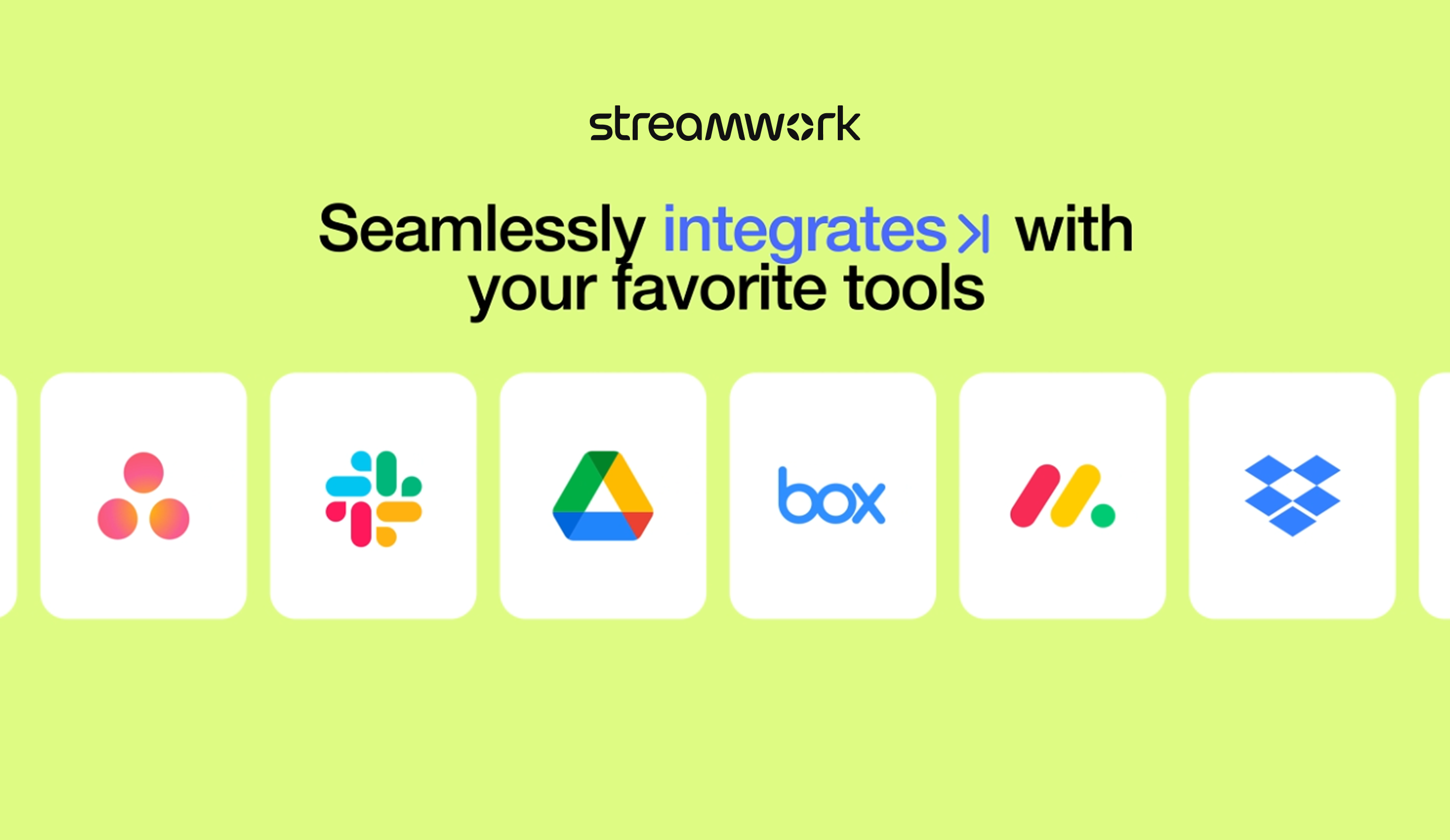
    • Integrates with Asana, keeping tasks aligned without extra duplication
    • Simple, intuitive interface that makes setup and adoption quick
    Read full review
    Cons
    Projector PSA
    • Release management process needs to be improved. Currently no facility is provided to test the impact of new releases in a sand-box. This introduces business risk if there are interfaces into Projector PSA as part of it's use in the business.
    Read full review
    StreamWork
    • Allow for more subfolders to better organize large campaigns
    • Create a new layout for the main workspace to allow for better organization for large agencies with many simultaneous projects
    • Allow changes to be made to approval process after initiated, and allow external users (clients) to be added to approval process
    Read full review
    Likelihood to Renew
    Projector PSA
    We have been using this tool for a year now and find our use of it continually evolves and broadens. We are also very excited about the overhaul that's under way and feel many of the improvements being put in place will help make us that much more effective and efficient. The Projector team is also very responsive and collaborative in terms of user feedback and improvement suggestions, which helps us know they will work hard to help us get what we need out of the tool.
    Read full review
    StreamWork
    No answers on this topic
    Usability
    Projector PSA
    Desktop interface feels complex to new users.
    Read full review
    StreamWork
    Once set up, StreamWork is very easy to use! Since I started using the platform, the team has pushed several key updates that have further improved user experience and usability.
    Read full review
    Reliability and Availability
    Projector PSA
    In 5 years of use we have never experienced an unscheduled outage.
    Read full review
    StreamWork
    No answers on this topic
    Alternatives Considered
    Projector PSA
    We did pursue Quick Arrow another tool that was similar. We found that be in inflexible in use. Projector allows a lot of flexibility in setup. Our organization has very specific business processes and we were able to set up Projector to work with those processes. Several other systems we tried were not as flexible in allowing set up to our needs.
    Read full review
    StreamWork
    StreamWork's Asana integration was the stand-out. I could not find any other platform that integrated so seamlessly into our existing process and automations.
    Read full review
    Return on Investment
    Projector PSA
    • Even in the small time that I stayed to see Projector PSA reporting I saw ROI projections become more realistic. There was real data to analyze that proved we were spending way too much and charging way too less on some projects.
    • Although employees were not used at entering their hours, this single reporting improved operations management and validated employees concerns that more people were needed to manage workload
    • Project proposals were more realistic because they were driven by real data.
    • Decision making overall for the department became more efficient and effective
    Incentivized
    Read full review
    StreamWork
    • StreamWork has made our creative review process far more efficient. It’s reduced turnaround times, minimized miscommunication, and helped us deliver assets to clients faster... all of which translate into better project outcomes and a clear ROI.
    Incentivized
    Read full review
    ScreenShots

    Projector PSA Screenshots

    Screenshot of Employee Dashboards help resources stay on task by displaying schedules and alerts.

    StreamWork Screenshots

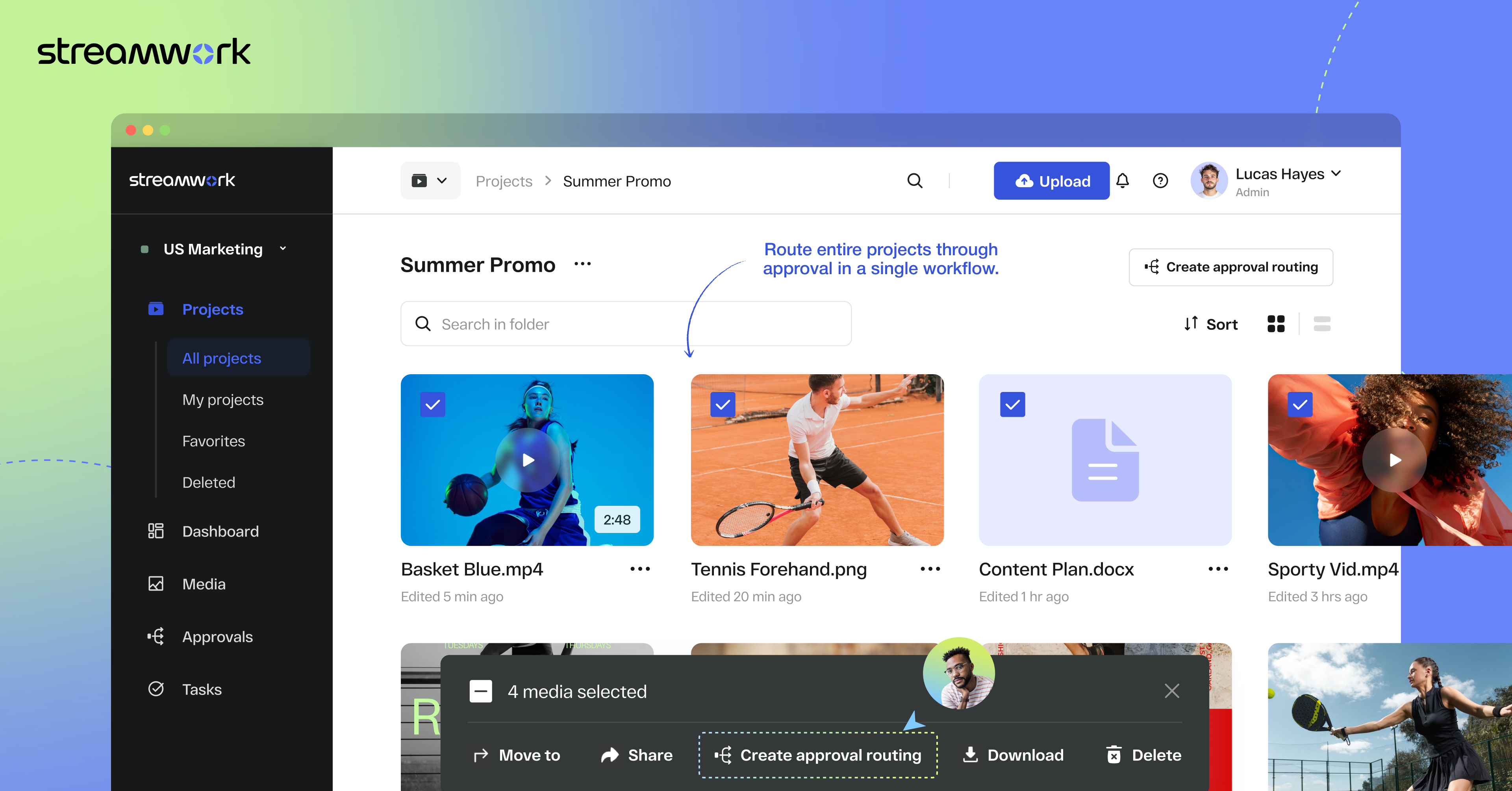
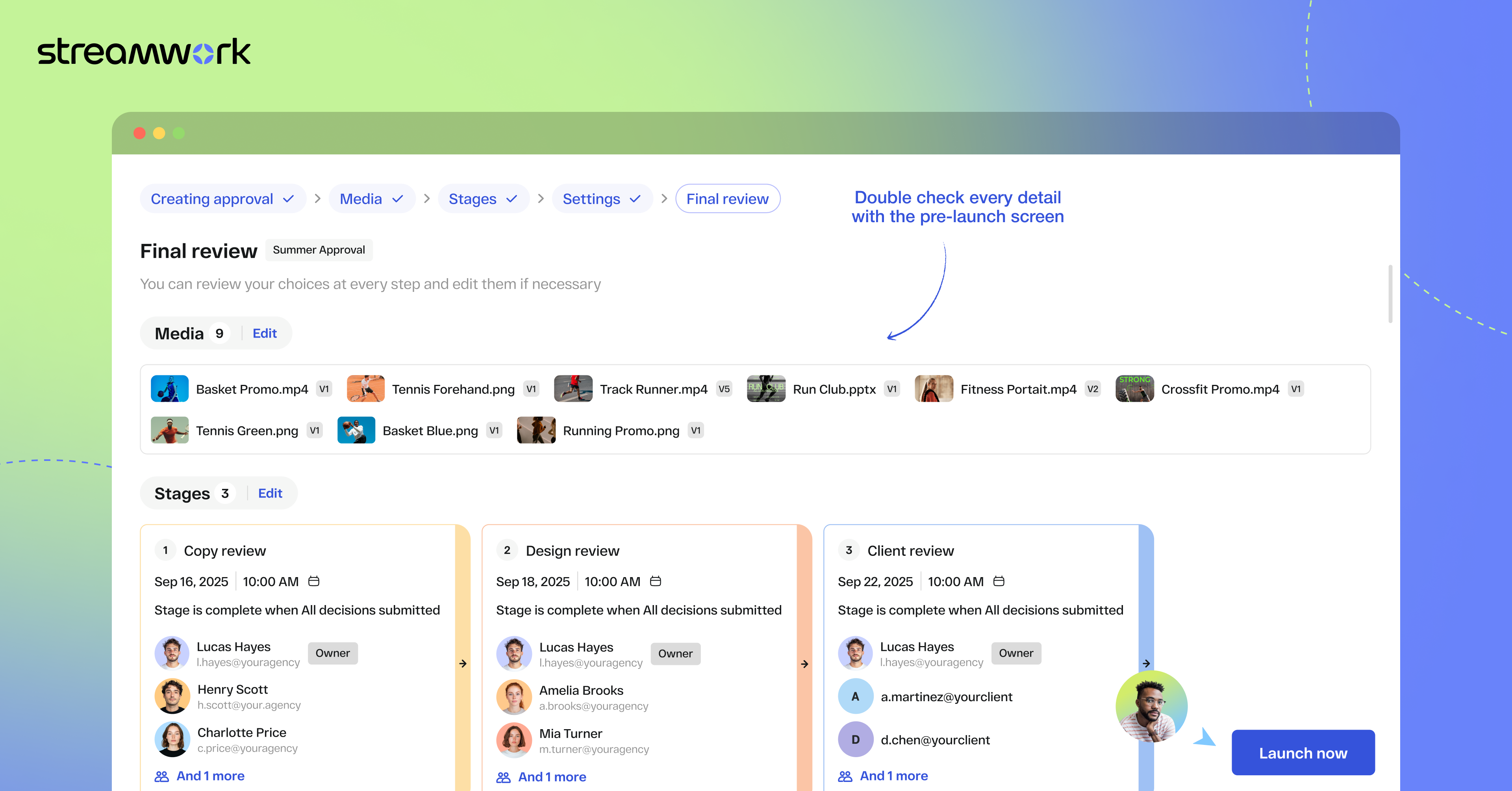
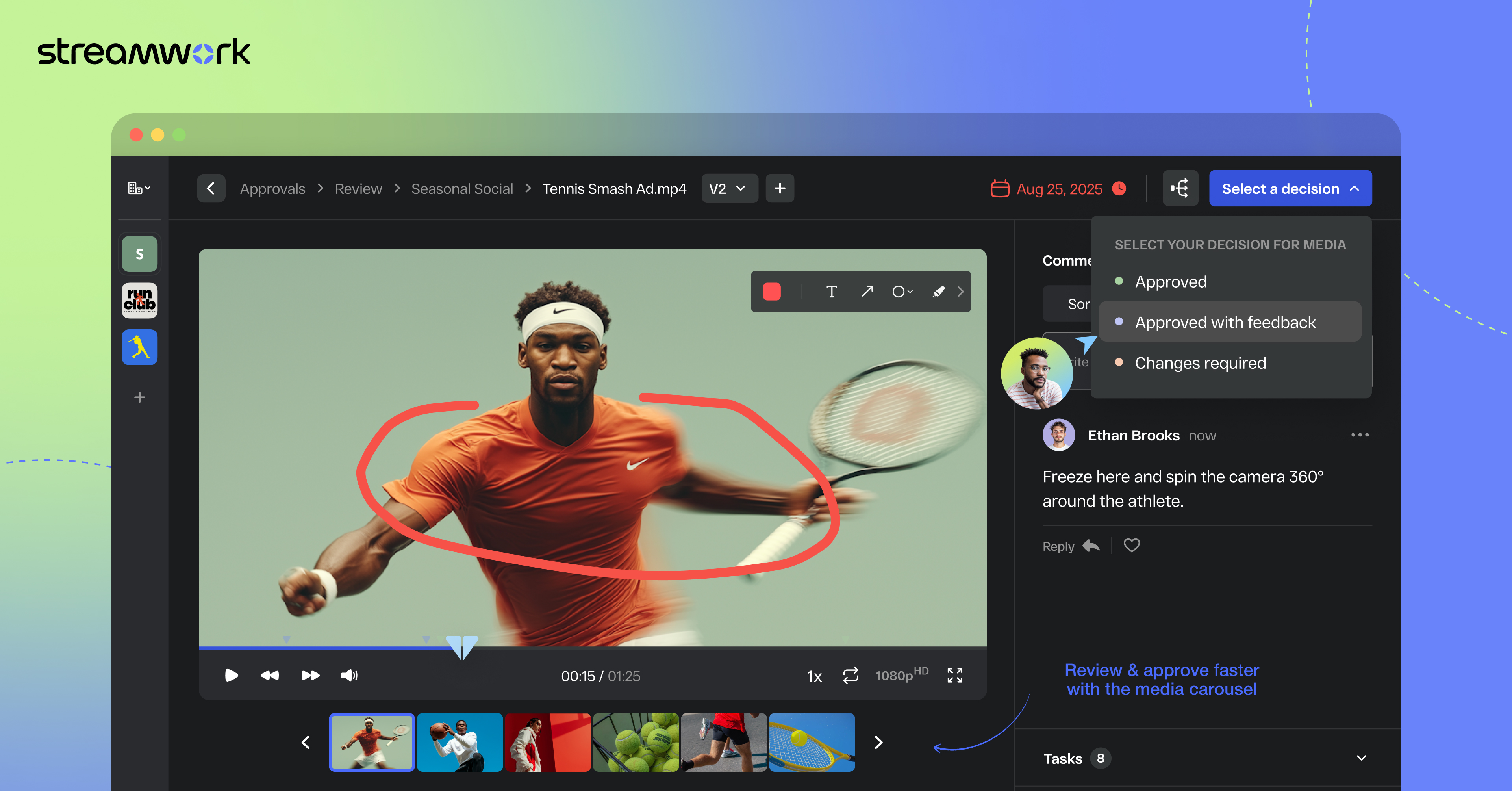
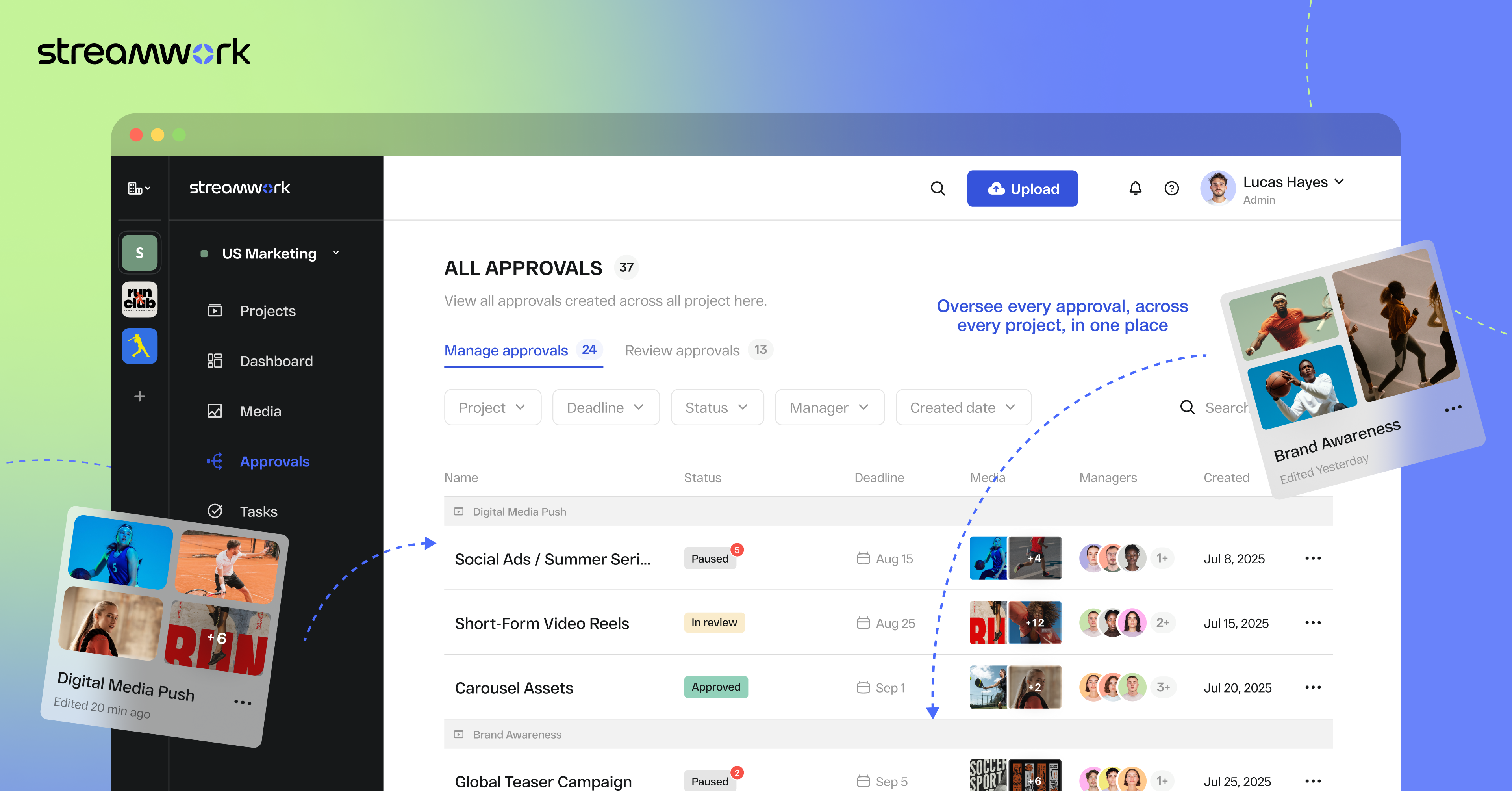
    Screenshot of StreamWork Bulk Enterprise Approval. Here, users can route multiple media files—videos, PDFs, images, and decks—through a single approval flow, helping to keep stakeholders aligned, reduce bottlenecks, and upload new versions without disrupting progress.Screenshot of StreamWork Final Approval Review. This automates complex reviews with customizable, multi-stage workflows. Conditional routing, reviewer permissions, and smart deadlines help to ensure projects move forward efficiently without manual follow-ups.Screenshot of StreamWork Online Proofing Software. Here, users can annotate nearly any file type with precision markup and contextual comments, convert feedback into tasks instantly, and @mention teammates to streamline collaboration and keep projects on track.Screenshot of StreamWork Granular Approval Tracking. This creates real-time visibility into all approvals at a glance by enabling users to track deadlines, reviewer progress, and project status from a single dashboard.Screenshot of StreamWork Enterprise Approval Dashboards. These help maintain full compliance and accountability with immutable audit logs. They display time-stamped decisions, monitor reviewer activity, and generate reliable approval histories for enterprise-grade governance.Screenshot of some of StreamWork direct integrations like Asana, Monday.com, Slack, Google Drive, and Dropbox.