QuickBooks Time vs. WebWork Time Tracker

Overview
ProductRatingMost Used ByProduct SummaryStarting Price
QuickBooks Time
Score 8.8 out of 10
N/A
QuickBooks Time (formerly TSheets) is a cloud-based time tracking and scheduling app that allows employees to clock in and out from the job site with the devices they’ve already got in their pockets. The vendor aims to help companies replace paper timesheets with accurate, electronic time data as well as make payroll and invoicing faster and less costly. QuickBooks Time also accurately tracks time and GPS points (even without cell or internet service) then automatically syncs when back…
$0
1 user, unlimited projects
WebWork Time Tracker
Score 9.8 out of 10
Small Businesses (1-50 employees)
WebWork Time Tracker is a time tracking and workforce management platform designed for growing teams. It combines automatic time tracking, task management, attendance and leave management, optional screenshots, and AI-driven productivity insights. WebWork integrates natively with Slack, Notion, and Asana, plus provides access to 8,000+ additional tools through Zapier and Make. WebWork is available across desktop (Windows, macOS, Linux), web, and mobile. Key Solutions…
$4.99
per month per user
Pricing
QuickBooks TimeWebWork Time Tracker
Editions & Modules
Free
$0
1 user, unlimited projects
Premium
$8
per user/month + $20 base fee/month (paid annually)
Elite
$10
per user/month + $40 base fee/month (paid annually)
Pro
$4.99
per month per user
Plus
$7.99
per month per user
Premium
$8.99
per month per user
Offerings
Pricing Offerings
QuickBooks TimeWebWork Time Tracker
Free Trial
YesYes
Free/Freemium Version
YesNo
Premium Consulting/Integration Services
NoNo
Entry-level Setup FeeNo setup feeNo setup fee
Additional Details14-day free trial for all pricing plans. No credit card is required. Discount available for annual pricing.
More Pricing Information
Community Pulse
QuickBooks TimeWebWork Time Tracker
Best Alternatives
QuickBooks TimeWebWork Time Tracker
Small Businesses
Buddy Punch
Buddy Punch
Score 10.0 out of 10
Buddy Punch
Buddy Punch
Score 10.0 out of 10
Medium-sized Companies
Buddy Punch
Buddy Punch
Score 10.0 out of 10
Buddy Punch
Buddy Punch
Score 10.0 out of 10
Enterprises
Zoho People
Zoho People
Score 8.6 out of 10
Zoho People
Zoho People
Score 8.6 out of 10
All AlternativesView all alternativesView all alternatives
User Ratings
QuickBooks TimeWebWork Time Tracker
Likelihood to Recommend
8.6
(195 ratings)
10.0
(1 ratings)
Likelihood to Renew
10.0
(3 ratings)
-
(0 ratings)
Usability
9.5
(6 ratings)
-
(0 ratings)
Support Rating
2.1
(31 ratings)
-
(0 ratings)
Implementation Rating
6.0
(1 ratings)
-
(0 ratings)
User Testimonials
QuickBooks TimeWebWork Time Tracker
Likelihood to Recommend
Intuit
It would be very useful for certain remote jobs that require a high level of presence, as in the case of web development, or remote maintenance sessions, so that when reviewing the work data it is possible to ensure that there will be no failures. By being able to include files in the management, from the equipment tab, it is possible to fully control the hours in which each change in these files were made.
Read full review
WebWork Time Tracker
WebWork is well suited for all organizations where they need to maintain a tracker for the employee to detect productivity and maintain attendance by calculating time. We can easily manage projects with WebWork and also easy for the team to work on.
Read full review
Pros
Intuit
  • Support (their help desk team is incredibly helpful and always quick to respond).
  • Ease of access and use (the app is user-friendly an intuitive, and the desktop version is equally as approachable).
  • Manager functionality (it's useful to be able to clock employees in and out at multiple events on the same day by sorting them into different groups by manager/event).
Read full review
WebWork Time Tracker
  • It super cool features to detect user's productivity
  • We can work on team easily through WebWork on perticular project.
  • Accurate time showing.
  • Catch snapshot of user's screen on daily basis.
Read full review
Cons
Intuit
  • The desktop version of the TSheets schedule does not have a search feature. This makes it challenging to find things you are looking for without extra work
  • The app can be a bit buggy. Though it is a great app, there are many reasons that the app will stop syncing and can cause problems with staff scheduling
Read full review
WebWork Time Tracker
  • Some times snapshot of user's screen is going black.
Read full review
Likelihood to Renew
Intuit
TSheets tech support people, like Shawn Sommer, from Tsheets. She has been instrumental, after terminating the person in charge of TSheets I was left with a learning curve too high to climb but after 10 mins of her instructions I was able to make payroll in no time. She cleared all errors that nobody had fixed before.
TSheets is not a vendor for me, TSheets is my partner in business. Thank you TSheets.
Read full review
WebWork Time Tracker
No answers on this topic
Usability
Intuit
Our employees find TSheets easy to use and spend minimal time at reporting hours using it. As an administrator and user of the TSheets "data and information" I am extremely positive on the functionality and reporting that it has provided me. From its ease of set-up to training to reporting, TSheets has made us so much more efficient from an administration standpoint
Read full review
WebWork Time Tracker
No answers on this topic
Support Rating
Intuit
I have never failed to have an issue resolved within minutes of contacting Support. Jen D recently assisted my with an export issue and I was back on track in less the 10 minutes. She was knowledgable and thought about the current and future contexts of the issue and assured there would be no recurrence next payroll.
Read full review
WebWork Time Tracker
No answers on this topic
Implementation Rating
Intuit
I wasn't originally helping with the implementation so not sure.
Read full review
WebWork Time Tracker
No answers on this topic
Alternatives Considered
Intuit
Besides Intuit Payroll (Sage), the only program I've used is WorkBrain through Menards, and it's more as a scheduling guideline for management, employees don't use it to punch in or out or record hours. However, WorkBrain does show scheduling and it matches with a punch clock to record those hours. Every other place I've used has used either punch clocks or handwritten time cards. I think the TSheets is modern, user-friendly, convenient, accessible, and cost-effective for the owners. It also streamlines payroll for the Accountant instead of manually entering all hours for multiple employees by hand into a software program like Sage.
Read full review
WebWork Time Tracker
No answers on this topic
Return on Investment
Intuit
  • As a Microsoft Access software development shop, Help4Access could have built ourselves a time tracking system, but why reinvent the wheel?
  • tSheets got us out of spreadsheets and into the cloud in days not months.
  • The ROI the first year is over $5,000.
Read full review
WebWork Time Tracker
  • It impact almost positively in our organization like we can maintain attendance and check time spent.
  • Easily maintain task on different project.
Read full review
ScreenShots

QuickBooks Time Screenshots

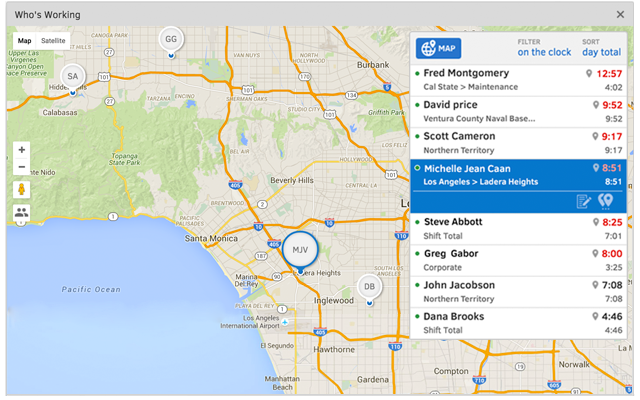
Screenshot of TSheets is the only time tracking app embedded inside QuickBooks. You can easily review and approve employee time cards to run payroll, do job costing, or create invoices--without ever leaving QuickBooks!Screenshot of With accurate employee hours from TSheets at your fingertips, you're always ready to run payroll--without the tedious manual entry!Screenshot of TSheets is more than just a time tracker. It keeps a timestamp for each clock in/out, job code change & GPS location. See who’s on the clock, where, and their assigned schedule—in real-time.Screenshot of Creating a schedule with Excel is costing you more than you think. TSheets employee scheduling software makes it faster & easier than ever to build & share schedules with employees, assign jobs & shifts, & keep your workforce in sync.Screenshot of Track time using devices your employees already use; any computer, mobile phone or landline, iPhone or Android app, smartphone browser, text message or Twitter.Screenshot of Really friendly free, unlimited support by phone, chat, or email. We guarantee you'll be impressed.

WebWork Time Tracker Screenshots

Screenshot of the payment processScreenshot of the time tracker, with screenshots with 4 modes for increased transparencyScreenshot of productivity monitoring and activity level reportsScreenshot of the team productivity monitoring interfaceScreenshot of timesheet approvals for streamlined processesScreenshot of