Quire vs. TickTick

Overview
ProductRatingMost Used ByProduct SummaryStarting Price
Quire
Score 8.0 out of 10
N/A
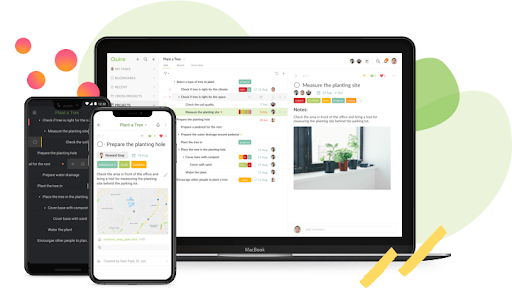
Quire is a visual collaboration platform that enables task and project management. It allows users to visualize their workflows and improves real-time collaboration.
$10.95
per month per user
TickTick
Score 8.2 out of 10
N/A
TickTick from the company of the same name in San Francisco is presented by the vendor as a simple and effective to-do list and task manager that helps users make schedules, manage time, and organize all aspects of life.
$35.99
per year
Pricing
QuireTickTick
Editions & Modules
Professional
$10.95
per month per user
Premium
$18.95
per month per user
Enterprise
$24.95
per month per user
TickTick Premium
$35.99
per year
Offerings
Pricing Offerings
QuireTickTick
Free Trial
YesNo
Free/Freemium Version
YesNo
Premium Consulting/Integration Services
NoNo
Entry-level Setup FeeNo setup feeNo setup fee
Additional Details
More Pricing Information
Community Pulse
QuireTickTick
Considered Both Products
Quire
Chose Quire
Much better for bigger projects than Todoist because of the Gantt chart view. Lighterweight than Jira, which is nice to get started quickly. And more specific than notion for project management, where you have to set everything up yourself, and the Gantt chart experience isn't …
Chose Quire
Quire comes close to Nuclino, but Nuclino wins with its ability to create "cards" and organize a little more neatly.
Chose Quire
Quire outdoes Todoist in terms of free features but Todoist has a native mac app, and that's why I use it. If Quire had a native mac app, that would be very useful to me.
TickTick
Chose TickTick
Notion has a lot more feature but it is much more complicated and chaotic for simple to do lists. Google tasks is easy to use, but at least for me much harder to organize correctly. While you can do that nicely, goodle requires more effort and I don't like to overcolicate …
Chose TickTick
Todoist is almost equivalent to Ticktick; the only thing is that it is a bit more expensive. Todoist does have a few more fancy AI features, which I presume will be helpful moving forward. Google Tasks would have been great had it not been left undeveloped by Google. The fact …
Chose TickTick
They all fill a similar role, but I have found TickTick to be the most robust, while still being simple to use and navigate. I like the ability to set due dates and importance levels to individual tasks. I like the ability to create subtasks and assign them different due dates.
Chose TickTick
TickTick has a better UI and UX compared to the other competitors, and the Quick Add feature from any window is a must for inbox task management!
Chose TickTick
In researching options for our task manager, we chose to use TickTick because it was the most user-friendly. The platform made sense to us, is intuitive to use, is affordable for our needs, and has "smart" features that make our jobs easier. Trello is a great program and has …
Features
QuireTickTick
Project Management
Comparison of Project Management features of Product A and Product B
Quire
7.0
Ratings
10% below category average
TickTick
7.0
Ratings
10% below category average
Task Management8.20 Ratings9.30 Ratings
Resource Management7.30 Ratings6.60 Ratings
Gantt Charts9.10 Ratings7.00 Ratings
Scheduling7.30 Ratings8.00 Ratings
Workflow Automation5.50 Ratings7.50 Ratings
Team Collaboration4.50 Ratings6.50 Ratings
Support for Agile Methodology6.40 Ratings6.20 Ratings
Email integration7.30 Ratings6.20 Ratings
Mobile Access7.30 Ratings9.00 Ratings
Support for Waterfall Methodology00 Ratings7.00 Ratings
Document Management00 Ratings6.00 Ratings
Timesheet Tracking00 Ratings5.00 Ratings
Best Alternatives
QuireTickTick
Small Businesses
Stackby
Stackby
Score 8.8 out of 10
Stackby
Stackby
Score 8.8 out of 10
Medium-sized Companies
InEight
InEight
Score 8.2 out of 10
InEight
InEight
Score 8.2 out of 10
Enterprises
InEight
InEight
Score 8.2 out of 10
InEight
InEight
Score 8.2 out of 10
All AlternativesView all alternativesView all alternatives
User Ratings
QuireTickTick
Likelihood to Recommend
7.3
(0 ratings)
7.9
(0 ratings)
Likelihood to Renew
-
(0 ratings)
9.0
(0 ratings)
Usability
7.3
(0 ratings)
9.3
(0 ratings)
Support Rating
10.0
(0 ratings)
10.0
(0 ratings)
User Testimonials
QuireTickTick
Likelihood to Recommend
Quire is useful for tracking daily to-do's or keeping track of a project. It's not as clean as some other software (such as Nuclino, for example) and can get a little messy when creating a Workspace. It was difficult for me to know what was private and what was visible to my collaborators
Read full review
TickTick works well for personal use - managing daily and/or recurring to do's through a variety of lists. These can be renamed as needed. This has contributed to an increase in the completion of projects for me. TickTick also works well for collaboration on a list by list basis. Say that I have a project at work that I need to work with a teammate on - I can create the list and share it with my teammate. From there we can tag-team the project. There is the option for adding to-do lists inside of a top-level list and areas for commenting by the collaborators. This allows us to bypass unneeded meetings or emails to remember what needs to be done next on the project. TickTick may be less suited for situations where photos or files need to be shared for a project or for more complex project management.
Read full review
Pros
  • The ability to tag and label items.
  • The ability to set the priority level.
  • The ability to complete items and have them removed from the list.
Read full review
  • Quick Input Feature
  • Custom List
  • Multi view. Including the calendar view and kanban view
  • Multi-platform including web, desktop, and mobile
  • Easy-to-share specific list
Read full review
Cons
  • Minor UI bugs.
  • Sometimes unintuitive entry order.
  • Calendar view
Read full review
  • 2 way sync integration with Google Calendar.
  • Sync with Apple Calendar and Reminders.
  • Natural language processing.
  • AI enabled quick task creation, suggestions and segregation.
  • AI suggested segregation of tasks.
Read full review
Likelihood to Renew
No answers on this topic
So far it accomplishes everything I need it to without unnecessary complications. The only reason I can think that I wouldn't renew is if I was required to use something else.
Read full review
Usability
Very easy to input tasks, assign them to people, and make dependencies between tasks. Workflow is super convenient once you get used to using enter or tab in the right place. Can do a lot of things from the keyboard, but the commands are not as intuitive as those in Todoist.
Read full review
It is super simple in its set up and easy to learn to use. Many other apps are overly complicated which TickTick is not. It always depende on what features you are looking for but I did not even need to explain anything to those who struggle with newer technology
Read full review
Support Rating
Friendly and prompt support. No issues.
Read full review
In all honesty, we have never needed to reach out to TickTick for support.
Read full review
Alternatives Considered
Much better for bigger projects than Todoist because of the Gantt chart view. Lighterweight than Jira, which is nice to get started quickly. And more specific than notion for project management, where you have to set everything up yourself, and the Gantt chart experience isn't great. Selected Quire because it was fast to put stuff into and get started quickly!
Read full review
Todoist is almost equivalent to Ticktick; the only thing is that it is a bit more expensive. Todoist does have a few more fancy AI features, which I presume will be helpful moving forward. Google Tasks would have been great had it not been left undeveloped by Google. The fact that it has a great integration with Google Calendar is what I personally desire, but unfortunately, it falls massively short in all other things. The notion is great for overall knowledge management, unlike personal tasks, as it gets slower the more you load it up. Any.do is good, but it doesn't match up with Ticktick or Todoist and is more expensive.
Read full review
Return on Investment
  • There has been a lot of time saved
  • Overall clarity
Read full review
  • easier handovers for new and current employees
  • better structure leads to time saved
Read full review
ScreenShots

Quire Screenshots

Screenshot of Quire workspace overviewScreenshot of device syncScreenshot of Quire project view