TrustRadius: an HG Insights company

Save this comparison

Save this comparison

Add Product

Recommended Comparisons

    Overview
    ProductRatingMost Used ByProduct SummaryStarting Price

    resynced.io

    N/AN/Aresynced.io is a platform used to keep data in sync across different tools like monday.com, Google Sheets, Notion, and Smarsheet. It supports both one-way and two-way synchronization, so that the user decides whether changes flow in a single direction or stay in sync across both platforms. The goal of resynced.io is to reduce the need for manual data copying or repetitive updates between tools. For example, if a team manages tasks in monday.com but builds reports in Google…

    $29

    per month

    Zapier

    Score8.9 out of 10
    N/AThe Zapier Automation Platform designed to integrate data between web apps. It is scaled for small to mid-sized businesses, with a functional but limited free version of the program.

    $29.99

    per month 750 tasks per month

    Pricing
    resynced.ioZapier
    Editions & Modules
    Micro
    $29
    per month (500 items in sync & 5 active syncs)
    Starter
    $59
    per month (1000 items in sync & 10 active syncs)
    Standard
    $119
    per month (5000 items in sync & 20 active syncs)
    Pro
    $359
    per month (25000 items in sync & 30 active syncs)
    Custom
    Custom Pricing
    Starter
    $29.99
    per month 750 tasks per month
    Professional
    $73.50
    per month 2k tasks per month
    Team
    $103.50
    per month 2k tasks per month
    Company
    Contact Sales
    Offerings
    Pricing Offerings
    resynced.ioZapier
    Free Trial
    YesNo
    Free/Freemium Version
    NoYes
    Premium Consulting/Integration Services
    YesNo
    Entry-level Setup FeeNo setup feeNo setup fee
    Additional DetailsDiscount of up to 20% for annual pricing.33% discount for annual pricing.
    More Pricing Information
    Community Pulse
    resynced.ioZapier
    Considered Both Products
    LeanyLabs
    No answer on this topic
    Zapier
    No answer on this topic
    Key User Insights
    Would buy again
    No answers on this topic
    94%
    Would buy again
    47 Answers
    Delivers good value for the price
    No answers on this topic
    92%
    Delivers good value for the price
    44 Answers
    Happy with the feature set
    No answers on this topic
    96%
    Happy with the feature set
    48 Answers
    Lived up to sales and marketing promises
    No answers on this topic
    93%
    Lived up to sales and marketing promises
    43 Answers
    Implementation went as expected
    No answers on this topic
    98%
    Implementation went as expected
    46 Answers
    Features
    resynced.ioZapier
    Cloud Data Integration
    Comparison of Cloud Data Integration features of resynced.io and Zapier
    Feature
    resynced.io
    -
    Ratings
    Zapier
    9.3
    107 Ratings
    14% above category average
    Pre-built connectors00 Ratings9.6103 Ratings
    Connector modification00 Ratings9.091 Ratings
    Support for real-time and batch integration00 Ratings8.389 Ratings
    Data quality services00 Ratings9.672 Ratings
    Data security features00 Ratings9.871 Ratings
    Monitoring console00 Ratings9.580 Ratings
    Best Alternatives
    resynced.ioZapier
    Small Businesses
    Make
    Score9.3 out of 10
    Make
    Score9.3 out of 10
    Medium-sized Companies
    IBM App Connect
    Score9 out of 10
    IBM App Connect
    Score9 out of 10
    Enterprises
    Workato
    Score9.3 out of 10
    Workato
    Score9.3 out of 10
    All AlternativesView all alternativesView all alternatives
    User Ratings
    resynced.ioZapier
    Likelihood to Recommend
    -
    (0 ratings)
    9.4
    (112 ratings)
    Likelihood to Renew
    -
    (0 ratings)
    10.0
    (1 ratings)
    Usability
    -
    (0 ratings)
    9.7
    (11 ratings)
    Support Rating
    -
    (0 ratings)
    1.0
    (10 ratings)
    User Testimonials
    resynced.ioZapier
    Likelihood to Recommend
    LeanyLabs
    No answers on this topic
    Zapier
    If you have processes that are now managed and controlled using a spreadsheet, Zapier will give you a lot more control over what is happening and will help you increase productivity by eliminating simple steps such as sending emails and sharing information with your colleagues. It frees time for very transactional activities.
    Incentivized
    Read full review
    Pros
    LeanyLabs
    No answers on this topic
    Zapier
    • Ease of use - multiple people in the organization can set up and run Zaps per their specific use cases without much training.
    • Connectivity - Zapier is able to connect to multiple applications we use on a regular basis.
    • Functionality - Zapier provides embedded functionality within the app itself (email, data conversion), but also appropriate triggers and actions for apps it connects to.
    • Versatile - Zapier can execute complicated and simple tasks and thus has many use cases.
    Incentivized
    Read full review
    Cons
    LeanyLabs
    No answers on this topic
    Zapier
    • Being able to turn off one leg of a Zap without having to delete it or turn the whole Zap off
    • Not all fields populate when using certain aspects of Salesforce, but that could be an SF issue
    • Communication when support is actually needed basically doesn't happen
    Incentivized
    Read full review
    Likelihood to Renew
    LeanyLabs
    No answers on this topic
    Zapier
    Zapier is now very much an integral part of our business and we could not operate without it!
    Incentivized
    Read full review
    Usability
    LeanyLabs
    No answers on this topic
    Zapier
    The interface is very user-friendly, and there are also many tools to help a brand-new user get started. For example, you can put your Zap idea into the AI bot, and it will basically build a shell of your Zap to get started on. The format for each step within a Zap is also very helpful (set up the connection/app, set up the fields/details, then test).
    Incentivized
    Read full review
    Support Rating
    LeanyLabs
    No answers on this topic
    Zapier
    Before we purchased Zapier, I contacted support and asked them if Zapier could support my intended workflow (this is actually a selection on their support form - awesome). Within 2 hours, I was contacted by a support team member who seemed sure it would work, but granted me premium access for 2 weeks to try it out for myself. Sure enough, it did! Ever since then, support has replied rapidly to any problems I have experienced and answered my questions within a few sentences.
    Incentivized
    Read full review
    Alternatives Considered
    LeanyLabs
    No answers on this topic
    Zapier
    We actually utilize both Integromat and Zapier at our company, for all the reasons detailed in this review. Though Zapier is excellent for simple client integrations, we often run into internal use cases that require complexity that Zapier cannot provide. Specifically working with API calls (not just webhooks), complex multi-step integrations with Routing/parsing/etc, and large volume integrations. Integromat is perfect for these use cases, but doesn’t provide the simplicity and account scalability that Zapier offers.
    Incentivized
    Read full review
    Return on Investment
    LeanyLabs
    No answers on this topic
    Zapier
    • It has saved me the money in hiring an administrative assistant
    • It also saved me the time it took to do these tasks
    • It also allowed me to automate things that increased my lead generation
    • It also allowed me to automate several processes
    Incentivized
    Read full review
    ScreenShots

    resynced.io Screenshots

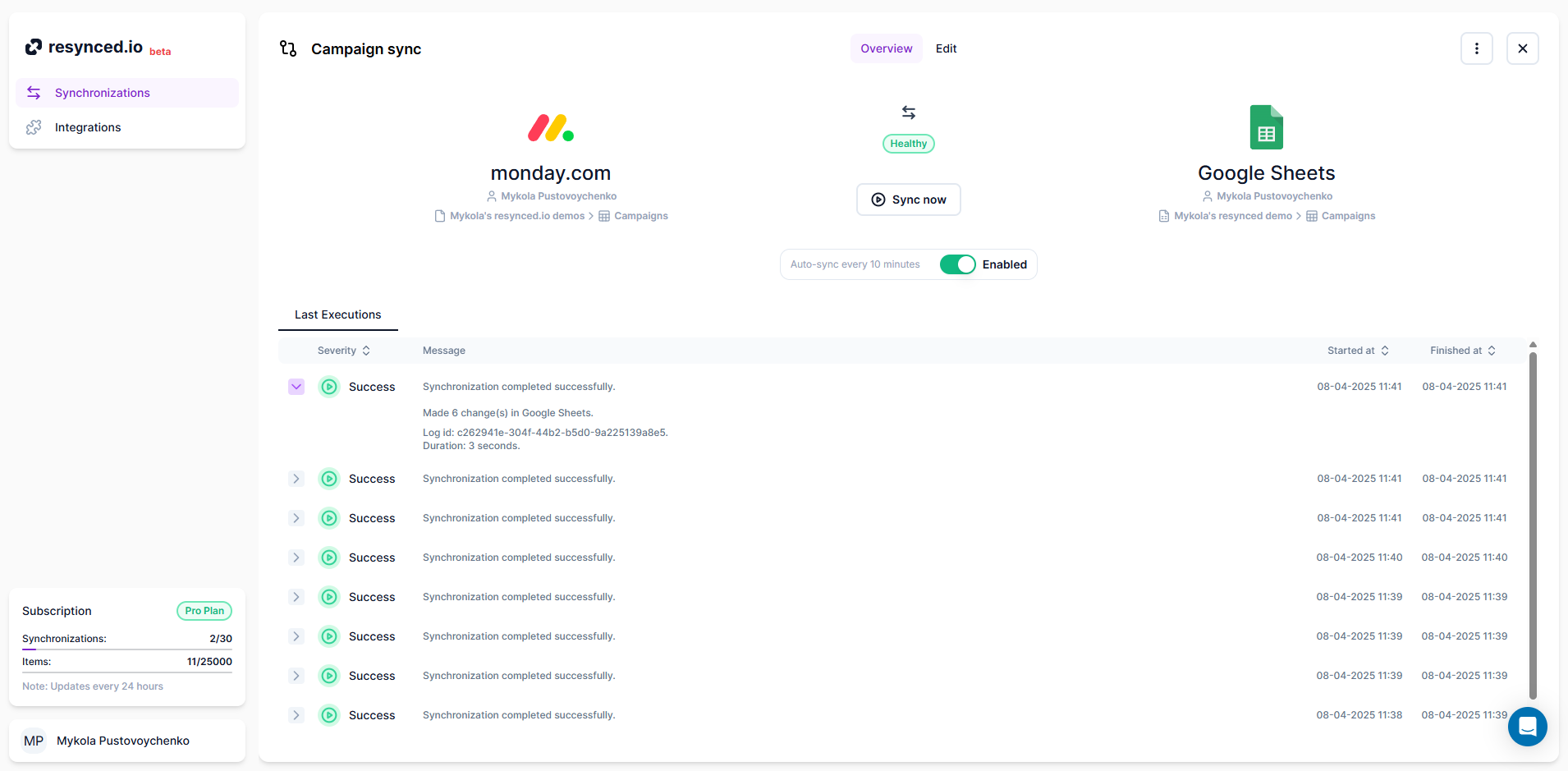
    Screenshot of the synchronization editor, which is the heart of resynced.io This is how the synchronization is created. Here, the user can decide on sync sources, sync direction, and map columns between their tools.Screenshot of how resynced.io allows having multiple synchronizations between different tools managed in one place.Screenshot of where it's shown every synchronization has a detailed log for every execution, so users can see a summary of each sync and, in case of an error, a detailed explanation with actionable steps.