BitBar vs. WebEngage

Overview
ProductRatingMost Used ByProduct SummaryStarting Price
BitBar
Score 6.6 out of 10
N/A
BitBar allows users to test applications across the latest and most popular real browsers and devices. Users can scale testing by increasing test coverage and decreasing test execution time by running automated tests in parallel across browsers and devices. BitBar integrates with the user's current tech stack or CI/CD pipeline. Key Features: * BitBar offers one cloud for all testing platforms whether it be web, native, or hybrid applications. * Test an application across real…
$39
per month
WebEngage
Score 4.4 out of 10
N/A
WebEngage calls itself a multi-channel user engagement platform. It automates communication across a user's lifecycle and helps companies send messages via these channels: Web Messages In-app Messages Push Notifications Web Push Notification Email Marketing SMS Marketing Facebook Remarketing According to the vendor, cross-device tracking helps keep communication coherent and contextual, making the…N/A
Pricing
BitBarWebEngage
Editions & Modules
No answers on this topic
Offerings
Pricing Offerings
BitBarWebEngage
Free Trial
YesYes
Free/Freemium Version
NoYes
Premium Consulting/Integration Services
NoYes
Entry-level Setup FeeNo setup feeNo setup fee
Additional DetailsEnterprise packages are available for larger teams and customers.Pricing is customised according to the customer usage and requirement. Contact support@webengage.com to know more about pricing plans.
More Pricing Information
Community Pulse
BitBarWebEngage
Features
BitBarWebEngage
Email & Online Marketing
Comparison of Email & Online Marketing features of Product A and Product B
BitBar
-
Ratings
WebEngage
7.4
6 Ratings
3% below category average
Dynamic content00 Ratings7.36 Ratings
Ability to test dynamic content00 Ratings7.76 Ratings
Mobile optimization00 Ratings6.35 Ratings
Email deliverability reporting00 Ratings7.16 Ratings
List management00 Ratings7.86 Ratings
Triggered drip sequences00 Ratings8.26 Ratings
Lead Management
Comparison of Lead Management features of Product A and Product B
BitBar
-
Ratings
WebEngage
6.1
5 Ratings
25% below category average
Lead nurturing automation00 Ratings6.65 Ratings
Automated sales alerts and tasks00 Ratings5.65 Ratings
Campaign Management
Comparison of Campaign Management features of Product A and Product B
BitBar
-
Ratings
WebEngage
6.9
6 Ratings
7% below category average
Calendaring00 Ratings8.05 Ratings
Event/webinar marketing00 Ratings5.74 Ratings
Reporting & Analytics
Comparison of Reporting & Analytics features of Product A and Product B
BitBar
-
Ratings
WebEngage
7.2
6 Ratings
2% below category average
Dashboards00 Ratings7.56 Ratings
Standard reports00 Ratings7.56 Ratings
Custom reports00 Ratings6.76 Ratings
Platform & Infrastructure
Comparison of Platform & Infrastructure features of Product A and Product B
BitBar
-
Ratings
WebEngage
7.1
6 Ratings
5% below category average
API00 Ratings8.26 Ratings
Role-based workflow & approvals00 Ratings7.15 Ratings
Customizability00 Ratings6.85 Ratings
Integration with Salesforce.com00 Ratings6.15 Ratings
Best Alternatives
BitBarWebEngage
Small Businesses
BrowserStack
BrowserStack
Score 8.5 out of 10
Vbout
Vbout
Score 9.9 out of 10
Medium-sized Companies
BrowserStack
BrowserStack
Score 8.5 out of 10
PFL Direct Mail Platform
Score 9.0 out of 10
Enterprises
BrowserStack
BrowserStack
Score 8.5 out of 10
PFL Direct Mail Platform
Score 9.0 out of 10
All AlternativesView all alternativesView all alternatives
User Ratings
BitBarWebEngage
Likelihood to Recommend
8.2
(6 ratings)
7.3
(6 ratings)
User Testimonials
BitBarWebEngage
Likelihood to Recommend
SmartBear
CrossBrowserTesting is a great tool to use when you have a new page or new content that you want to test on an array of devices/browsers. In the diverse online world nowadays, it is nearly impossible to ensure optimization for every case. CBT allows you to get closer to that goal.
Read full review
WebEngage
WebEngage can easily reduce turnaround time for product and marketing teams to execute marketing campaigns for specific user segments as well as remove any dependency on internal tech teams for the development and maintenance of automation journeys. Further, A/B tests can be executed to measure the performance of message variants in real-time directly from the panel. But WebEngage lacks a robust Analytics platform. While basic metrics such as open rate and click-through rate for messages being sent can be considered for reporting, attribution is still not the strongest suit in case the marketing team relies on multiple Ad networks for acquisition. Thus, as per experience, it's better to use the automation suite offered by WebEngage with a different data analytics platform.
Read full review
Pros
SmartBear
  • Allows me to test on our development server with ease which is behind a firewall.
  • Using automation for my tests.
  • Screenshots of the problems on each page.
  • Ability to jump between screen sizes quickly.
Read full review
WebEngage
  • Ease in creating user journeys.
  • Easy implementation of APIs.
  • Good reporting dashboard and scheduling features.
  • Segmentation of the users is easy.
Read full review
Cons
SmartBear
  • Test case support is somewhat limited in customization ability.
  • Not a unique problem to them (or their 'fault'), but content behind VPN or intranet cannot be scanned.
  • Pricing with tier level and features can sometimes be confusing (ie. what is and what is not included).
Read full review
WebEngage
  • Relays
  • Onsite should have more options of templates.
  • Backend support for better reachability of the channels.
  • Cohort studies should be more customizable.
Read full review
Alternatives Considered
SmartBear
Selenium: 1. Selenium is Open source tool 2. Needs proper framework development and integration with multiple 3rd party tools 3. Not much secure 4. Needs scripting knowledge for people working on it 5. takes time and effort CrossBrowser Testing: 1. Licensed , so secure 2. Less time , less effort 3. Quick results 4. No scripting language knowledge needed 5. More coverage 6. Without any framework creation also we can test on multiple devices/browsers
Read full review
WebEngage
WebEngage's dashboard is relatively more intuitive and easy to understand. Further in terms of cost as well it is value to money as it delivers excellent ROI. The after-sales support is also better in terms of responsiveness and helps in case of issues with the execution of campaigns. The account managers also ideate and help in the optimization and creation of new user journeys.
Read full review
Return on Investment
SmartBear
  • By using CrossBrowserTesting we are saving many hours a week in manual work hours.
  • Our automated Selenium tests run in a fraction of the time it takes to manually test our components, so we can spend more time building great user experiences and less time triaging bugs.
Read full review
WebEngage
  • Helped in lowering cost of marketing.
  • Driving higher volume of Direct Sales.
  • Increasing conversion rate on the website.
  • Increasing lead to sale ratio.
Read full review
ScreenShots

WebEngage Screenshots

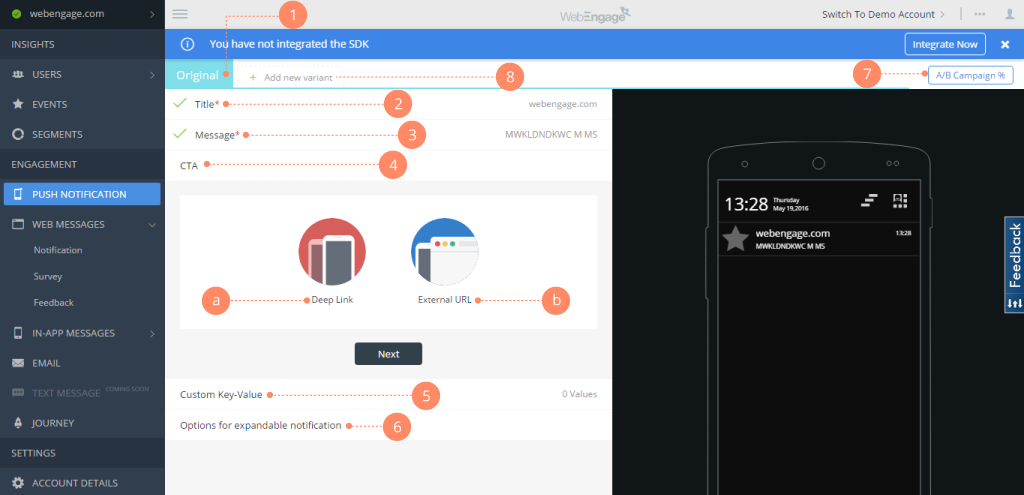
Screenshot of Webengage dashboard - User AnalyticsScreenshot of Webenagge dashboard - User DetailsScreenshot of Webengage dashboard - Creating Mobile notificationsScreenshot of Webengage dashboard - Creating EmailsScreenshot of Webengage Dashboard - Journey DesignerScreenshot of Webengage Dashboard - Journey Designer (2)