SolarWinds Netflow Traffic Analyzer is a network monitoring tool within the broader SolarWinds ecosystem. It includes core traffic monitoring features, as well as customizable traffic reports and alerts.
N/A
SolarWinds Network Configuration Manager (NCM)
Score8.3 out of 10
N/A
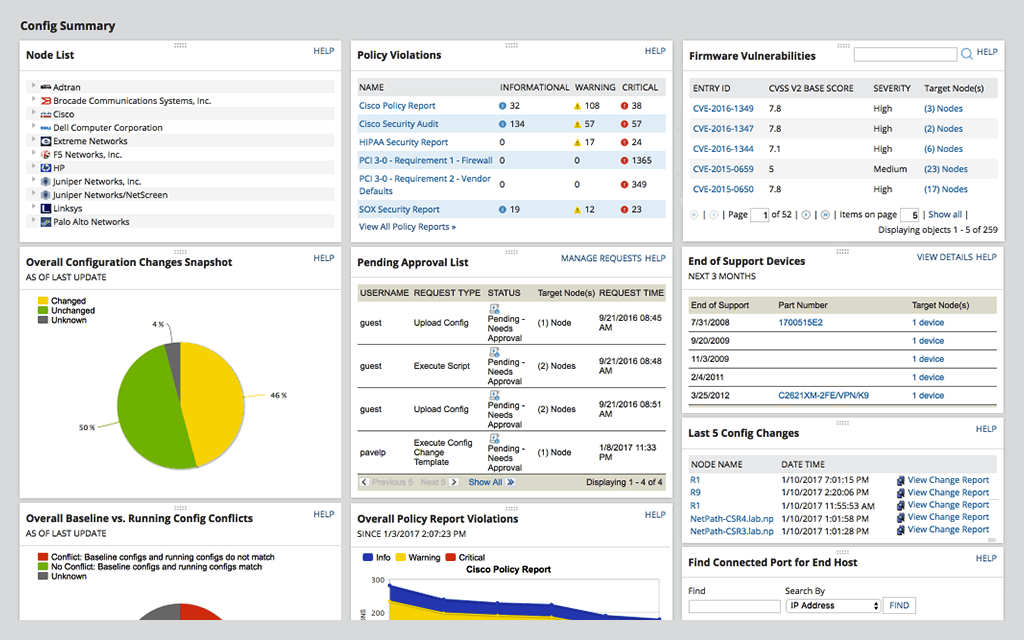
SolarWinds Network Configuration Manager is network diagnostics and troubleshooting technology, from Austin-based SolarWinds.
Associate Consultant in Engineering at HCL Technologies (Information Technology & Services, 10,001+ employees)
Chose SolarWinds NetFlow Traffic Analyzer (NTA)
I must say no other tools stands against SolarWinds NTA module, as it is easy to use tool with complete feature set, with almost all types of flows supported. Not just this, you will have rich information-based dashboard (fully customizable), out of the box reports, and Alert …
A de minimis incentive was given to thank the reviewer for their time. The incentive was not used to bias or drive a particular response, nor was the incentive contingent on a positive endorsement. More Info
Lead Automation and Electrical Engineer at TransCanada (Oil & Energy, 5001-10,000 employees)
Chose SolarWinds NetFlow Traffic Analyzer (NTA)
We utilize NetScout in conjunction with NetScout. NetScout gives a finer grained insight into traffic, while [SolarWinds NetFlow Traffic Analyzer] (NTA) gives a better quick glance at the entire organizational structure.
A de minimis incentive was given to thank the reviewer for their time. The incentive was not used to bias or drive a particular response, nor was the incentive contingent on a positive endorsement. TR verified that a representative sample of customers was invited. More Info
Verified User
Chose SolarWinds NetFlow Traffic Analyzer (NTA)
We went with SolarWinds b/c we already had npm and NCM and NTA just integrates better.
A de minimis incentive was given to thank the reviewer for their time. The incentive was not used to bias or drive a particular response, nor was the incentive contingent on a positive endorsement. More Info
Central Office Network Tech in Information Technology at Ketchikan Public Utilities (Telecommunications, 51-200 employees)
Chose SolarWinds NetFlow Traffic Analyzer (NTA)
My team inherited SolarWinds NetFlow Traffic Analyzer along with other SolarWinds products so I can't give reviews for alternatives as we haven't evaluated any other services. We are happy with what NTA provides us.
A de minimis incentive was given to thank the reviewer for their time. The incentive was not used to bias or drive a particular response, nor was the incentive contingent on a positive endorsement. More Info
A de minimis incentive was given to thank the reviewer for their time. The incentive was not used to bias or drive a particular response, nor was the incentive contingent on a positive endorsement. More Info
Tools Lead in Information Technology at Vetafore (Banking, 501-1000 employees)
Chose SolarWinds NetFlow Traffic Analyzer (NTA)
There are not many tools in the market that provide a lot of info on networks that also integrate with other server related components like SAM, NCM, etc. SolarWinds NTA and all other modules need to embed a bit of AI into them which can give a lot more value than what it is …
A de minimis incentive was given to thank the reviewer for their time. The incentive was not used to bias or drive a particular response, nor was the incentive contingent on a positive endorsement. TR verified that a representative sample of customers was invited. More Info
Server and Storage Administrator-2 in Information Technology at Michigan Supreme Court (Government Administration, 201-500 employees)
Chose SolarWinds NetFlow Traffic Analyzer (NTA)
We already have several other Solar Winds products, so we did not compare NTA to competing products. We are trying to keep down the number of different products to support and maintain with limited staff.
A de minimis incentive was given to thank the reviewer for their time. The incentive was not used to bias or drive a particular response, nor was the incentive contingent on a positive endorsement. More Info
Verified User
Chose SolarWinds NetFlow Traffic Analyzer (NTA)
To be perfectly honest, I've never used a comparable product to NTA. As a matter of fact, I have never used anything other than SolarWinds monitoring products at all. That could be a negative thing to some, but consider the fact that my company has never found a need to …
A de minimis incentive was given to thank the reviewer for their time. The incentive was not used to bias or drive a particular response, nor was the incentive contingent on a positive endorsement. More Info
Auvik has some similar features but it is very expensive. SolarWinds Network Configuration Manager (NCM) has gone up in price but it is much more affordable than Auvik. Auvik has no way of sending a script to more than one device at a time so that is a downside of Auvik versus …
A de minimis incentive was given to thank the reviewer for their time. The incentive was not used to bias or drive a particular response, nor was the incentive contingent on a positive endorsement. More Info
If it has been used and it has been functional since it reduces the work time by more than half, making the process faster, safer, and more precise, carrying out not so complex and functional processes referring to configurations of multiple devices at the same time in an agile …
A de minimis incentive was given to thank the reviewer for their time. The incentive was not used to bias or drive a particular response, nor was the incentive contingent on a positive endorsement. TR verified that a representative sample of customers was invited. More Info
We have a very diverse IT environment (Cisco/Palo Alto, VMWare, Cisco UC, SD-WAN, Windows Servers) and we wanted to have one suite of software that we could manage as many of our different areas in one single pane of glass. SolarWinds allows the network team, VOIP team, Storage …
A de minimis incentive was given to thank the reviewer for their time. The incentive was not used to bias or drive a particular response, nor was the incentive contingent on a positive endorsement. More Info
A de minimis incentive was given to thank the reviewer for their time. The incentive was not used to bias or drive a particular response, nor was the incentive contingent on a positive endorsement. More Info
A de minimis incentive was given to thank the reviewer for their time. The incentive was not used to bias or drive a particular response, nor was the incentive contingent on a positive endorsement. More Info
While not competition, using these other products exposed how little I knew of networking and what tools I needed to have in my arsenal. Moving to NCM was a logical next step, therefore, to provide greater insight across all fronts while still expanding my standard day to day …
A de minimis incentive was given to thank the reviewer for their time. The incentive was not used to bias or drive a particular response, nor was the incentive contingent on a positive endorsement. More Info
We use and depend on it for status state of our network gear, switches and routers. It does an excellent job of getting you the details you need to confirm all devices and products are working at the level needed. At times, it does tend to flag network switch ports and/or switches themselves as exceeding their rated capacity when frequently it was a quick blip of high traffic due to downloads, or uploads causing the max'ing of the device. Again, you can adjust the settings but then you adjust it too high and miss real activity. It can become nuisance alerting when you tend to then ignore
A de minimis incentive was given to thank the reviewer for their time. The incentive was not used to bias or drive a particular response, nor was the incentive contingent on a positive endorsement. More Info
Network Configuration Manager is well suited for backing up configurations of all your devices. It also has a great comparison tool for seeing only the differences in config. Another great feature is it's ability to push a script to any number of devices. This is very handy for pushing changes to one, 10 or multiple devices. There are also some great reports that you can run against the devices in inventory
A de minimis incentive was given to thank the reviewer for their time. The incentive was not used to bias or drive a particular response, nor was the incentive contingent on a positive endorsement. More Info
The level of customization possible with Network Bandwidth Analyzer is very valuable. Rather than being stuck with a "one-size-fits-all" presentation, an administrator can easily create customized views, reports, and alerts so that users can have a more tailored view of the data provided by Network Bandwidth Analyzer. This has the effect of making the tool more attractive to the end user.
The NetFlow Traffic Analyzer piece of Network Bandwidth Analyzer provides the details on bandwidth usage on the network. More than knowing how much bandwidth is being used, one is provided with detailed information on how that bandwidth is being used. This provides invaluable information for capacity planning and even certain forensic tasks faced by the network engineer.
The ability to produce network maps provides an easy way to create an attractive and functional NOC/SOC view of the entire network. Both technician and the occasional passerby can quickly determine if there are issues to be addressed. The ability to customize a map with background images and custom icons and stencils can make these maps really pop.
A de minimis incentive was given to thank the reviewer for their time. The incentive was not used to bias or drive a particular response, nor was the incentive contingent on a positive endorsement. More Info
A de minimis incentive was given to thank the reviewer for their time. The incentive was not used to bias or drive a particular response, nor was the incentive contingent on a positive endorsement. TR verified that a representative sample of customers was invited. More Info
The ability to intuitively and quickly serve up specified information up to a dashboard for general “public” consumption, that cycles through several pages of information.
The ability to intuitively set up alerting on bandwidth levels, instead of having to dig through all types of alerts available to find the one needed.
Provide a pricing model based on different support levels: if I want only available update installations, don’t make me pay the same amount as those wanting full support.
A de minimis incentive was given to thank the reviewer for their time. The incentive was not used to bias or drive a particular response, nor was the incentive contingent on a positive endorsement. TR verified that a representative sample of customers was invited. More Info
For our use case, it does everything great and some of the features we underutilize but I would like to be able to set a configuration baseline when initially adding a node instead of after the configuration is pulled but it's not a particularly big deal to let it pull the configuration then set it as the baseline.
A de minimis incentive was given to thank the reviewer for their time. The incentive was not used to bias or drive a particular response, nor was the incentive contingent on a positive endorsement. TR verified that a representative sample of customers was invited. More Info
Medium complexity to set up in the beginning if using any non-standard devices or configurations, else fairly easy (e.g. Cisco Nexus or IOS-based devices). Reports are fairly straightforward to set up. Updates to the platform are fairly straightforward and don't take a major effort. Easy to add or remove devices.
A de minimis incentive was given to thank the reviewer for their time. The incentive was not used to bias or drive a particular response, nor was the incentive contingent on a positive endorsement. TR verified that a representative sample of customers was invited. More Info
As far as rating for usability is concerned I would give 10/10 as NTA is very easy to use. All you need to do is install that module and ask network Team to configure the Netflow towards Server IP. [The] rest is pre-configured and reports are pre-built. Moment you receive the flows from Network all you will have is information about traffic.
A de minimis incentive was given to thank the reviewer for their time. The incentive was not used to bias or drive a particular response, nor was the incentive contingent on a positive endorsement. More Info
The user interface is lacking. It is difficult to navigate at times and things can be done multiple ways. Quite often I am confused by how their notification structure works. It is not very intuitive. They do offer a free Academy. They also offer a community of other technical folks. I have enjoyed both.
A de minimis incentive was given to thank the reviewer for their time. The incentive was not used to bias or drive a particular response, nor was the incentive contingent on a positive endorsement. More Info
I know we could probably pay for it, but it would be nice if we could get to a tier 2 technician faster. Spending a couple of hours on the phone with the level 1 technician, when we have already tried the troubleshooting they are walking us through, is just a waste of time.
A de minimis incentive was given to thank the reviewer for their time. The incentive was not used to bias or drive a particular response, nor was the incentive contingent on a positive endorsement. TR verified that a representative sample of customers was invited. More Info
To be fair, I have not had to involve Support in a number of years, but when I did, I was greeted with enthusiastic engineers who wanted to understand and solve the issue. It was a fairly complex scenario and I have discovered in my most recent implementation that engineering included that option as a standard now.
A de minimis incentive was given to thank the reviewer for their time. The incentive was not used to bias or drive a particular response, nor was the incentive contingent on a positive endorsement. More Info
The training offered by SolarWinds is some of the best out there. They have several different videos that go into great detail from initial setup to advanced configurations. In addition to the view at your own pace video, they also have live training for customers that focus on a single product and you can ask questions with the folks who develop the software. I have had good success with their live sessions and getting questions answered.
A de minimis incentive was given to thank the reviewer for their time. The incentive was not used to bias or drive a particular response, nor was the incentive contingent on a positive endorsement. More Info
Solarwinds has actually produced new training since I last used it that is available on their site at any time. Their previous training was more than enough to get us started but now there is significantly more content. Since I'm comfortable with the Orion platform and the products we use I haven't checked the new training out yet but we have new staff go through portions of that training and they always come away with an understanding of the platform and ready to use it
A de minimis incentive was given to thank the reviewer for their time. The incentive was not used to bias or drive a particular response, nor was the incentive contingent on a positive endorsement. TR verified that a representative sample of customers was invited. More Info
it was a fairly easy implementation and everything was pretty straightforward. only challenge we had was getting all the snmp communities updated on the networking equipment
A de minimis incentive was given to thank the reviewer for their time. The incentive was not used to bias or drive a particular response, nor was the incentive contingent on a positive endorsement. More Info
SolarWinds NetFlow Traffic Analyzer compared to Wireshark and PRTG Network Monitor beats it by just the simple interface. Though all are manual setup, NTA takes it a step further with graphs and reports that analyze the data for you. In comparing to Extrahop from a bandwidth comparison, Extrahop wins but Extrahop is a lot more than just a bandwidth monitoring and cost.
A de minimis incentive was given to thank the reviewer for their time. The incentive was not used to bias or drive a particular response, nor was the incentive contingent on a positive endorsement. More Info
At the time SolarWinds was the biggest player in the space and their whole portfolio was very comprehensive. As time progressed and newer technologies came about (i.e. SDWAN) their products couldn't keep up with the consumer demands and changing market. Security became such a big focus that once Solarwinds got hacked we had to remove all their products from our environment
A de minimis incentive was given to thank the reviewer for their time. The incentive was not used to bias or drive a particular response, nor was the incentive contingent on a positive endorsement. More Info
Be prepared to answer lots of questions. When people see the data in NTA they are going to want to know why App A is talking to App B. Be ready to explain!
Hand the keys to the NTA kingdom to the network team. They will thank you. Everyone wants to have friends on the network team, right?
Be prepared to invest in some significant compute and storage performance to keep up with your NTA monitoring
Running the latest firmware for your network gear is (often) required to take advantage of all the flow-monitoring. You upgrade regularly, right??
A de minimis incentive was given to thank the reviewer for their time. The incentive was not used to bias or drive a particular response, nor was the incentive contingent on a positive endorsement. More Info
Saves 100s of hours a year in man hours over manual configuration.
Saved easily 50k in lost revenue when a switch rebooted with months old unsaved configuration. NCM let us quickly restore a snapshot of the running config from the previous day.
Saves us several man hours per week of config auditing by reducing all changes to a summary email.
A de minimis incentive was given to thank the reviewer for their time. The incentive was not used to bias or drive a particular response, nor was the incentive contingent on a positive endorsement. TR verified that a representative sample of customers was invited. More Info