TrustRadius: an HG Insights company

Ivanti Neurons for Patch Management

Score7.3 out of 10

14 Reviews and Ratings

What is Ivanti Neurons for Patch Management?

Ivanti Neurons for Patch Management is a risk‑based cloud patch management solution used to prioritize and patch vulnerabilities based on active risk exposure, patch reliability and device compliance.

Read more details.

Media

Screenshot of Deployment by Risk and Continuous Compliance
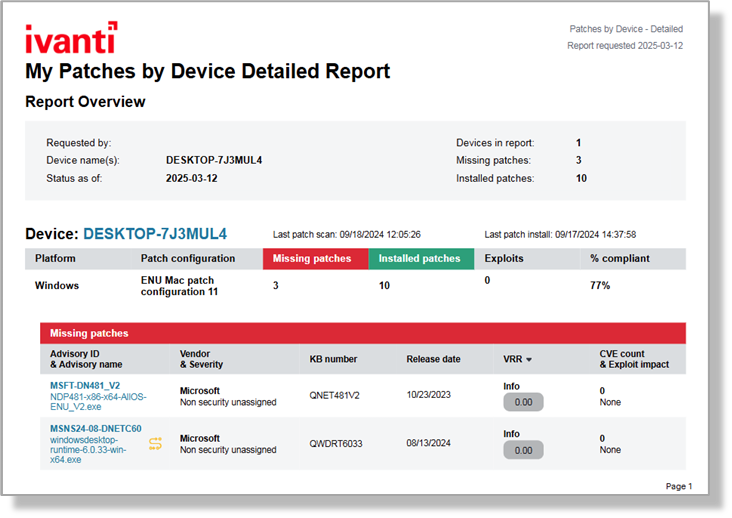
Screenshot of Example of Detailed Report by Patches by Device
Screenshot of Patch Intelligence View
Screenshot of Endpoint Vulnerability View
Screenshot of Out-of-box Reports

1 / 5

Screenshot of Deployment by Risk and Continuous Compliance

Top Performing Features

  • Automated Alerts and Reporting

    Systems in place to automatically alert, report, or notify of issues that may need timely remediation.

    Category average: 8.1

  • Configuration Monitoring

    Constant monitoring of a network set up to identify vulnerabilities as they occur within the network or tech stack on the network.

    Category average: 8.2

  • Vulnerability Classification

    Prioritizing vulnerabilities, to determine which vulnerabilities are most urgent and require a quicker resolution.

    Category average: 8.7

Areas for Improvement

  • Automated Threat Identification

    Leveraging multiple sources of information (such as threat intelligence databases) to automatically identify threats.

    Category average: 7.6

  • Web Scanning

    Specifically scans webpages for potential threats or vulnerabilities.

    Category average: 7.8

  • Threat Analysis

    Analyzing known factors such as behavior patterns, affected areas, and other specific features to more easily identify a threat.

    Category average: 7.8

Pros

  • Effective vulnerability management and risk-based prioritization
  • Streamlined patch scheduling and deployment across endpoints
  • User-friendly interface for configuration and administration

Cons

  • Lack of clarity and control over patching schedules and timing
  • User interface could be improved for policy creation and agent assignment
  • Limited automation, requiring manual setup for some patching cycles

Ivanti Neurons for Patch Management is easy to configure and administrate

Use Cases and Deployment Scope

We use Patch Management to manage vulnerabilities across at an enterprise level. Scale involves protecting thousands of traditional IT endpoints (desktops, servers) alongside distributed, public-facing transit tech such as fare systems, digital kiosks, and regional operational facilities. We use the Vulnerability Risk Rating (VRR) to establish Risk-Based Vulnerability Prioritization. Continuous Compliance is a major touchpoint for the agency at large, especially for Field and Remote Assets. We are trying to implement Autonomous Endpoint Management as a future-step.

Pros

  • ease of use for configuration, regular administration
  • integrates into our ecosystem rather seamlessly, since we use rest of Ivanti product suite.
  • cost-competitive to the competition.

Cons

  • We are branching scope of work for other ITS-platforms towards more modern, broader scope engines like ServiceNow / SalesForce. Would like to see better integration at an Ivanti-wide level.

Return on Investment

  • Drastic Reduction in Cyber Risk Exposure - avg ransomware breach can cost millions.
  • Labor Reclamation and Process Automation - autonomous patch config and scheduling is a time saver, critical for daily operations.
  • Visibility and Audit Readiness - cloud native birds-eye view console gives us more immediate, accessible views of endpoint health.

Usability

Alternatives Considered

11:11 Disaster Recovery as a Service (DRaaS), ServiceNow IT Service Management, EPM Live, HaloITSM, TeamDynamix IT Service Management (ITSM) and Avast Business Patch Management

Other Software Used

ServiceNow IT Service Management, Everbridge IT Alerting, EPM Live, ServiceNow IT Asset Management, ServiceNow IT Operations Management, Microsoft SharePoint

Ivanti Is a Good Tool That Needs to Work on Automation

Use Cases and Deployment Scope

We use Ivanti Neurons for Patch Management to patch servers in our customer environment. It has been a decent solution for creating schedules and patching servers. It has also has some advanced features that allow us to exclude updating some legacy environments on those servers, for instance excluding Java, during patching updates. Aside from patching our servers we do use some of the built-in functionality for inventory management of our environment.

Pros

  • Details the updates that will be applied for each server
  • Has good exclusion policies so we do not accidentally do a version update of Java for instance.
  • Has a decent interface so our junior engineers can do some of the patching.

Cons

  • Automation of the patching would be welcome. Right now we have to set up each patch cycle manually.
  • The software is somewhat buggy at times. More reliability would be nice.
  • The discovery piece could use a little work.

Return on Investment

  • This product has made it easier to update our applications that have dependencies with older versions of Java, saving our engineers time.
  • The interface does make it somewhat easy to view some information with a quick glance.
  • Ivanti has saved us time and remediation by allowing us to update hundreds of our servers during our scheduled maintenance Windows.

Usability

Alternatives Considered

Tanium and Absolute Visibility

Other Software Used

Absolute Resilience, Ivanti Connect Secure, Remote Desktop Manager

Is Ivanti Neurons patch management already ready for use

Use Cases and Deployment Scope

We are testing Ivanti Neurons Patch Management, to replace Ivanti EPM.The Look and feel is modern, but there are still growing pains.As example application setup "run as". When distributing applications via the App Portal, there are options to “Run as System” or “Run as Current User,” but there is no option to “Run as a Defined User.” However, if the logged-in user does not have admin privileges, it becomes difficult—at least when network resources are required—because running the program as “Local System” does not allow access to the network. In the past, we solved this problem in Ivanti EPM by configuring a user with admin and network permissions in the software. Currently, there is no option for this in Ivanti Neureon. Likewise, there is no way to save filter criteria in the Device view. This means that different device lists with different columns can be created. However, unlike in EPM—where you could simply include the appropriate filter—this isn’t currently possible. This means that if you want to filter the list, you have to create and apply the filter from scratch each time. On a positive note, though, it’s clear that the company is incorporating improvements with every new release, and the product is growing and evolving from quarter to quarter.

Pros

  • 3-tier patch management: 1. default routine; prioritized patch routing, e.g., daily browser updates and emergency updates based on severity

Cons

  • It should be possible to save user spezific filter criteria.

Return on Investment

  • Easy default reports, with easy to read overview
  • It takes a lot of time to create your own reports with all the details.
  • The existing report templates cannot be modified, and even to change the email recipients, you have to recreate the report.

Usability

Alternatives Considered

NinjaOne

Ivanti patch

Use Cases and Deployment Scope

We use patch management to keep our servers and endpoints up to date. We update all patches weekly to maintain a secure network.

Pros

  • Patch policies.
  • Security
  • Software patching.

Cons

  • Improved UI for creating policies.
  • Improved UI for assigning agents.
  • Better definitions on each patch.

Return on Investment

  • Reduced patch complexity.
  • Improved security.
  • Enables better policies.

Usability

Alternatives Considered

NinjaOne

Application Admin review.

Use Cases and Deployment Scope

Ivanti Patch management is proactive; they do updates, but sometimes patching causes system outages, which were not mentioned on the portal for the client tenant, which is very embarrassing - thanks.

Pros

  • Patch as per release notes.
  • Many improvements went well.

Cons

  • Patching with outages.
  • Update with exam timeline, sometimes patching starts late and ends late.

Return on Investment

  • ROI is good.
  • ITSM tool need to be more stable.

Usability

Other Software Used

Salesforce Agentforce Marketing