TrustRadius: an HG Insights company

JAMS

Score9.1 out of 10

111 Reviews and Ratings

What is JAMS?

JAMS is a centralized workload automation and job scheduling solution that runs, monitors, and manages jobs and workflows. Reliably orchestrate the critical IT processes that run your business from a single pane of glass.

Categories & Use Cases

Media

the Visual Job Editor - a drag and drop editor for tasks is used to build multistep workflows that include dependencies, user input, parallel processes, and triggers.
the Centralized Job Repository - here users store job definitions, schedules, and parameters in one central database.
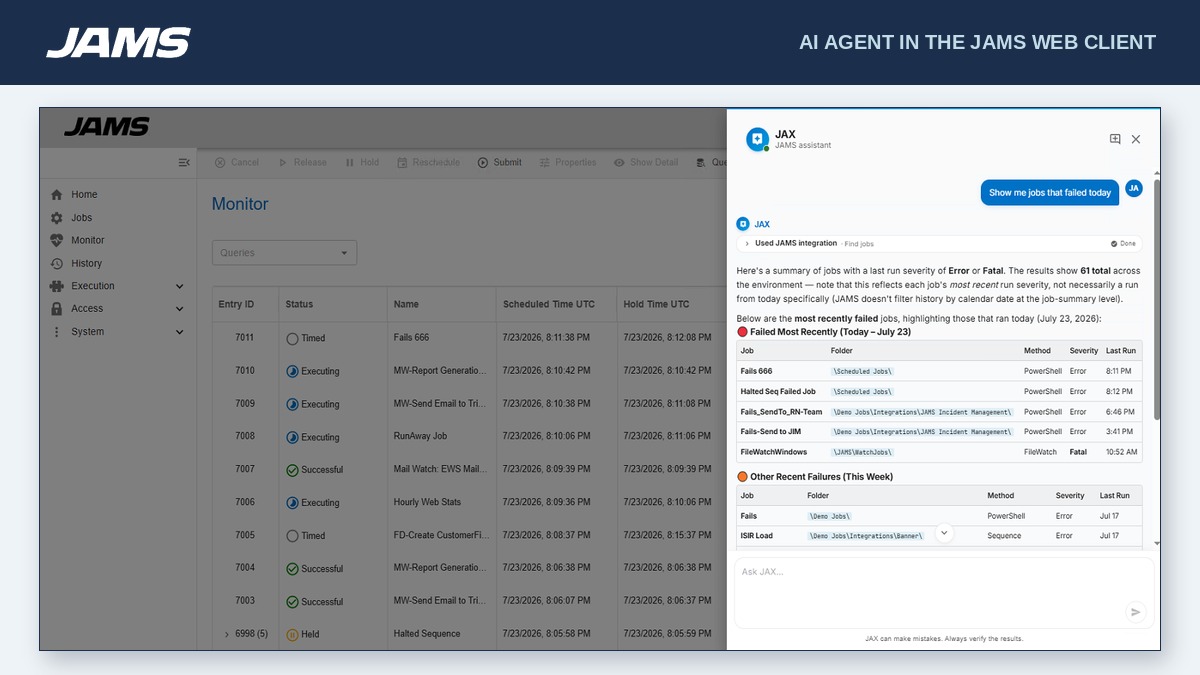
the Job Monitor - this displays the status of jobs and workloads from one central monitoring console. Viewers can drill down on individual jobs to diagnose failures, dependencies, and expected completion times.
a Dashboard - Here, users can create data-rich visuals to monitor critical batch jobs and workflows running on various agents and on different business applications.
the Centralized Job Repository - Stores job definitions, schedules, and parameters in a central database.

1 / 5

Top Performing Features

  • Alerts and notifications

    Alerts and notifications enabling management by exception

    Category average: 8.7

  • Multi-platform scheduling

    Multi-platform scheduling is the ability to centrally manage a business process from end-to-end

    Category average: 9.1

  • Central monitoring

    A central monitoring dashboard provides data on trends and forecasts

    Category average: 9

Areas for Improvement

  • Logging

    Logging and audit trails to ensure regulatory compliance

    Category average: 8.5

  • Application integration

    Integration with a broad range of enterprise applications

    Category average: 8.3

  • Analysis and visualization

    Analysis and visualization tools provide clear understanding of critical errors and helps prioritize errors

    Category average: 8.2

JAMS for the win

Use Cases and Deployment Scope

The N-tier application we use has jobs coming from multiple servers 24 hours a day. JAMS manages all of those and allows us to set alerts, to set automatic retires and send notifications. The history is fantasic way to get a quick view of what failed over the day without checking every job. There are so many funtionalities we have yet to use, such as running sql jobs or CMD scripts. Fantasic product, highly recommended.

Pros

  • history
  • alerts
  • auto-resubmits

Cons

  • a wizard for setting up jobs
  • a folder with the failed job notifications, easy to find
  • an easier way to set web interface (back to the wizard)
  • a set of video walk throughs with examples for each type of scheduling

Return on Investment

  • The ROI is unquestionable, I cannot imagine life without it
  • Reliability is top notch, haven't seen it crash in 15 years of use
  • As for resources, it has a small footprint on the server

Alternatives Considered

Microsoft To Do

Other Software Used

Microsoft SQL Server, Microsoft IIS, Microsoft 365

JAMS VEA Review

Use Cases and Deployment Scope

We have been using JAMS as our main job scheduler since 2016 for all our applications like JDE, ESB Middleware, SFTP/FTP Interfaces, SharePoint, API calls, etc. In other words, we use it heavily to do most of our automated processing to run JDE jobs, bank file transfers, file triggers, etc.

Pros

  • Running JDE UBE/Programs
  • File Transfers using SFTP and FTP
  • Running ESB/Middleware API calls

Cons

  • We use PowerShell 5 and 7+. I think for PowerShell we cannot use the JAMS Module functionality.

Return on Investment

  • Increase reliability due to automation of main business function

Other Software Used

Microsoft SharePoint, ReportsNow

JAMS Scheduler is the perfect automation tool for Small to Medium businesses

Use Cases and Deployment Scope

We use JAMS to schedule tasks. Full stop. With over 3000 scheduled tasks across production and non-production environments, the quality of our output is limited by our imagination and competence. The scheduler itself it rock solid.

Pros

  • Human readable scheduling, "second Thursday of month", etc
  • Error handling workflows "If the file isn't found, silently log or loudly alert as configured"
  • Agents that support different OS platforms, "Windows, Linux, and many more"

Cons

  • We struggle getting data directly from the database, but that is because it is structured well and not for people. Still a frustration.
  • Custom reports are too difficult to create and use. We don't use them.

Return on Investment

  • Using JAMS is about setting and forgetting so that you can focus on running the business, not chasing tasks.
  • The only way we would fail to use JAMS is if we failed to plan our automation strategy.
  • This software was the difference between going out of business in 2012 and thriving today. We were drowning in sprawling scripts and scheduled tasks (cron jobs, mainframe jobs, windows task scheduler, Bob's Totally Cool Desktop Batch file; all now handled by JAMS)

Alternatives Considered

Stonebranch and Progress MOVEit

Cost efficient scheduling tool.

Use Cases and Deployment Scope

We use jams to automate our batch jobs. Mainly used for scheduling GoAnywhere projects. It is used by many different departments in our business.

Pros

  • Managing credentials securely.
  • Allowing segregation by business group.
  • Promotion between environments.

Cons

  • How to specify scheduling is not intuitive.
  • When promoting between environments have to manually massage the file to remove credentials
  • Terrible integration with GoAnywhere which is their own product.

Return on Investment

  • Allows us to have 1 enterprise level scheduling.
  • Completely different to windows scheduler so a lot of development work required.
  • More secure than custom scheduling.

Other Software Used

Fortra's GoAnywhere MFT, Coviant Diplomat Managed File Transfer, Azure Functions

Are we on legacy software.

Use Cases and Deployment Scope

JAMS is an automated scheduler for us that helps coordinate a range of tasks and executes scripts at specific times. The problem we face is automation and execution without human intervention, and JAMS solves that for us. JAMS handles tasks across hundreds of applications and different types of scripts, such as JSON, Python, etc., and alerts responsible IT teams to resolve errors. JAMS does not use any AI in the solution we are licensed for, nor does it have any SaaS components, so elements such as dashboarding and reporting are very difficult to implement.

Pros

  • Task scheduling.
  • Error alerting and handling.
  • Customisation of scripts.

Cons

  • Simple dashboarding: users should be able to visit a simple URL/page with SSO that shows upcoming, past, and outcome tasks, along with the underlying script, etc.
  • Error handling: when a script fails or encounters problems, an error is sent for handling. Auto-recovery would be fabulous with AI elements.
  • "Tell me what this script does" would be excellent - provide summaries to users without having to rely on the accuracy or inaccuracy of comments. Integrate w/ LLMs.

Return on Investment

  • Resource optimisation - reduction of manual labour.
  • Task scheduling.
  • Unsure exactly how much we pay (but probably not much).

Alternatives Considered

Accenture myWizard

Other Software Used

Illumio Adaptive Security Platform, CrowdStrike Falcon Complete Next-Gen MDR, SailPoint Identity Security Cloud
