TrustRadius: an HG Insights company

Planview ProjectAdvantage

Score8.9 out of 10

7 Reviews and Ratings

What is Planview ProjectAdvantage?

Planview ProjectAdvantage is a project and portfolio management (PPM) platform for mid-sized organizations and developing project management offices (PMOs). The platform centralizes project, program, resource, financial, and performance data through configurable workflows, dashboards, and AI-assisted planning tools.

The vendor reports that organizations across IT, research and development, and product development use ProjectAdvantage to plan work, allocate resources, monitor portfolios, and manage delivery.

Key Capabilities
  • Project and Program Management: Configurable Gantt charts support drag-and-drop scheduling, role-specific layouts, project hierarchies, and dependency management. Teams can create projects from templates or import project data from Microsoft Project and Microsoft Excel. Phase-gate views and program rollups provide visibility across multilevel portfolio structures.
  • Delivery Methodologies: ProjectAdvantage supports Waterfall, Agile, Hybrid, Critical Chain Project Management (CCPM), and Phase-Gate methodologies within the same governed environment.
  • Resource and Capacity Management: Named and generic resource assignments support workload analysis, availability checks, forecasting, and role- or skill-based allocation. A request-and-commit workflow supports top-down resource planning. AI-assisted resource fulfillment matches generic resource requirements with named resources based on availability, role alignment, cost, and prior work history.
  • Portfolio Simulation: What-if planning tools allow portfolio managers to compare scenarios, rank projects by budget or key performance indicators (KPIs), and analyze time-distributed costs. Roadmaps display dependencies among portfolio initiatives.
  • Demand Management: Structured request intake includes approval workflows and configurable scoring models for evaluating proposed projects against strategic priorities.
  • Financial Management: Budgeting, time-distributed cost tracking, and financial forecasting operate alongside project and resource data. Actual expenditures can be compared with budgets to monitor financial performance throughout delivery.
  • Workflow Configuration and Governance: No-code configuration tools allow administrators to adapt workflows, templates, and stage-gate processes without custom development. Role-based permissions and single sign-on (SSO) support access governance. The vendor states that the platform maintains ISO 27001 and SOC 2 compliance.
  • Reporting and Analytics: Self-service dashboards and predefined portfolio KPIs can be shared with stakeholders. Reporting options include a native Microsoft Power BI connector, Microsoft PowerPoint export, and scheduled data exports.
  • Microsoft Teams Integration: Users can submit timesheets, update work items, and manage tasks through Microsoft Teams. An AI assistant supports natural-language timesheet entry, work-item updates, and task prioritization.
  • Planview Anvi: AI-assisted project initialization generates work breakdown structures, phases, gates, activities, and dependencies from plain-language project descriptions. Risk analysis tools propose potential risks and recommend updates to existing risk records based on project and historical data.
  • Conversational and Agentic AI: Anvi Chat provides a conversational interface for questions about project status, timelines, dependencies, and reports. Anvi Agents execute saved, multistep prompt sequences for recurring analysis and reporting tasks.

Audience and Use Cases

  • Audience: Project managers, program managers, portfolio managers, resource managers, finance teams, PMO leaders, and business administrators.
  • Use Cases: Project planning, program oversight, portfolio prioritization, demand intake, resource allocation, capacity forecasting, financial tracking, governance, and executive reporting.

Technical Specifications

  • Project Data Import: Microsoft Project and Microsoft Excel
  • Reporting and Visualization: Microsoft Power BI, Tableau, and Microsoft PowerPoint
  • CRM and ERP Connectivity: Microsoft Dynamics 365, SAP, Oracle NetSuite, Workday, and Salesforce
  • IT Service Management: ServiceNow and Atlassian
  • Agile Delivery: Jira Software, Azure DevOps, and Planview AgilePlace
  • Ecosystem Integration: Planview Hub
  • Security and Access: Role-based permissions and single sign-on
  • Compliance: ISO 27001 and SOC 2

Media

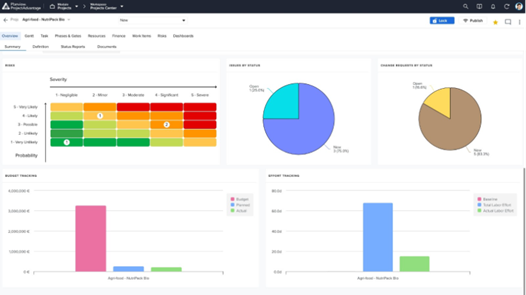
Screenshot of Project Dashboard Summary View - A consolidated dashboard showing project health, status, and key metrics at a glance.
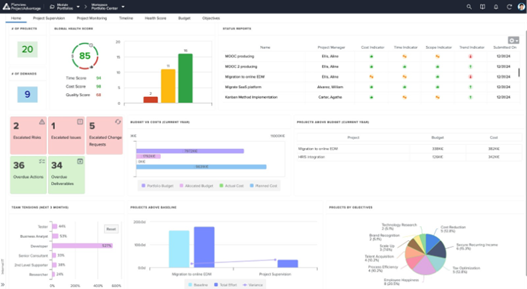
Screenshot of Dashboard Summary View - A portfolio-level dashboard summarizing project performance, financials, and overall portfolio health.
Screenshot of Resource Forecast and Capacity View - Visualize resource demand against available capacity to plan and allocate teams effectively.
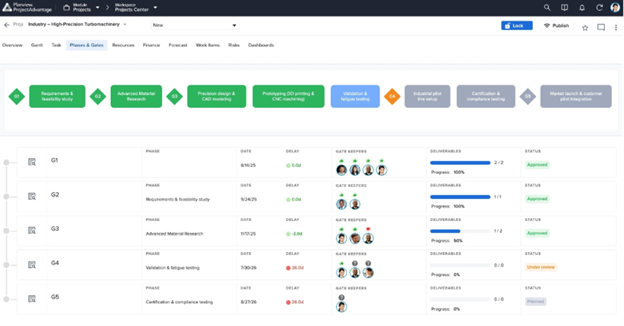
Screenshot of Phase Gate - Summary View Page - Track project progression through governance gates with clear milestone visibility.
Screenshot of Demand / Idea Qualification - Capture, evaluate, and qualify incoming ideas and demands before they enter the pipeline.

1 / 5

Screenshot of Project Dashboard Summary View - A consolidated dashboard showing project health, status, and key metrics at a glance.

Who Buys & Uses Planview ProjectAdvantage

My Experience with Sciforma

Pros

  • Scheduling tasks.
  • Assigning resources and cost items.
  • Managing a team.

Cons

  • This may not be suitable for organizations who are not mature in enough in project management or that have very basic needs.

Return on Investment

  • Fairly priced.
  • Reduce project failure rates.
  • Reduce project cycle times.
  • Avoid low/no-value projects.
  • Eliminate PM time spent on low-value tasks.

Alternatives Considered

Smartsheet

Other Software Used

Smartsheet

Complete project management tool, but not intuitive to use.

Pros

  • The cloud based application allows multiple project managers to collaborate and work together.
  • The application gets updated frequently, and can be customized to your company's needs.
  • Tracking resources and allocation is simple and easy to use.

Cons

  • The largest con for me is the clunky UI. It's not very intuitive, and has a larger learning curve to become a proficient user.
  • Reports are functional, but could use some improvements.
  • It can be slow at times, and you have to wait to make sure your changes are saved before moving on.

Return on Investment

  • Before Sciforma we were running projects out of Excel and emails. Using a cloud based application means that everyone is viewing information in real time.
  • Our executive leadership knows that they have one place to go for a real time status on all of our strategic projects.

Alternatives Considered

Mavenlink and TaskRay

Other Software Used

Salesforce Community Cloud, Concur Travel and Expense, ADP ezLaborManager, Pardot, DemandTools, Dataloader.io

Great PPM Software. Nothing more, nothing less. - Flexible is THE word.

Pros

  • Flexible: I believe it is the best part. The software is completely and especially designed for our needs.
  • Easy to use: any configuration can be done either by us or Sciforma. At first, we would only use the project extension. After a year, we decided to add more users and roll-out time tracking. We did the configuration by ourselves and didn’t need Sciforma’s help. It was pretty easy, even without having a dedicated developer.
  • They have a lot of features: you can start as small as you want and always get more features . This was our case and we haven’t been limited so far.
  • They are methodology agnostic: We use both Agile and Waterfall and it’s great to see it all rolls up to the portfolio level.

Cons

  • Some bugs when the new version was released. But they were very quickly fixed, the Sciforma team is reactive and is always ready to help.

Return on Investment

  • It’s hard to evaluate our ROI. I can say though that:
  • More efficiency, we do not lose time looking for documents in different places anymore. Everything is gathered in one place.
  • Reports are amazing and quick to create.
  • As a project manager, I can better manage my project and my resources. It helps me a lot to prioritize what needs to be done and gives me the bigger picture.