TrustRadius: an HG Insights company

OpenText XM Fax

Score10 out of 10

19 Reviews and Ratings

What is OpenText XM Fax?

XM Fax, now from OpenText (acquired March 2020) is a software-based solution for sending and receiving confidential faxes by email. It allows secure transmission of highly sensitive documents, using standardized T.38 Fax-over-IP and G.711 Fax Pass-Through protocols. The vendor says it is easy to install, and faxes can be sent using a desktop client (SendFAX), email clients (MS outlook), networked MFPs or via Web Services.

According to the vendor, one of the main benefits of using XM Fax is the elimination of costs for analog phone lines, maintenance, paper, supplies and other related expenses. XM Fax is also designed with security and technical compliance in mind, with built-in features like audit logging, zero fax retention, and encryption.

Categories & Use Cases

Media

Screenshot of Track your faxes through an event log tab.
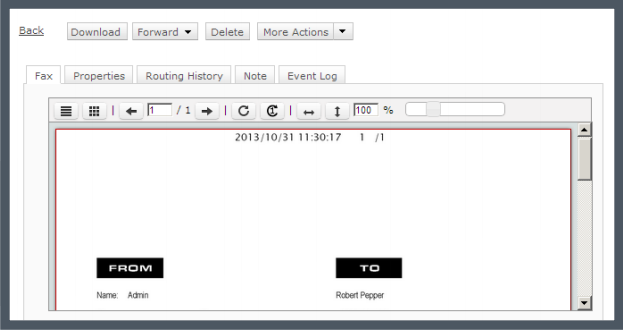
Screenshot of Built-in viewer in the web client: XMediusFAX® allows you to view faxes directly in your browser without having to download files.
Screenshot of Download the free XMediusFAX® application for Android, iPhone or iPad and send secure faxes from your mobile.
Screenshot of Choose your fax recipients (Device contacts, Fax service Phone Book, Favorites).
Screenshot of Select your documents from any file management application available on your mobile device.
Screenshot of Configure your fax options (priority, resolution, retries).

1 / 6

Screenshot of Track your faxes through an event log tab.

XM Fax Ease of Use

Use Cases and Deployment Scope

I currently work for a Xerox Dealer who resells OpenText XM Fax to our customers. Our sales team discusses XM Fax with every customer. The cost savings for faxing through XM Fax over an analog fax line is significant. We currently bill over 180k fax pages per month through XM Fax. The sales and service support through OpenText has always been outstanding. I wished other software vendors were as easy to work with as OpenText and XM Fax.

Pros

  • Contacted sales to set up the creation of enterprise accounts directly through the dashboard.
  • XM Fax Support worked directly with Xerox to correct an issue I had with a device software update. Issues correct within a few days.
  • XM Fax provided onsite sales support for sales and technical training.

Cons

  • Honestly, I am not sure I have anything. I worked for Xerox for nearly 20 years and have worked with the XM Fax support folks for many of those years. The support I have received has always been outstanding and a phone call away.

Most Important Features

  • XM Fax Dashboard and the ability to see fax confirmation and resubmit faxes.
  • Fax to Email.
  • Autofill electronic cover pages.

Return on Investment

  • XM Fax has been a great revenue stream when added to the hardware sale.

Alternatives Considered

eFax and OpenText RightFax

Other Software Used

Xerox DocuShare, DocuSign, Dropbox Business

opentext is a good tool to uses

Use Cases and Deployment Scope

We use this product for customer who have a multifonction printers at their office and they don't have regular phone line . Some modern building don't have regular phone line built in . So this software is perfect for this situation. The users can send and receive fax via this interface . They can attach a word , excel sheet and send it as a fax using microsoft outlook.

Pros

  • send and receive fax using the printer
  • can send fax using an iphone or android
  • send fax directly from outlook

Cons

  • very simple to use , but not for the first time user without training
  • because of it specialty , a lot of people don't know the product
  • people they don't know that they can use this app in outlook.

Most Important Features

  • no need to buy a fax device
  • no monthly fees for a regular phone line
  • keeping tracks of send and receive document.
  • good log memory

Return on Investment

  • we can provide more solutions to our customers
  • very easy to add on the after sale market
  • add more value to our products

Other Software Used

LogMeIn Pro, Microsoft Windows, Genesys PureConnect

XMediusFAX, fast and secure

Pros

  • Goes right to my mobile
  • Can respond immediately with a forward of the attachment
  • Don't have to save to my desktop faxes.

Cons

  • The headers can be condensed or smaller
  • Being able to send a fax from it
  • Use of an app

Return on Investment

  • Speed
  • Efficiency
  • Convenient

Other Software Used

Microsoft Office 365, MS SharePoint

Quick and effective secure PDF faxes

Pros

  • When you get a fax it previews the whole fax in email
  • As you can see the scan without needing to open the attachment it speeds up review and approvals.
  • Anybody can fax you even members outside your organization and it converts it to a PDF super easy.
  • Quick email response after the fax.

Cons

  • I cannot think of a way to make this easier to use. It is fool proof.

Return on Investment

  • Overall it expedites approvals when an approving authority is mobile, effectively helping to ensure no slow down in business.
  • It works wherever you are so nobody is waiting for an approval and even people outside the company can use it.

Other Software Used

Jabber

XMedius

Pros

  • Fax Conversion
  • Monitoring of incoming and outgoing faxes
  • Working with XMedius support

Cons

  • Coversheet editor is garbage, seems like a product designed in 1998
  • Documentation
  • Their support site needs more articles. I hardly ever can find the help I need on my own. I almost always have to open a ticket with them. Sometimes their tickets won't contain notes about what they did to fix it... so if I have the problem again I have to open another ticket. I can't just simply reference their notes.

Return on Investment

  • Positive