TrustRadius: an HG Insights company

Able2Extract Professional vs. Alida CXM vs. FormSwift

Save this comparison

Save this comparison

Add Product

Recommended Comparisons

    Overview
    ProductRatingMost Used ByProduct SummaryStarting Price

    Able2Extract Professional

    Score8.4 out of 10
    N/AAble2Extract Professional, is a PDF converter, editor, and creator - a PDF suite that aims to cut down on time spent dealing with PDFs and increase PDF productivity in the office. Able2Extract lets users convert scanned (multi-language OCR included) and native PDFs to more than 10 formats, such as MS Word, Excel, PowerPoint, Publisher, Text, AutoCAD, HTML, CSV, and image formats. It also comes with batch PDF conversion and creation that let users manage multiple PDFs in seconds.…

    $34.95

    30-day full version single-user license.

    Alida CXM

    Score7 out of 10
    N/AAlida CXM (formerly Vision Critical) is designed to enable users to listen to direct & indirect sources of customer feedback, perform automated actions on collected feedback and have complete visibility into key customer experience metrics so users can create exemplary customer experiences day after day. Alida CXM offers a holistic customer experience platform that brings in both operational and experiential data, integrates this data with the tools to collect, understand and action customer…N/A

    FormSwift

    Score10 out of 10
    N/AFormSwift is a SaaS product from Dropbox since the December 2022 acquisition, aiming to provide businesses with a modern solution to paperwork. Users can customize, sign, and download popular business, legal, or personal forms.N/A
    Pricing
    Able2Extract ProfessionalAlida CXMFormSwift
    Editions & Modules
    No answers on this topic
    No answers on this topic
    No answers on this topic
    Offerings
    Pricing Offerings
    Able2Extract ProfessionalAlida CXMFormSwift
    Free Trial
    YesNoNo
    Free/Freemium Version
    NoNoNo
    Premium Consulting/Integration Services
    NoNoNo
    Entry-level Setup FeeNo setup feeNo setup feeNo setup fee
    Additional DetailsLifetime license: $149.95 / 30-Day License: $34.95 / Volume licensing available: Contact us——
    More Pricing Information
    Best Alternatives
    Able2Extract ProfessionalAlida CXMFormSwift
    Small Businesses
    Tungsten Power PDF
    Score9.8 out of 10
    MindTouch
    Score7 out of 10
    Formstack for Salesforce
    Score7.1 out of 10
    Medium-sized Companies
    PDF Xchange Viewer and Editor
    Score9.3 out of 10
    Sogolytics
    Score9 out of 10
    Formstack for Salesforce
    Score7.1 out of 10
    Enterprises
    Adobe Acrobat Reader
    Score8.5 out of 10
    Medallia
    Score8.9 out of 10
    Conga Composer
    Score7.9 out of 10
    All AlternativesView all alternativesView all alternativesView all alternatives
    User Ratings
    Able2Extract ProfessionalAlida CXMFormSwift
    Likelihood to Recommend
    10.0
    (2 ratings)
    5.0
    (7 ratings)
    10.0
    (1 ratings)
    Likelihood to Renew
    -
    (0 ratings)
    7.5
    (6 ratings)
    -
    (0 ratings)
    Usability
    -
    (0 ratings)
    3.0
    (1 ratings)
    -
    (0 ratings)
    Support Rating
    -
    (0 ratings)
    10.0
    (1 ratings)
    -
    (0 ratings)
    User Testimonials
    Able2Extract ProfessionalAlida CXMFormSwift
    Likelihood to Recommend
    Investintech.com Inc.
    Able2Extract is extremely helpful if you have a PDF with text that you want to manipulate. By converting it into another file format that is more conducive to text, you can correct spelling mistakes, copy paragraphs, and remove them or relocate them. Since I had to take spreadsheets and text from a PDF and insert them into a Word document, Able2Extract Professional was the exact tool I needed to avoid simply taking screenshots.
    Incentivized
    Read full review
    Alida
    From my experience, I believe that Vision Critical offers the best software to manage an insights community. They are great to work with, and my opinion has only improved over time. However, that doesn't mean it is the best survey software overall. If someone simply needs to program and distribute surveys, this may or may not be the right solution. There are some other really great survey tools on the market that are competitively priced and offer very intuitive interfaces (like Qualtrics). If you are going to recruit people to answer surveys or provide feedback on an ongoing basis (re-contacting and engaging with the same people repeatedly), though, Vision Critical would be my #1 recommendation.
    Read full review
    Dropbox
    FormSwift is well suited for legal and accounting firms that need to quickly create form documents. It is easier to navigate than Nolo.
    Incentivized
    Read full review
    Pros
    Investintech.com Inc.
    • Creates editable spreadsheets from Excel documents that have been scanned.
    • Allows certain segments of documents to be selected for editing.
    • Allows bulk conversion.
    Incentivized
    Read full review
    Alida
    • The team is helpful in creating complicated survey logic
    • The team is accommodating in creating interfaces that suit our desired look
    • The team keeps in regular contact in order to effectively manage our requests and goals
    Read full review
    Dropbox
    • The "Document Creator" is an excellent tool. Very easy to work with.
    • The "My Documents " area is a helpful storage area for completed docs.
    • The "Document Library" is an extremely valuable resource.
    Incentivized
    Read full review
    Cons
    Investintech.com Inc.
    • GUI can always improve, even if it's currently good
    • Better how-to instructions to address initial learning curve
    • Functionality could be inserted into Adobe Acrobat Pro, potentially merging products
    Incentivized
    Read full review
    Alida
    • The functionality when creating a new questionnaire is rather clunky, particularly when there are a few conditional factors in the logical flow; being able to see those factors and how they apply with some sort of other logical layout would really help when creating a longer survey.
    • There are quite a few steps that aren't intuitive when launching a survey, for instance all the various dates (launch date, reserve date, survey date, etc etc etc). If there were a description field if you hovered above labeled areas of sections that explained what this field was for that would really help
    • It doesn't help either that the entire site is grey; it's a cold environment to be in for a long time, and the simple design makes it seem more clunky than it probably really is.
    Read full review
    Dropbox
    • The "Fillable Fields" area could use some additional customizable fields.
    Incentivized
    Read full review
    Likelihood to Renew
    Investintech.com Inc.
    No answers on this topic
    Alida
    Vision Critical often requires you to dump the data to a statistical program. I hate that step. You waste time, and improve the chance of data being lost, or changed.
    Read full review
    Dropbox
    No answers on this topic
    Usability
    Investintech.com Inc.
    No answers on this topic
    Alida
    I think there is a ton of room to improve, in things as simple as aesthetics and other areas of logical flow when it comes to creating and then launching a survey, as well as providing descriptors for what each field is referencing. For instance, there are like 5 date fields to be filled out, but no button near them that says "this date will determine _________" and I am not about to go back into the training module, which was confusing enough to FIND, let alone work through to find just ONE answer.
    Read full review
    Dropbox
    No answers on this topic
    Support Rating
    Investintech.com Inc.
    No answers on this topic
    Alida
    Absolutely fantastic support team. Willing to help you online through vast collection of how-to guides and resources, online via chatbox, or over the phone. Even though we were in different time zones, they were always available. Very helpful and knowledgeable
    Read full review
    Dropbox
    No answers on this topic
    Alternatives Considered
    Investintech.com Inc.
    None, except for conversions in Acrobat.
    Incentivized
    Read full review
    Alida
    Vision Critical is more appealing visually but no where near as complex or robust. Vision Critical is also much more expensive though.
    Read full review
    Dropbox
    Much better than Rocket Lawyer.
    Incentivized
    Read full review
    Return on Investment
    Investintech.com Inc.
    • Able2Extract Professional allows me to compile annual reports without having to seek out creators of supplemental material and ask them to rerun their reports in a different file format
    • Our business objective of maintaining consistent branding is achievable through converting PDFs into file formats where we can alter text and swap out logos
    • Able2Extract Professional has the speed and ease of use we need to meet our reporting deadlines
    Incentivized
    Read full review
    Alida
    • Our use of Vision Critical's software has allowed us to dramatically increase the amount of research that we do, at a much lower cost. Since there is no incremental cost for each survey we field, we can ask many questions we wouldn't have been able to otherwise.
    • Our use of an insights community has also sped up the research process, allowing us to write, program, field and report on a survey within only a few days.
    • Because of the two advantages listed above, we have been able to listen closer to our customers' opinions.
    Read full review
    Dropbox
    • FormSwift has enabled us to work faster and smarter.
    • FormSwift saves time and money.
    Incentivized
    Read full review
    ScreenShots

    Able2Extract Professional Screenshots

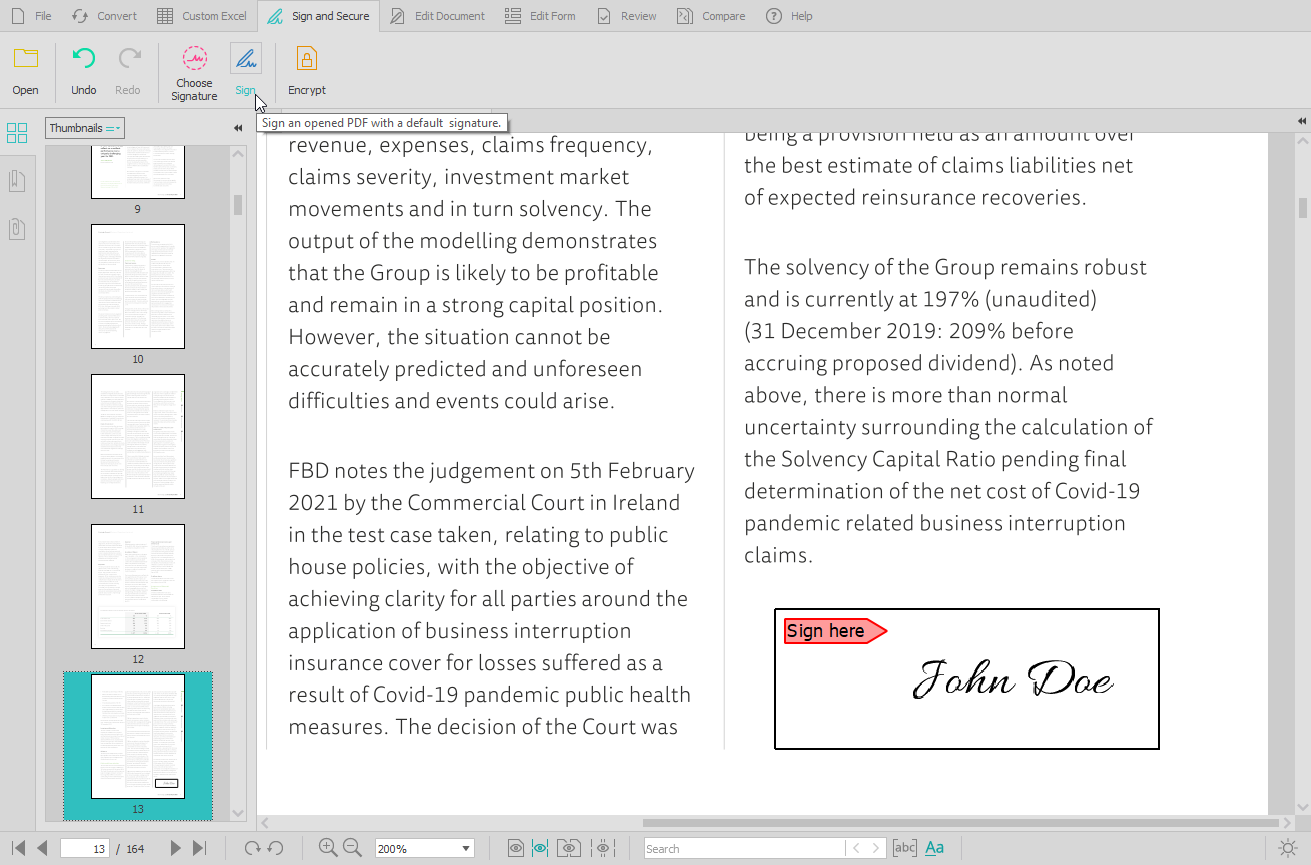
    Screenshot of the PDF conversion interface, that work with most popular formats and lets users extract all images from a PDF document in one click, extract PDF form data, and Batch convert hundreds of PDFs in one go.Screenshot of the Custom PDF to Excel feature, for the conversion of PDF tables to spreadsheet file formats. Users can manually designate columns and rows, preview results before conversion, or manage headers and footers.Screenshot of the PDF editing interface, used to modify or add text and graphics, redact content, merge and split documents, insert, delete, move, rotate, and resize PDF pages.Screenshot of the digital signature feature, secured with cryptographic certificates.Screenshot of the comparison of printable documents, that displays all differences in a handy side-by-side view.