Able2Extract Professional vs. Dropbox

Overview
ProductRatingMost Used ByProduct SummaryStarting Price
Able2Extract Professional
Score 8.4 out of 10
N/A
Able2Extract Professional, is a PDF converter, editor, and creator - a PDF suite that aims to cut down on time spent dealing with PDFs and increase PDF productivity in the office. Able2Extract lets users convert scanned (multi-language OCR included) and native PDFs to more than 10 formats, such as MS Word, Excel, PowerPoint, Publisher, Text, AutoCAD, HTML, CSV, and image formats. It also comes with batch PDF conversion and creation that let users manage multiple PDFs in seconds.…
$34.95
30-day full version single-user license.
Dropbox
Score 8.6 out of 10
N/A
Dropbox is a cloud storage solution, equipped with features that help users to save time, improve productivity, and collaborate with others. Users can edit PDFs, share videos, sign documents, and collaborate with stakeholders without leaving Dropbox.
$9.99
per month
Pricing
Able2Extract ProfessionalDropbox
Editions & Modules
No answers on this topic
Plus
$9.99
per month
Essentials
$18
per month
Business
$20
per month per user
Business Plus
$26
per month per user
Basic
Free
Offerings
Pricing Offerings
Able2Extract ProfessionalDropbox
Free Trial
YesNo
Free/Freemium Version
NoNo
Premium Consulting/Integration Services
NoNo
Entry-level Setup FeeNo setup feeNo setup fee
Additional DetailsLifetime license: $149.95 / 30-Day License: $34.95 / Volume licensing available: Contact us
More Pricing Information
Community Pulse
Able2Extract ProfessionalDropbox
Features
Able2Extract ProfessionalDropbox
File Sharing & Management
Comparison of File Sharing & Management features of Product A and Product B
Able2Extract Professional
-
Ratings
Dropbox
8.1
1367 Ratings
4% below category average
Versioning00 Ratings8.61139 Ratings
Video files00 Ratings7.61117 Ratings
Audio files00 Ratings8.11013 Ratings
Document collaboration00 Ratings8.41189 Ratings
Access control00 Ratings8.41265 Ratings
File search00 Ratings7.61311 Ratings
Device sync00 Ratings8.31258 Ratings
Cloud Storage Security & Administration
Comparison of Cloud Storage Security & Administration features of Product A and Product B
Able2Extract Professional
-
Ratings
Dropbox
8.3
1296 Ratings
4% below category average
User and role management00 Ratings7.71156 Ratings
File organization00 Ratings8.81278 Ratings
Device management00 Ratings8.41137 Ratings
Cloud Storage Platform
Comparison of Cloud Storage Platform features of Product A and Product B
Able2Extract Professional
-
Ratings
Dropbox
8.3
1285 Ratings
4% below category average
Performance00 Ratings8.21274 Ratings
Reliability00 Ratings8.61282 Ratings
Storage Reports00 Ratings8.0977 Ratings
Best Alternatives
Able2Extract ProfessionalDropbox
Small Businesses
Tungsten Power PDF
Tungsten Power PDF
Score 9.8 out of 10
SugarSync
SugarSync
Score 3.7 out of 10
Medium-sized Companies
PDF Xchange Viewer and Editor
Score 9.4 out of 10
Druva Security Cloud
Score 9.3 out of 10
Enterprises
Bluebeam
Bluebeam
Score 9.0 out of 10
Druva Security Cloud
Score 9.3 out of 10
All AlternativesView all alternativesView all alternatives
User Ratings
Able2Extract ProfessionalDropbox
Likelihood to Recommend
10.0
(2 ratings)
8.8
(1403 ratings)
Likelihood to Renew
-
(0 ratings)
8.2
(44 ratings)
Usability
-
(0 ratings)
8.8
(542 ratings)
Availability
-
(0 ratings)
8.9
(4 ratings)
Performance
-
(0 ratings)
8.7
(9 ratings)
Support Rating
-
(0 ratings)
7.1
(40 ratings)
In-Person Training
-
(0 ratings)
9.1
(1 ratings)
Online Training
-
(0 ratings)
9.0
(3 ratings)
Implementation Rating
-
(0 ratings)
8.0
(5 ratings)
Configurability
-
(0 ratings)
8.1
(2 ratings)
Contract Terms and Pricing Model
-
(0 ratings)
9.1
(1 ratings)
Ease of integration
-
(0 ratings)
9.1
(1 ratings)
Product Scalability
-
(0 ratings)
8.0
(5 ratings)
Professional Services
-
(0 ratings)
9.1
(1 ratings)
Vendor post-sale
-
(0 ratings)
8.2
(1 ratings)
Vendor pre-sale
-
(0 ratings)
8.2
(1 ratings)
User Testimonials
Able2Extract ProfessionalDropbox
Likelihood to Recommend
Investintech.com Inc.
Able2Extract is extremely helpful if you have a PDF with text that you want to manipulate. By converting it into another file format that is more conducive to text, you can correct spelling mistakes, copy paragraphs, and remove them or relocate them. Since I had to take spreadsheets and text from a PDF and insert them into a Word document, Able2Extract Professional was the exact tool I needed to avoid simply taking screenshots.
Read full review
Dropbox
Dropbox is well suited for sending File Requests to clients to upload documents, and for me to send File Transfers to clients with documents for them to download. I can create separate files for each client, and also create files within files, which is very convenient and useful for my business purposes. In Dropbox I can also see all of the File Requests that I have sent and it shows me how many times they've accessed it and how many files they uploaded. I can also see all of the File Transfers that I have made and whether how many times the client has accessed it and how many documents were downloaded. It also sends me notifications if the clients haven't downloaded their files yet so I can remind them. Dropbox Sign has been very easy to use, and I have already stated what could be changed with it
Read full review
Pros
Investintech.com Inc.
  • Creates editable spreadsheets from Excel documents that have been scanned.
  • Allows certain segments of documents to be selected for editing.
  • Allows bulk conversion.
Read full review
Dropbox
  • I can share projects I need feedback on.
  • I can make projects available to editors so that they can do their work.
  • Dropbox is a place where I can store files that I can access from anywhere, even if I don't have my laptop with me at the time.
  • I have an old friend who is an acting professor in Tokyo. He loves the dialogue that I write in my novels. He converts chapters into scenework for his acting students. They get very excited when there's new material!
Read full review
Cons
Investintech.com Inc.
  • GUI can always improve, even if it's currently good
  • Better how-to instructions to address initial learning curve
  • Functionality could be inserted into Adobe Acrobat Pro, potentially merging products
Read full review
Dropbox
  • Admid Control Can feels little basic it can be improve by easy access quick tabs for important button.
  • Smart sync behaviour can be little confusing it can be improve by displaying more futuristic way
  • Pricing and storage facility can be improve for really more demanding for a tool can be imporve.
Read full review
Likelihood to Renew
Investintech.com Inc.
No answers on this topic
Dropbox
Dropbox is a user-friendly, easy tool which requires little to no skill and they offer a free version with a good amount of storage available. There are other file sharing tools available however at a cost. Dropbox free version I have used for years and it serves every purpose I need.
Read full review
Usability
Investintech.com Inc.
No answers on this topic
Dropbox
It works extremely well, and we have never had any issues with connecting or sharing files. It's very easy to use, and any team member can share, add, and delete files to a virtual drive. This is extremely helpful, and it's an amazing tool to use, ensuring everyone can connect and work together effectively.
Read full review
Reliability and Availability
Investintech.com Inc.
No answers on this topic
Dropbox
I really recommend the product for the Dropbox availability is a great having very very less downtimes, they errors are less I have been faced yet, due to connectivity sometimes we are getting errors. Only sometimes the limitations of some features show some errors.
Read full review
Performance
Investintech.com Inc.
No answers on this topic
Dropbox
Dropbox is really useful, you can access any file from anywhere and you can upload and even edit files online, but, sometimes it can be slow. Downloading, uploading, and syncing is a bit slow, it can take several minutes. Furthermore, the search engine for large amounts of data can be slow too and it is not powerful.
Read full review
Support Rating
Investintech.com Inc.
No answers on this topic
Dropbox
They immediately responded like in an example that I gave where one of our staff members accidentally deleted the whole Special Hope Network Dropbox, we immediately contacted Dropbox they walked us through the steps of how to retrieve the information and luckily enough we were able to retrieve the entire Dropbox and we have had back and forth with Dropbox on what to do when an employee leaves how to remove them how to add another employee.
Read full review
In-Person Training
Investintech.com Inc.
No answers on this topic
Dropbox
The person for corporate product dealing and knowledge of the product explore and better and secure use are properly handover to us. Also provide full software and tool training from the basic to the pro level with each and every possible explanation. Provide many sessions regarding every doubt. Also Guide better suitable options for our business to migrate and integrate for the expansion in all places employee smoothly.
Read full review
Online Training
Investintech.com Inc.
No answers on this topic
Dropbox
I did not personally take any training for Dropbox so I am self taught but I know when our Vice President selected Dropbox, he personally did do some training modules on it and I'm assuming it was very easy and simple to understand since he now acts like he is a pro at it!
Read full review
Implementation Rating
Investintech.com Inc.
No answers on this topic
Dropbox
I needed to stay current in improving my daily operations. Dropbox
was suggested to me by a former colleague two-years ago and I've been using it just fine ever since.
Read full review
Alternatives Considered
Investintech.com Inc.
None, except for conversions in Acrobat.
Read full review
Dropbox
I prefer the layout and visual aspect of Dropbox as it mirrors my files on my computer. I feel that I am more organized, and it's easier to find my files in Dropbox than it was with Google Drive.
Read full review
Contract Terms and Pricing Model
Investintech.com Inc.
No answers on this topic
Dropbox
I would recommend to this product directly to the sales team of Dropbox for the best deal provide to my referred person and provide the best service to them.
Read full review
Scalability
Investintech.com Inc.
No answers on this topic
Dropbox
It's easy to integrate with the systems of Windows and Linux, easy to have web versions accessible, which provide the web login credentials. Also, it can be installed for individuals for the best autosync features.
Read full review
Professional Services
Investintech.com Inc.
No answers on this topic
Dropbox
Their services are highly rated for moving massive, complex data sets from legacy on-premise servers to the cloud with minimal downtime.
Read full review
Return on Investment
Investintech.com Inc.
  • Able2Extract Professional allows me to compile annual reports without having to seek out creators of supplemental material and ask them to rerun their reports in a different file format
  • Our business objective of maintaining consistent branding is achievable through converting PDFs into file formats where we can alter text and swap out logos
  • Able2Extract Professional has the speed and ease of use we need to meet our reporting deadlines
Read full review
Dropbox
  • When it works (usually if a client already has Dropbox, so they don't get the solicitation to sign up), it works flawlessly.
  • I've had multiple clients not see the "continue with download only" at the bottom and email me to resend the media another way because they don't have a Dropbox account.
Read full review
ScreenShots

Able2Extract Professional Screenshots

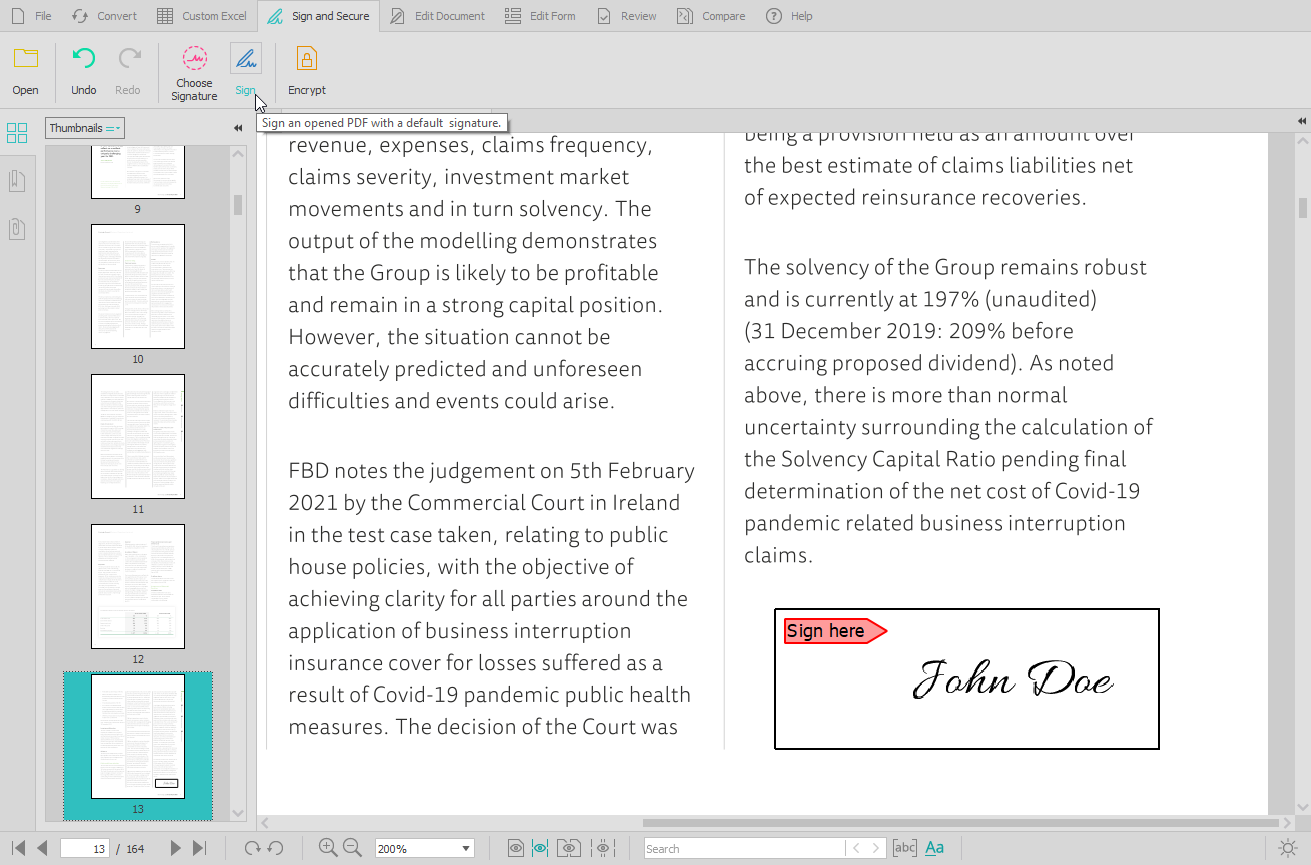
Screenshot of the PDF conversion interface, that work with most popular formats and lets users extract all images from a PDF document in one click, extract PDF form data, and Batch convert hundreds of PDFs in one go.Screenshot of the Custom PDF to Excel feature, for the conversion of PDF tables to spreadsheet file formats. Users can manually designate columns and rows, preview results before conversion, or manage headers and footers.Screenshot of the PDF editing interface, used to modify or add text and graphics, redact content, merge and split documents, insert, delete, move, rotate, and resize PDF pages.Screenshot of the digital signature feature, secured with cryptographic certificates.Screenshot of the comparison of printable documents, that displays all differences in a handy side-by-side view.

Dropbox Screenshots

Screenshot of the action bar, that sits across the browser page can be used to record the screen, edit PDFs, upload files, create folders, get signatures, or send and track documents.Screenshot of Dropbox Replay, that lets collaborators leave frame-accurate feedback and markups directly on project files.Screenshot of Dropbox Capture, which can be used to take screen recordings, screenshots, and GIFs with one click and share them with a link.Screenshot of the interface where Dropbox lets users upload, edit, send, and sign PDFs in one place.