Overview
ProductRatingMost Used ByProduct SummaryStarting Price
Adobe Express
Score 8.7 out of 10
N/A
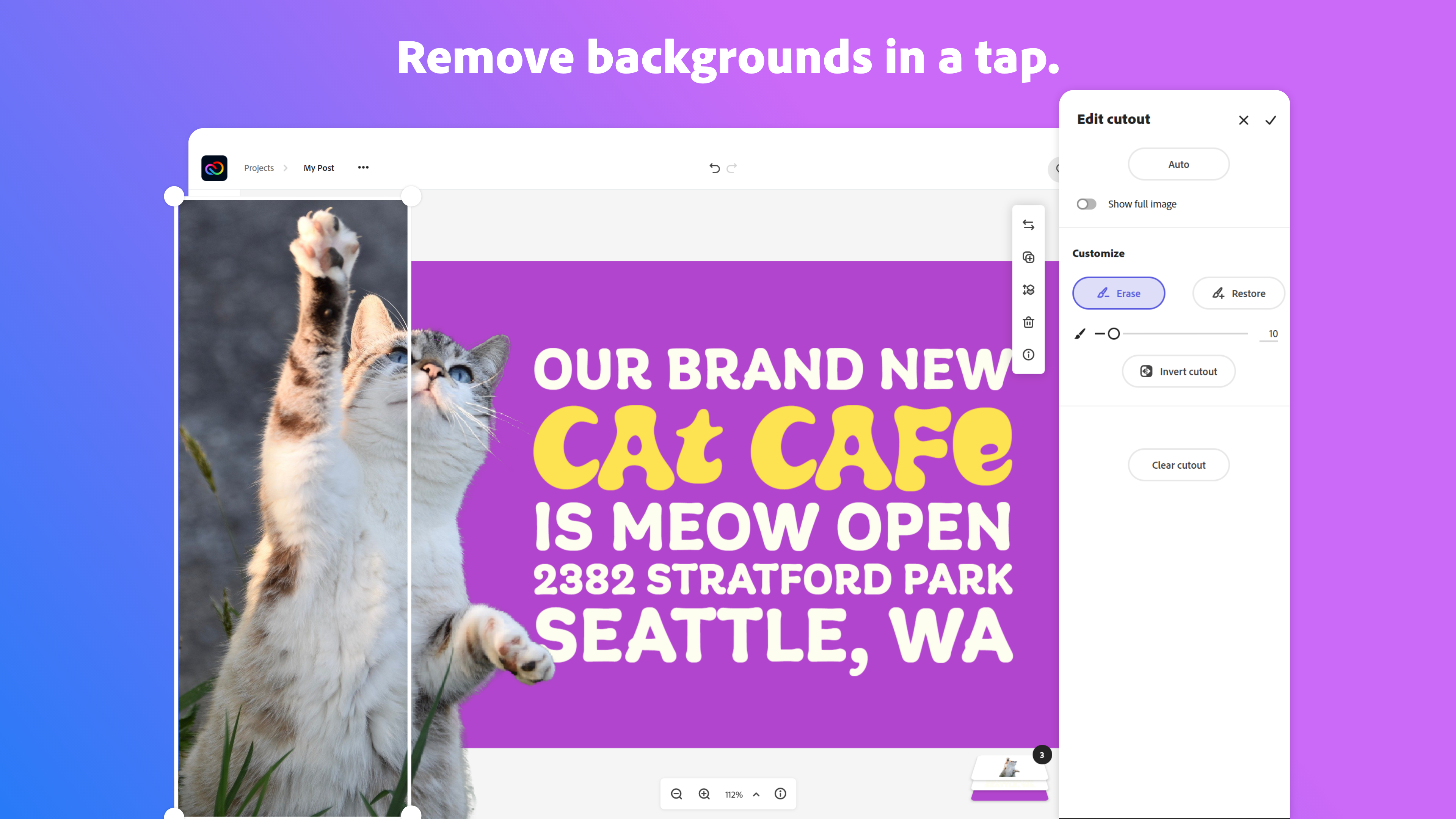
Adobe Creative Cloud Express (formerly Adobe Spark) is a task-based, web and mobile product used to create and share rich multimedia content – from social media posts and stories to invitations to marketing materials like logos, flyers and banners.
$0
Adobe Illustrator
Score 9.3 out of 10
N/A
Adobe Illustrator CC is a vector-based graphic design software.
$20.99
per month
VanceAI Image Enhancer
Score 0.0 out of 10
N/A
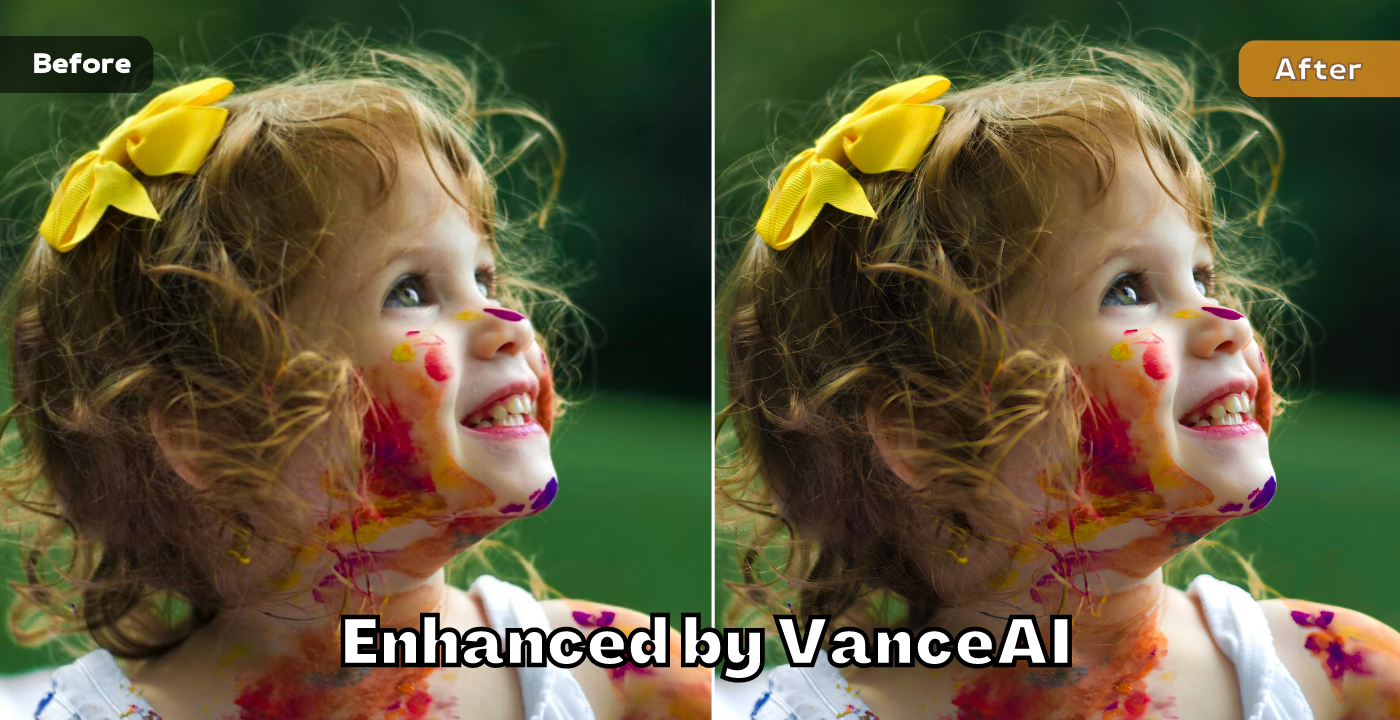
VanceAI Image Enhancer offers a one-click AI solution to improve image quality online. This AI photo enhancer is developed by VanceAI, a developer with expertise in artificial intelligence. The AI enables VanceAI Image Enhancer to improve photo quality in seconds while sharpening, denoising and enhancing colors automatically.N/A
Pricing
Adobe ExpressAdobe Illustrator CCVanceAI Image Enhancer
Editions & Modules
Free
$0.00
Premium
$9.99 / $99.99
per month
Teams
$9.99
per month per user
Yearly - Billed Monthly
$20.99
per month
Monthly
$31.49
per month
Yearly - Billed Upfront
$239.88
per year
No answers on this topic
Offerings
Pricing Offerings
Adobe ExpressAdobe IllustratorVanceAI Image Enhancer
Free Trial
YesNoYes
Free/Freemium Version
YesNoNo
Premium Consulting/Integration Services
NoNoNo
Entry-level Setup FeeNo setup feeNo setup feeNo setup fee
Additional DetailsContact Adobe directly for Enterprise pricing plan details.Three pricing plans for Monthly, Year,ly and One-Time
More Pricing Information
Community Pulse
Adobe ExpressAdobe Illustrator CCVanceAI Image Enhancer
Considered Multiple Products
Adobe Express
Chose Adobe Express
I can input creative content and files I've made in other Adobe programs directly into Adobe Express, which helps me create more authentic, original content.
Chose Adobe Express
Adobe Illustrator CC, Adobe InDesign, Adobe Workfront and Adobe PhotoShop
Chose Adobe Express
Adobe Firefly, Frame.io, Adobe Creative Cloud for Enterprise, Adobe PhotoShop, Adobe Illustrator CC, Adobe InDesign and Adobe Stock
Chose Adobe Express
Express is very similar to Canva. I like to express more, except that Canva makes it easier to ensure that text/images are centered and aligned, and that the spacing is correct.
Chose Adobe Express
Express has put all the tools a design agency will need for day-to-day operations, production, and creation. And with the addition of the Calendar, scheduling these posts is a breeze and very important in a designer's tool belt. We used other products before and found ourselves …
Chose Adobe Express
The feature of using the library in Adobe Express helps me to manage my content easily, and the content can be used across all other Adobe apps. Which can be benificial than using Canva.
Chose Adobe Express
Adobe Express integrates very well with other products like Adobe Photoshop or Adobe Firefly. The Images from the other Tools can be integrated in new projects or edited out of Adobe Express into those Adobe Tools. Also the Files can be managed and rearranged in the Creative …
Chose Adobe Express
In addition to Adobe Express, I have also used Canva because both platforms are quite similar. Basically, the application that I use is typically based on the clients needs, however my personal preference is Adobe Express because I find it too intuitive to my creative persona.
Chose Adobe Express
I think they all have a different target audience and a different use for them. I love crafting posts with Figma but i think the "figma look" is a bit cold and super recognizable for my taste. I think creating something with Illustrator still gives me the most options in terms …
Chose Adobe Express
I use Adobe Express for designing social media content, appreciating its ready-made templates which save time and effort. It solves creative blocks by providing design ideas, and I love its voice character feature for making animations. However, the layering feature feels basic …
Chose Adobe Express
I think Adobe Express is a bit behind Canva, but as an Adobe Community Expert, I try to provide as much feedback as I can to help improve Adobe Express. ADobe Express does a better job than InShot and a few other apps, but isn't quite there against Canva, I'm sorry to say!
Chose Adobe Express
In my opinion, Adobe Express blows it away. Canva is great and all and gets the job done. But it lacks the additional value offered by Adobe Express and Adobe. Canva's stock asset library doesn't come close to Adobe's stock asset library, and the Creative Cloud makes using …
Chose Adobe Express
I like them both equally, but Adobe Express is free because I have Creative Cloud, so I prefer it.
Chose Adobe Express
Software like Illustrator, Photoshop, and After Effects are indispensable for my needs. I used Canva to streamline the process of creating carousels, mainly, and Express effectively replaces Canva. The advantage of having everything under a single subscription was crucial for …
Chose Adobe Express
It's very easy to generate images or graphics and find them on Adobe Express.In the application, in "Your stuff" > Files section, you'll find all the creations you've made with Adobe Photoshop and Adobe Illustrator, and you can use them directly in Adobe Express. No need to …
Chose Adobe Express
Maybe because I use other Adobe products, but I find that Adobe Express is more intuitive than Canva, especially when trying to format text. As for Adobe Express versus other Adobe products, well I think there is a place for them all. There are just certain things that you …
Chose Adobe Express
Adobe Express has better integration with other Adobe product I use, however it is lacking in the templates area.
Chose Adobe Express
I prefer adobe products but Canva for quick purposes seems to be a better UI and UX
Chose Adobe Express
Adobe Express is faster easier and better
Chose Adobe Express
Adobe Express is incredibly similar to Canva. Both tools are something that makes design easy for anyone to do as well as provide templates and pre-made graphics to assist in the design process. However, Express still feels limited compared to Canva and Illustrator. Illustrator …
Chose Adobe Express
In my view, they are essentially the same.
Chose Adobe Express
Adobe Express stands out for me. This product is amazing!
Chose Adobe Express
Overall Adobe Express offers a more polished finished product but does take a little time to learn. But worth the time spent to have more unique content
Adobe Illustrator
Chose Adobe Illustrator
I have been using all of these tools for years. Illustrator is usually my go to tool. Once you learn Illustrator, it makes using all of the other programs easier to learn and it integrates with them beautifully. For the most part, each tool has it's own strengths - InDesign …
Chose Adobe Illustrator
We selected Adobe Illustrator CC as a company because of it's wide array of other programs that we can bundle together. It's a tool that most our vendors are also familiar with so it simplifies our workflow to use it. I like the functionality and the fact it's a tool I'm super …
Chose Adobe Illustrator
I use both of those programs together at times.
Chose Adobe Illustrator
Adobe Illustrator CC is the best program to use for creating vector illustrations and graphics, whereas Photoshop is best for pixel-based digital pieces. Indesign is best for printed pieces and Adobe Illustrator CC is a great collaborator tool to use for Indesign projects. The …
Chose Adobe Illustrator
The integration with Creative Cloud Libraries and Adobe Fonts, combined with the powerful array of tools offered in Adobe Illustrator makes up for the high price compared with other tools that are often free. You even get an outstanding 3D renderer built in with excellent …
Chose Adobe Illustrator
Adobe Illustrator gives you much more control over every aspect of the design process. Canva has several limitations like being unable to customize gradients or creating clipping masks. Inkscape only works in RGB space and has a less intuitive user interface. They benefit from …
Chose Adobe Illustrator
Gimp does not have a lot of reference information, so it takes time to solve problems. Illustrator takes less time because there is a lot of reference information on the Internet and in books. Also, Gimp does not allow batch processing, so the work must be repeated. Illustrator …
Chose Adobe Illustrator
Illustrator is far ahead of Xara with features and manage images better than Corel Draw
Chose Adobe Illustrator
There are so many things you can create in Adobe Illustrator CC. It's easy to use and the options for saving and exporting are fantastic. Fortunately, this is the only software of its kind that I have used. I know other people that have used lesser quality products and turned …
Chose Adobe Illustrator
Both are powerful design/vector art tools. And they do the same things - just in a little different way. Tools and interface are a little different. Illustrator thinks like a designer, Corel thinks like an architect. I picked Illustrator mostly due to integration with …
Chose Adobe Illustrator
I know a lot of designers that like to work in Photoshop, when text is involved I prefer Adobe Illustrator CC. You can outline your text and kern and correct there, it is crisp and easy. I would rather push vector points than pixels. I also really appreciate the multiple boards …
Chose Adobe Illustrator
Illustrator has never let me down recently. There have been times where the program didn't do things I wanted it, but over the years the updates gradually modified how I used the program to the point where everything we need to do can be done.Whatever the situation is, Adobe …
Chose Adobe Illustrator
Simply stated, Adobe Illustrator CC just offers more. Not all projects require 'more', but when you need it, it is nice that you don't have to jump programs and start over on a project. Inkscape is simple to use, but so is Canva. Point being, just because a program has a great …
Chose Adobe Illustrator
This is free. But if Adobe is charging then it gives you the best quality and work.
Chose Adobe Illustrator
I chose Rhinoceros 3D because it is accurate to make drawings in it and it is better to make drawings in Rhinoceros 3D and then put them in Adobe Illustrator. But while printing or scaling it is much easier to put it in Adobe Illustrator. This makes the whole printing aspect of …
Chose Adobe Illustrator
For customized designs where text and some artistic touches are needed Adobe Illustrator CC is the best.
Chose Adobe Illustrator
Illustrator has a wide capability for editing ability and can be used in combination with any of the other programs I've listed and used. This makes it incredibly versatile and one of my favorites. Each of the other products have specific purposes, making them less likely for …
Chose Adobe Illustrator
Before using Adobe Illustrator CC, I was using other design tools and struggled with the lack of control over my artwork. Adobe Illustrator CC has given me so much more control over my designs. The interface is beautiful and easy to use; new features like Live Shape and the …
Chose Adobe Illustrator
They complement each other, each with its own specific characteristics, but within a marketing sector, an experienced designer knows that the use of these tools in sets makes all the difference. It is possible to combine their uses and create really relevant materials that will …
Chose Adobe Illustrator
All these software integrate and each one has a purpose, I, particularly, always work with almost all of them together and I don't see competition between them, [but rather] an integration [with] different purposes and uses. I use them all and they all serve me in the best way …
Chose Adobe Illustrator
with ease and many features offered as well as very easy vendor support
Chose Adobe Illustrator
Adode Illustrator is better for the design work in the company, sice it works with vectors and easy shortcuts, the other adobe software is not so useful because we do not work with video editing or rendering. Adobe Illustrator CC meets all our needs and expectations and that is …
Chose Adobe Illustrator
Honestly, Adobe illustrator is the best in the market in terms of what the software is capable of doing. I've used other software in my career, and honestly, I just haven't found anything that has the tools and the capabilities like adobe illustrator. I honestly will pay extra …
Chose Adobe Illustrator
I have not used any other graphic design software but I have used Photoshop and InDesign. If you're looking to create graphics, especially scalable vectors, Adobe Illustrator CC is, hands down, the best tool out there. Photoshop is much better for photo editing and …
VanceAI Image Enhancer

No answer on this topic

Best Alternatives
Adobe ExpressAdobe Illustrator CCVanceAI Image Enhancer
Small Businesses
Pexels
Pexels
Score 8.1 out of 10
CorelDRAW Graphics Suite
Score 7.5 out of 10
CorelDRAW Graphics Suite
Score 7.5 out of 10
Medium-sized Companies
Pexels
Pexels
Score 8.1 out of 10
GIMP
GIMP
Score 7.9 out of 10
GIMP
GIMP
Score 7.9 out of 10
Enterprises
Pexels
Pexels
Score 8.1 out of 10
CorelDRAW Graphics Suite
Score 7.5 out of 10
CorelDRAW Graphics Suite
Score 7.5 out of 10
All AlternativesView all alternativesView all alternativesView all alternatives
User Ratings
Adobe ExpressAdobe Illustrator CCVanceAI Image Enhancer
Likelihood to Recommend
8.8
(0 ratings)
9.3
(0 ratings)
-
(0 ratings)
Likelihood to Renew
9.5
(0 ratings)
9.0
(0 ratings)
-
(0 ratings)
Usability
8.2
(0 ratings)
9.4
(0 ratings)
-
(0 ratings)
Support Rating
7.0
(0 ratings)
5.0
(0 ratings)
-
(0 ratings)
Implementation Rating
6.4
(0 ratings)
10.0
(0 ratings)
-
(0 ratings)
User Testimonials
Adobe ExpressAdobe Illustrator CCVanceAI Image Enhancer
Likelihood to Recommend
Basically, I truly find that Adobe Express is pretty much great for all professional scenarios because it offers many creative options and comes with an extremely robust collection of assets (stock photos, videos, music, and graphics) all of which can be edited and enhanced within Adobe Express if needed. One project that it was quite helpful with utilizing was creating a logo for one of our clients. I was able to create the prototype and then offer several iterations of said logo to help the client quickly decide on its official branding. By having all of my assets neatly stored right on my Adobe Express project folder it was very easy for me to remain organized when creating various outputs.
Read full review
Adobe Illustrator is used to help make drawings look good but not make them. It is easy to add color or texture but it is hard to actually make the drawings in it. I would recommend using other software to make the lines for plans and sections and using Adobe Illustrator to make it look good.
Read full review
No answers on this topic
Pros
  • Brand Kit: provides quick access to approved fonts, logos, colors, and other assets
  • Libraries: syncs will with other Adobe Tools
  • Animation: provides a decent collection of modifiable motions for objects in the design
  • Social Media-ready Layouts: being able to design graphics of multiple sizes/Layouts within the same document is a GOD-SEND
Read full review
  • Vector graphics for scaling to large sizes
  • Filling an object with a texture
  • Easily adjusting and expanding an artboard to fit the size of the content (especially for infographics)
  • Compatibility with other Adobe CC programs, but also exporting for PPT graphics
Read full review
No answers on this topic
Cons
  • It could have a search bar which searches through other Adobe products (esp for Stock images, videos, audio) from within Adobe Express.
  • It could make it so switching between Adobe products from within Adobe Express almost like a tab function is smooth.
  • It could partner with other companies to allow for company specific events in exchange for valuable products or programs.
Read full review
  • Illustrator Files can get large/cumbersome when you begin to incorporate high resolution photography, especially if you 'place' the photo instead of linking to it's source file
  • Typography can sometimes be a challenge, especially if you working on different machines that may not always have the font you need installed or sending the file to a commercial printer
  • OLDER versions of Illustrator can be a bit temperamental about being backward compatible though this issue has been greatly reduced with Adobe's move the Cloud Based subscription model
  • Not great for large print layouts (books, magazine etc) you're better off to move the project to Adobe InDesign in that case.
Read full review
No answers on this topic
Likelihood to Renew
i love express!!! i use it every day and will continue to use it even if my job doesn't pay for it, although i hope i never have to pay for it haha. even though the updates are sometimes frustrating, i think for the most part i get used to/like the updates. it's easy to use and i like the change to projects instead of sharing a brand with collaborators
Read full review
While Adobe Illustrator CC is one of the only true design software out there, it really stands heads above the other products. It's clean UI and menu structure is easy to navigate.
Read full review
No answers on this topic
Usability
The user interface is pretty straightforward to use. It has easy to navigate navigations, and the canvas UX is also pretty good. One thing i would like to add it to use shortcuts to add elements on canvas. Like if I am on canvas and I press 'T' on my keyboard the text box should be added automatically
Read full review
There's a bit of a learning curve to this software vs other similar tools that can take some time to learn and get familiar with but the amount of functionality that Adobe Illustrator CC offers is quite large compared to simpler tools.
Read full review
No answers on this topic
Support Rating
Overall, the Adobe Creative Cloud Express is worth a try and may be a good fit for many organizations and businesses. At a monthly rate, the cost is not prohibitive, but the tools are somewhat limited and not necessarily worthwhile when compared to standard applications and software that are often available free or through a package of services commonly found on workplace computers.
Read full review
I normally already know how to do whatever I'm trying out, but the documentation (as well as a simple Google search) makes any question quick to resolve. The Adobe boards themselves are a fantastic resource, especially for resolving questions between new programs and iterative releases.
Read full review
No answers on this topic
Implementation Rating
No answers on this topic
It was very easy to purchase and download.
Read full review
No answers on this topic
Alternatives Considered
Express has put all the tools a design agency will need for day-to-day operations, production, and creation. And with the addition of the Calendar, scheduling these posts is a breeze and very important in a designer's tool belt. We used other products before and found ourselves importing, exporting, editing and then exporting again a bit tiresome. We only need one app: Adobe Express.
Read full review
I have been using all of these tools for years. Illustrator is usually my go to tool. Once you learn Illustrator, it makes using all of the other programs easier to learn and it integrates with them beautifully. For the most part, each tool has it's own strengths - InDesign for layout, Photoshop for pixels, etc., but for me, working with vectors is my prime need.
Read full review
No answers on this topic
Return on Investment
  • Positive: Time and working for a nonprofit with minimal staff this is essential.
  • Negative: There are certain features that I need to find in other Adobe products like layer masking.
  • Positive: It makes content creation less intimidating for our newer staff.
Read full review
  • Improved engagement in employee programs that are now represented in documents created using Illustrator.
  • Improved customer outcomes/interest as a result of materials created using Illustrator.
  • Better ROI on the programs we have developed or introduced due to the higher engagement and involvement.
Read full review
No answers on this topic
ScreenShots

Adobe Express Screenshots

Screenshot of Screenshot of Screenshot of Screenshot of Screenshot of Screenshot of

VanceAI Image Enhancer Screenshots

Screenshot of VanceAI Image Enhancer ScreenshotScreenshot of photo enhanced by VanceAI Image Enhancer