
Appy Pie vs. Layer2 Cloud Connector vs. Zapier
Appy Pie vs. Layer2 Cloud Connector vs. Zapier
| Product | Rating | Most Used By | Product Summary | Starting Price |
|---|---|---|---|---|
 Appy Pie | N/A | Appy Pie is a diversified no-code development platform. It offers app and web development, helpdesk support, chatbot building, design features, and integration that are helpful when starting, running, or growing a business. | $16 per app/per month | |
 Layer2 Cloud Connector | N/A | The Layer2 Cloud Connector can integrate data and sync documents between 100+ corporate data sources without programming. It is used to connect services and apps on-premises or cloud-based, such as Microsoft Office 365, SharePoint, Dynamics, Azure, SQL/ERP/CRM, and more for migration, backup, or permanent two-way synchronization. | $491 per installation | |
 Zapier | N/A | The Zapier Automation Platform designed to integrate data between web apps. It is scaled for small to mid-sized businesses, with a functional but limited free version of the program. | $29.99 per month 750 tasks per month |
| Appy Pie | Layer2 Cloud Connector | Zapier | ||||||||||||||||||||||
|---|---|---|---|---|---|---|---|---|---|---|---|---|---|---|---|---|---|---|---|---|---|---|---|---|
| Editions & Modules |
|
|
| |||||||||||||||||||||
| Offerings |
| |||||||||||||||||||||||
| Entry-level Setup Fee | No setup fee | $185 Setup Support | No setup fee | |||||||||||||||||||||
| Additional Details | — | — | 33% discount for annual pricing. | |||||||||||||||||||||
| More Pricing Information | ||||||||||||||||||||||||
| Appy Pie | Layer2 Cloud Connector | Zapier |
|---|
| Appy Pie | Layer2 Cloud Connector | Zapier | |||||||||||||||||||||||||||
|---|---|---|---|---|---|---|---|---|---|---|---|---|---|---|---|---|---|---|---|---|---|---|---|---|---|---|---|---|---|
| Low-Code Development |
| ||||||||||||||||||||||||||||
| Data Source Connection |
| ||||||||||||||||||||||||||||
| Data Transformations |
| ||||||||||||||||||||||||||||
| Data Governance |
| ||||||||||||||||||||||||||||
| Cloud Data Integration |
|
| Appy Pie | Layer2 Cloud Connector | Zapier | |
|---|---|---|---|
| Small Businesses |  Creatio Score 9.0 out of 10 |  Skyvia Score 10.0 out of 10 |  Make Score 9.3 out of 10 |
| Medium-sized Companies |  Quixy Score 9.9 out of 10 |  IBM InfoSphere Information Server Score 8.0 out of 10 | IBM App Connect Score 9.2 out of 10 |
| Enterprises | Creatio Score 9.0 out of 10 | IBM InfoSphere Information Server Score 8.0 out of 10 | IBM App Connect Score 9.2 out of 10 |
| All Alternatives | View all alternatives | View all alternatives | View all alternatives |
| Appy Pie | Layer2 Cloud Connector | Zapier | |
|---|---|---|---|
| Likelihood to Recommend | 8.0 (1 ratings) | 7.0 (1 ratings) | 9.4 (112 ratings) |
| Likelihood to Renew | - (0 ratings) | - (0 ratings) | 10.0 (1 ratings) |
| Usability | 8.0 (1 ratings) | - (0 ratings) | 9.5 (11 ratings) |
| Support Rating | 9.0 (1 ratings) | - (0 ratings) | 1.0 (10 ratings) |
| Appy Pie | Layer2 Cloud Connector | Zapier | |
|---|---|---|---|
| Likelihood to Recommend | Appy Pie
 Sanjana Vakkund Co-Founder | Layer 2 GmbH
 Umair Mehboob Senior Devops Engineer |  Zapier
|
| Pros | Appy Pie
Sanjana Vakkund Co-Founder | Layer 2 GmbH
Umair Mehboob Senior Devops Engineer | Zapier
 Omri Friedel - CPA, CA Head of Finance and Operations |
| Cons | Appy Pie
Sanjana Vakkund Co-Founder | Layer 2 GmbH
Umair Mehboob Senior Devops Engineer | Zapier
|
| Likelihood to Renew | Appy Pie No answers on this topic | Layer 2 GmbH No answers on this topic | Zapier
 Malessa Brisbane Web Marketing Consultant |
| Usability | Appy Pie
Sanjana Vakkund Co-Founder | Layer 2 GmbH No answers on this topic | Zapier
|
| Support Rating | Appy Pie
Sanjana Vakkund Co-Founder | Layer 2 GmbH No answers on this topic | Zapier
 David Hoffman Director of Marketing |
| Alternatives Considered | Appy Pie
Sanjana Vakkund Co-Founder | Layer 2 GmbH
Umair Mehboob Senior Devops Engineer | Zapier
 Thomas (TC) Riley Senior Director, Information Services |
| Return on Investment | Appy Pie
Sanjana Vakkund Co-Founder | Layer 2 GmbH
Umair Mehboob Senior Devops Engineer | Zapier
 Omar Abdelrehim CEO/President |
| ScreenShots | Appy Pie Screenshots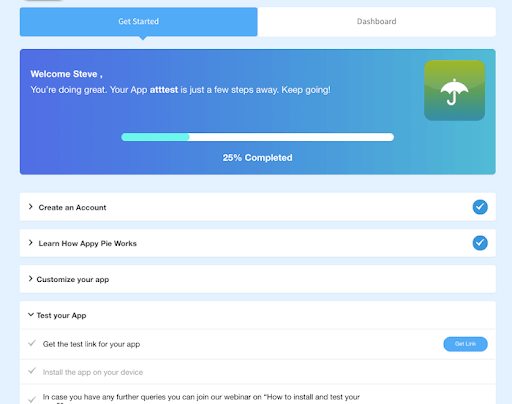 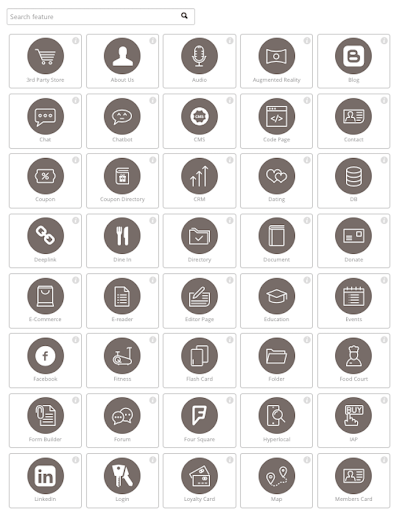 |