Asana vs. Prism PPM

Overview
ProductRatingMost Used ByProduct SummaryStarting Price
Asana
Score 8.5 out of 10
N/A
Asana is a web and mobile project management app. With tasks, projects, conversations, and dashboards, Asana lets an entire team know who's doing what by when, enabling workload balancing. Users can also add integrations for GANTT charts, time tracking and more.
$13.49
per month per user
Prism PPM
Score 9.1 out of 10
Mid-Size Companies (51-1,000 employees)
Prism PPM (formerly WorkOtter) is a Project Portfolio Management platform for IT PMOs, enterprise project management offices, and transformation offices. The software manages work from idea intake through planning, execution, lessons learned, and project closeout; it groups projects into programs and portfolios for prioritization and scenario planning. Key Capabilities Project delivery: Project Management capabilities include Gantt,…
$240
per year per user
Pricing
AsanaPrism PPM
Editions & Modules
Starter
$13.49
per month per user
Advanced
$30.49
per month per user
Enterprise
Contact Sales
Personal
Free
Standard
$240
per year per user
Business
$360
per year per user
Enterprise
Contact Sales
Offerings
Pricing Offerings
AsanaPrism PPM
Free Trial
YesNo
Free/Freemium Version
YesNo
Premium Consulting/Integration Services
YesYes
Entry-level Setup FeeOptionalRequired
Additional DetailsA discount is offered for annual billing.
More Pricing Information
Community Pulse
AsanaPrism PPM
Features
AsanaPrism PPM
Project Management
Comparison of Project Management features of Product A and Product B
Asana
8.4
179 Ratings
9% above category average
Prism PPM
-
Ratings
Task Management9.2179 Ratings00 Ratings
Resource Management8.1152 Ratings00 Ratings
Gantt Charts9.261 Ratings00 Ratings
Scheduling8.3162 Ratings00 Ratings
Workflow Automation9.2132 Ratings00 Ratings
Team Collaboration9.4178 Ratings00 Ratings
Support for Agile Methodology8.57 Ratings00 Ratings
Support for Waterfall Methodology8.57 Ratings00 Ratings
Document Management8.6150 Ratings00 Ratings
Email integration8.7142 Ratings00 Ratings
Mobile Access8.8149 Ratings00 Ratings
Timesheet Tracking6.16 Ratings00 Ratings
Change request and Case Management8.44 Ratings00 Ratings
Budget and Expense Management7.277 Ratings00 Ratings
Professional Services Automation
Comparison of Professional Services Automation features of Product A and Product B
Asana
6.7
48 Ratings
14% below category average
Prism PPM
-
Ratings
Project & financial reporting5.51 Ratings00 Ratings
Integration with accounting software7.947 Ratings00 Ratings
Best Alternatives
AsanaPrism PPM
Small Businesses
Kintone
Kintone
Score 9.7 out of 10
Wrike
Wrike
Score 8.5 out of 10
Medium-sized Companies
Kintone
Kintone
Score 9.7 out of 10
Planview PPM Pro
Planview PPM Pro
Score 8.9 out of 10
Enterprises
Planview AgilePlace
Planview AgilePlace
Score 7.6 out of 10
Planview PPM Pro
Planview PPM Pro
Score 8.9 out of 10
All AlternativesView all alternativesView all alternatives
User Ratings
AsanaPrism PPM
Likelihood to Recommend
9.1
(209 ratings)
10.0
(2 ratings)
Likelihood to Renew
9.6
(34 ratings)
-
(0 ratings)
Usability
8.8
(37 ratings)
-
(0 ratings)
Availability
8.4
(2 ratings)
-
(0 ratings)
Support Rating
5.0
(42 ratings)
-
(0 ratings)
Product Scalability
8.2
(1 ratings)
-
(0 ratings)
User Testimonials
AsanaPrism PPM
Likelihood to Recommend
Asana
The usability of Asana is broad since it's available in a variety of platforms that are widely used nowadays. I think that it would be great for people who are constantly on the move and switching devices, since it has allowed me to work from my phone, too. I also think that Asana has proven itself to handle a large quantity of work
Read full review
Prism PPM
I know it works well for IT but not sure how it would work for construction. I think construction has a different set of needs.
Read full review
Pros
Asana
  • Through it, we were able to communicate and cooperate with the rest of the team to complete the work in the required manner and at the appropriate time.
  • Available for free on Android and iPhone.
  • Asana has a simple and easy user interface
Read full review
Prism PPM
  • Users find it easy to use which is important if you have a large number of users who don't have time for a lot of training or when new hires come on-board.
  • WorkOtter has a lot of advanced features that we don't use but when we do need one, it is nice to know the feature is waiting for us. We have used several of these features for special projects.
  • It does a good job with resource management.
Read full review
Cons
Asana
  • Asana is not really a project management tool, it is good for simple projects only
  • UI has some glitches (doesn't save preferences, etc.)
  • Integration with other tools (Office 365, MS Project)
  • No reminders if the working period you entered is on holidays
Read full review
Prism PPM
  • Nothing significant. Maybe could be faster at times but I'm not sure if that is our own internet connection.
Read full review
Likelihood to Renew
Asana
  • Mobile + Desktop capabilities - Able to use it anywhere, anytime.
  • Task management - Easy to view projects and their progress.
  • Time management - Easy to see what elements require time / how they interrelate and manage the project on an overall basis.
  • Company management - Be able to see from a master dashboard perspective where each project is in its stages of completion.
  • Clear communication - It's visually documented who is doing what at what time so that the whole project gets done.
Read full review
Prism PPM
No answers on this topic
Usability
Asana
It is very user-friendly. Takes a new employee an hour to start figuring out how the system works. That's an important factor. You don't want to encounter the issue where employees need a week to understand how the system works. For example, JIRA, I tried using it for a week and I still don't understand the complicated layout. Asana has a simple interface. Once you see it, you get it type of program.
Read full review
Prism PPM
No answers on this topic
Reliability and Availability
Asana
Working with Asana on a daily basis
Read full review
Prism PPM
No answers on this topic
Support Rating
Asana
I haven't had to use their support so I can't rate it. The fact that I haven't needed them reflects the ease of use of the product. I would recommend that any new users schedule a complete demo of the product to ensure that they are using it to it's fullest (there's a lot of useful features).
Read full review
Prism PPM
No answers on this topic
Alternatives Considered
Asana
Asana is a top-tier project management software that helps us organize and track projects from start to finish. It allows us to apply tasks/to-dos to multiple projects without duplication, divide complex projects into smaller tasks, and track project progress. It also helps us organize work on Kanban boards or linear lists. It stands out from the crowd in a big way compared to the competition.
Read full review
Prism PPM
No answers on this topic
Scalability
Asana
I used this tool on a daily basis at work and it runs as a solid rock
Read full review
Prism PPM
No answers on this topic
Return on Investment
Asana
  • Productivity - Most of all, it allows me to be more productive and have a good sense of where I am with projects and deadlines.
  • Easy to use - I can make the most of my time to get up (and stay) up and running.
  • Project coordination - Allows me to assign tasks to my interns and communicate directly within the platform to keep the work train moving.
Read full review
Prism PPM
  • I think it has really helped us make sure we are using resources effectively but I think it is hard to prove. Although we don't have hard ROI numbers, I believe the general feeling is that you really need a good PPM tool or will waste a lot of time and money.
  • It helps with communication since we have a standard process.
Read full review
ScreenShots

Asana Screenshots

Screenshot of Product HomepageScreenshot of Team ConversationsScreenshot of Project CalendarsScreenshot of InboxScreenshot of List ProjectScreenshot of Portfolios

Prism PPM Screenshots

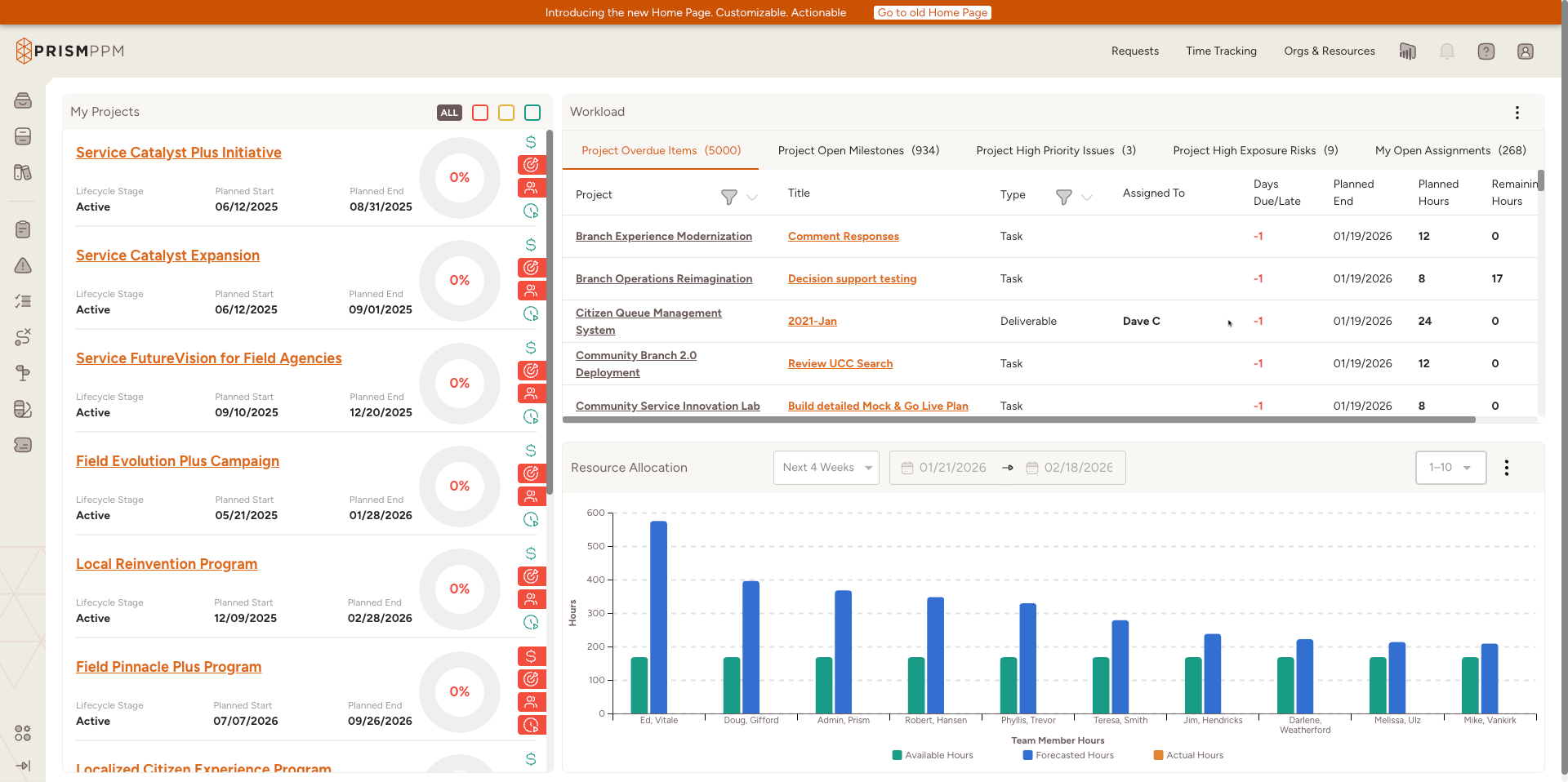
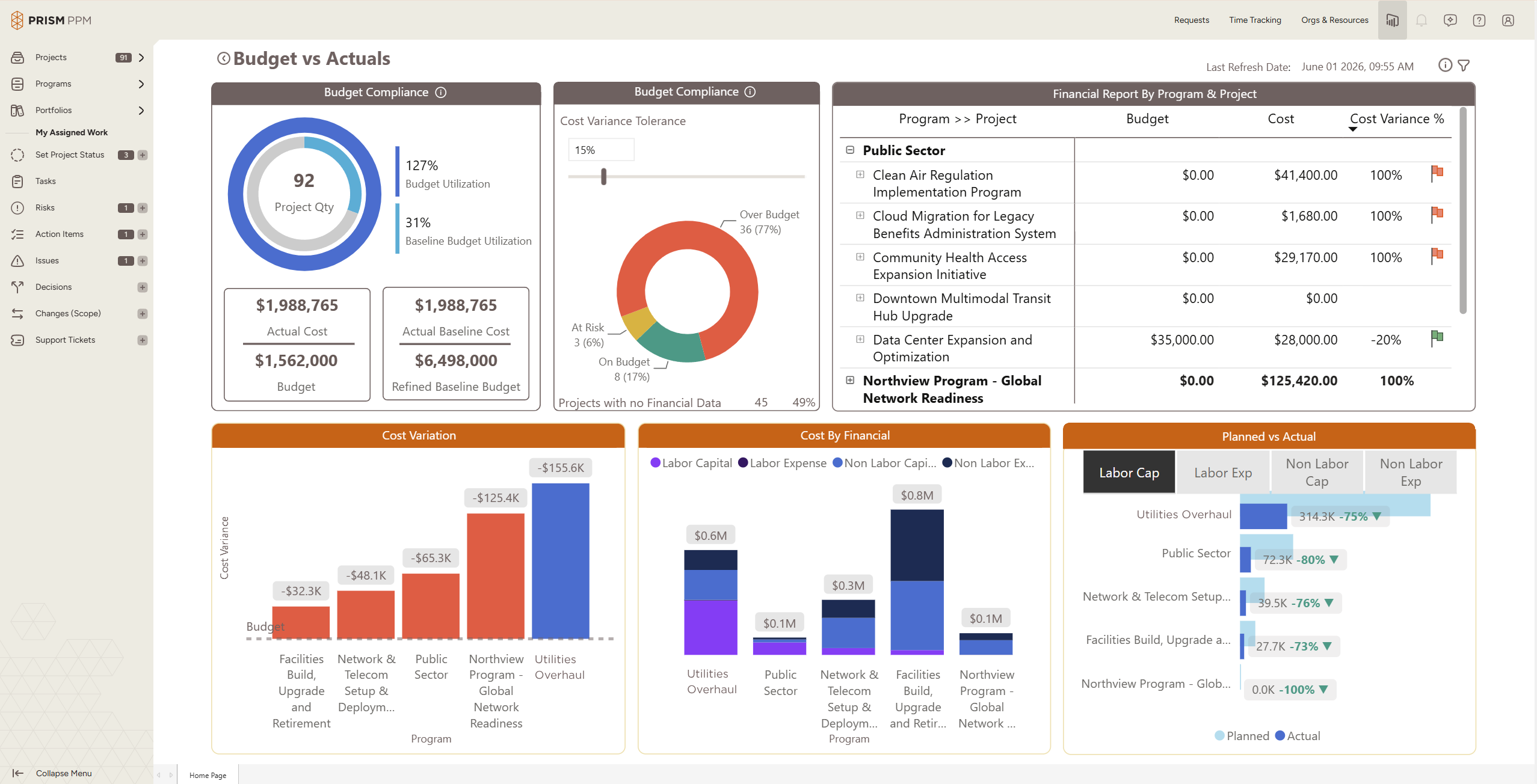
Screenshot of Role-based My Home page shows active projects, status and health scoresScreenshot of Program health dashboard with the ability to drill into individual projects and detailsScreenshot of Data hygiene dashboard identifies missing or stale data, ensuring reporting is accurate and completeScreenshot of Track actual and forecast resource utilization to understand capacity and contraintsScreenshot of Understand budget implications and get ahead of overages at a project, program or whole portfolio levelScreenshot of Use AI Chat to quickly create projects, populate risk registries, and determine initial staffing needs