ShotGrid is a production management and review toolset for VFX, animation, and games teams. ShotGrid is equipped to handle creative production tracking needs, supporting teams from large to smaller studios.
$45
per month per user
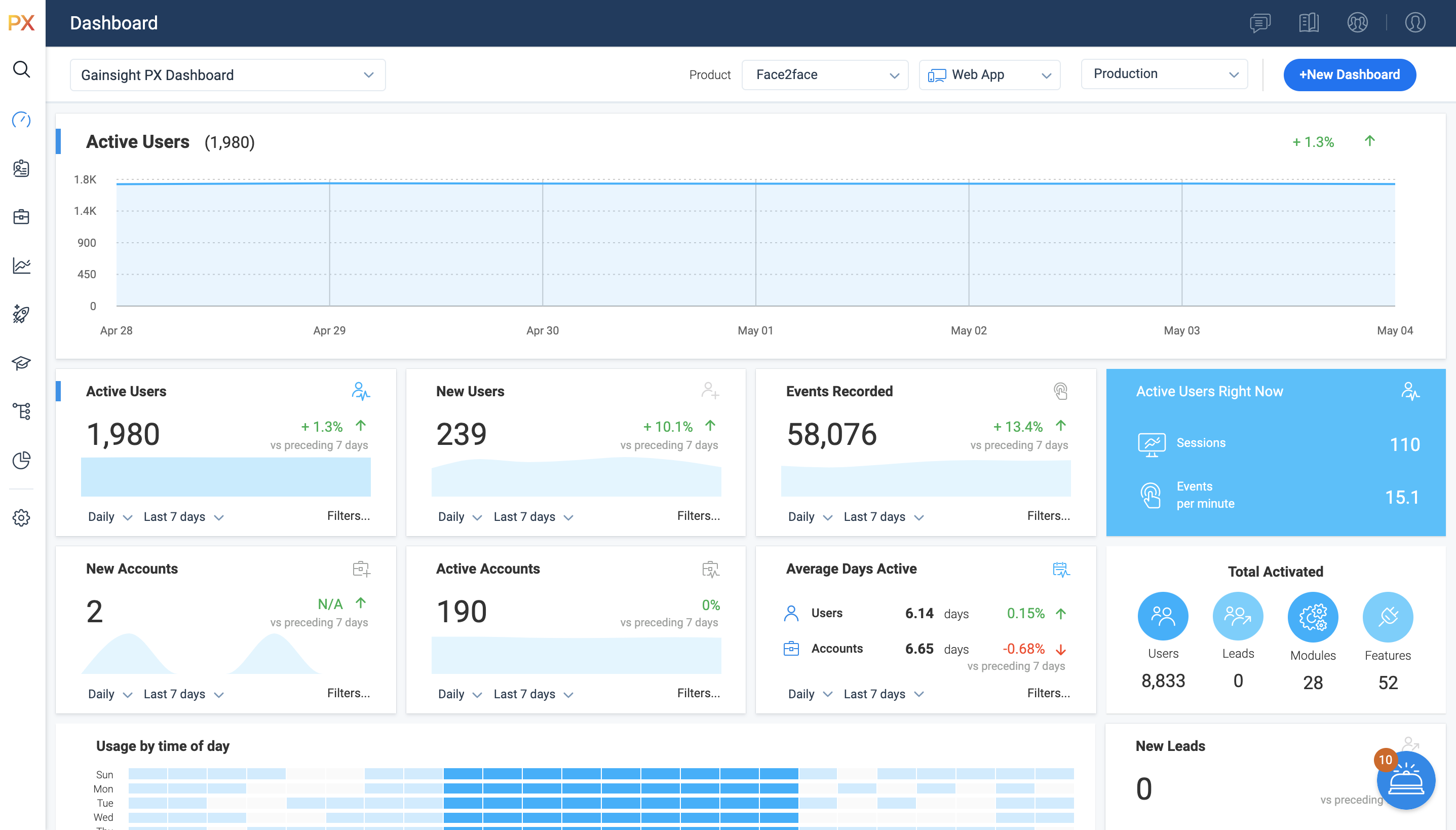
Gainsight PX
Score7.6 out of 10
N/A
For SaaS products, Gainsight's product experience software enables companies to track every step of their user's journey and fully understand how they're interacting with a product over time.
ShotGrid seems to be well suited for a video team for reviews and project tracking. It may not be well suited for Project managers who need to see the bigger picture of the project.
A de minimis incentive was given to thank the reviewer for their time. The incentive was not used to bias or drive a particular response, nor was the incentive contingent on a positive endorsement. More Info
It’s a robust tool that allows you to easily map and track key features and actions within your products. It also allows for in app communications to help guide the user through the path you want them to follow. The ability to connect with Gainsight CS also allows you to leverage that data to drive actions for the account team, incorporate it in health scoring, and use it to trigger digital programs. You do need a well thought out strategy for management of the platform, the data and how you will use it.
A de minimis incentive was given to thank the reviewer for their time. The incentive was not used to bias or drive a particular response, nor was the incentive contingent on a positive endorsement. More Info
Gainsight PX provides powerful segmentation capabilities to help marketers target the right customers with the right message. Through its segmentation capabilities, Gainsight PX enables marketers to create custom segments based on user behavior, demographics, and other criteria to ensure that the right message is delivered to the right customer.
Gainsight PX offers robust analytics capabilities to help marketers gain insights into customer behavior and engagement. Through its analytics capabilities, Gainsight PX enables marketers to track user engagement, identify customer trends, and gain insights into customer behavior.
Gainsight PX provides an intuitive user interface to help marketers quickly and easily create and manage campaigns. Through its user interface, Gainsight PX enables marketers to create and manage campaigns with ease, allowing them to quickly launch campaigns and track their progress.
A de minimis incentive was given to thank the reviewer for their time. The incentive was not used to bias or drive a particular response, nor was the incentive contingent on a positive endorsement. More Info
Ordering comments made by different people by timecode/frame number, instead by the time and date the comment was made
Being able to move an uploaded video from shots to assets and vice versa. Right now we have to re-upload but lose any comments made already if they were in the wrong place
Custom filters are great but they could get a little confusing with all the options. Might help with guidelines or a place we could ask what we want and someone could answer with the best way to achieve those specific filters we want
A de minimis incentive was given to thank the reviewer for their time. The incentive was not used to bias or drive a particular response, nor was the incentive contingent on a positive endorsement. More Info
Dashboards. There is no way to provide notes to others which would be very beneficial in consuming data across a team. Lacking functionality - no resizing, no organization options, run into bugs when using it frequently, overall hard to design a layout that is easy to follow.
No way to identify what features/elements are being used but aren't tagged. This would be a huge value add.
Retention Analyzer. Default view doesnt allow for filtering and includes test data. In our case this doesnt allow for a true comparison between two segments.
Segments. You can't use segments in areas you should be able to. I shouldnt have to recreate a segment as a saved filter.
A de minimis incentive was given to thank the reviewer for their time. The incentive was not used to bias or drive a particular response, nor was the incentive contingent on a positive endorsement. More Info
A de minimis incentive was given to thank the reviewer for their time. The incentive was not used to bias or drive a particular response, nor was the incentive contingent on a positive endorsement. More Info
A de minimis incentive was given to thank the reviewer for their time. The incentive was not used to bias or drive a particular response, nor was the incentive contingent on a positive endorsement. More Info
It's UI/UX is very robust. There's a lot of functionality but it's not very intuitive or intuitive. I spend time with new hires and contractors to overview ShotGrid for a day and revisit after a week or two. Questions always arise down the line
A de minimis incentive was given to thank the reviewer for their time. The incentive was not used to bias or drive a particular response, nor was the incentive contingent on a positive endorsement. More Info
It is a good product, but like with every product, there is room for improvement or even just things I, as a user, would prefer, such as the ability to click on a company and have it go to Salesforce instead of Insight. It can also be difficult to find certain reports.
A de minimis incentive was given to thank the reviewer for their time. The incentive was not used to bias or drive a particular response, nor was the incentive contingent on a positive endorsement. More Info
I have not had to contact support frequently but when I have I used the chat and my questions were answered immediately. I've also used their knowledge center, help documentation and training videos which are all very thorough. The support we've received from our Customer Success Manager has been helpful as well.
A de minimis incentive was given to thank the reviewer for their time. The incentive was not used to bias or drive a particular response, nor was the incentive contingent on a positive endorsement. More Info
Wipster had limitations on video uploads, which was a major drawback. One thing we liked with Wipster was how we can see comments made in order on the timeline while watching the video.
A de minimis incentive was given to thank the reviewer for their time. The incentive was not used to bias or drive a particular response, nor was the incentive contingent on a positive endorsement. More Info
Heap has a great value proposition and very nice user experience. But it lacks the clear funnel analysis that Gainsight PX provides. Plus Heap also does not have integration with a lot of CRMs and Customer data platforms. Also, Additionally if you go in the market to find Heap implementors or SI vendors, you won't find any.
A de minimis incentive was given to thank the reviewer for their time. The incentive was not used to bias or drive a particular response, nor was the incentive contingent on a positive endorsement. More Info
A de minimis incentive was given to thank the reviewer for their time. The incentive was not used to bias or drive a particular response, nor was the incentive contingent on a positive endorsement. More Info
Allow us to integrate actual product usage with Salesforce.
Too much developer time went into it, especially when the premise was that this was mostly going to be handled by the Product team. This was mostly because the Gainsight PX event editor doesn't support more complex querying on events.
A de minimis incentive was given to thank the reviewer for their time. The incentive was not used to bias or drive a particular response, nor was the incentive contingent on a positive endorsement. More Info