Beebole vs. Traqq

Overview
ProductRatingMost Used ByProduct SummaryStarting Price
Beebole
Score 8.6 out of 10
N/A
Beebole is a project management and time tracking platform for planning human resources, measuring labor costs, and managing multi-stage approval workflows. The system integrates timesheet data with financial management to monitor project profitability and resource allocation in real time. Key Capabilities Resource Planning & Time Tracking: Connects planning views directly to employee timesheets. Managers assign work entries that pre-populate into…
$0
per month per user
Traqq
Score 9.1 out of 10
Small Businesses (1-50 employees)
Traqq is offered as an ethical time tracking solution for client-focused teams, professional services companies, and distributed organizations that need visibility into workload, projects, and billable work without employee surveillance. Traqq focuses on transparent time tracking instead of invasive monitoring. It does not use screenshots, idle time tracking, activity tracking, or app and website monitoring. Teams can track time with automatic timers or manual…
$0
(up to 3 users)
Pricing
BeeboleTraqq
Editions & Modules
Free
$0
per month per user
Essential
$10
per month per user
Advanced
$20
per month per user
Free
$0
(up to 3 users)
Plus
$4
per month per user
Business
$9
per month per user
Scale
$13
per month per user
Enterprise
Custom Plan
For teams of 300+ seats
Offerings
Pricing Offerings
BeeboleTraqq
Free Trial
YesYes
Free/Freemium Version
YesYes
Premium Consulting/Integration Services
NoNo
Entry-level Setup FeeNo setup feeNo setup fee
Additional DetailsBeebole offers a 10% discount for annual subscriptions, 10% for NGOs and educational institutions, and volume discounts. Subscriptions can be canceled or modified at any time within the dashboard. The 30-day free trial includes access to all of the tool's features with no commitments. Unlimited live support and configuration calls are available to get started and are provided at no extra cost.Traqq offers different plans based on the number of users and required features. Higher-tier plans include additional tools for project management, workload visibility, reporting, and enterprise needs. Discounts are available for quarterly (10%) and annual (15%) pricing.
More Pricing Information
Community Pulse
BeeboleTraqq
Considered Both Products
Beebole
Chose Beebole
More detailed / layered options for complex organizations and teams, but Beebole's user interface is not as modern and much more cumbersome / higher learning curve
Chose Beebole
Functionality both system are +- the same, Harvest has some screen which looks to be more modern as web based, some modern screen for time tracking of the individuals (which can be more convenient) but the price is higher near in two times!
Traqq
Chose Traqq
The UI/UX of Traqq is way more understandable and more convenient to be used. Also, the price policy is more reasonable and affordable.
Chose Traqq
So I have used Jibble and time doctor for time tracking, but none of these would reflect the reasons for low/high performance of the employees as Jibble is just a time clock, and the time doctor won't yet make reports and send them to superiors right away. Traqq solves it. …
Chose Traqq
The benefits are obvious as soon as you log in. The dashboard is an easy read, the reports are appropriate and the ease of use is top-notch.
Chose Traqq
I haven't used any other products in this area but I think Traqq will be my choice as it provides all the features and services that I would be requesting from such a product. We selected it because they have excellent support and a smooth onboarding process.
Chose Traqq
As silly as it sounds, I was using Google to search for "timezone converters" prior to finding Traqq. I could never go back to managing my company in this way. I now realize how absolutely ridiculous it was to be using Google to manage a company with about 30 employees. The …
Chose Traqq
I was an Upwork user for a few years. I think the advantage of Traqq is it has an intuitive Dashboard that you can refer to. On Traqq's Dashboard, you can grasp the data of the whole team at once. While on Upwork, generally, we need to click on each contract to check the …
Chose Traqq
It's similar to the Upwork time tracker, but Upwork does not let you erase screenshots or blur them, and that's a plus for my employees because they feel they are being tracked but without a privacy invasion.
Chose Traqq
Traqq is the first tracking app I've used. I have heard friends and former colleagues (On Upwork) complain bitterly about how poor most tracking apps are and the countless number of times they've been underpaid after putting in a great amount of time and energy. Traqq was …
Chose Traqq
Traqq have very clear and user friendly user interface as compare to the other tracking tools
Chose Traqq
Capture for Jira (formerly Zephyr Capture), from SmartBear and ClickUp
Chose Traqq
I selected Traqq because in the TickTick app it was difficult to manage the application and I can’t able to see all team members' daily activities in terms of performance.
Best Alternatives
BeeboleTraqq
Small Businesses
Traqq
Traqq
Score 9.1 out of 10
Dayforce Powerpay
Dayforce Powerpay
Score 9.2 out of 10
Medium-sized Companies
TimeClock Plus
TimeClock Plus
Score 9.5 out of 10
TimeClock Plus
TimeClock Plus
Score 9.5 out of 10
Enterprises
Zoho People
Zoho People
Score 8.9 out of 10
Zoho People
Zoho People
Score 8.9 out of 10
All AlternativesView all alternativesView all alternatives
User Ratings
BeeboleTraqq
Likelihood to Recommend
8.7
(0 ratings)
9.4
(0 ratings)
Likelihood to Renew
9.1
(0 ratings)
-
(0 ratings)
Usability
8.1
(0 ratings)
-
(0 ratings)
Support Rating
9.1
(0 ratings)
-
(0 ratings)
User Testimonials
BeeboleTraqq
Likelihood to Recommend
We are very happy with Beebole. Their flexible approach and willingness to grant licenses when our offshore IT partner had to onboard 25 specialists for hypercare - they gave us the licenses immediately
Read full review
Traqq is a great system when you are in the field of education. In my experience, it has saved me countless hours of figuring out how to remember the timezone my employees and students are located in. I used to use a written spreadsheet of each employee's timezone and one of those random timezone calculators. Being able to modify Traqq based on my employees' timezone, my timezone, and our company's timezone (the technical "working hours") has been a game-changer.
Read full review
Pros
  • Task management on a project
  • Time management on a project
  • Profitability check on each project
  • Overtime management
  • Gestion des tâches sur un projets
  • Gestion des temps sur un projets
  • Vérification de la rentabilité sur chaque projet
  • Gestion des heures supplémentaires
Read full review
  • The productivity colour system (red, amber, green) displayed on the work timeline works really well for quickly gauging productivity
  • Reports are easy to generate, and can quickly be sent to others.
  • Privacy features make it feel like a productivity tracker rather than a surveillance product.
Read full review
Cons
  • Somewhat of a cumbersome user interface / not as intuitive
  • Interface appears a bit outdated, not as appealing as other software
  • Reporting is cumbersome / difficult to customize views
Read full review
  • Being able to log in directly through networks such as Google, Apple ID, or even Facebook.
  • I missed being able to use the application in other languages ​​such as Spanish.
  • Seeing the exposed data with graphics and being able to export them to PDF or Excel for example.
Read full review
Likelihood to Renew
It has been proving its functionality since 2018
Read full review
No answers on this topic
Usability
Again, it is easy to set up projects and the phases of projects.
Read full review
No answers on this topic
Support Rating
Response is always quick and intelligent!
Read full review
No answers on this topic
Alternatives Considered
More detailed / layered options for complex organizations and teams, but Beebole's user interface is not as modern and much more cumbersome / higher learning curve
Read full review
So I have used Jibble and Time Doctor for time tracking, but none of these would reflect the reasons for low/high performance of the employees as Jibble is just a time clock, and the Time Doctor won't yet make reports and send them to superiors right away. Traqq solves it. Honestly, I have never come across any software competing with functionalities like Traqq yet.
Read full review
Return on Investment
  • Beebole is fantastic value from my perspective and it allows me to charge out my time in a completel;y transparent manner with my Fee Notes supported by detailed time records. This maintains Cleint trust and bills are settled promptly and without enquiries and delays.
Read full review
  • I've been able to get things done faster with Traqq. One of my clients made a comment a while back(I asked for her permission before posting this). She said, "I loved how I don't get to pay freelancers for doing nothing, now I pay employees according to the quality of work I receive". We both laughed about it though, but I believe that's a positive impact on her.
  • I've been able to write more, knowing that my clients can see my major moves. My main aim is to impress my employers to get good feedback in return and Traqq helps me greatly in that area.
Read full review
ScreenShots

Beebole Screenshots

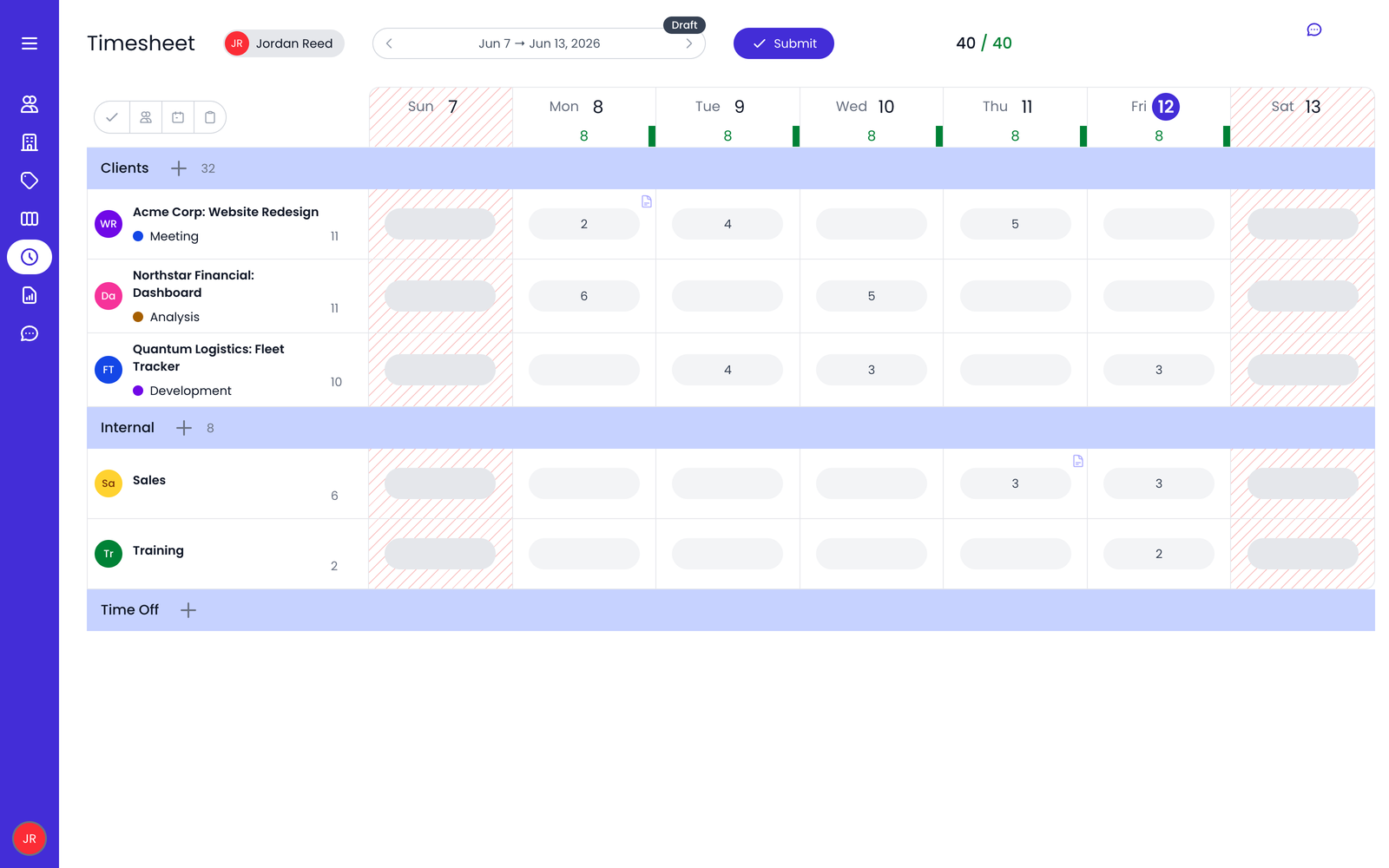
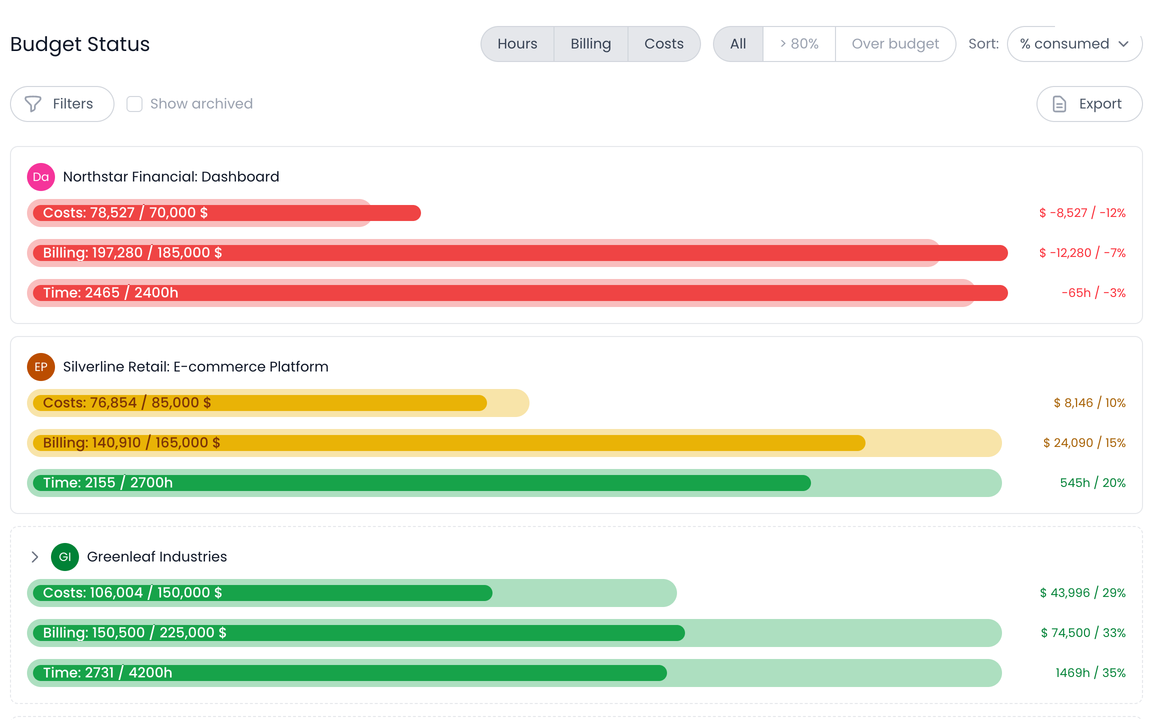
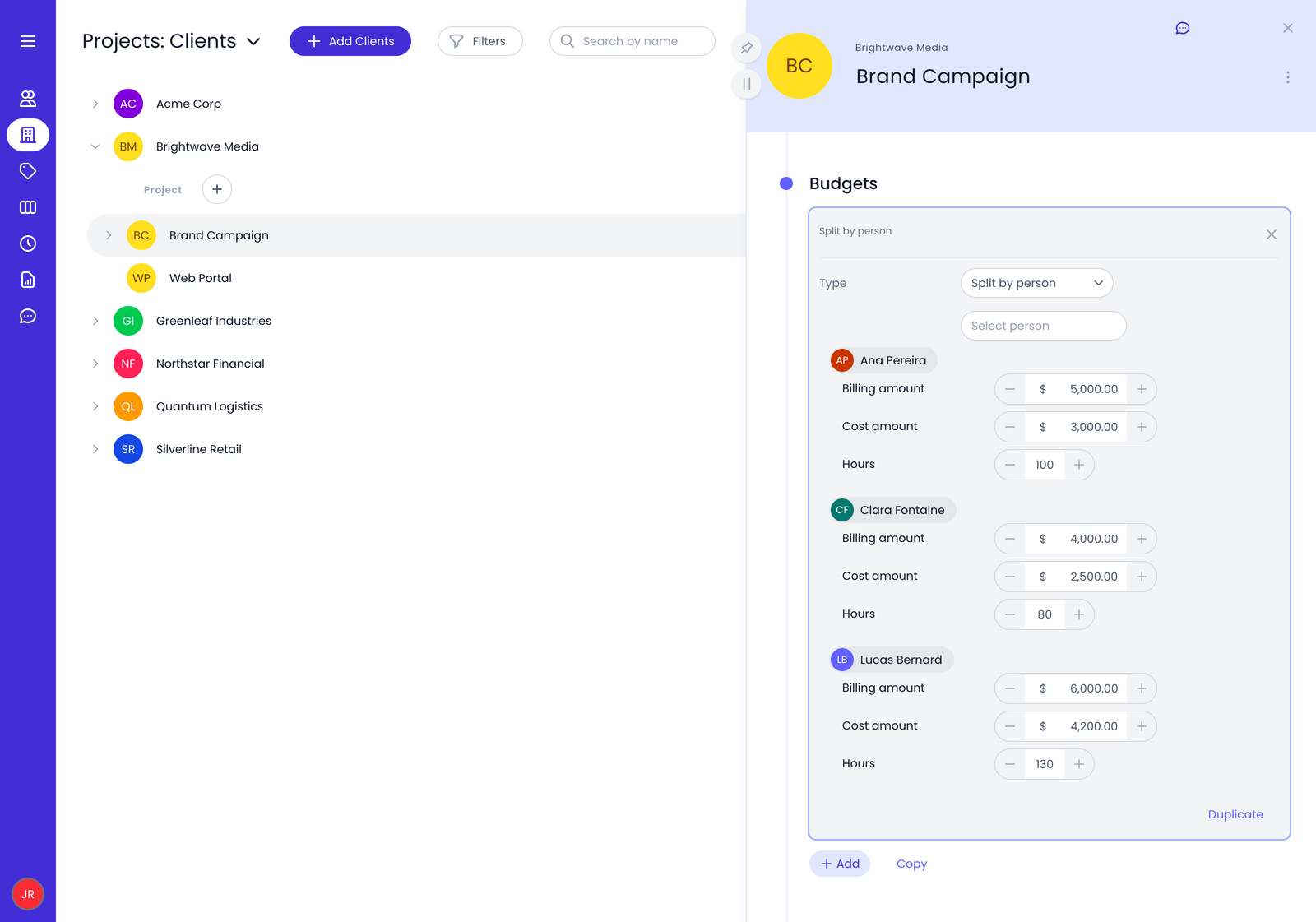
Screenshot of Timesheet view in BeeboleScreenshot of Beebole's customizable reporting functionalityScreenshot of Screenshot of Hours by projects report visualized in BeeboleScreenshot of A look at budget splits in BeeboleScreenshot of In Beebole, you can run multidimensional reports like the one seen here

Traqq Screenshots

Screenshot of the dashboard to track time with start/stop timers or manual entries, add tasks, projects, billable status, and tags, and review previous time logs by day.Screenshot of where to review time and financial performance, track total and billable hours, revenue, costs, and margins, and break down data by teams, users, clients, and projects.Screenshot of where to compare tracked hours with planned capacity and identify underutilized and overloaded team members.Screenshot of the interface to create and manage invoices, track statuses, due dates, balances, and payments, and generate invoices from billable time.Screenshot of the interface to create projects with names and colors, set billing and cost rates, link clients, and assign project managers.