Bluehost, headquartered in Orem, Utah, offers website hosting. Bluehost also offers managed WordPress hosting, with optional SEO and marketing tools for WordPress plans.
$19.95
per month for 36 month term
WebWave
Score9.5 out of 10
N/A
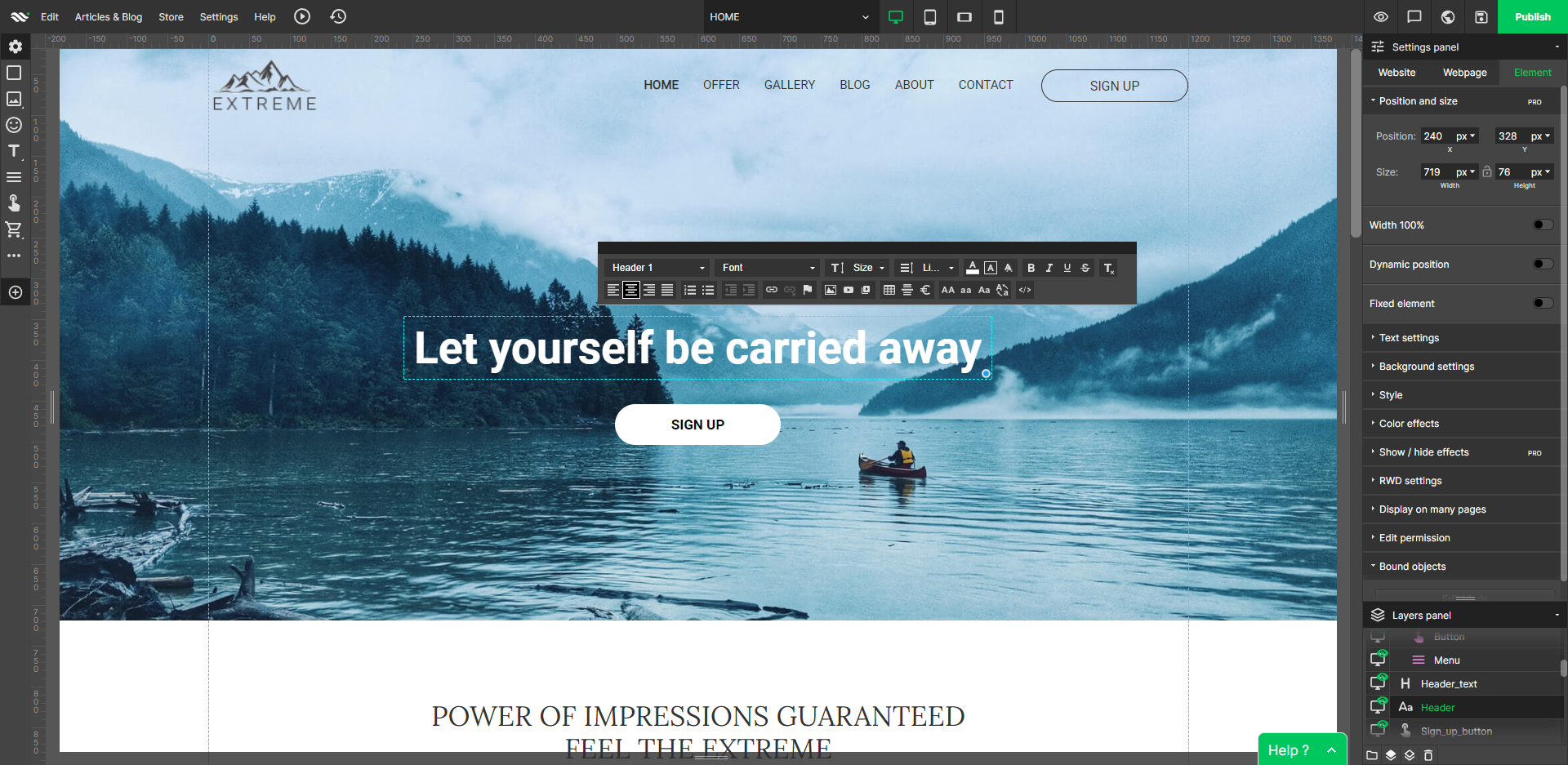
WebWave — an alternative for agencies and freelancers for creating custom websites for clients with the support of CMS. Using CMS with no sacrifices WebWave is a CMS platform that gives a designer precision up to 1 px in every single detail just like in more sophisticated graphic programs such as Photoshop while remaining a drag and drop software. This is to make creating websites much faster without loosing on details. Spend less time talking WebWave…
Bluehost is a decent all-around choice for web hosting with professional web development and domain management features that are particularly ideal for WordPress websites and blogs. They have a good reputation within the industry as a company that invests heavily in new technology and platform innovation. Bluehost has made a lot of improvements to customize their back-end administration (AMP & control panel) by working to improve the usability and design of the browser interface. Bluehost is primarily focused on customers who use WordPress and we would recommend either their hybrid cloud or managed WordPress platform, which provides everything that you need to build and maintain a popular website. All in all, Bluehost is a well-established brand that continually improves its hosting products, regularly upgrades their data center hardware, and is generally considered a leader in the development of new cloud hosting platform services.
A de minimis incentive was given to thank the reviewer for their time. The incentive was not used to bias or drive a particular response, nor was the incentive contingent on a positive endorsement. More Info
Well suited: Small businesses and entrepreneurs: WebWave is an excellent option for small businesses and entrepreneurs who need a professional-looking website without spending a lot of time and money. It's easy to use, customizable, and offers fast load times and responsive design. Less appropriate: Large e-commerce websites: If you're looking to create a large e-commerce website with a vast number of products and advanced features, WebWave may not be the best option. Its e-commerce functionality is limited compared to other website builders, and it may not be able to accommodate the needs of a large-scale online store. Also, if you need much coding, you would rather have it with something that is wordpress-based.
A de minimis incentive was given to thank the reviewer for their time. The incentive was not used to bias or drive a particular response, nor was the incentive contingent on a positive endorsement. More Info
Customer service/tech support is simply top-notch. Being able to pick up the phone, get help, and not get charged for it is rare in the tech-support world.
Their Dashboard/C-panel has a wide selection of popular tools and options to make website design and all that goes with it very easy. Lots of choices; they are more than a simple hosting service.
Keeping their tools up-to-date. I never have to worry about upgrades or having the latest features; it just happens automatically!
A de minimis incentive was given to thank the reviewer for their time. The incentive was not used to bias or drive a particular response, nor was the incentive contingent on a positive endorsement. More Info
WebWave's site builder is the platform's truly innovative feature. I've never come across another service that deploys a layer-based approach in web design, as most of them usually deploy a grid-based system. This is an incredible alteration that ensures WebWave behaves much like a traditional graphic design tool, thereby resulting in an experience that is a lot more intuitive and instinctive. I believe this has the potential to radically change the way people approach no-code web design.
WebWave provides automatic, daily backups and a free SSL certificate for every website. This results in excellent security.
WebWave's support team is first-class! I had some teething-issues in the beginning, but the support team quickly got me back on track.
WebWave's community/forum is an excellent place to vote and request new features. This proves the development team is committed to making WebWave better by listening to their users.
A de minimis incentive was given to thank the reviewer for their time. The incentive was not used to bias or drive a particular response, nor was the incentive contingent on a positive endorsement. More Info
Some scope for improvement in UX (colors are not very appealing). It is simple to use but design is a little dated. Especially in the builder section, I'd like to see modern design for buttons and maybe gradients also: as this is where visual motivation is also important
Some edits take effect only after pressing OK. That should be eliminated as it's an unnecessary addition. It's also kind of annoying to do that again and again, which can add up to a lot as we do so many small tweaks while building the website.
Few things (maybe glitches) in design. The rectangle below the footer was uneditable for me. I spent quite some time trying to figure it out so I'm convinced it's a glitch.
I use Wordpress for my website on Bluehost, so I already know how it works and happy with it. I gave it this rating as I love the fact that If you do plan on creating multiple websites on Bluehost you'll be able to create specific login access for each website sites making it less likely to enter into the wrong website accounts. Which makes it even easier to manage client websites if you plan to create and host websites on behalf of your clients.
A de minimis incentive was given to thank the reviewer for their time. The incentive was not used to bias or drive a particular response, nor was the incentive contingent on a positive endorsement. More Info
They are quick, easily reached, and can usually solve problems on the first try. However I noticed I had to go to customer support more often than with other providers, whether that was things breaking more often or if their customer support couldn't fix things on the first try. But in most scenarios, they are fine.
A de minimis incentive was given to thank the reviewer for their time. The incentive was not used to bias or drive a particular response, nor was the incentive contingent on a positive endorsement. More Info
1. The support person does not seem to understand the issues, and seems like they go off to talk to somebody and revert back every 5 to 10 minutes. It takes up a lot of time. 2. There is a lack of reading material to address simple issues like changing the website name in the dashboard, pasting a code, etc.
A de minimis incentive was given to thank the reviewer for their time. The incentive was not used to bias or drive a particular response, nor was the incentive contingent on a positive endorsement. More Info
Bluehost did not stack up against HostGator; in fact, HostGator was where we ended up migrating after we realized Bluehost was not for us. Bluehost is not geared toward businesses, especially ones like ours that have a very customized site. HostGator allowed us the customization that we needed, and their prices were terrific.
A de minimis incentive was given to thank the reviewer for their time. The incentive was not used to bias or drive a particular response, nor was the incentive contingent on a positive endorsement. More Info
WordPress is a more flexible and adaptive content management system than Webwave. In addition to the functionalities that are already built-in, I am unable to add any customizable plugins or add-ons. However, in the majority of cases, the inherent features of Webwave are sufficient for developing a website that serves its intended purpose. Webwave also makes it possible for you to add animations and the appearance of each of your design elements, whereas WordPress builders require additional plugins in order for users to access most of such capabilities. Webwave has several essential design features available internally, thus saving money and time.
The website is slow. The speed is not reliable. Sometimes, sites would go down without warning. You would have to get a VPS to get consistent speed. If you have small website as a hobby, then Bluehost will be sufficient. Otherwise, I recommend looking for something more fast. Storage is good, but speed is lacking
A de minimis incentive was given to thank the reviewer for their time. The incentive was not used to bias or drive a particular response, nor was the incentive contingent on a positive endorsement. More Info
A de minimis incentive was given to thank the reviewer for their time. The incentive was not used to bias or drive a particular response, nor was the incentive contingent on a positive endorsement. More Info