Bonita Platform vs. FlowX — No-Code BPM Automation

Overview
ProductRatingMost Used ByProduct SummaryStarting Price
Bonita Platform
Score 4.0 out of 10
N/A
Bonita is an open-source business process and workflow management platform created by the French National Institute for Research in Computer Science. It is available as a free community edition or as a commercial subscription product.N/A
FlowX — No-Code BPM Automation
Score 10.0 out of 10
N/A
FlowX for Jira is a no‑code tool for designing business processes directly on top of standard Jira tasks. It enables building smart task chains, managing data flow between steps, and integrating with external systems without writing a single line of code. The goal is to eliminate manual routine (e.g., onboarding/offboarding), increase execution transparency, and accelerate delivery across teams. Key Features Flow Editor. Processes are designed visually: create…N/A
Pricing
Bonita PlatformFlowX — No-Code BPM Automation
Editions & Modules
No answers on this topic
Offerings
Pricing Offerings
Bonita PlatformFlowX — No-Code BPM Automation
Free Trial
NoNo
Free/Freemium Version
YesYes
Premium Consulting/Integration Services
YesNo
Entry-level Setup FeeNo setup feeNo setup fee
Additional Details
More Pricing Information
Community Pulse
Bonita PlatformFlowX — No-Code BPM Automation
Features
Bonita PlatformFlowX — No-Code BPM Automation
Reporting & Analytics
Comparison of Reporting & Analytics features of Product A and Product B
Bonita Platform
6.4
43 Ratings
20% below category average
FlowX — No-Code BPM Automation
-
Ratings
Dashboards6.041 Ratings00 Ratings
Standard reports5.540 Ratings00 Ratings
Custom reports7.740 Ratings00 Ratings
Process Engine
Comparison of Process Engine features of Product A and Product B
Bonita Platform
7.7
53 Ratings
8% below category average
FlowX — No-Code BPM Automation
9.0
1 Ratings
8% above category average
Process designer9.052 Ratings9.01 Ratings
Process simulation6.910 Ratings00 Ratings
Business rules engine8.242 Ratings00 Ratings
SOA support6.440 Ratings00 Ratings
Process player6.78 Ratings00 Ratings
Support for modeling languages9.038 Ratings00 Ratings
Form builder8.148 Ratings00 Ratings
Model execution6.948 Ratings9.01 Ratings
Collaboration
Comparison of Collaboration features of Product A and Product B
Bonita Platform
5.9
24 Ratings
34% below category average
FlowX — No-Code BPM Automation
-
Ratings
Social collaboration tools5.924 Ratings00 Ratings
Content Management Capabilties
Comparison of Content Management Capabilties features of Product A and Product B
Bonita Platform
6.8
34 Ratings
18% below category average
FlowX — No-Code BPM Automation
9.0
1 Ratings
10% above category average
Content management6.834 Ratings9.01 Ratings
Best Alternatives
Bonita PlatformFlowX — No-Code BPM Automation
Small Businesses
Square 9 Softworks
Square 9 Softworks
Score 9.5 out of 10
Square 9 Softworks
Square 9 Softworks
Score 9.5 out of 10
Medium-sized Companies
Square 9 Softworks
Square 9 Softworks
Score 9.5 out of 10
Square 9 Softworks
Square 9 Softworks
Score 9.5 out of 10
Enterprises
CMW Platform
CMW Platform
Score 9.2 out of 10
CMW Platform
CMW Platform
Score 9.2 out of 10
All AlternativesView all alternativesView all alternatives
User Ratings
Bonita PlatformFlowX — No-Code BPM Automation
Likelihood to Recommend
8.2
(53 ratings)
-
(0 ratings)
Likelihood to Renew
6.4
(4 ratings)
-
(0 ratings)
Usability
7.7
(25 ratings)
-
(0 ratings)
Performance
8.0
(2 ratings)
-
(0 ratings)
Support Rating
4.6
(3 ratings)
-
(0 ratings)
Implementation Rating
4.5
(5 ratings)
-
(0 ratings)
Ease of integration
7.3
(10 ratings)
-
(0 ratings)
Product Scalability
7.5
(10 ratings)
-
(0 ratings)
User Testimonials
Bonita PlatformFlowX — No-Code BPM Automation
Likelihood to Recommend
Bonitasoft
Well suited for low code/no code applications centered around approval flows. It has built-in task management for users to see their pending actions, comments, statuses, etc. It has a very nice design for process flows. Less appropriate may be for generic type applications with complex screens and logic within those screens that need a lot of data to process.
Read full review
QS Integration
FlowX has a very intuitive interface and great documentation with video tutorials.
Even I, as a non-technical specialist, was able to set up the process on my own in just a few hours.
Everything is clear, logical, and simple a truly user-friendly solution
Read full review
Pros
Bonitasoft
  • Bonita seems particularly suited for processes requiring a great deal of human interaction. Its user model allows you to control access to business processes in a fine-grained way. This allows for business processes to move smoothly between users and services as the process advances.
  • The definition and usage of custom forms from the latest version of Bonita seems particularly powerful. It allows for a thorough customization of the look-and-feel and does not require complex developments.
  • The web interface and administration section have greatly improved in the latest versions. Installation and configuration of processes has become more flexible and more structured. The administration section gives a good view on failed processes, allowing to analyse problems in an efficient way.
Read full review
QS Integration
  • Automates routine tasks — creates issues, triggers processes, and sends notifications without manual work.
  • Builds “if–then” logic — lets you create flexible workflows with conditions and variables.
  • Visualizes processes — everything is shown on a clear diagram, easy to understand even for non-technical users.
Read full review
Cons
Bonitasoft
  • There is a learning curve beyond the boot camps that needs to be addressed with more structured curriculum.
  • The full stack technologies are industry standard, but these [are] challenging to learn and could use a learning path and orientation. There's probably opportunity for third-parties here to help with learning and adoption.
Read full review
QS Integration
No answers on this topic
Likelihood to Renew
Bonitasoft
We just renewed our license
Read full review
QS Integration
No answers on this topic
Usability
Bonitasoft
Bonita Platform has allowed us to develop GUI relatively fast using its UI Designer while being able to seamlessly integrate our business logic in Java in a BPMN2 process diagram. It gives a nice productivity boost but still requires programming know-how to be able to deliver the final solution to your business problems.
Read full review
QS Integration
A very convenient automation system for setting up processes in Jira.
It’s easy to create logic, templates, and conditions without any coding.
It helps make Jira smarter and more user-friendly for the whole team.
Read full review
Performance
Bonitasoft
Engine itself is efficient enough for most cases I dealt with. It can also be extended by clustering. I have done performance tests with JMeter and only managed to induce the crash of... JMeter. If there are efficiency issues they usually concern bad design/implementation of created apps or bottlenecks in integrated systems. Although I have met two cases with efficiency loss.
1. Java 7 related PermGen saturation caused by big number of installed apps (there is no jar dependency reusal between apps option).
2. Big number of waiting event handlers in processes stresses the database.
Read full review
QS Integration
No answers on this topic
Support Rating
Bonitasoft
It was sometimes difficult to get support on Bonita API.
Read full review
QS Integration
No answers on this topic
Implementation Rating
Bonitasoft
Nothing in particular
Read full review
QS Integration
No answers on this topic
Alternatives Considered
Bonitasoft
RHPAM is maybe a very good BPM process engine but is very limited to build a complete application.
We also try site soft W4 which needs more developments to build an application. We finally choose Bonita which is easier to get ready with.
Read full review
QS Integration
No answers on this topic
Scalability
Bonitasoft
Respect of BPMN standard over the long term. Good enhancements by Bonitasoft for new use cases, for example the introduction of a real form editor even if it has been technically difficult to manage. Once done though, we have far greater possibility of human interaction.
Read full review
QS Integration
No answers on this topic
Return on Investment
Bonitasoft
  • Case management provided as better tracking which help us to meet SLAs.
  • Auto email notification helps to address "Where are my request" answers which eventually increased our customer delight index.
  • By using the third-party integration, we are able to provide visibility w.r.t end to end request status.
Read full review
QS Integration
  • Reduced routine work by over 3 hours on just one onboarding process.
  • Full transparency: with the process map, every participant can see in real time where the process is and why it stopped.
  • Easy setup of multi-condition workflows — even complex scenarios are simple to build and adjust.
Read full review
ScreenShots

Bonita Platform Screenshots

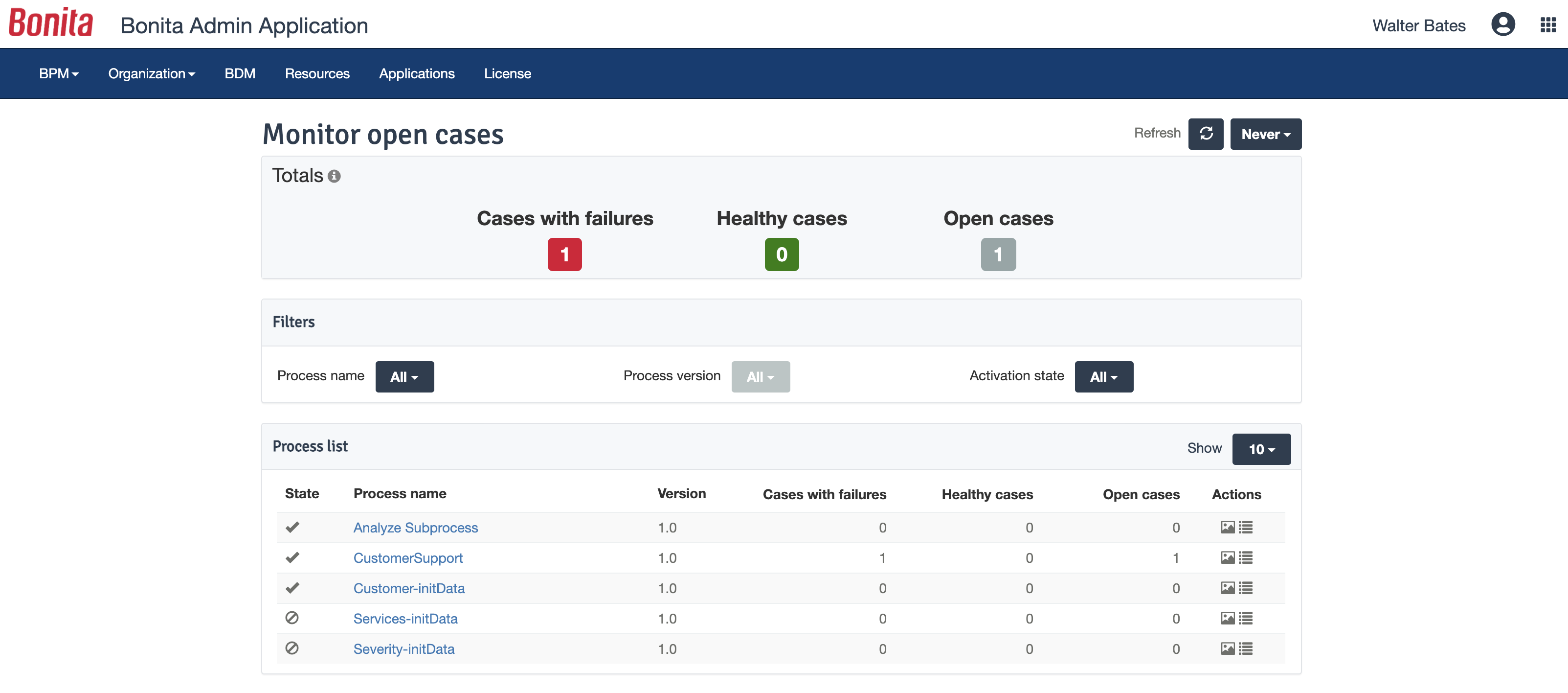
Screenshot of process designed in Bonita BPM StudioScreenshot of Bonita BPM project overviewScreenshot of Fully customized end user interfaceScreenshot of Bonita BPM Admin AppScreenshot of Bonita Process Insights

FlowX — No-Code BPM Automation Screenshots
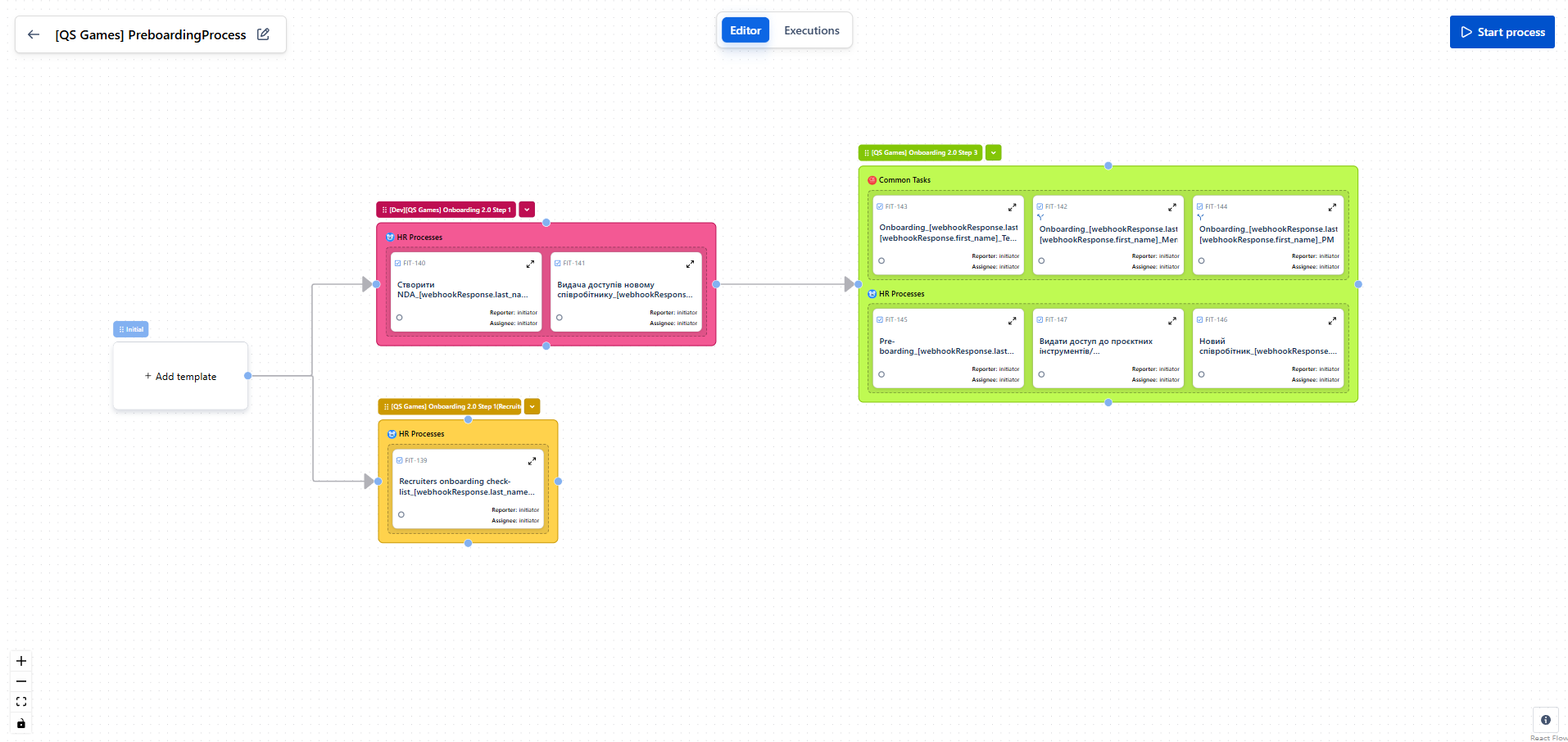
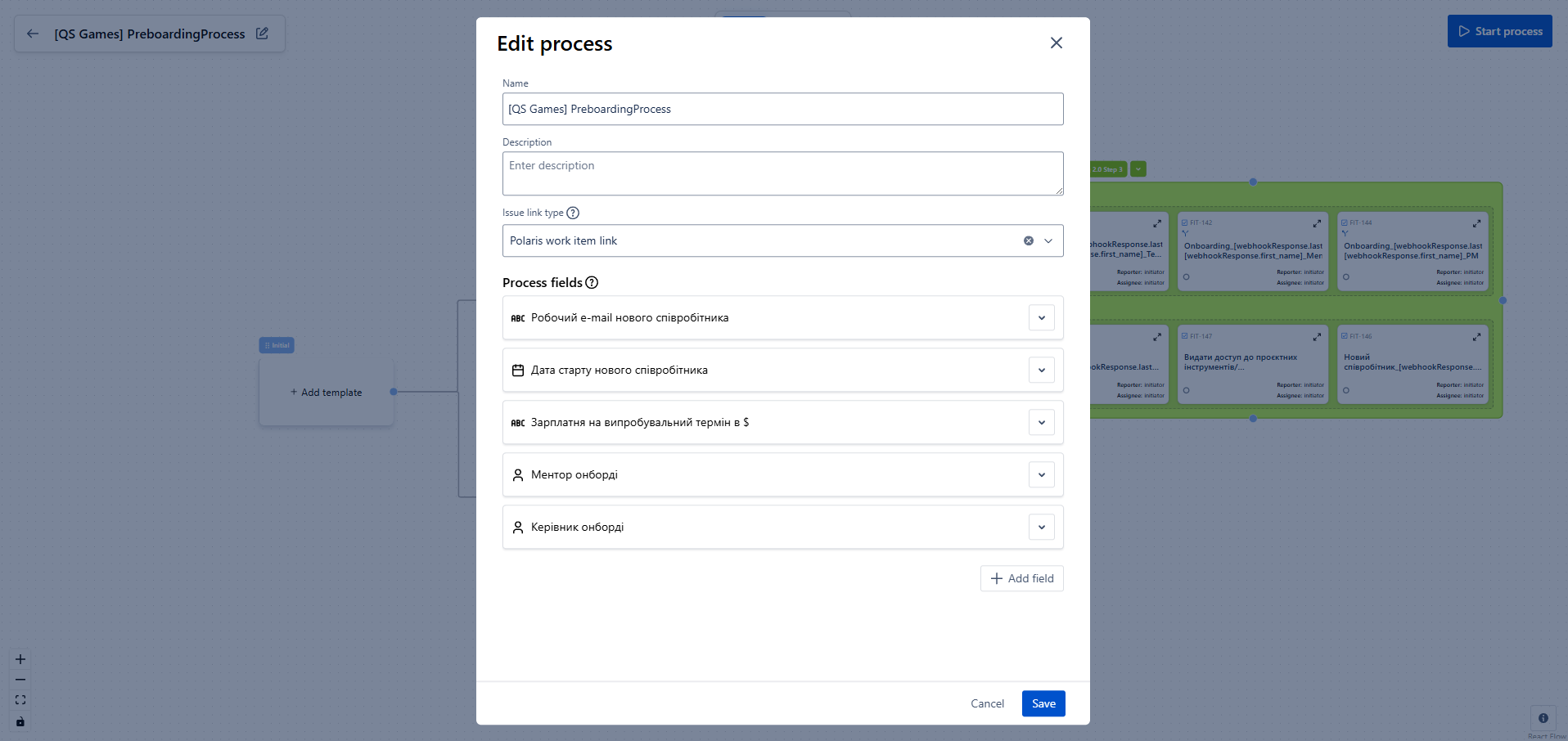
Screenshot of Screenshot of