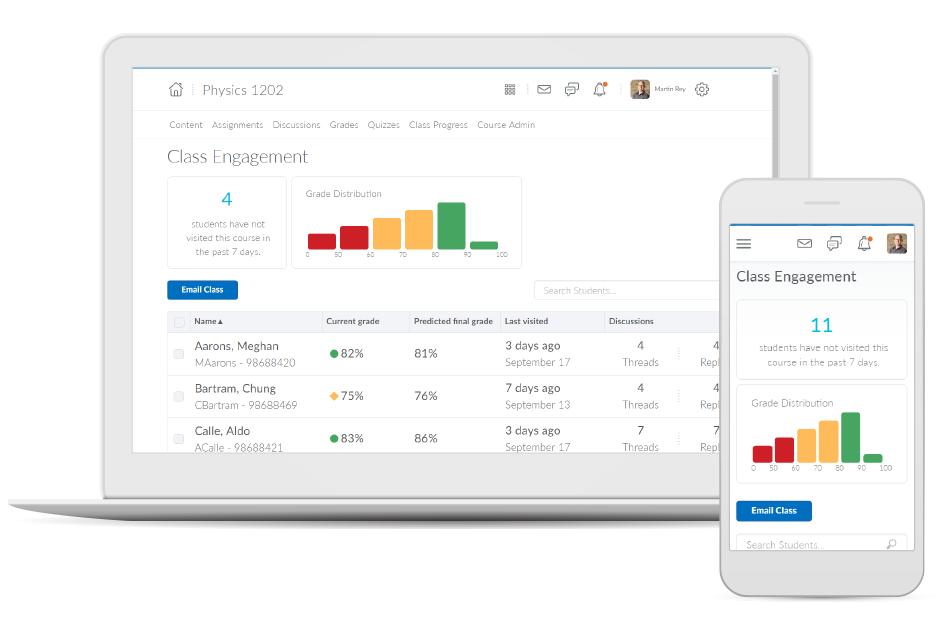
Brightspace is an academic and corporate learning management platform. It provides core e-learning features, as well as mobile accessibility and granular personalization and analytics insights.
N/A
PhishingBox
Score 8.0 out of 10
N/A
PhishingBox headquartered in Lexington provides a Security Awareness Ecosystem through a suite of tools and services to implement and maintain a high-level security awareness training program. Key components include a phishing simulation tool, security awareness training, a learning management system (LMS), KillPhish reporting button, and the 'Phishing Inbox,' which allows InfoSec teams to thoroughly investigate reported emails and related information.
N/A
Sakai
Score 8.7 out of 10
N/A
Sakai is an open source learning
management system provided by the Apero Foundation. The LMS provides what it
calls Core and Expanded Features. The Core Features encompass an integrated
tool set that is tested by the Sakai community members and is then included
with each new release. The tool set can be configured by: instructors,
students, research investigators and project leaders. The other set of tools, known as “Contrib
Tools” are specific to Sakai tools and innovations that are developed…
N/A
Pricing
D2L Brightspace
PhishingBox
Sakai
Editions & Modules
No answers on this topic
No answers on this topic
No answers on this topic
Offerings
Pricing Offerings
D2L Brightspace
PhishingBox
Sakai
Free Trial
Yes
No
No
Free/Freemium Version
No
No
Yes
Premium Consulting/Integration Services
No
No
No
Entry-level Setup Fee
No setup fee
No setup fee
No setup fee
Additional Details
Must contact vendor for pricing information. 30-day free trial is available.
20% discount for yearly billing.
Must contact vendor for pricing information.
More Pricing Information
Community Pulse
D2L Brightspace
PhishingBox
Sakai
Considered Multiple Products
D2L Brightspace
Verified User
Anonymous
Chose D2L Brightspace
It's an all-in-one platform with great analytics. It can also easily be used for external training programs, which is important for a B2B use case. I really like how it can embed different types of content, like video, and the integrations are also great. It is more costly than …
Brightspace is by far the most user-friendly LMS I have ever used. Faculty with a lower technical skill set have an easier time navigating Brightspace features. Teaching wise, I have also found Brightspace to be easier for students to navigate than its competitors. I adjunct …
In looking at Brightspace versus its competitors currently, it continues to provide the widest functionality, great value, and better ability to tailor the user experience of it to our organizations needs. The longer that our institution has had Brightspace, the more we've been …
Compared to Blackboard, Brightspace is a much more powerful application that allows instructors to share more content, customize their courses, and design courses in a more intuitive wizard style if desired. Brightspace is also designed to work well on mobile devices and …
Brightspace offers one of the most tailored employee engagement learning platforms in existence. My organization has utilized a multitude of employee engagement and learning platforms and Brightspace has offered one of the most customized tools that we have used thus far. We …
We migrated from PLS. Brightspace is much more intuitive and modern than PLS was. The ability for Brightspace to work across a range of devices (mobile, tablet, PC, Mac, etc) has been positive for our instructors and students. The main interface is straightforward and easy to …
Although it's been some time since I used Blackboard (as a student in my undergraduate degree), it felt much more intuitive at the time than Brightspace has when I've taken or taught classes. However, I don't feel especially comfortable comparing them since it's been quite …
I used blackboard when I was in college, but that was very little. I just used it to register for classes and to view grades. Brightspace is leaps and bounds what Blackboard was when I last used it in 2010.
I have used Blackboard Learn 8 and 9. I am currently learning about Canvas. Blackboard is overall much clunkier and lacks the intuitive feel in some parts of D2L. Its grade book is much harder to control and manipulate than D2L's. Its navigation menu can be more radically …
I was not involved in the selection process for my organization since I am only a professor. However, I have worked at 2 previous organizations that have used other online LMSs, and I think overall, D2L is at the top of the list of LMSs I find the most usable.
Desire2Learn was selected for me, but I find it to be simpler to navigate than Moodle, more intuitive. Blackboard was many years ago, but I find more flexibility in assigning due dates and end dates in the newer version of Desire2Learn.
Faculty Development Coordinator & Emerging Technologies Specialist
Chose D2L Brightspace
Comparing Desire2Learn to Blackboard Vista, I actually believe that Blackboard has a better product, although it has its own set of challenges. We changed systems because of the extremely poor customer service and high level of faculty irritation with Blackboard at the time. I …
Desire2Learn is very good compared to Blackboard and has a lot more flexibility with presenting and organizing material. Desire2Learn is about the same as WebCT. There are similar features and while each one has its drawbacks, they are both acceptable for my current class …
Desire2Learn is similar to Blackboard but with less functionality and intuitiveness in terms of use. Grading options are more limited. Desire2Learn uses a cluttered interface with many tabs and options needing to be used to create even basic assignments for upload and grading. …
The Desire2Learn system provided a greater ability to customize the learning environment than the Canvas system we evaluated. We did like the simpler interface that Canvas provides and the navigation was easy to follow. We also evaluated the Blackboard LMS and found a large …
We believe D2L to be the best LMS, based on our long-term use, functionality, and overall product stability.
Verified User
Anonymous
Chose D2L Brightspace
Some faculty have used WebCT, Blackboard, Angel and/or Moodle in the past. Most of us really do like D2L the very best!
Verified User
Anonymous
Chose D2L Brightspace
These days, most LMS systems provide somewhat comparable feature sets. We selected Desire2Learn because our organization saw it as a stable product that would scale well, we could manage our own self-hosting hardware and infrastructure, it is a tool that our faculty and …
Before using Sakai, we used Blackboard. Ultimately, I think moving to Sakai was a financial decision (it was cheaper), but I believe it ended up being better accepted by faculty and students as well. At the time (this was several years ago), Blackboard's UI wasn't as …
Sakai will check most of the same boxes as Canvas as far as features. Students can receive feedback, emails, comments, grade and submit assignments, etc. However, everything is going to be a bit more difficult with Sakai. Finding something will take more clicks. Sakai is more …
Courses are organized into tabs. Teachers use the program to list assignments with due dates for students in each course. Students use the program to upload assignments before they are due. Teachers upload syllabi along which the students can follow the progress of the …
When considering an LMS there are multiple factors to consider, and typically those factors are not co-equal amongst all stakeholders. Some institutions select an LMS based on C-Level directive; others narrow the field based on feedback from the largest constituent user base or …
Sakai and Moodle seem to be neck and neck. I much prefer a proper LMS over a WordPress LMS Plugin. Sakai was much more robust than a simple plugin solution.
Assistant Director Online Instructional Design & Technology
Chose Sakai
We were for a year or two on WebCT, which has been acquired by Blackboard. It was hard to learn and difficult to administer. Changing to Sakai not only meant a great deal of financial savings, but it was easier to use and more responsive to institutional and consortial needs. …
Every few years we evaluate LMSs. Each time Sakai comes out ahead due to cost, customizations, and the Sakai community. We like to keep things in house because it allows us an extra amount of reliability and control that you will have to give up when running most other …
I was not part of the selection committee, but I believe the ability to white label Sakai was very significant to the choice being made. In another institution I taught (not the one in which I used Sakai) the decision was made to go with MoodleRooms due to the need for support …
We selected Sakai for our purposes (copyright/IP education) because students were familiar with the interface and the assessments worked just as desired. Though Canvas could serve as an ideal alternative and is used robustly here at UD, we have chosen Sakai for its familiarity …
Sakai is a fair competitor to other online learning systems (i.e. Blackboard, Canvas, Desire-to-Learn). Essentially, Sakai is simply a different flavor of similar models for online learning management systems. It is more different from Moodle and Moodle's social networking …
I did not personally select Sakai. However, it is fairly easy to use and customize. That being said, this product is being abandoned by developers/universities and should not be adopted by an organization.
As an adjunct professor, I didn't pick Sakai for the university. I have experience with Moodle, Blackboard, eCollege, iBoard and now Sakai. I would have to say that Sakai is one of my all time favorite LMSs to use as it is very easy to navigate.
Our faculty found Moodle difficult to use-we tried at least two different releases of it with different vendors. It may have changed greatly since we worked with it in 2010-2012, but that was our experience.
Blackboard was what we were familiar with, but some of its tools were …
As a member of a large-scale organization with a wide variety of employment positions, I view Brightspace as primarily an administrative solution for continuous learning and engagement. As an educational platform, Brightspace works perfectly for setting learning goals for particular groups or departments. Furthermore, there are many customization options intent on personalizing the overall user experience for employees. The platform also does a wonderful job of increasing overall engagement, retention, and completion of learning goals. However, I do not necessarily view Brightspace as the learning tool for all employees. There are production employees within my company and they may better benefit from other learning tools that do not require being on a computer.
Basically for training purposes is what we've been using it for. I understand that for expert people this program would not be much help but for the vast majority of new workers that we receive at the company is pretty well suited. The editor is good because we let the students train by creating templates.
Sakai is well suited for any size institution or training organization looking to use an extremely flexible, well-supported and extensible LMS that doesn't sacrifice budget for useless options and extra features. The community that is Sakai (by way of students, instructors, teachers, administrators, information technology professionals, instructional designers and developers) all make Sakai what it is. Sakai can be paired with multiple LTI tools, streaming services, conferencing and plagiarism detection platforms and student information systems to ultimately help students meet with success. As we have a very limited IT staff Sakai is hosted off-site, but are still able to provide support to our faculty with very little extra effort. While Sakai is not as well-known as platforms like Blackboard or Canvas, because we're one of just a few clients, requests to our host for second or third tier assistance are resolved pretty quickly. We recently had an instance where all of our users were unable to login; this turned out to be an issue with host configuration rather than Sakai itself. Sakai is not perfect: "Auto-saved draft" text disappears sometimes, question pools are difficult to share among faculty, the forums interface could be modernized and progress analytics surfaced more easily to students.
The grade book is very customizable. There is a learning curve, as there always is if something is flexible, but there are a lot of good options available for grading, displaying grades, and calculation of grades.
Adding course content of many types can easily be done using drag & drop or copy-paste. It is easy to retain stored content from semester to semester. Updating an item takes three clicks. It is easy to organize and reorganize content and allows sub-sections. It records whether individual students have opened material and how much time they spent using an item.
I like the flexibility of organizing the dropbox for student submissions. Deadlines in the dropbox or discussions automatically appear in the course calendar.
I like the range of quiz question options, in particular, the "multi-select" question type.
The use of rubrics in the discussion area and the quizzes area could use some TLC. The rubrics actually have to be added to the grade book item for them to be functional. In the Discussion area the instructor is unable to grade them discussions and publish them to the grades area. In quizzes, students are not able to see the rubric at all. If the rubric functioned in these two tools like they do in the dropbox they would be a very useful tool.
The discussion area could benefit from a few different enhancements. There is currently no way to grade group restricted discussions without having to manually enter the grades in the grade book or setup a different grade item for each group and then someone restrict those grade book items to individual groups. It is not an easy process one way or the other. The discussion area would also benefit from the ability to add categories so that Forums could be grouped by a certain category (i.e. Units)
D2L needs to invest some time and resources to develop/redevelop blogging, journaling, and wiki in the LMS.
While the check box to send an email when you send a message is helpful, there have been times that teachers forgot to check that box, so students didn't get important assignments/announcements.
Discussion forums can be fun, but it's annoying to read other people's comments since you have to click into each person's comment, & it always marks the comments as new, even if you've read them.
I think it would be helpful if Sakai warned you before submitting an assignment how many submissions or when the assignment is due, before hitting submit.
Our faculty and students are satisfied with D2L, find its features to be mostly intuitive, and it is sufficient for our needs. After version 10.4, D2L will be going to a continuous incremental release model, which will allow them to innovate more frequently. The introduction of version 10 has been a tremendous improvement over prior versions. D2L has integrated well with our ERP (Peoplesoft) and it has become a core part of our technology suite.
Sakai is a good general learning management system - it is not leading edge but rather a stable system with standard learning management system features. It can be fairly easily customized and is fairly easy to learn from both student learning and faculty administrative vantage points. New paradigms for online learning though are emergent so the current field should also be investigated with competitors.
I really love the mobile application. Allowing folks to do training on the go is really important and a great feature for us. I do think it can be a little hard to set up courses sometimes. The Web UI can be a little clunky compared to lightweight tools like Atlassian or Notion.
When faculty are preparing courses from term to term, a portion of the content is static within a specific discipline. The time it takes to import past lessons into new versions of Sakai can be an inefficient use of my time. When I want to add new content and edit from the old content, it's reliant upon me to cut and paste the content from term to term rather than simply import and edit from a backup.
Both students and instructor enjoy the 24-hoiur access. After, all isn't that the point of online learning. As an instructor located in an Eastern time zone state it is great to connect with students located in a Pacific time zone state. I have gotten comments about the early hours I am in the course room grading assignments . . . 4:00 a.m. PST; 7:00 a.m. EST So, it's sleep time for my students and "first cup of coffee" time for me.
I have had excellent support from Desire2Learn. Any ticket that I submit is acknowledged immediately and the correction is usually almost as quick. We use this for thousands of classes and it is pretty well liked by both faculty and students. We have been using it for almost 4 years now and most of our instructors have become pretty proficient with it.
Since Sakai is open-source their documentation is often lacking and support is absolutely needed onsite. Internal documentation is more important with Sakai than other services. The Sakai community is fun, passionate, engaged, and absolutely doing their best, but it's an uphill battle against the current market and trends.
The training provided online did not, necessarily, fit the version of the system that I was using. Screens were somewhat different and not all options were readily available. This could have been due to customization on the part of my institution however, I rather believe it was due to version changes and training materials not yet being updated.
In looking at Brightspace versus its competitors currently, it continues to provide the widest functionality, great value, and better ability to tailor the user experience of it to our organizations needs. The longer that our institution has had Brightspace, the more we've been able to leverage it for one-off projects and long-term organizational needs, many of which would not have been possible if we would've had a competitor's product.
Before using Sakai, we used Blackboard. Ultimately, I think moving to Sakai was a financial decision (it was cheaper), but I believe it ended up being better accepted by faculty and students as well. At the time (this was several years ago), Blackboard's UI wasn't as user-friendly and there were issues with administrating it. I don't think most of campus used it, actually. We changed to Sakai and haven't looked back.
During my first semester working with Desire2Learn the integrated learning management system was more down than up. This meant reconfiguring assignment due dates, frustration for both the instructor, students, and help desk staff. After an upgrade, Desire2Learn has been reliable.
I cannot speak to whether this system is less expensive than the more fully featured Blackboard, but employees are far less efficient, frustrated, and require frequent calls to the help center to set up fairly simple course templates.
I have been asked to consider teaching courses which will be completely online at my current institution. I have done such online courses several times at other universities, but I have decided Desire2Learn is too frustrating and cumbersome to do so. I am now exploring using Google Drive to teach a course online. Otherwise, I will not teach online until required or I find an alternate system.