Call Center Studio vs. NiCE CXone

Overview
ProductRatingMost Used ByProduct SummaryStarting Price
Call Center Studio
Score 9.0 out of 10
N/A
Call Center Studio is a call center built on Google, a secure and stable system with what the vendor describes as industry best reporting. For companies running a call center operation that are frustrated with the high cost, complexity and difficulty of the conventional systems, Call Center Studio provides a web-based, pay-as-you-go solution running on Google. It is a full-featured enterprise grade system and includes Google’s new Dialogflow and Speech API. Call Center Studio is designed…N/A
NiCE CXone
Score 8.6 out of 10
N/A
NICE CXone Mpower is a cloud-based contact center platform that manages customer interactions across multiple communication channels. It includes features such as automatic call distribution (ACD), interactive voice response (IVR), omnichannel routing, workforce optimization, feedback management, and interaction analytics.
$71
per month per user
Pricing
Call Center StudioNiCE CXone
Editions & Modules
No answers on this topic
CXone Mpower Digital Agent
$71
per month per user
CXone Mpower Voice Agent
$94
per month per user
CXone Mpower Omnichannel Agent
$110
per month per user
CXone Mpower Essential Suite
$135
per month per user
Cxone Mpower Core Suite
$169
per month per user
CXone Mpower Complete Suite
$209
per month per user
CXone Mpower Ultimate Suite
$249
per month per user
Offerings
Pricing Offerings
Call Center StudioNiCE CXone
Free Trial
YesYes
Free/Freemium Version
NoNo
Premium Consulting/Integration Services
YesNo
Entry-level Setup FeeNo setup feeNo setup fee
Additional Details
More Pricing Information
Community Pulse
Call Center StudioNiCE CXone
Features
Call Center StudioNiCE CXone
Contact Center Software
Comparison of Contact Center Software features of Product A and Product B
Call Center Studio
9.5
2 Ratings
12% above category average
NiCE CXone
9.4
581 Ratings
11% above category average
Agent dashboard8.92 Ratings9.3559 Ratings
Validate callers9.01 Ratings9.6471 Ratings
Outbound response9.02 Ratings9.5490 Ratings
Call forwarding10.02 Ratings9.4443 Ratings
Click-to-call (CTC)10.01 Ratings9.1403 Ratings
Warm transfer9.01 Ratings9.8531 Ratings
Predictive dialing10.02 Ratings9.7317 Ratings
Interactive voice response9.02 Ratings9.6376 Ratings
REST APIs9.02 Ratings9.3301 Ratings
Call scripts10.02 Ratings9.2322 Ratings
Call tracking10.02 Ratings9.5510 Ratings
Multichannel integration10.02 Ratings9.4364 Ratings
CRM software integration9.02 Ratings9.0365 Ratings
Workforce Optimization (WFO)
Comparison of Workforce Optimization (WFO) features of Product A and Product B
Call Center Studio
9.4
2 Ratings
13% above category average
NiCE CXone
9.4
556 Ratings
13% above category average
Inbound call routing9.02 Ratings9.5511 Ratings
Omnichannel inbound routing10.01 Ratings9.2373 Ratings
Recording10.02 Ratings9.6495 Ratings
Quality management9.02 Ratings9.2480 Ratings
Call analytics9.02 Ratings9.1486 Ratings
Historical reporting10.02 Ratings9.4479 Ratings
Live reporting9.02 Ratings9.4465 Ratings
Customer surveys9.02 Ratings9.6299 Ratings
Customer interaction analytics9.02 Ratings9.7319 Ratings
Best Alternatives
Call Center StudioNiCE CXone
Small Businesses
CloudTalk
CloudTalk
Score 7.5 out of 10
CloudTalk
CloudTalk
Score 7.5 out of 10
Medium-sized Companies
CloudTalk
CloudTalk
Score 7.5 out of 10
CloudTalk
CloudTalk
Score 7.5 out of 10
Enterprises
Bright Pattern Contact Center
Score 8.6 out of 10
Bright Pattern Contact Center
Score 8.6 out of 10
All AlternativesView all alternativesView all alternatives
User Ratings
Call Center StudioNiCE CXone
Likelihood to Recommend
9.0
(2 ratings)
9.6
(613 ratings)
Likelihood to Renew
-
(0 ratings)
10.0
(28 ratings)
Usability
-
(0 ratings)
9.3
(587 ratings)
Availability
-
(0 ratings)
8.1
(9 ratings)
Performance
-
(0 ratings)
7.7
(9 ratings)
Support Rating
-
(0 ratings)
9.1
(6 ratings)
In-Person Training
-
(0 ratings)
8.1
(5 ratings)
Online Training
-
(0 ratings)
8.0
(7 ratings)
Implementation Rating
-
(0 ratings)
7.6
(11 ratings)
Configurability
-
(0 ratings)
8.2
(6 ratings)
Ease of integration
-
(0 ratings)
6.8
(6 ratings)
Product Scalability
-
(0 ratings)
7.3
(9 ratings)
Vendor post-sale
-
(0 ratings)
7.6
(8 ratings)
Vendor pre-sale
-
(0 ratings)
7.6
(8 ratings)
User Testimonials
Call Center StudioNiCE CXone
Likelihood to Recommend
Call Center Studio
+ We need to have make a unique survey implemantation. Like we had many surveys after the call and wanted distrubute randomly since they have such a good technical knowledge, we solved many technical obstacles in couple of days and implemented our survey. - I would like to see the dashboard pinned on my agents desktops.
Read full review
NICE Systems
NICE CXone Mpower offers a great suite of products and tools appropriate for contact centers. It is a one stop shop for all of the monitoring, scheduling, reporting, and quality tools a large or small contact center may need. It is very feature rich and has many components, some of which we haven't even grown to adopt yet but may in the near future.
Read full review
Pros
Call Center Studio
  • It has many important functions, such as call management, which allows me to know the calls on hold, incoming calls, time of the call, waiting time of the calls, this way I can have more control of how much time I invest to each client.
  • The function of recording calls is also very important to know my performance with the client and improve in the future.
  • It integrates very well with other applications such as Skype and Salesforce, which are the ones I use.
Read full review
NICE Systems
  • Organizes everyone's interactions within the platform
  • Shows interactions real time with productivity stats
  • Makes Chat/Call quality a breeze with customizable quality forms
  • Easy to share an interaction within the company for others to review
  • Keeps everyone on track with scheduled lunches/breaks/meetings so you don't have to remember yourself and never miss another event again!
Read full review
Cons
Call Center Studio
  • Dashboards can not be pin to the screen.
Read full review
NICE Systems
  • There can be changes in interface of the app, however it's still very good
  • I would appreciete detailed web page with all necessary information, but when I need anything, the customer support is very quick and provide all the information
  • Hardly to find any other :)
Read full review
Likelihood to Renew
Call Center Studio
No answers on this topic
NICE Systems
Nice made it possible for employees to work from anywhere with access to the internet, it made it possible to extract data from contacts in a very thorough way. In addition, the meticaes can be fully customized and the day-to-day monitoring of the operation is more visible.With nice, contacts with clients abroad became easier.
Read full review
Usability
Call Center Studio
No answers on this topic
NICE Systems
The lack of written SOPs makes some features (WFM / Performance management) very difficult to use. The training provided by NICE is extensive, but it's hard to remember everything shared in the hour. We spend so much time on the platform just trying to figure out how to use the features; it would be much easier with written instructions and screenshots.
Read full review
Reliability and Availability
Call Center Studio
No answers on this topic
NICE Systems
NICE inContact CXone is available when you need it. I have been using it for about a year and I have never suffered any issues that caused my not to have access to the product. If there are updates, they must be downloaded and install in the background because I do not see them
Read full review
Performance
Call Center Studio
No answers on this topic
NICE Systems
NICE inContact CXone performs very well even on old computers that are limited in resources. I use a older computer with limited memory and it seems to handle NICE inContact CXone very well in most cases. There will be times when it acts up for whatever reason bust over ninety percent of the time.
Read full review
Support Rating
Call Center Studio
No answers on this topic
NICE Systems
inContact only allows specific users to contact them for support. Even though I use the product daily and it accounts for a large amount of my workload, I still have to contact an authorized user to create an incident. These users are managers and their schedules are very busy. This can result in delays in incidents being opened and resolved.
Read full review
In-Person Training
Call Center Studio
No answers on this topic
NICE Systems
The In-person training was fine for a general overview. I think it would have been really helpful to have a review of pre-built reports and how to use them as tools.
Read full review
Online Training
Call Center Studio
No answers on this topic
NICE Systems
I would rate 10, since the explanations were far enough to catch all the usabilities.I would rate 10, since the explanations were far enough to catch all the usabilities.I would rate 10, since the explanations were far enough to catch all the usabilities.I would rate 10, since the explanations were far enough to catch all the usabilities.
Read full review
Implementation Rating
Call Center Studio
No answers on this topic
NICE Systems
We love the use of our new tools. However, NICE staff turnover was frustrating. We lost ground each time a new team took over. Some people were good some were not as much. Some people did great training while others were not as helpful
Read full review
Alternatives Considered
Call Center Studio
cloud based and more flexible.
Read full review
NICE Systems
When it comes to this specific situation (cell centers) NICE definitely has an ADP beat. The analytics, scheduling, and forecasts are extremely well-tailored for this situation. ADP has a more comprehensive solution in my opinion - I feel their UI and mobile app are also more user-friendly. But in terms of performance management functionality, NICE has a more robust system and is able to create additional metrics if we need them When I used ADP there were no custom options available.
Read full review
Scalability
Call Center Studio
No answers on this topic
NICE Systems
I rated 10, because Nice CX one is very much functional. You can simply acess it by website Nice, in any navigator, desktop, notebook or mobile, so you can in a fast way run on every departament of the company.
Read full review
Return on Investment
Call Center Studio
  • A tool that has helped me a lot to handle my clients in a faster, more personal and diligent way, being able to increase my sales margins in a short time. The way this program showed me my mistakes, was decisive for the growth of my business, because I knew how to solve the problems efficiently.
Read full review
NICE Systems
  • NICE CXone has allowed us the ability to, on specific teams, not have to back fill positions due to attrition.
  • NICE CXone has provided us insight into data metrics that we did not have before.
  • NICE CXone provides us with visibility into the productivity of our offshore agents which we did NOT have prior to our partnership.
Read full review
ScreenShots

Call Center Studio Screenshots

Screenshot of Supervisor Screen

NiCE CXone Screenshots

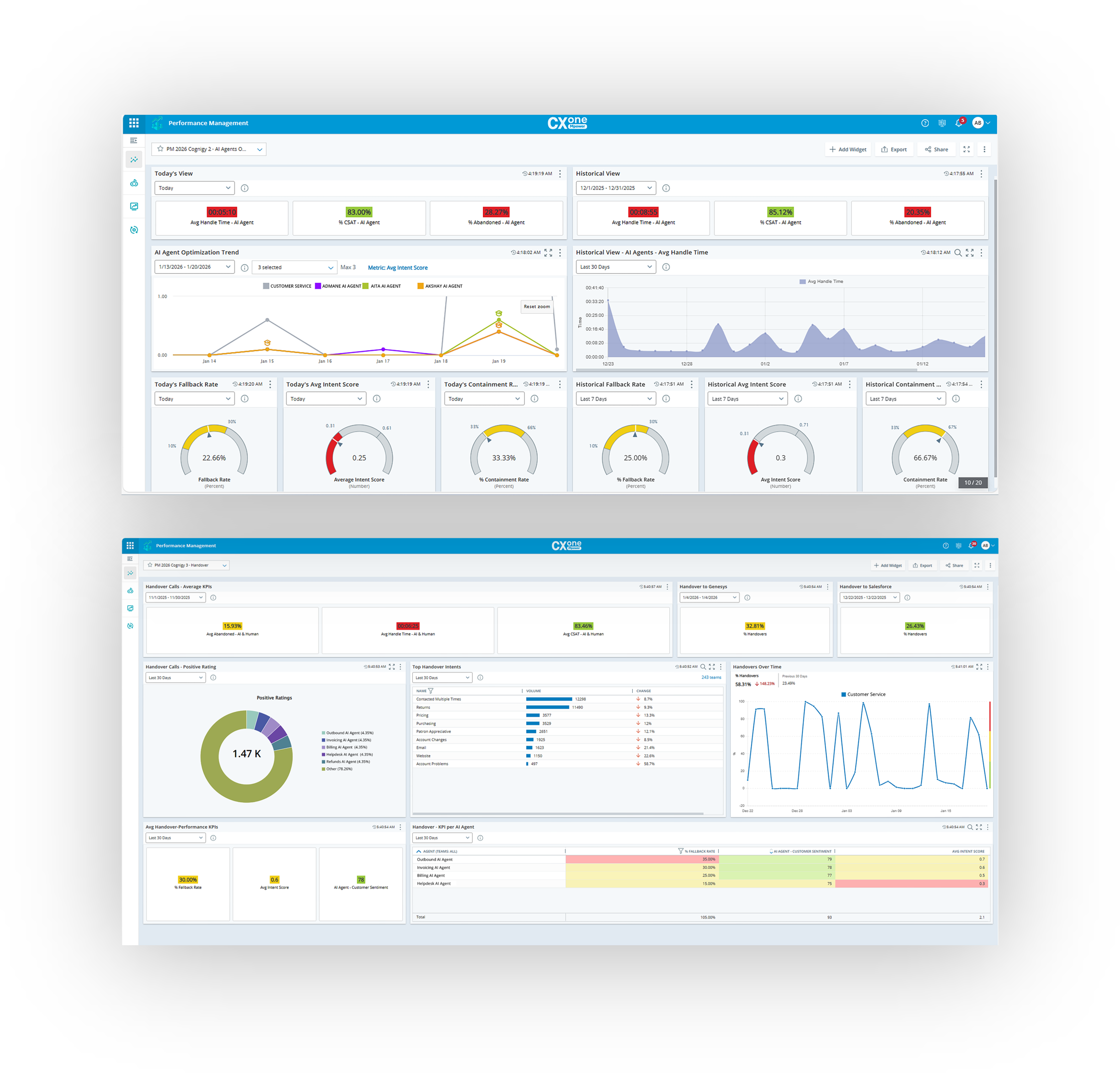
Screenshot of a holistic view of omnichannel call center metrics, with insights for everyone in the contact center. The CXone Mpower Dashboard aggregates both real-time and historical cross-domain data.Screenshot of CXone Mpower Copilot for Agent, which empowers agents with smarter interactions, personalized coaching, and automation opportunities.Screenshot of the CXone Mpower AgentScreenshot of CXone Mpower Orchestrator, a tool that does not require programming skills, but instead empowers everyone—from business user to routing flow programmer—to build and manage routing flows for all channels.Screenshot of CXone Mpower Interaction Analytics, used to get actionable insights from every voice, digital, and self-service customer interaction.Screenshot of CXone Mpower Performance Management, which aligns employee performance, contact center goals, and customer expectations with continuous improvement.