Citrix Endpoint Management (formerly XenMobile), is a UEM and enterprise mobility management application for securing mobile applications and devices.
N/A
Microsoft Intune
Score 8.2 out of 10
N/A
Microsoft Intune (formerly Microsoft Endpoint Manager), combining the capabilities of the former Microsoft System Center Configuration Manager, SCCM or ConfigMgr, is presented as a unified endpoint management option. Microsoft Intune is an endpoint management solution for mobile devices, an MDM solution that allows the user to securely manage iOS, Android, Windows, and macOS devices with a single endpoint management solution. The component Endpoint Configuration Manager (the…
$5
per user/per month
SolarWinds Network Configuration Manager (NCM)
Score 8.4 out of 10
N/A
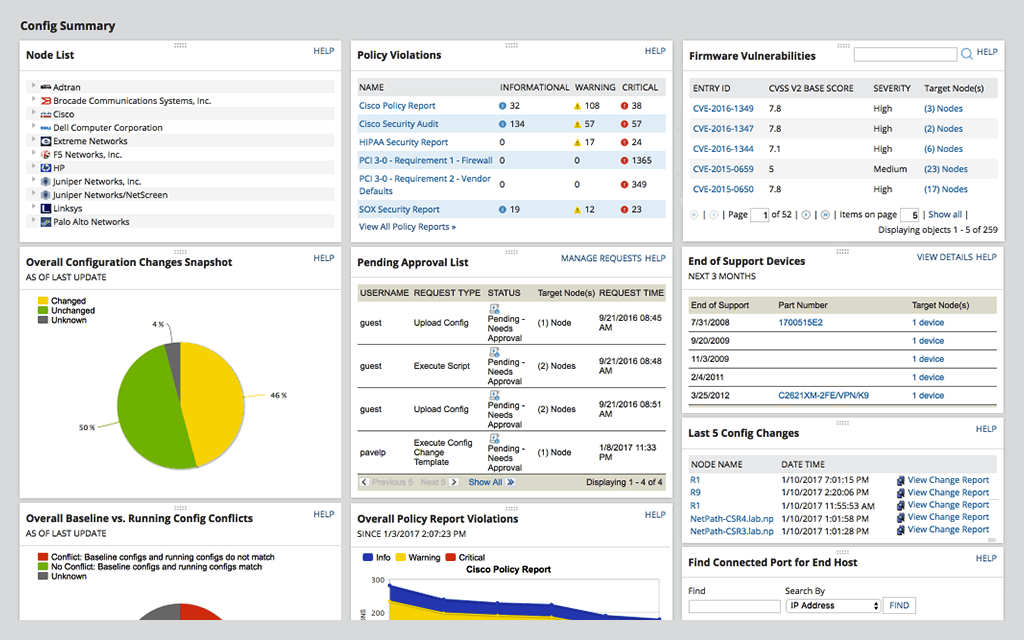
SolarWinds Network Configuration Manager is network diagnostics and troubleshooting technology, from Austin-based SolarWinds.
N/A
Pricing
Citrix Endpoint Management
Microsoft Intune
SolarWinds Network Configuration Manager (NCM)
Editions & Modules
No answers on this topic
Microsoft 365 Business Basic
$5
per user/per month
Microsoft 365 For Individuals
$6.99
per month
Microsoft 365 Apps
$8.25
per user/per month
Microsoft 365 For Families
$9.99
per month
Microsoft 365 Business Standard
$12.50
per user/per month
Microsoft 365 Business Premium
$15
per user/per month
No answers on this topic
Offerings
Pricing Offerings
Citrix Endpoint Management
Microsoft Intune
SolarWinds Network Configuration Manager (NCM)
Free Trial
No
No
Yes
Free/Freemium Version
No
No
No
Premium Consulting/Integration Services
No
No
No
Entry-level Setup Fee
No setup fee
No setup fee
Optional
Additional Details
—
—
—
More Pricing Information
Community Pulse
Citrix Endpoint Management
Microsoft Intune
SolarWinds Network Configuration Manager (NCM)
Considered Multiple Products
Citrix Endpoint Management
No answer on this topic
Microsoft Intune
Verified User
Administrator
Chose Microsoft Intune
Microsoft Intune fits seamlessly with the other Microsoft products that are installed at our customers. Furthermore, Microsoft Intune has a lot of possibilities and can be used very flexibly. In terms of management, maintenance and rollout, it fits the wishes of our …
This product is well suited for any healthcare organization, especially one privately owned by the providers. Many of our providers were displeased with our efforts to use a product that forced sandboxing of Exchange information. Therefore, we needed something that was flexible enough that sandboxing could be used where desired but still allowed native OS integration where necessary.
Microsoft Intune is well suited for the larger end of the small business segment to the enterprise. The ability to configure and remotely deploy computer configurations, control mobile devices, and fine tune security controls of each device or device group is a major win for this product. Smaller and mid-sized businesses may balk at having to increase their license level to unlock the better updating features.
Network Configuration Manager is well suited for backing up configurations of all your devices. It also has a great comparison tool for seeing only the differences in config. Another great feature is it's ability to push a script to any number of devices. This is very handy for pushing changes to one, 10 or multiple devices. There are also some great reports that you can run against the devices in inventory
[Microsoft Endpoint Manager (Microsoft Intune + SCCM)] helps to speed up the deployment of patches/software throughout our environment. I can easily build a package and then deploy across all endpoints.
The ability to supercede software is also quite handy. This automates the removal of old versions and replacing them with newer versions.
The Intune Autopilot option is very useful if you want to deploy software to devices straight out of the box. You can configure them to download software when a user opens a new PC and turns it on for the first time.
issues with non apple, non samsung devices: if it is not setup with an apple or samsung phone, then the Certificate onboarding is a struggle/unable to be done.
user-pin setup: for a user to be onboarded, requiring a PIN; there is a self service way but it is clunky and users prefer to call in instead of trying to follow the 15 step process via PDF
if the certificate is ever lost, due to an upgrade via IOS or android, then the entire process [uninstall, reinstall] has to be done, which means downtime for the end user, and higher call volume when a service provider pushes an iOS update.
Deploying more apps besides Microsoft Edge and Microsoft Office 365 app
Microsoft needs to make it easier to deploy exe, pkg, and msi apps without having to go through the manual process of re-packaging these apps using tools from github like intuneapputil
Add a feature to push out software updates for 3rd party apps
For our use case, it does everything great and some of the features we underutilize but I would like to be able to set a configuration baseline when initially adding a node instead of after the configuration is pulled but it's not a particularly big deal to let it pull the configuration then set it as the baseline.
Mascom Wireless is a Microsoft shop and SCCM has proved to be helpful in keeping our Microsoft products up to date every month without fail. We also have a Microsoft Enterprise Agreement which we renewed for three years ending 2022. The remote access utility works wonders for the organisation and have saved travel bills including subsistance allowance. We have been able to fulfill security audits both internal and external. We have been able to keep a robust inventory of our computer assets and nothing falls of the cracks
Medium complexity to set up in the beginning if using any non-standard devices or configurations, else fairly easy (e.g. Cisco Nexus or IOS-based devices). Reports are fairly straightforward to set up. Updates to the platform are fairly straightforward and don't take a major effort. Easy to add or remove devices.
The software's usability is what we expected. We knew what our organization needed and Citrix was able to meet our needs. The ability to have the apps on a mobile device has been a great plus and Citrix seems to have really developed a software based on the every day needs of the user.
The console is not intuitive and does not work well often. Due to the complexity of the product, documentation can be confusing. When properly configured, routine tasks like OS deployment, remote control, and software deployment are easy to do. Troubleshooting of System Center Configuration Manager issues is hard, as there are various logs, and their content can be hard to understand.
The user interface is lacking. It is difficult to navigate at times and things can be done multiple ways. Quite often I am confused by how their notification structure works. It is not very intuitive. They do offer a free Academy. They also offer a community of other technical folks. I have enjoyed both.
It's a 'heavy' system, which demands a lot of resources form the datacenter perspective. So, make sure you followed the requirements to avoid frustration in the future. From the 'client' perspective, it's fine. I've never had any issue with that.
Overall the support from the customer service team has been good. They are very timely and expert in resolving the tickets. They have appropriate knowledge to resolve issues in all stages to development. They were up to the point during the implementation stage of the XenMobile, all queries were answered in time to help finish the deployment. The support for last three years has been extraordinary in helping us use XenMobile effectively and efficiently.
We have not needed to seek support for this product in the time that we have used it thus far. It's been working really well, and have not had any major issues. Being that it's a Microsoft product, it goes without saying that there will be many support options available if needed. This includes phone, web, forums, KB articles, etc. There is even comprehensive documentation that is available on the web through Microsoft's website for use of the product.
To be fair, I have not had to involve Support in a number of years, but when I did, I was greeted with enthusiastic engineers who wanted to understand and solve the issue. It was a fairly complex scenario and I have discovered in my most recent implementation that engineering included that option as a standard now.
Solarwinds has actually produced new training since I last used it that is available on their site at any time. Their previous training was more than enough to get us started but now there is significantly more content. Since I'm comfortable with the Orion platform and the products we use I haven't checked the new training out yet but we have new staff go through portions of that training and they always come away with an understanding of the platform and ready to use it
Work with a "test group" of users who you have a good relationship with so that when things don't work properly they understand! Work with your partner nicely without forcing things especially timelines as you are bound to make mistakes and create oversights in the project Management can also interfere with the implementation (which can cause delays) if you make too many mistakes which takes me back to having a "test group" where you have good relations
it was a fairly easy implementation and everything was pretty straightforward. only challenge we had was getting all the snmp communities updated on the networking equipment
With a zero trust solution for the entire digital workspace, you can continually monitor and assess session activities before, during, and after login. Reduce risk, gain more control over every session, and get deeper insights across your entire application landscape. To achieve this strong security posture across all environments, you need an application delivery solution that shares a common code base. This lets you implement consistent security policies across all your applications for comprehensive protection.
We did not evaluate or use other products like Microsoft Endpoint Manager (Microsoft Intune + SCCM). The main reason we did not evaluate or use other products is because Microsoft Endpoint Manager (Microsoft Intune + SCCM) integrates seamlessly with Microsoft 365 and Windows PCs. Expenses would have increased as well if we had purchased another similar product.
At the time SolarWinds was the biggest player in the space and their whole portfolio was very comprehensive. As time progressed and newer technologies came about (i.e. SDWAN) their products couldn't keep up with the consumer demands and changing market. Security became such a big focus that once Solarwinds got hacked we had to remove all their products from our environment
Specific ROI was on us avoiding purchasing company managed cell phones - one of the most important drivers
Makes on boarding, and especially offboarding remote users a heck of a lot easier w/the ability to wipe the container, even if not connected (via time setting)
Easy access to internal resources - no need for separate vpn, etc...
In our current environment, this System Center Configuration Manager had replaced several standalone solutions for patching, imaging, remote assistance, reporting, etc. That saved a lot of time and resulted in money to manage the IT infrastructure.
Once SCCM is deployed and fully configured, all agents are deployed and it is easy to automate a lot of processes and just control them from time to time to make sure that everything is working as supposed to be.
SCCM + Windows 10: great built-in endpoint protection solution. As a result, there is no need to buy additional software for that purpose.
The imaging process is better compared to WDS because you can modify deployment packages and apply patches to a newly imaged machine. This saves tons of time for new employees deployment.
Saves 100s of hours a year in man hours over manual configuration.
Saved easily 50k in lost revenue when a switch rebooted with months old unsaved configuration. NCM let us quickly restore a snapshot of the running config from the previous day.
Saves us several man hours per week of config auditing by reducing all changes to a summary email.