Overview
ProductRatingMost Used ByProduct SummaryStarting Price
Clear Analytics
Score 8.8 out of 10
Enterprise companies (1,001+ employees)
Clear Analytics is a business intelligence solution that enables non technical end users to perform analytics by leveraging existing knowledge of Excel coupled with a built in query builder. Some key features include: Dynamic Data Refresh, Data Share and In-Excel Collaboration.
$29
Per Seat per Month
Microsoft BI (MSBI)
Score 9.0 out of 10
N/A
Microsoft BI is a business intelligence product used for data analysis and generating reports on server-based data. It features unlimited data analysis capacity with its reporting engine, SQL Server Reporting Services alongside ETL, master data management, and data cleansing.
$14
per month per user
Progress MOVEit
Score 9.3 out of 10
Enterprise companies (1,001+ employees)
Progress MOVEit offers a range of solutions to help companies: Securely transfer files between applications, internal users, external customers or business partners. Automate and administer tasks without advanced programming. Consolidate costs and management while establishing a documented audit trail. Meet internal and external compliance requirements including HIPAA, SOX, GDPR, FINRA, BASEL, PCI and others.N/A
Pricing
Clear AnalyticsMicrosoft BI (MSBI)Progress MOVEit
Editions & Modules
Personal
$29
Per Seat per Month
Team
$165
upto 10 Seat per Month
Department
$265
upto 25 Seat per month
Organization
$565
Upto 100 per seat per month
Power BI Pro
$14
per month per user
Power BI Premium
$24
per month per user
No answers on this topic
Offerings
Pricing Offerings
Clear AnalyticsMicrosoft BI (MSBI)Progress MOVEit
Free Trial
YesNoYes
Free/Freemium Version
NoYesNo
Premium Consulting/Integration Services
YesNoYes
Entry-level Setup Fee$800 Initial OnBoardingNo setup feeOptional
Additional DetailsCertain Enterprise level features can be made available to Small Business edition at additional cost. Such services include Scheduler and OLAP connectivity. Custom adapters can also be created to connect to SaaS services.
More Pricing Information
Community Pulse
Clear AnalyticsMicrosoft BI (MSBI)Progress MOVEit
Features
Clear AnalyticsMicrosoft BI (MSBI)Progress MOVEit
BI Standard Reporting
Comparison of BI Standard Reporting features of Product A and Product B
Clear Analytics
9.0
8 Ratings
9% above category average
Microsoft BI (MSBI)
9.5
50 Ratings
15% above category average
Progress MOVEit
-
Ratings
Pixel Perfect reports9.08 Ratings9.543 Ratings00 Ratings
Customizable dashboards9.18 Ratings9.450 Ratings00 Ratings
Report Formatting Templates8.78 Ratings9.548 Ratings00 Ratings
Ad-hoc Reporting
Comparison of Ad-hoc Reporting features of Product A and Product B
Clear Analytics
8.9
8 Ratings
10% above category average
Microsoft BI (MSBI)
9.6
50 Ratings
18% above category average
Progress MOVEit
-
Ratings
Drill-down analysis9.28 Ratings9.545 Ratings00 Ratings
Formatting capabilities8.78 Ratings9.450 Ratings00 Ratings
Report sharing and collaboration8.98 Ratings9.550 Ratings00 Ratings
Integration with R or other statistical packages00 Ratings10.039 Ratings00 Ratings
Report Output and Scheduling
Comparison of Report Output and Scheduling features of Product A and Product B
Clear Analytics
9.0
8 Ratings
9% above category average
Microsoft BI (MSBI)
9.6
49 Ratings
15% above category average
Progress MOVEit
-
Ratings
Publish to Web9.08 Ratings9.545 Ratings00 Ratings
Publish to PDF9.17 Ratings9.545 Ratings00 Ratings
Report Versioning8.98 Ratings9.541 Ratings00 Ratings
Report Delivery Scheduling8.87 Ratings9.544 Ratings00 Ratings
Delivery to Remote Servers00 Ratings10.024 Ratings00 Ratings
Data Discovery and Visualization
Comparison of Data Discovery and Visualization features of Product A and Product B
Clear Analytics
9.0
8 Ratings
12% above category average
Microsoft BI (MSBI)
9.6
49 Ratings
18% above category average
Progress MOVEit
-
Ratings
Pre-built visualization formats (heatmaps, scatter plots etc.)8.98 Ratings9.548 Ratings00 Ratings
Location Analytics / Geographic Visualization9.18 Ratings9.545 Ratings00 Ratings
Predictive Analytics00 Ratings10.042 Ratings00 Ratings
Pattern Recognition and Data Mining00 Ratings9.53 Ratings00 Ratings
Access Control and Security
Comparison of Access Control and Security features of Product A and Product B
Clear Analytics
9.3
8 Ratings
9% above category average
Microsoft BI (MSBI)
9.5
50 Ratings
11% above category average
Progress MOVEit
-
Ratings
Multi-User Support (named login)9.48 Ratings9.547 Ratings00 Ratings
Role-Based Security Model9.08 Ratings9.544 Ratings00 Ratings
Multiple Access Permission Levels (Create, Read, Delete)9.48 Ratings9.547 Ratings00 Ratings
Report-Level Access Control00 Ratings9.53 Ratings00 Ratings
Single Sign-On (SSO)00 Ratings9.529 Ratings00 Ratings
Mobile Capabilities
Comparison of Mobile Capabilities features of Product A and Product B
Clear Analytics
8.6
6 Ratings
10% above category average
Microsoft BI (MSBI)
8.8
39 Ratings
13% above category average
Progress MOVEit
-
Ratings
Mobile Application8.54 Ratings8.027 Ratings00 Ratings
Dashboard / Report / Visualization Interactivity on Mobile8.76 Ratings10.036 Ratings00 Ratings
Responsive Design for Web Access00 Ratings9.036 Ratings00 Ratings
Application Program Interfaces (APIs) / Embedding
Comparison of Application Program Interfaces (APIs) / Embedding features of Product A and Product B
Clear Analytics
-
Ratings
Microsoft BI (MSBI)
9.4
22 Ratings
19% above category average
Progress MOVEit
-
Ratings
REST API00 Ratings10.019 Ratings00 Ratings
Javascript API00 Ratings10.019 Ratings00 Ratings
iFrames00 Ratings10.018 Ratings00 Ratings
Java API00 Ratings10.017 Ratings00 Ratings
Themeable User Interface (UI)00 Ratings9.519 Ratings00 Ratings
Customizable Platform (Open Source)00 Ratings6.818 Ratings00 Ratings
Best Alternatives
Clear AnalyticsMicrosoft BI (MSBI)Progress MOVEit
Small Businesses
Yellowfin
Yellowfin
Score 8.7 out of 10
Yellowfin
Yellowfin
Score 8.7 out of 10
DataMotion
DataMotion
Score 9.3 out of 10
Medium-sized Companies
Reveal
Reveal
Score 10.0 out of 10
Reveal
Reveal
Score 10.0 out of 10
DataMotion
DataMotion
Score 9.3 out of 10
Enterprises
Kyvos Semantic Layer
Score 9.5 out of 10
Kyvos Semantic Layer
Score 9.5 out of 10
Fortra's GoAnywhere MFT
Score 7.7 out of 10
All AlternativesView all alternativesView all alternativesView all alternatives
User Ratings
Clear AnalyticsMicrosoft BI (MSBI)Progress MOVEit
Likelihood to Recommend
9.0
(8 ratings)
10.0
(73 ratings)
9.0
(7 ratings)
Likelihood to Renew
-
(0 ratings)
8.0
(25 ratings)
-
(0 ratings)
Usability
9.1
(8 ratings)
10.0
(15 ratings)
-
(0 ratings)
Availability
-
(0 ratings)
9.5
(2 ratings)
-
(0 ratings)
Performance
-
(0 ratings)
7.0
(2 ratings)
-
(0 ratings)
Support Rating
9.5
(8 ratings)
8.9
(15 ratings)
-
(0 ratings)
In-Person Training
-
(0 ratings)
6.9
(3 ratings)
-
(0 ratings)
Online Training
-
(0 ratings)
8.5
(2 ratings)
-
(0 ratings)
Implementation Rating
-
(0 ratings)
9.6
(7 ratings)
-
(0 ratings)
Configurability
-
(0 ratings)
10.0
(2 ratings)
-
(0 ratings)
User Testimonials
Clear AnalyticsMicrosoft BI (MSBI)Progress MOVEit
Likelihood to Recommend
Clear Analytics
Clear Analytics has almost all the features which are mostly required by the organizations for their data analytics and transformation activities. Clear Analytics is built on the support of a parallel query engine which makes it handle large volume requests and also provides optimized results. However, every solution has some limitations, Clear Analytics lacks advanced features such as Predictive Analytics which is a very demanding feature in the market as most organizations are adopting AI/ML automation for their businesses. Also, it needs to add a lot of advanced visualizations so that the user has the choice of selection. Overall a good solution to be recommended.
Read full review
Microsoft
Microsoft BI is well suited for Stream analytics, easy data integration, report creation and UI/UX designs (limited but what all available are great ones) Microsoft BI may be less appropriate for handling huge number of datasets and difficult queries. It may also be difficult for a company with heavy data.
Read full review
Progress Software
MOVEit is actively used on a dedicated server to supply clients with SFTP transactions. Automation is configured easily and safely. We rely on MOVEit to provide the transmission of daily, weekly, and monthly files across many companies and businesses. MOVEit is recommended by my group for any SFTP needs etc.
Read full review
Pros
Clear Analytics
  • Quick management of the data through Excel thanks to the tools Clear Analytics provides such as filtering different information for an easier view.
  • Ability to add new KPIs to measure different areas of our business.
  • Drag and drop tool which makes an easier usage of Excel.
  • Cost-effective. I find Clear Analytics to be affordable considering the number of features added and the unlimited sharing and editing it provides.
Read full review
Microsoft
  • Comparatively easy to use compared to other data analytics solutions, collaborating with other colleagues on data work is simple.
  • Using Visual Studio for database, ETL, reporting, and analytics development save time and money.
  • Transfer of data from one application to another via Excel and comparison of data attributes between applications
  • Dashboard functionality, as well as Python support, are available, allowing you to add additional charts and graphs.
Read full review
Progress Software
  • Dashboard provides good insight and quick access to troubled jobs
  • Being able to handle file transfer across various protocols securely
  • Ability to connect to various cloud sites and storage (SharePoint, Amazon S3)
  • Easy SSL certificate implementation of the web UI
  • Easy SSH with certificate implementation
  • Strong permissions configuration.
Read full review
Cons
Clear Analytics
  • For Charts and Graphs , getting the Power Point Deck would be helpful. As of now we use the data from Excel Reports
Read full review
Microsoft
  • The race to perfect gathering of Non-Traditional datasets is on-going; with Microsoft arguably not the leader of the pack in this category.
  • Licensing options for PowerBI visualizations may be a factor. I.e. if you need to implement B2C PowerBI visualizations, the cost is considerably high especially for startups.
  • Some clients are still resistant putting their data on the cloud, which restricts lots of functionality to Power BI.
Read full review
Progress Software
  • Drag and dropping of files to attached to packages.
  • I believe there is room for improvement when it comes to setting up folder and group security.
  • A better mobile app is absolutely needed. The current app lacks in features.
Read full review
Likelihood to Renew
Clear Analytics
No answers on this topic
Microsoft
Microsoft BI is fundamental to our suite of BI applications. That being said, Northcraft Analytics is focused on delighting our customers, so if the underlying factors of our decision change, we would choose to re-write our BI applications on a different stack. Luckily, mathematics are the fundamental IP of our technology... and is portable across all BI platforms for the foreseeable future.
Read full review
Progress Software
No answers on this topic
Usability
Clear Analytics
I have really enjoyed working with Clear Analytics. This platform has contributed to increased production and reliable data control processes. It has flexible user interface that can be operated by any organization member. Reports are shared on simple and transparent way in the dashboard for easy access. Data analytics from all departments have created manageable working environment that have increased production.
Read full review
Microsoft
The Microsoft BI tools have great usability for both developers and end users alike. For developers familiar with Visual Studio, there is little learning curve. For those not, the single Visual Studio IDE means not having to learn separate tools for each component. For end-users, the web interface for SSRS is simple to navigate with intuitive controls. For ad-hoc analysis, Excel can connect directly to SSAS and provide a pivot table like experience which is familiar to many users. For database development, there is beginning to be some confusion, as there are now three tool choices (VS, SSMS, Azure Data Studio) for developers. I would like to see Azure Data Studio become the superset of SSMS and eventually supplant it.
Read full review
Progress Software
No answers on this topic
Reliability and Availability
Clear Analytics
No answers on this topic
Microsoft
The product has been reliable.
Read full review
Progress Software
No answers on this topic
Performance
Clear Analytics
No answers on this topic
Microsoft
SQL Server Reporting Services (SSRS) can drag at times. We created two report servers and placed them under an F5 load balancer. This configuration has worked well. We have seen sluggish performance at times due to the Windows Firewall.
Read full review
Progress Software
No answers on this topic
Support Rating
Clear Analytics
I have had multiple scenarios where I had to reach out to the support team of Clear Analytics, be it access-related, general queries, during initial implementation, etc. My overall experience has always been good. I got the needed support every time without any delay. I can definitely recommend Clear Analytics simply on the basis of its excellent support team.
Read full review
Microsoft
While support from Microsoft isn't necessarily always best of breed, you're also not paying the price for premium support that you would on other platforms. The strength of the stack is in the ecosystem that surrounds it. In contrast to other products, there are hundreds, even thousands of bloggers that post daily as well as vibrant user communities that surround the tool. I've had much better luck finding help with SQL Server related issues than I have with any other product, but that help doesn't always come directly from Microsoft.
Read full review
Progress Software
No answers on this topic
In-Person Training
Clear Analytics
No answers on this topic
Microsoft
This training was more directed toward what the product was capable of rather than actual programming.
Read full review
Progress Software
No answers on this topic
Online Training
Clear Analytics
No answers on this topic
Microsoft
I have used on-line training from Microsoft and from Pragmatic Works. I would recommend Pragmatic Works as the best way to get up to speed quickly, and then use the Microsoft on-line training to deep dive into specific features that you need to get depth with.
Read full review
Progress Software
No answers on this topic
Implementation Rating
Clear Analytics
No answers on this topic
Microsoft
We are a consulting firm and as such our best resources are always billing on client projects. Our internal implementation has weaknesses, but that's true for any company like ours. My rating is based on the product's ease of implementation.
Read full review
Progress Software
No answers on this topic
Alternatives Considered
Clear Analytics
There are other great tools that are out there but Clear Analytics is reasonable for our business and provides a lot of features that we specifically needed
Read full review
Microsoft
We have used the built in ConnectWise Manager reports and custom reports. The reports provide static data. PowerBI shows us live data we can drill down into and easily adjust parameters. It's much more useful than a static PDF report.
Read full review
Progress Software
We previously used Attunity MFT (Formerly Repliweb MFT); We were looking to move away from the platform becuase, while flexible, it was too flexible. The flexibility was gained by running scripts with each job to do what you want. So, not only did you have to define the job (Source and Destination), you had to have a fairly strong programming background. Tasks as simple as renaming files with a date stamp, required a script be written. MoveIt has many of these basic macros available for file name manipulations like various date pieces, times, file names, etc, and they're all well documented. Ex: [OrigName] = Original Filename (TestFile.pdf), [OnlyName] = Just the filename, no extension (TestFile), [OnlyExt] = Just the file extentions (.pdf). Pretty much every field within a job can use pre-defined Macros, which is a huge benefit. We also moved away from that platform because it had gone stale, it wasn't their "Core" product. The vendor supported it, but was not actively developing it or fixing bugs or anything. We went 2-3 years without even an update to the binary. MoveIt is one of Progress's "Core" products, so they are adding features / functionality and fixing bugs actively
Read full review
Return on Investment
Clear Analytics
  • Super useful to get started immediately
  • Didn't have to rely on migrating data
  • Easy to add members
  • Easy to learn and build charts
Read full review
Microsoft
  • As a SaaS provider we see being able to provide self-service BI to our client users as a competitive advantage. In fact the MSSQL enabled BI is a contributing factor to many winning RFPs we have done for prospective client organisations.
  • However MSSQL BI requires extensive knowledge and skills to design and develop data warehouses & data models as a foundation to support business analysts and users to interrogate data effectively and efficiently. Often times we find having strong in-house MSSQL expertise is a bless.
Read full review
Progress Software
  • It gave us the ability to exchange files with customers and vendors in a secure manner.
  • Given the sensitivity of our files exchange, MOVEit helped in gaining the trust of our customers that their data is safe.
  • Using its API, we were able to build a custom app that is adding even more features, specific to our needs, like empowering project managers with more permissions on their folders
Read full review
ScreenShots

Clear Analytics Screenshots

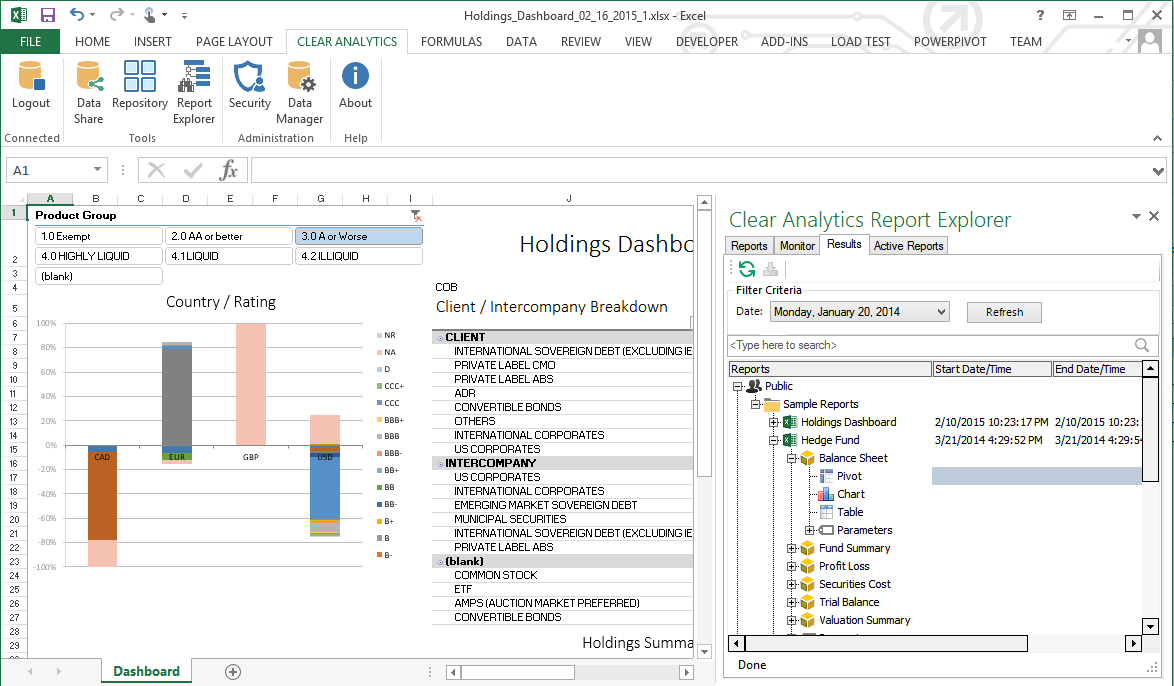
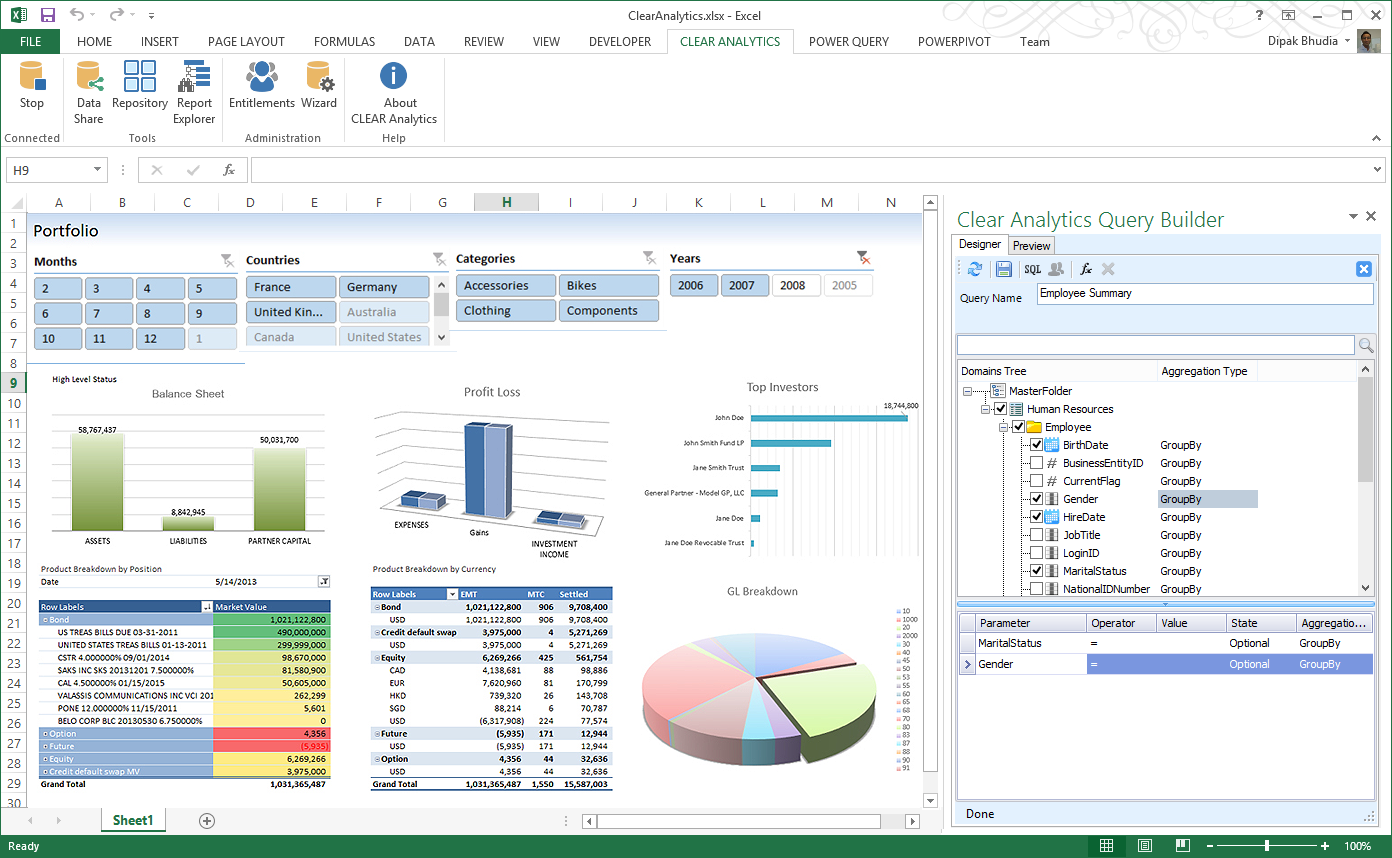
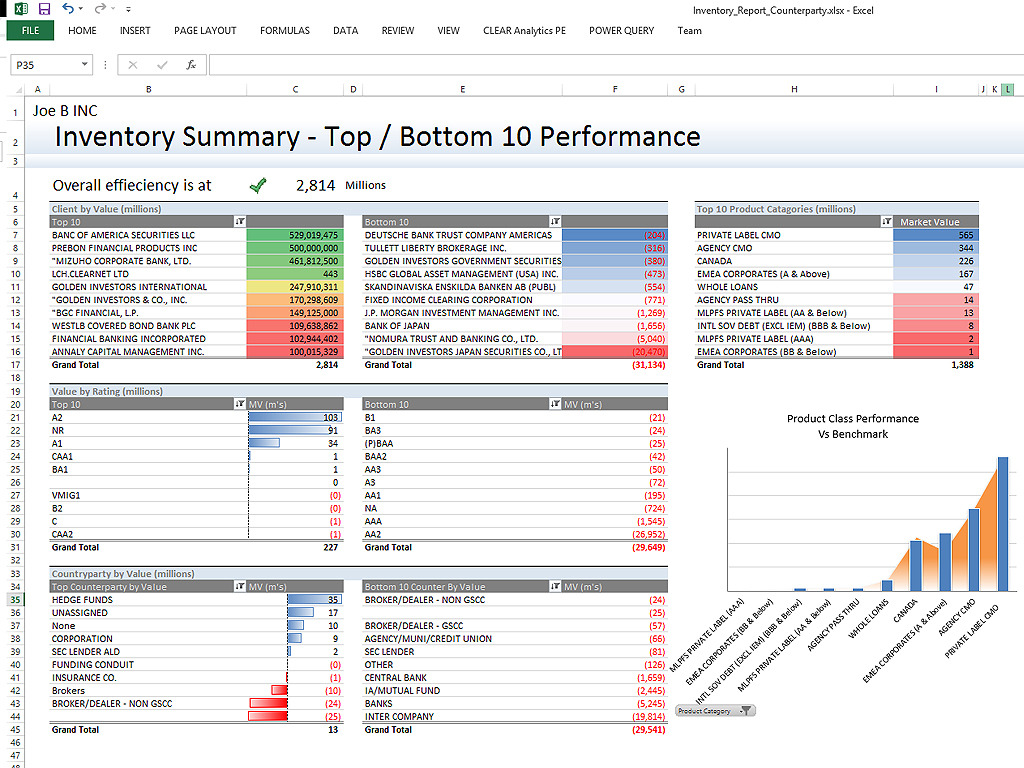
Screenshot of Clear Analytics integrated Excel panel essentially transforms standalone Excel into an enterprise strength, fully auditable, collaborative and centralized business intelligence platform.Screenshot of Users have the ability to dynamically query systems and render that data in any way they like.  No more waiting on IT to create reports.Screenshot of Your firms existing knowledge of Excel enables the firm to be product from day 1. Use the skills already present in your organization and don't pay for outside reporting consultants to create reports for you.Screenshot of Leverage the integration capability of Microsoft's Power BI to extend the reach of your data to web and mobile devices.Screenshot of Leverage all of Excels capabilities, from it's slicers to miniature spark-line charts to create incredibly informative and responsive dashboards.

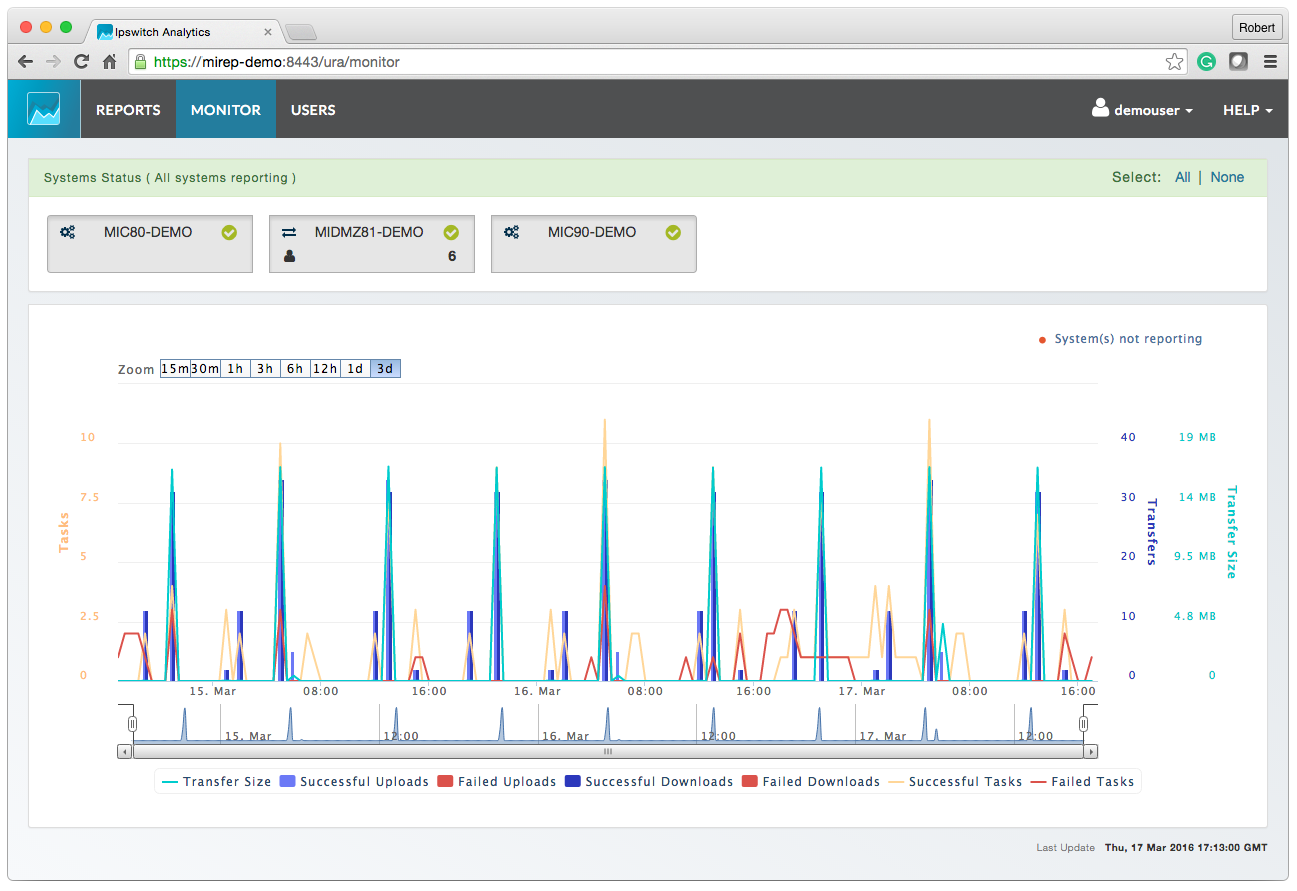
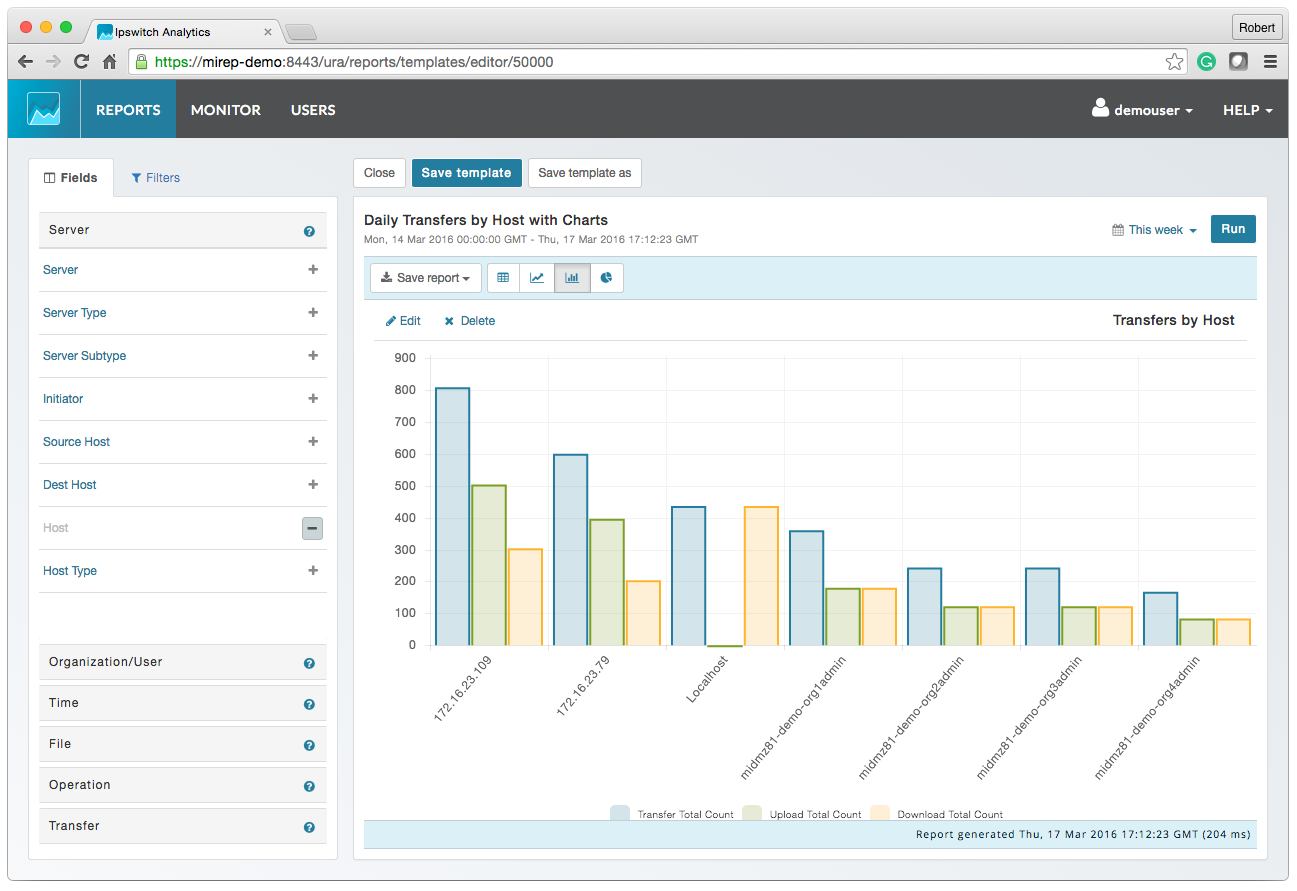
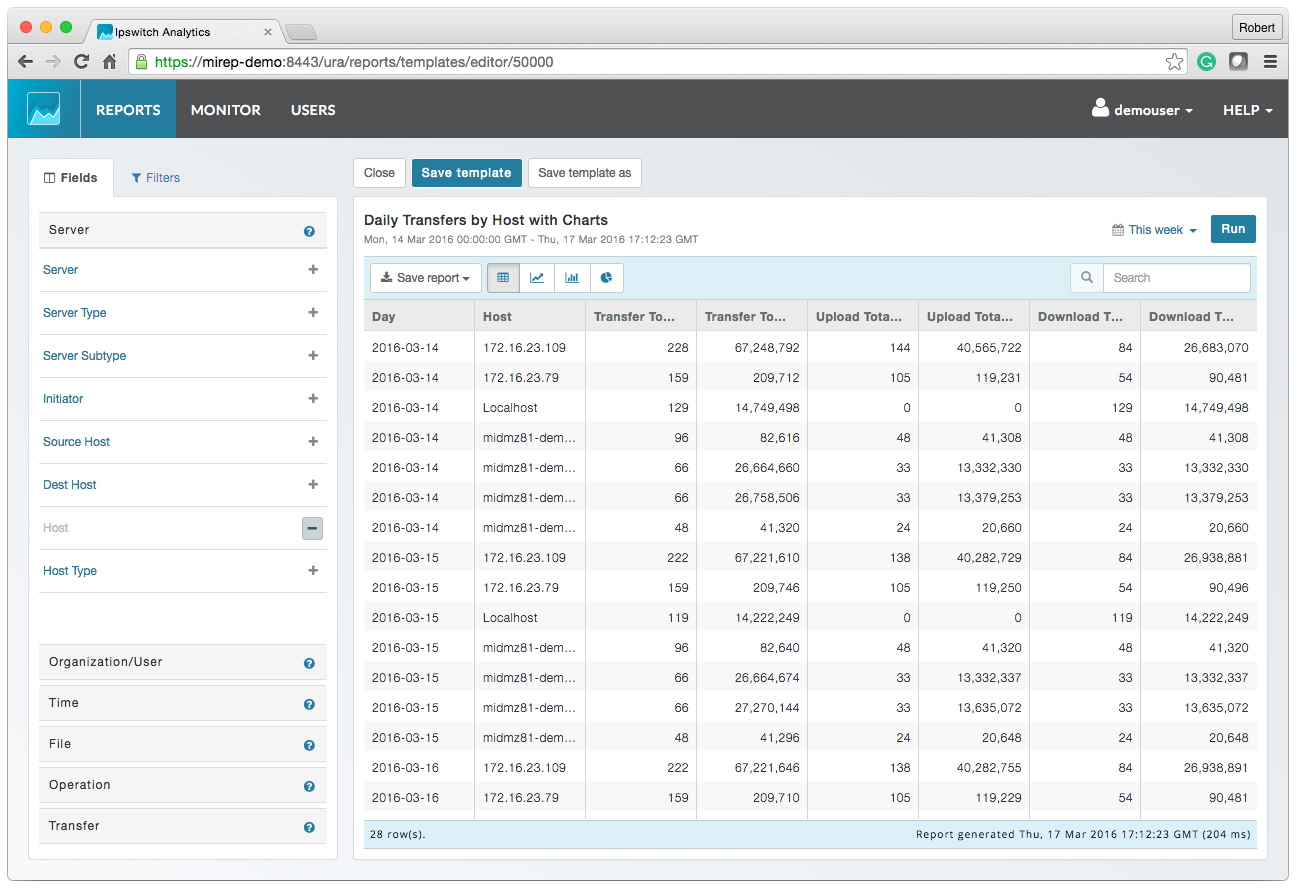
Progress MOVEit Screenshots

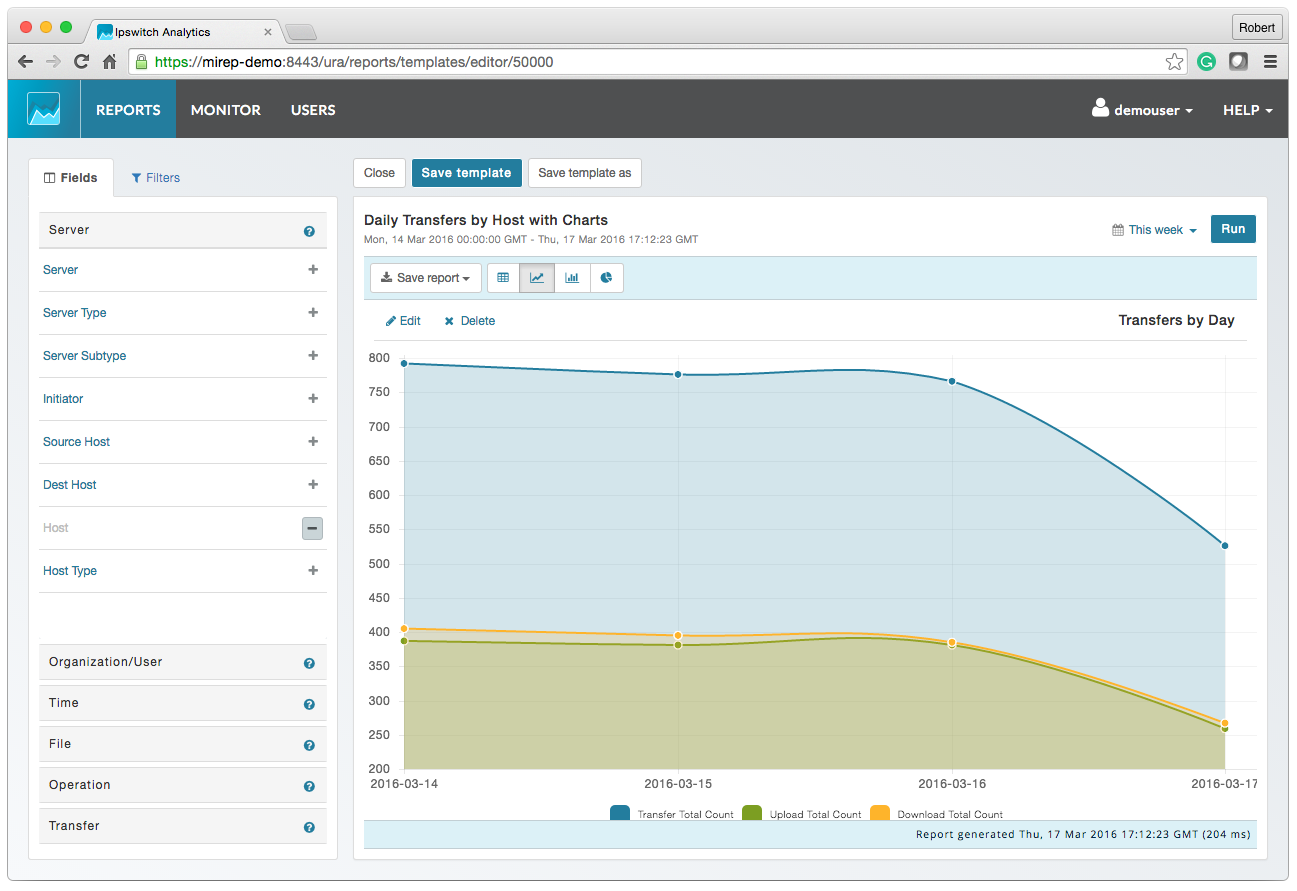
Screenshot of MOVEit AnalyticsScreenshot of MOVEit Automated ReportingScreenshot of MOVEit Data ConsolidationScreenshot of MOVEit AuditsScreenshot of MOVEit TransfersScreenshot of MOVEit Visibility and Control