ClickUp vs. Teamcamp

Overview
ProductRatingMost Used ByProduct SummaryStarting Price
ClickUp
Score 8.8 out of 10
Small Businesses (1-50 employees)
ClickUp is a productivity platform that brings together work apps, data, and workflows. Also presented as a Converged AI Workspace, ClickUp eliminates work sprawl to provide context and a single place for humans and agents to work together. The platform currently boasts over 20 million users worldwide. ClickUp Brain² is deeply embedded into the workspace, offering conversational intake for project scoping and autonomous task generation. It can transform brainstorming docs…
$0
per month per seat
Teamcamp
Score 10.0 out of 10
Small Businesses (1-50 employees)
Teamcamp is a project management solution that streamlines workflows and boosts collaboration, whether teams are remote or in-office. The platform centralizes project management to keep teams organized, on schedule, and within budget. Key Features: Task Management: Assign and track tasks. Collaboration Tools: Built-in messaging and file-sharing for real-time teamwork. Time Tracking: Monitor time spent to enhance productivity. Project…
$49
per month (unlimited users)
Pricing
ClickUpTeamcamp
Editions & Modules
Unlimited
$10
per month per user
Business
$19
per month per user
Enterprise
Custom
Standard
$49
per month unlimited users
Offerings
Pricing Offerings
ClickUpTeamcamp
Free Trial
YesYes
Free/Freemium Version
YesYes
Premium Consulting/Integration Services
YesNo
Entry-level Setup FeeNo setup feeNo setup fee
Additional DetailsDiscount available for annual billing.Teamcamp offers monthly subscription plans ranging from $25 to $299, depending on the number of users. However, on TrustRadius, Teamcamp also provides a special lifetime pricing option, designed for those who prefer a one-time investment without recurring fees. This lifetime plan aims to offer long-term value as a choice for teams looking to maximize their ROI.
More Pricing Information
Community Pulse
ClickUpTeamcamp
Considered Both Products
ClickUp

No answer on this topic

Teamcamp
Chose Teamcamp
I used Slack before Teamcamp; it is not all in one place, so I had to change tools too often.
Features
ClickUpTeamcamp
Project Management
Comparison of Project Management features of Product A and Product B
ClickUp
8.4
809 Ratings
9% above category average
Teamcamp
10.0
1 Ratings
26% above category average
Task Management9.4820 Ratings10.01 Ratings
Resource Management8.5658 Ratings00 Ratings
Gantt Charts8.1603 Ratings00 Ratings
Scheduling8.7685 Ratings10.01 Ratings
Workflow Automation8.3658 Ratings00 Ratings
Team Collaboration9.3784 Ratings10.01 Ratings
Support for Agile Methodology8.7555 Ratings00 Ratings
Support for Waterfall Methodology8.4470 Ratings00 Ratings
Document Management8.1712 Ratings10.01 Ratings
Email integration7.5576 Ratings00 Ratings
Mobile Access7.3665 Ratings10.01 Ratings
Timesheet Tracking8.0554 Ratings10.01 Ratings
Professional Services Automation
Comparison of Professional Services Automation features of Product A and Product B
ClickUp
7.7
420 Ratings
0% below category average
Teamcamp
10.0
1 Ratings
26% above category average
Project & financial reporting7.7427 Ratings00 Ratings
Invoicing00 Ratings10.01 Ratings
Best Alternatives
ClickUpTeamcamp
Small Businesses
Kintone
Kintone
Score 9.7 out of 10
Kintone
Kintone
Score 9.7 out of 10
Medium-sized Companies
Kintone
Kintone
Score 9.7 out of 10
Kintone
Kintone
Score 9.7 out of 10
Enterprises
Planview AgilePlace
Planview AgilePlace
Score 7.8 out of 10
Planview AgilePlace
Planview AgilePlace
Score 7.8 out of 10
All AlternativesView all alternativesView all alternatives
User Ratings
ClickUpTeamcamp
Likelihood to Recommend
8.9
(820 ratings)
10.0
(1 ratings)
Likelihood to Renew
9.6
(43 ratings)
-
(0 ratings)
Usability
8.4
(177 ratings)
10.0
(1 ratings)
Availability
9.5
(6 ratings)
-
(0 ratings)
Performance
8.0
(5 ratings)
-
(0 ratings)
Support Rating
9.4
(47 ratings)
-
(0 ratings)
Online Training
10.0
(2 ratings)
-
(0 ratings)
Implementation Rating
8.7
(9 ratings)
-
(0 ratings)
Configurability
8.0
(2 ratings)
-
(0 ratings)
Contract Terms and Pricing Model
5.0
(1 ratings)
-
(0 ratings)
Ease of integration
7.0
(2 ratings)
-
(0 ratings)
Product Scalability
8.9
(6 ratings)
-
(0 ratings)
Professional Services
5.0
(1 ratings)
-
(0 ratings)
Vendor post-sale
5.0
(2 ratings)
-
(0 ratings)
Vendor pre-sale
5.0
(2 ratings)
-
(0 ratings)
User Testimonials
ClickUpTeamcamp
Likelihood to Recommend
ClickUp
Suitable for: Complex projects with a lot of text and attachments Not suitable for: Creative teams and the graphic feedback they require, I don't see it as very suitable since it's not very practical visually. The learning curve for someone starting out isn't very easy, and this creates some problems within the team. adecuado Proyectos complejos con mucha carga de información textual y adjuntos no adecuado para equipos creativos y el feedback gráfico que estos requieren no lo veo tan adecuado ya que visualmente no lo tan práctico. la curva de aprendizaje para alguien que comienza no es tan sencillo y esto genera algunos problemas en el equipo This review was originally written in Spanish and has been translated into English using a third-party translation tool. While we strive for accuracy, some nuances or meanings may not be perfectly captured.
Read full review
Teamcamp
-Startup Teams Managing Product Development -Remote Teams Needing a Central Collaboration Hub
Read full review
Pros
ClickUp
  • Task Management - you can easily track details and notes of the tasks, deadlines and important dates, and notes and key links for the task. This has really leveled up how we manage projects and tasks.
  • Operational efficiency - by tracking where time goes the most or which tasks go the most, it enables you to identify areas where the most time is being spent and if that process needs to be improved or changed to streamline workflow.
  • SOP/Document storage - it is easy to create documents for standard operating procedures and processes and have a file to easily locate and reference them.
  • Files for projects or clients - ClickUp allows you to create separate files, folders, and subfolders to easily store and locate any corresponding tasks, projects, or important documents for that specific project or client.
  • AI overview - for tasks or documents with longer note sections or that have spanned more time and have more notes involved, ClickUp has an AI overview tool that helps with summarizing.
Read full review
Teamcamp
  • Creat Task
  • Team Collaboration
  • Time Tracking
Read full review
Cons
ClickUp
  • The onboarding is much to be desired. If I weren't such a fan of this product, we might have abandoned it. I think some people have their own way to project manage and so forcing them to use a tool they don't like is a barrier.
  • I wish it was more intuitive to send the notetaker to impromptu meetings. That was a struggle to find out.
  • I wish folders were also for documents. But they are only for lists.
Read full review
Teamcamp
  • Mobile App UX
Read full review
Likelihood to Renew
ClickUp
It has been a game-changer in terms of project tracking, as animation is a demanding product that requires multiple layers of analysis, revisions, tracking, scheduling, etc. ClickUp simplifies many approvals as anyone can easily add items, and you can tag the people who need to look at them.
Read full review
Teamcamp
No answers on this topic
Usability
ClickUp
I think for an extremely robust platform with lots of customizations and abilities, it does a really good job of making it feel simplified without overwhelm. As a beginner, it was easy to navigate and build out, and as an expert now, it gives me all the capabilities without dumbing down anywhere!
Read full review
Teamcamp
Teamcamp is an all-in-one tool, so I don't have to switch for my work. It is a very helpful tool.
Read full review
Reliability and Availability
ClickUp
For over a year ClickUp was unavailable to us just twice for a couple of hours. I would say for a system this big and working globally that was a minor issue. They managed to fix all the issues within a couple hours and then it was back up and running perfectly fine.
Read full review
Teamcamp
No answers on this topic
Performance
ClickUp
The speed of ClickUp is average to be honest. This is one of the biggest flaws of the system, sometimes it's also lagging a little bit but we also have a lot of documents, lists etc. on our workspace. However, with the next version of ClickUp I've seen they are planning to increase the speed by almost 500%, probably by changing the technology, so I am more than looking forward to it.
Read full review
Teamcamp
No answers on this topic
Support Rating
ClickUp
I started using ClickUp when it was what most would consider a baby company. There were the occasional bugs that made working in ClickUp a little bit of a headache, but the support feature allowed me to chat with a real persona and communicate my issues. I would always get prompt support and someone willing to really help me, not just point me to FAQ pages. Not feeling like a number really makes a difference.
Read full review
Teamcamp
No answers on this topic
Online Training
ClickUp
There are multiple guides on literally all of the functions you can find within the system, therefore it's easy to learn anything you'd really like to use, starting from project and people management, down to Gantts, mind maps, time tracking, inviting Clients as guests to work with you on the projects and so much more.
Read full review
Teamcamp
No answers on this topic
Implementation Rating
ClickUp
Start small. Don’t try to build the most elaborate plans first. Resist the urge to get into Gantt charts if no one is used to them. Just get work written, add dates and assignees, and start getting used to it. If you did not use a work management tool before, you need to be gracious with yourself about the fact that you likely do not have the muscle memory for working this way yet. But you will get there.
And leverage people who know it if possible. Look for ClickUp experts and vendors. They can really supercharge your effectiveness at building the tool out and speed up the process.
Read full review
Teamcamp
No answers on this topic
Alternatives Considered
ClickUp
ClickUp offer far more for the price than any of these solutions. We're not a large business and cannot facilitate experience or expansive integrations or rigig processes, which I think Hubspot used to be good at, but now they've all turned into behemoth businesses that don't seem to service the little guys anymore. ClickUp provides just enough capacity, capability and flexibility for small businesses to generate a lot of value out of this product before needing to invest substantially (financially and in effort expended) in large organising systems
Read full review
Teamcamp
I used Slack before Teamcamp; it is not all in one place, so I had to change tools too often.
Read full review
Scalability
ClickUp
Scaling with ClickUp is superb. If you create a workflow best suited for your organization then it's all about creating new accounts and teaching the new employees the workflow you're using. It's that simple. There is no black magic when it comes to Clickup.
Read full review
Teamcamp
No answers on this topic
Return on Investment
ClickUp
  • Greater integration between peers and teams within the company
  • Increase in individual productivity
  • Cost savings on hiring workflow management tools
  • Maior integração entre pares e times da empresa
  • Aumento no produtividade individual
  • Economia na contratação de ferramentas de gerenciamento de fluxo de trabalho
Read full review
Teamcamp
  • It's great impact overall my business
  • It is useful tool
Read full review
ScreenShots

ClickUp Screenshots

Screenshot of Screenshot of Screenshot of Screenshot of Screenshot of

Teamcamp Screenshots

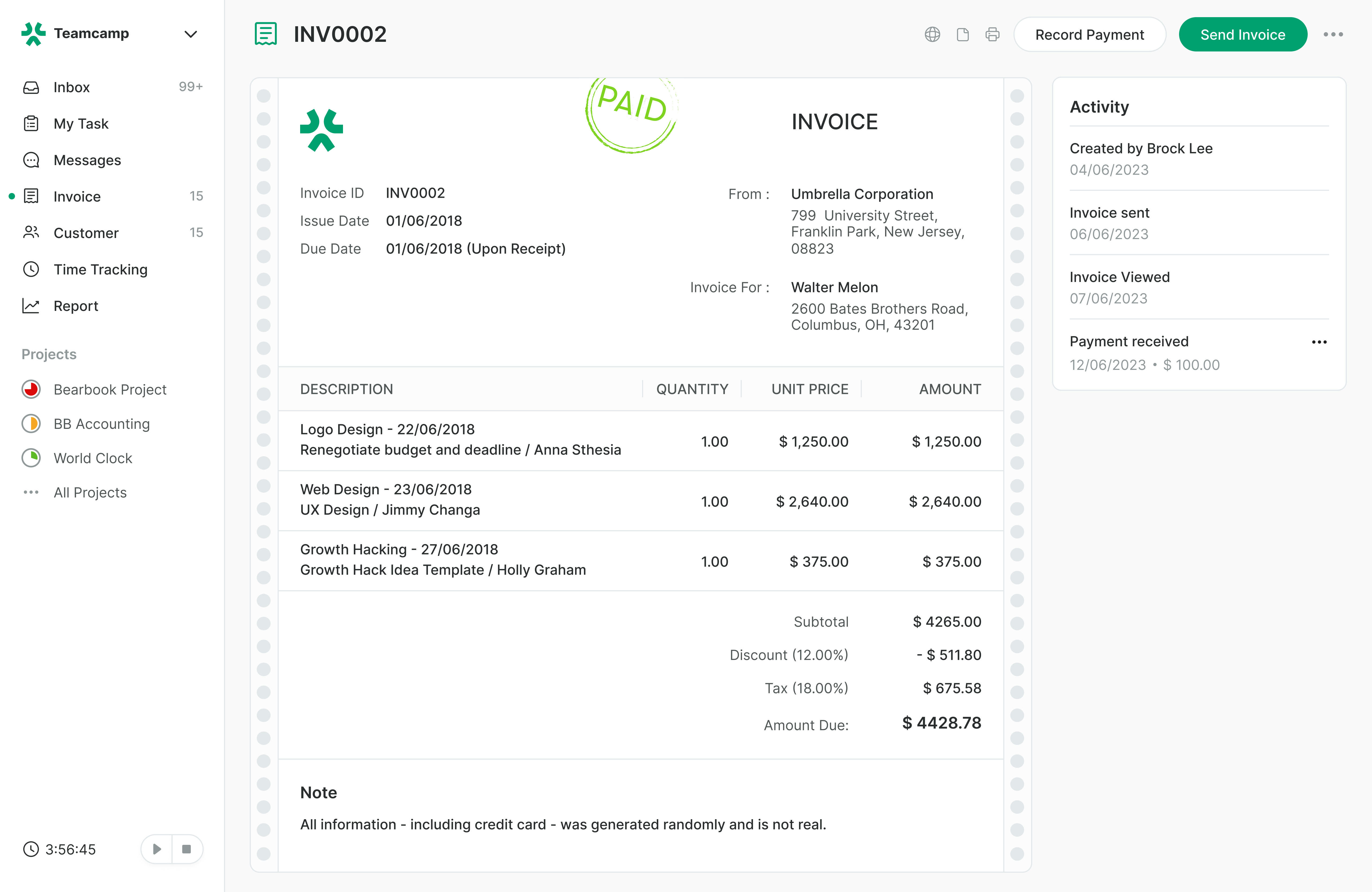
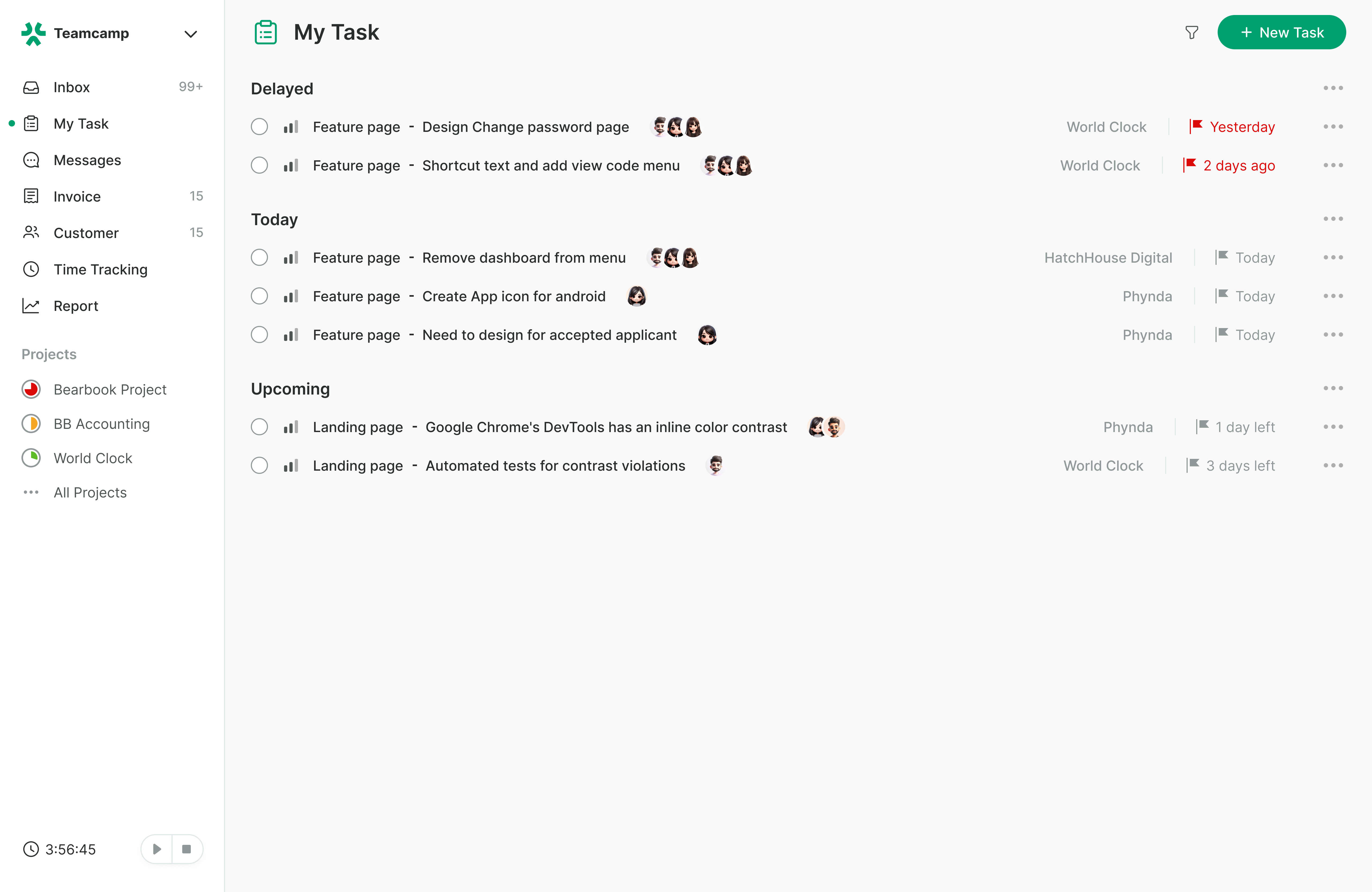
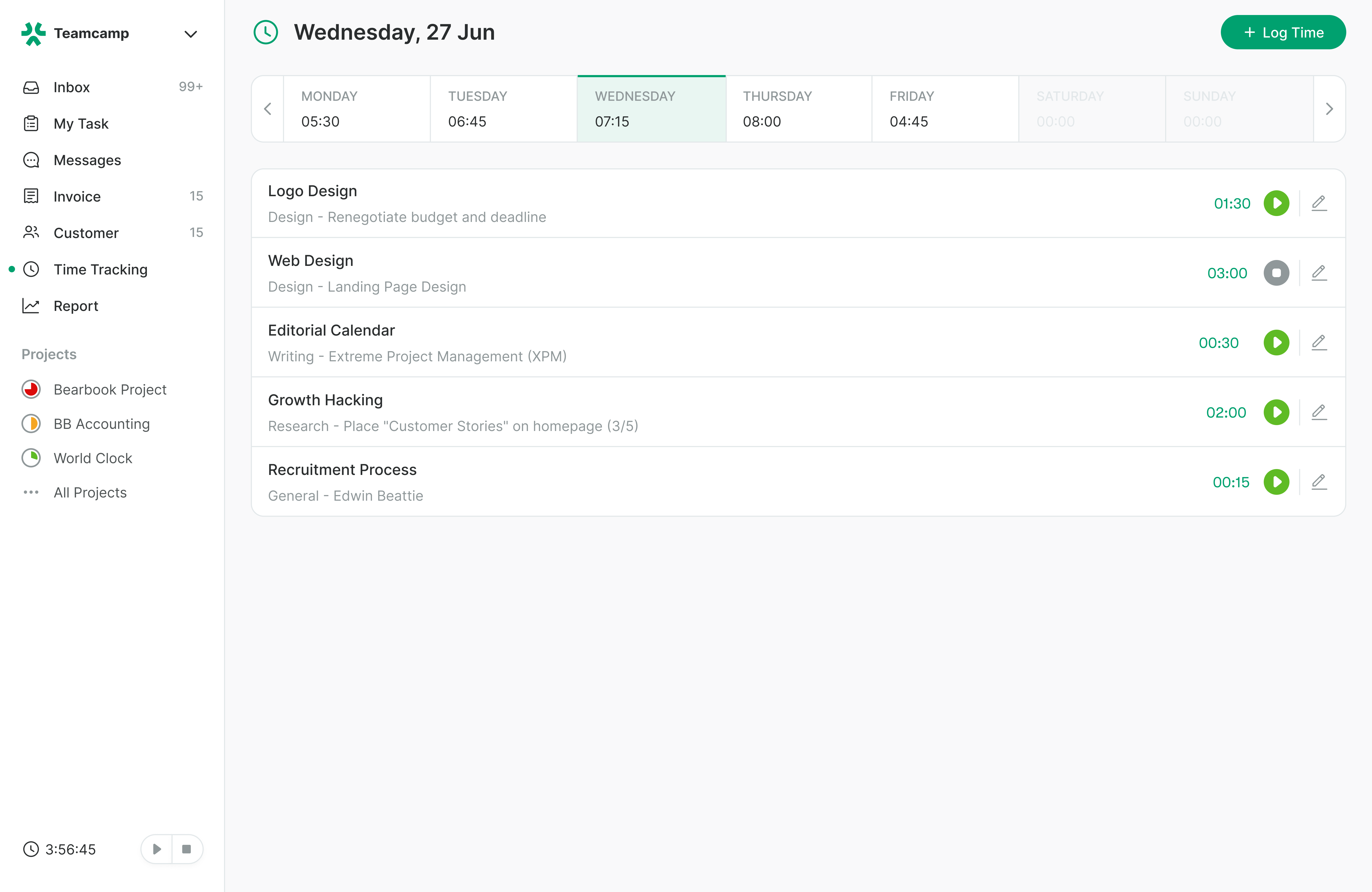
Screenshot of an overview of all active projects with timelines and progress tracking.Screenshot of where to generate and manage client invoices within projects.Screenshot of the interface to assign, prioritize, and track tasks across teams.Screenshot of a dedicated space for clients to view project updates and collaborate.Screenshot of the centralised communication hub for team discussions and project updates.Screenshot of where to monitor time spent on tasks and projects for accurate reporting and billing.