ConnectWise PSA vs. Flexmonster Pivot Table & Charts Component vs. Microsoft BI (MSBI)

Overview
ProductRatingMost Used ByProduct SummaryStarting Price
ConnectWise PSA
Score 8.1 out of 10
Small Businesses (1-50 employees)
ConnectWise PSA (formerly Manage) is a business management platform for companies that sell, service, and support technology. The platform is cloud-based and integrates automation, help desk and customer service, sales, marketing, project management, and business analytics. It is the hub of the ConnectWise suite.
$35
Per Tech Per Month
Flexmonster Pivot Table & Charts Component
Score 10.0 out of 10
Mid-Size Companies (51-1,000 employees)
Flexmonster Pivot Table & Charts is a component for interactive pivot reports that can be inserted into a web page or a web application. It’s a JavaScript tool that enables a user to visualize their business data. This solution supports Microsoft Analysis Services OLAP cubes, Mondrian, icCube, JSON, SQL (MS SQL, MySQL and others) databases or static JSON or CSV files. According to the vendor, this solution allows users to work extremely quickly with really large data…
$0
Annual SaaS Subscription
Microsoft BI (MSBI)
Score 8.6 out of 10
N/A
Microsoft BI is a business intelligence product used for data analysis and generating reports on server-based data. It features unlimited data analysis capacity with its reporting engine, SQL Server Reporting Services alongside ETL, master data management, and data cleansing.
$14
per month per user
Pricing
ConnectWise PSAFlexmonster Pivot Table & Charts ComponentMicrosoft BI (MSBI)
Editions & Modules
Subscription
$35.00
Per Tech Per Month
Pivot Table for SQL/CSV/JSON Unlimited
$0
Annual SaaS Subscription
Pivot Table for Pentaho Mondrian
$0
Annual SaaS Subscription
Pivot Table for MS Analysis Services
$0
Annual SaaS Subscription
Pivot Table for SQL/CSV/JSON Basic
$299
Annual subscription
Pivot Table for Pentaho Mondrian
$799
Annual subscription
Pivot Table for SQL/CSV/JSON Unlimited
$799
Annual subscription
Pivot Table for MS Analysis Services
$799
Annual subscription
Power BI Pro
$14
per month per user
Power BI Premium
$24
per month per user
Offerings
Pricing Offerings
ConnectWise PSAFlexmonster Pivot Table & Charts ComponentMicrosoft BI (MSBI)
Free Trial
NoYesNo
Free/Freemium Version
NoNoYes
Premium Consulting/Integration Services
NoYesNo
Entry-level Setup FeeNo setup feeNo setup feeNo setup fee
Additional Details
More Pricing Information
Community Pulse
ConnectWise PSAFlexmonster Pivot Table & Charts ComponentMicrosoft BI (MSBI)
Considered Multiple Products
ConnectWise PSA

No answer on this topic

Flexmonster Pivot Table & Charts Component

No answer on this topic

Microsoft BI (MSBI)
Chose Microsoft BI (MSBI)
We have used the built in ConnectWise Manager reports and custom reports. The reports provide static data. PowerBI shows us live data we can drill down into and easily adjust parameters. It's much more useful than a static PDF report.
Features
ConnectWise PSAFlexmonster Pivot Table & Charts ComponentMicrosoft BI (MSBI)
Incident and problem management
Comparison of Incident and problem management features of Product A and Product B
ConnectWise PSA
8.8
89 Ratings
7% above category average
Flexmonster Pivot Table & Charts Component
-
Ratings
Microsoft BI (MSBI)
-
Ratings
Organize and prioritize service tickets9.489 Ratings00 Ratings00 Ratings
Expert directory6.950 Ratings00 Ratings00 Ratings
Subscription-based notifications8.562 Ratings00 Ratings00 Ratings
ITSM collaboration and documentation8.169 Ratings00 Ratings00 Ratings
Ticket creation and submission9.989 Ratings00 Ratings00 Ratings
Ticket response9.788 Ratings00 Ratings00 Ratings
Self Help Community
Comparison of Self Help Community features of Product A and Product B
ConnectWise PSA
7.8
83 Ratings
3% below category average
Flexmonster Pivot Table & Charts Component
-
Ratings
Microsoft BI (MSBI)
-
Ratings
External knowledge base8.768 Ratings00 Ratings00 Ratings
Internal knowledge base6.978 Ratings00 Ratings00 Ratings
Multi-Channel Help
Comparison of Multi-Channel Help features of Product A and Product B
ConnectWise PSA
9.3
86 Ratings
15% above category average
Flexmonster Pivot Table & Charts Component
-
Ratings
Microsoft BI (MSBI)
-
Ratings
Customer portal8.081 Ratings00 Ratings00 Ratings
IVR10.021 Ratings00 Ratings00 Ratings
Social integration10.028 Ratings00 Ratings00 Ratings
Email support9.681 Ratings00 Ratings00 Ratings
Help Desk CRM integration8.876 Ratings00 Ratings00 Ratings
BI Standard Reporting
Comparison of BI Standard Reporting features of Product A and Product B
ConnectWise PSA
-
Ratings
Flexmonster Pivot Table & Charts Component
10.0
1 Ratings
20% above category average
Microsoft BI (MSBI)
9.2
52 Ratings
12% above category average
Report Formatting Templates00 Ratings10.01 Ratings9.250 Ratings
Pixel Perfect reports00 Ratings00 Ratings9.045 Ratings
Customizable dashboards00 Ratings00 Ratings9.552 Ratings
Ad-hoc Reporting
Comparison of Ad-hoc Reporting features of Product A and Product B
ConnectWise PSA
-
Ratings
Flexmonster Pivot Table & Charts Component
9.5
1 Ratings
17% above category average
Microsoft BI (MSBI)
8.7
52 Ratings
8% above category average
Formatting capabilities00 Ratings9.01 Ratings8.452 Ratings
Report sharing and collaboration00 Ratings10.01 Ratings8.752 Ratings
Drill-down analysis00 Ratings00 Ratings8.747 Ratings
Integration with R or other statistical packages00 Ratings00 Ratings9.041 Ratings
Report Output and Scheduling
Comparison of Report Output and Scheduling features of Product A and Product B
ConnectWise PSA
-
Ratings
Flexmonster Pivot Table & Charts Component
10.0
1 Ratings
20% above category average
Microsoft BI (MSBI)
8.8
51 Ratings
7% above category average
Publish to PDF00 Ratings10.01 Ratings9.047 Ratings
Publish to Web00 Ratings00 Ratings9.247 Ratings
Report Versioning00 Ratings00 Ratings8.243 Ratings
Report Delivery Scheduling00 Ratings00 Ratings9.046 Ratings
Delivery to Remote Servers00 Ratings00 Ratings8.626 Ratings
Mobile Capabilities
Comparison of Mobile Capabilities features of Product A and Product B
ConnectWise PSA
-
Ratings
Flexmonster Pivot Table & Charts Component
10.0
1 Ratings
26% above category average
Microsoft BI (MSBI)
8.3
41 Ratings
7% above category average
Responsive Design for Web Access00 Ratings10.01 Ratings8.338 Ratings
Mobile Application00 Ratings00 Ratings8.329 Ratings
Dashboard / Report / Visualization Interactivity on Mobile00 Ratings00 Ratings8.338 Ratings
Data Discovery and Visualization
Comparison of Data Discovery and Visualization features of Product A and Product B
ConnectWise PSA
-
Ratings
Flexmonster Pivot Table & Charts Component
-
Ratings
Microsoft BI (MSBI)
8.9
51 Ratings
11% above category average
Pre-built visualization formats (heatmaps, scatter plots etc.)00 Ratings00 Ratings9.550 Ratings
Location Analytics / Geographic Visualization00 Ratings00 Ratings9.247 Ratings
Predictive Analytics00 Ratings00 Ratings8.344 Ratings
Pattern Recognition and Data Mining00 Ratings00 Ratings8.55 Ratings
Access Control and Security
Comparison of Access Control and Security features of Product A and Product B
ConnectWise PSA
-
Ratings
Flexmonster Pivot Table & Charts Component
-
Ratings
Microsoft BI (MSBI)
9.3
52 Ratings
9% above category average
Multi-User Support (named login)00 Ratings00 Ratings9.549 Ratings
Role-Based Security Model00 Ratings00 Ratings9.246 Ratings
Multiple Access Permission Levels (Create, Read, Delete)00 Ratings00 Ratings9.049 Ratings
Report-Level Access Control00 Ratings00 Ratings9.25 Ratings
Single Sign-On (SSO)00 Ratings00 Ratings9.531 Ratings
Application Program Interfaces (APIs) / Embedding
Comparison of Application Program Interfaces (APIs) / Embedding features of Product A and Product B
ConnectWise PSA
-
Ratings
Flexmonster Pivot Table & Charts Component
-
Ratings
Microsoft BI (MSBI)
8.6
24 Ratings
11% above category average
REST API00 Ratings00 Ratings9.321 Ratings
Javascript API00 Ratings00 Ratings9.021 Ratings
iFrames00 Ratings00 Ratings9.020 Ratings
Java API00 Ratings00 Ratings8.918 Ratings
Themeable User Interface (UI)00 Ratings00 Ratings8.221 Ratings
Customizable Platform (Open Source)00 Ratings00 Ratings7.619 Ratings
Best Alternatives
ConnectWise PSAFlexmonster Pivot Table & Charts ComponentMicrosoft BI (MSBI)
Small Businesses
Agiloft Service Desk (discontinued)
Score 9.0 out of 10
Yellowfin
Yellowfin
Score 8.7 out of 10
Yellowfin
Yellowfin
Score 8.7 out of 10
Medium-sized Companies
Agiloft Service Desk (discontinued)
Score 9.0 out of 10
Reveal
Reveal
Score 10.0 out of 10
Reveal
Reveal
Score 10.0 out of 10
Enterprises
SysAid
SysAid
Score 8.9 out of 10
Kyvos Semantic Layer
Score 9.5 out of 10
Kyvos Semantic Layer
Score 9.5 out of 10
All AlternativesView all alternativesView all alternativesView all alternatives
User Ratings
ConnectWise PSAFlexmonster Pivot Table & Charts ComponentMicrosoft BI (MSBI)
Likelihood to Recommend
8.3
(143 ratings)
10.0
(1 ratings)
10.0
(73 ratings)
Likelihood to Renew
7.6
(25 ratings)
-
(0 ratings)
8.0
(25 ratings)
Usability
8.3
(35 ratings)
9.0
(1 ratings)
10.0
(15 ratings)
Availability
8.0
(4 ratings)
-
(0 ratings)
9.5
(2 ratings)
Performance
1.0
(7 ratings)
-
(0 ratings)
7.0
(2 ratings)
Support Rating
5.3
(27 ratings)
10.0
(1 ratings)
8.9
(15 ratings)
In-Person Training
-
(0 ratings)
-
(0 ratings)
6.9
(3 ratings)
Online Training
5.0
(8 ratings)
-
(0 ratings)
8.5
(2 ratings)
Implementation Rating
1.0
(5 ratings)
-
(0 ratings)
9.6
(7 ratings)
Configurability
1.0
(1 ratings)
-
(0 ratings)
10.0
(2 ratings)
Ease of integration
1.0
(2 ratings)
-
(0 ratings)
-
(0 ratings)
Product Scalability
1.0
(7 ratings)
-
(0 ratings)
-
(0 ratings)
Vendor post-sale
1.0
(1 ratings)
-
(0 ratings)
-
(0 ratings)
Vendor pre-sale
10.0
(1 ratings)
-
(0 ratings)
-
(0 ratings)
User Testimonials
ConnectWise PSAFlexmonster Pivot Table & Charts ComponentMicrosoft BI (MSBI)
Likelihood to Recommend
ConnectWise
BrightGauge lets us know when we have critical issues that need solving. A massive influx of tickets all at the same time triggers an investigation. Usually, it is tied to a server going down, which we can address. It would not be helpful for a small MSP or IT department with just a few daily tickets. The stats are better used to track a large amount of clients.
Read full review
Flexmonster
Fantastic product to embed in any SaaS solution for reporting and data exports. Excellent performance, ability to customize fields and tons of other features out of the box that makes it a well-rounded tool that is easy to use. To top it off their support is amazing for answering technical questions quickly and they provide great examples to learn how to interact with the code. We are very happy with our choice to use Flexmonster!
Read full review
Microsoft
Microsoft BI has a lot of features and is a very powerful tool, especially if you have folks on your team that know how to utilize all of its capabilities. To truly unlock all that it can do, it does require people to have a deep understanding of its capabilities. That's where the software really shines. If you are looking for a simpler, more basic reporting tool, there are other programs available that do not require such a steep learning curve.
Read full review
Pros
ConnectWise
  • Tickets- Customers can email and a ticket is generated and falls under their profile for historical records. You can save documents and select if they are customer facing or only internal facing. The option as well to have communication in tickets whether its internal facing or customer facing is nice to have when you're trying to keep a record or important details for just internal means and the customer doesn't have to see all the jargon.
  • Procurement - It's great to have this integrate with Quosal Sell. Quotes being processed into opportunities and then into a sales order which connects to a ticket or project is pretty easy to use. It does have a learning curve but once you get the hang of it, it's straightforward. Everything is pretty connected, whether keeping track of products customers have purchased historically through us, to knowing what ticket is associated to an RMA.
Read full review
Flexmonster
No answers on this topic
Microsoft
  • Comparatively easy to use compared to other data analytics solutions, collaborating with other colleagues on data work is simple.
  • Using Visual Studio for database, ETL, reporting, and analytics development save time and money.
  • Transfer of data from one application to another via Excel and comparison of data attributes between applications
  • Dashboard functionality, as well as Python support, are available, allowing you to add additional charts and graphs.
Read full review
Cons
ConnectWise
  • Annual or more than annualized data is desperately needed for MSPs to show trends, current limitation is previous 240 days for ConnectWise tickets
  • Alerts when datasets do not sync properly, I have to rely on my team to notice vs get an automated alert from BrightGauge
  • Small thing, but it would be nice to have more options on the report scheduler to enable a start date. If you wish to do it quarterly, you have to start the schedule exactly 3 months from the next run.
Read full review
Flexmonster
No answers on this topic
Microsoft
  • MSBI designs can work on increasing data processing capabilities enough to handle the huge datasets etc.
  • It would be a lot better if it is a little low on cost.
  • it needs to create opportunities little more than they do regarding customization of some very unique visualization effects
Read full review
Likelihood to Renew
ConnectWise
ConnectWise has uniquely positioned themselves with the Modern Office Suite to have direct integration with a nearly full suite of tools for MSPs. Although each tool may not necessarily be the absolute best tool on the market, the efficiencies leveraged through direct integration make the entire suite an obvious choice for most companies.
Read full review
Flexmonster
No answers on this topic
Microsoft
Microsoft BI is fundamental to our suite of BI applications. That being said, Northcraft Analytics is focused on delighting our customers, so if the underlying factors of our decision change, we would choose to re-write our BI applications on a different stack. Luckily, mathematics are the fundamental IP of our technology... and is portable across all BI platforms for the foreseeable future.
Read full review
Usability
ConnectWise
I have been using ConnectWise since 2004 and I am impressed with the progress they have made. However, there are still bugs that don't work quite like they should. If I were to run reports and get consistent answers along with a couple other annoyances, then I would score CW as a 10
Read full review
Flexmonster
Checks all the boxes! Easy to use, great out of the box feature set and fantastic support team
Read full review
Microsoft
The Microsoft BI tools have great usability for both developers and end users alike. For developers familiar with Visual Studio, there is little learning curve. For those not, the single Visual Studio IDE means not having to learn separate tools for each component. For end-users, the web interface for SSRS is simple to navigate with intuitive controls. For ad-hoc analysis, Excel can connect directly to SSAS and provide a pivot table like experience which is familiar to many users. For database development, there is beginning to be some confusion, as there are now three tool choices (VS, SSMS, Azure Data Studio) for developers. I would like to see Azure Data Studio become the superset of SSMS and eventually supplant it.
Read full review
Reliability and Availability
ConnectWise
We use the cloud version of ConnectWise and in the last 5 years it has never been down for us during business hours. I can only recall 1 time when it was not available during off hours when we wanted to use it.
Read full review
Flexmonster
No answers on this topic
Microsoft
The product has been reliable.
Read full review
Performance
ConnectWise
Some tab for certain areas load speeds could be better. Dashboards can load slowly when they reference multiple reports. Some reports can load slowly based on the tables and views they are accessing. At times the SQL queries being performed in the background can actually timeout and a tab or screen will fail to load.
Read full review
Flexmonster
No answers on this topic
Microsoft
SQL Server Reporting Services (SSRS) can drag at times. We created two report servers and placed them under an F5 load balancer. This configuration has worked well. We have seen sluggish performance at times due to the Windows Firewall.
Read full review
Support Rating
ConnectWise
The front line support techs are wildly inconsistent when it comes to the level of support. Sometimes you get someone who just wants to throw links to University documentation at you, sometimes you get someone who truly tries to understand your issue and confers with peers and managers to find an answer, and sometimes you get someone who just wants to create a ticket and escalate immediately. If you ask three different techs the same question you will probably get three different answers, one of them being, "That's not possible."
Read full review
Flexmonster
Quick response to questions and feedback, excellent documentation for learning about the product and tons of examples to leverage.
Read full review
Microsoft
MSBI natively has a site that allows you to vote on user enhancements and bug fixes. This allows the largest nagging issues to float to the top and the development team can prioritize accordingly. As mentioned earlier, the large community base of MSBI developers assist technical resources in handling technical questions.
Read full review
In-Person Training
ConnectWise
No answers on this topic
Flexmonster
No answers on this topic
Microsoft
This training was more directed toward what the product was capable of rather than actual programming.
Read full review
Online Training
ConnectWise
We are a telecoms company. Whilst CW were very happy to sell us their product and tell us how good it is for telecoms. All the training material is geared towards IT MSP's. The on-line training material was virtually useless. We found the implementation a bit of a joke. They tried telling us 12 hours of implementation time would be sufficient to launch the product. We erred on the side of caution and paid for 24 hours. This was quickly eaten away and we were nowhere near ready to go-live. I find the on-line chat facility is of much more use for us.
Read full review
Flexmonster
No answers on this topic
Microsoft
I have used on-line training from Microsoft and from Pragmatic Works. I would recommend Pragmatic Works as the best way to get up to speed quickly, and then use the Microsoft on-line training to deep dive into specific features that you need to get depth with.
Read full review
Implementation Rating
ConnectWise
Rather than letting them sell you a block of time for implementation, create a list of things that must be completed do declare the implementation complete. The implementer will have the discretion on what they set up and in what order. They will be trying to end their services in as little time as possible and may not get things set up right. You are best advised to hire a third-party wizard that has done many of these setups. Record the audio and video of all of your implementation sessions.
Read full review
Flexmonster
No answers on this topic
Microsoft
We are a consulting firm and as such our best resources are always billing on client projects. Our internal implementation has weaknesses, but that's true for any company like ours. My rating is based on the product's ease of implementation.
Read full review
Alternatives Considered
ConnectWise
Everyone but dynamics had holes in it. Dynamics is good, but it requires more development time. I spoke with some people that have CW and liked it. But when I inquired after our frustrations, I discovered they had a full time scheduling & logistics CW manager and the field people were using it purely like any other more simplistic ticket system. They said it would be impossible otherwise. The one big difference is the transparency of the sales effort. The other sales people were honest on the limitations or potential challenges and worked with us. They also worked with our agenda. At CW they don't have that option. The consulting time is eaten through a pre-formatted agenda which they communicate too you, not with you.
Read full review
Flexmonster
No answers on this topic
Microsoft
We have used the built in ConnectWise Manager reports and custom reports. The reports provide static data. PowerBI shows us live data we can drill down into and easily adjust parameters. It's much more useful than a static PDF report.
Read full review
Scalability
ConnectWise
ConnectWise seems to have a good understanding of the IT service industry. During the required onboarding training, they even preach configuring only features that you need right now, as you can always scale up later. The feature set for the most part takes into considerations all aspects of an IT business, whether small or enterprise, or growing from one to the next.
Read full review
Flexmonster
No answers on this topic
Microsoft
No answers on this topic
Return on Investment
ConnectWise
  • The positive impact is no one has to return to the office to look at notes - they can look up the support ticket on their laptop, tablet, or phone.
  • The positive impact on ROI is keeping all of your support tickets organized in one spot and multiple techs can update them.
  • The positive impact on ROI is that you have happier customers as you can update the support tickets no matter where you are at
Read full review
Flexmonster
No answers on this topic
Microsoft
  • As a SaaS provider we see being able to provide self-service BI to our client users as a competitive advantage. In fact the MSSQL enabled BI is a contributing factor to many winning RFPs we have done for prospective client organisations.
  • However MSSQL BI requires extensive knowledge and skills to design and develop data warehouses & data models as a foundation to support business analysts and users to interrogate data effectively and efficiently. Often times we find having strong in-house MSSQL expertise is a bless.
Read full review
ScreenShots

ConnectWise PSA Screenshots

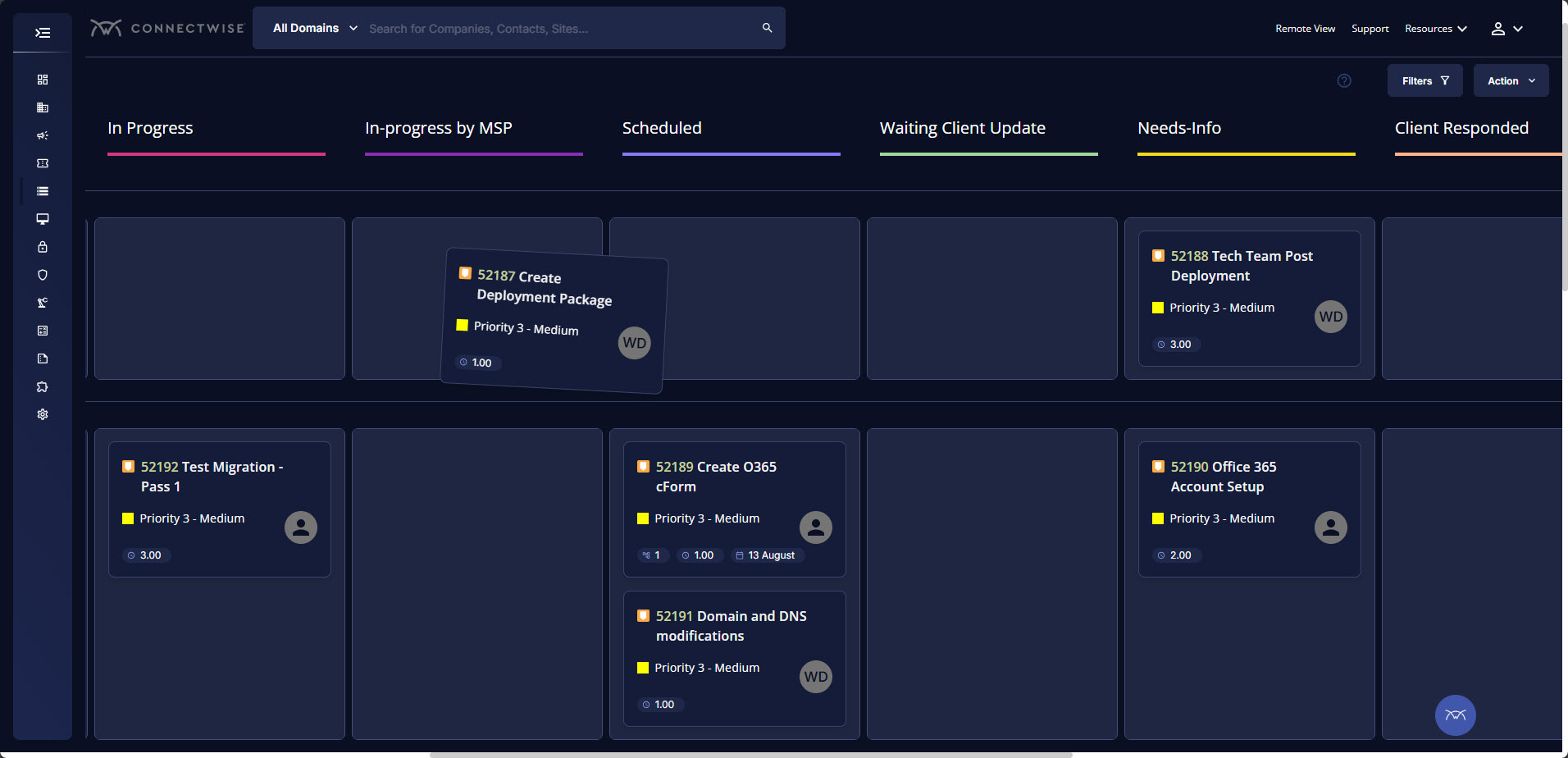
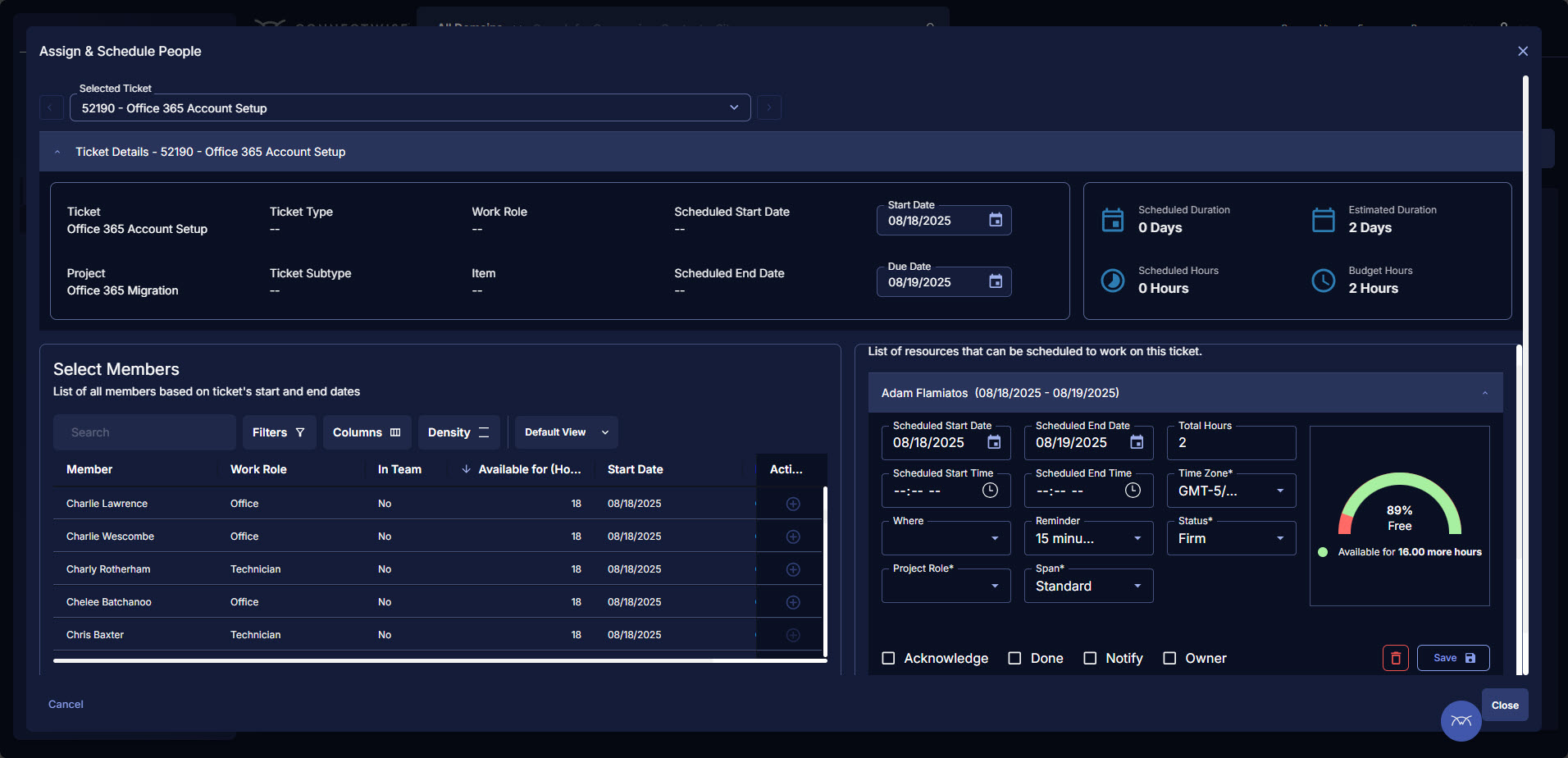
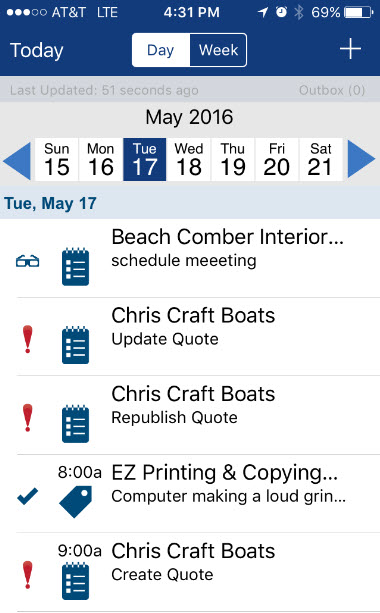
Screenshot of ConnectWise PSA service tickets, which give technicians everything they need in one view—communication history, device details, assigned resources, documentation, and integrated tools like ConnectWise RMM and ScreenConnect®. Here, users can track time, update progress, and resolve issues with a customizable workspace.Screenshot of the newly redesigned Projects module, which introduces Kanban board functionality, simplifying project execution with a visual approach to manage tasks, track progress, and maintain accountability. Teams stay aligned, focused, and efficient from kickoff to completion.Screenshot of the updated Projects module that introduces Scheduling Assistant functionality, making project planning and capacity management easier and more efficient, while maximizing team utilization.Screenshot of where technicians on the go can utilize the ConnectWise PSA Mobile App to quickly see what is scheduled, log time, and stay billable without ever opening their laptops.
Flexmonster Pivot Table & Charts Component Screenshots

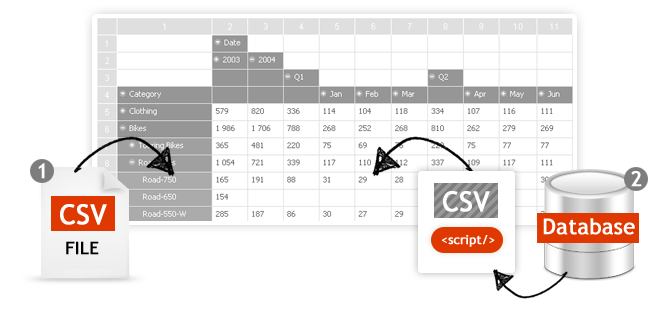
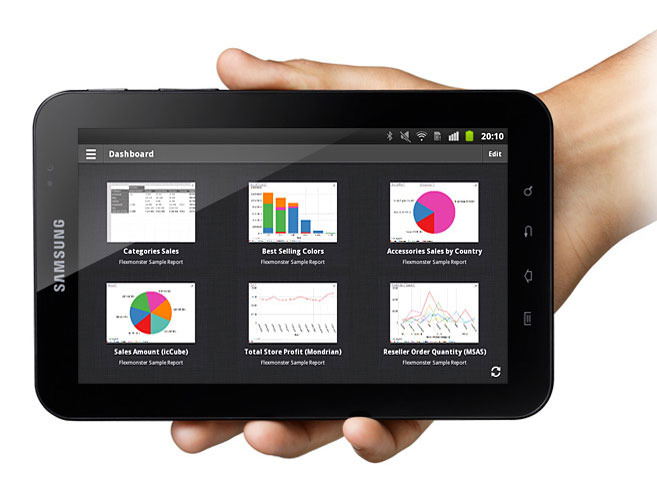
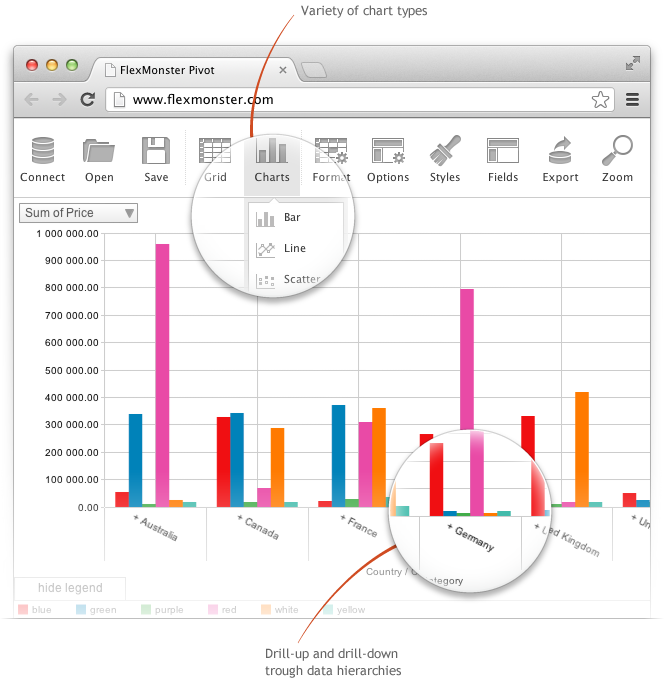
Screenshot of Pivot Component supports the printing of the Pivot view. Additionally users can export the reports into a variety of formats.Screenshot of Pivot Table Component helps you to create interactive pivot tables and charts reports for web and Flex applications. Pivot Component will provide your customers with an extremely intuitive end-user experience while creating and analyzing reports.Screenshot of Pivot Charts provide an alternative, interactive way to visualize data.Screenshot of The component will connect to any database: MS SQL, MySQL, Oracle, PostgreSQL - using simple script generating CSV output to enable real-time business analysis. Pivot Component is full browser-side component, thus you can use any desired server-side to generate CSV data.Screenshot of Pivot Table Component can connect to OLAP cubes via XMLA protocol. XMLA is XML for Analysis - an industry standard for data access in analytical systems, such as OLAP and Data Mining.Screenshot of Start mobile business reporting with the Flexmonster mobile application. It can be downloaded to your tablets from Google Play or Apple App Store.