TrustRadius: an HG Insights company

Coremetrics / IBM Digital Analytics (discontinued) vs. Lightning Tools DeliverPoint

Save this comparison

Save this comparison

Add Product

Recommended Comparisons

    Overview
    ProductRatingMost Used ByProduct SummaryStarting Price

    Coremetrics / IBM Digital Analytics (discontinued)

    Score9.1 out of 10
    N/ABased on the former Coremetrics, IBM Digital Analytics is a discontinued analytics product. IBM acquired Coremetrics in 2010, and re-branded the platform to the IBM Digital Marketing Optimization Solution. Product support was ultimately provided by Acoustic, but the product is not a part of the company's plans going forward.N/A

    Lightning Tools DeliverPoint

    Score8.2 out of 10
    Enterprise companies (1,001+ employees)
    DeliverPoint supports reporting and managing SharePoint permissions. Site Owners, Site Collection Administrators, and SharePoint Administrators can run permission reports that reflect the permissions of every user. Site collections, Teams Channels, Hub Sites, SharePoint Sites, OneDrive, Lists, Folders and Items can all be reported on individually or in bulk. Permissions can be modified, transferred, copied or deleted between accounts as staff changes occur.

    $2,500

    per year per installation

    Pricing
    Coremetrics / IBM Digital Analytics (discontinued)Lightning Tools DeliverPoint
    Editions & Modules
    No answers on this topic
    DeliverPoint OnPrem
    From $1950
    per year per installation
    DeliverPoint OnPrem Enterprise Edition
    POA
    per year per installation
    DeliverPoint Online
    From $2500
    per year per installation
    DeliverPoint Online Enterprise Edition (>10,000 users)
    POA
    per year per installation
    Offerings
    Pricing Offerings
    Coremetrics / IBM Digital Analytics (discontinued)Lightning Tools DeliverPoint
    Free Trial
    NoYes
    Free/Freemium Version
    NoNo
    Premium Consulting/Integration Services
    NoYes
    Entry-level Setup FeeNo setup feeNo setup fee
    Additional Details—Prices listed are starting prices for "stock" product. $2.50 per user/year on top of base price Enterprise product is designed for 10,000+ users, and can be customised if required to meet business needs. Prices are based on 12 month contract from 1st purchase month. Installation included in price. Full technical support available. Online versions will have access to free product updates during contract period.
    More Pricing Information
    Features
    Coremetrics / IBM Digital Analytics (discontinued)Lightning Tools DeliverPoint
    Identity Management
    Comparison of Identity Management features of Coremetrics / IBM Digital Analytics (discontinued) and Lightning Tools DeliverPoint
    Feature
    Coremetrics / IBM Digital Analytics (discontinued)
    -
    Ratings
    Lightning Tools DeliverPoint
    7.7
    1 Ratings
    6% below category average
    ID-Management Access Control00 Ratings7.31 Ratings
    Account Provisioning and De-provisioning00 Ratings8.21 Ratings
    Best Alternatives
    Coremetrics / IBM Digital Analytics (discontinued)Lightning Tools DeliverPoint
    Small Businesses
    Matomo Analytics
    Score9 out of 10
    JumpCloud
    Score9.3 out of 10
    Medium-sized Companies
    Lead Forensics
    Score8.9 out of 10
    OneLogin by One Identity
    Score9.4 out of 10
    Enterprises
    Chartbeat
    Score9.2 out of 10
    RSA Access Manager (Discontinued)
    Score10 out of 10
    All AlternativesView all alternativesView all alternatives
    User Ratings
    Coremetrics / IBM Digital Analytics (discontinued)Lightning Tools DeliverPoint
    Likelihood to Recommend
    7.0
    (24 ratings)
    8.2
    (1 ratings)
    Likelihood to Renew
    5.8
    (18 ratings)
    -
    (0 ratings)
    Usability
    9.0
    (1 ratings)
    -
    (0 ratings)
    Availability
    10.0
    (1 ratings)
    -
    (0 ratings)
    Performance
    8.0
    (1 ratings)
    -
    (0 ratings)
    Support Rating
    2.3
    (4 ratings)
    -
    (0 ratings)
    Online Training
    7.1
    (2 ratings)
    -
    (0 ratings)
    Implementation Rating
    9.9
    (2 ratings)
    -
    (0 ratings)
    Configurability
    8.0
    (1 ratings)
    -
    (0 ratings)
    Product Scalability
    9.0
    (1 ratings)
    -
    (0 ratings)
    User Testimonials
    Coremetrics / IBM Digital Analytics (discontinued)Lightning Tools DeliverPoint
    Likelihood to Recommend
    Discontinued Products
    IBM analytics has continued to improve upon the days of being the original core metrics. After using the updated version for quite some time, it has been great at providing the needed analytics to measure ROI and goal performance for our quarterly KPI's. It has resulted in a great increase in web engagements although we are a midsize company, smaller outfits may not need such an expensive option.
    Incentivized
    Read full review
    Lightning Tools
    Copy user permissions through the whole sites of SharePoint farm
    Read full review
    Pros
    Discontinued Products
    • IBM CXA comprises an acquisition called Tealeaf. This tool has deep heritage and this is evident in its present-day capabilities.
    • The Universal Behaviour Exchange or UBX puts the concept of personalisation at the forefront. The ability to combine physical (analog) and digital transactions to create the complete picture of a customer journey, is a stand out benefit.
    • The solution does not have to involve the purchase of software. IBM CXA can be sold as a service bundled with analytics as a service. This not only lowers the cost of ownership, it gets around one of the principal issues. Strong staff with design and analytical capability to drive the solution and deliver tangible benefits.
    • The seamless integration of Watson AI services to help with the heavy lifiting. Watson reinforces the analytical focus this solution has and can learn to recognise situations specific to a company.
    Incentivized
    Read full review
    Lightning Tools
    • Discover Site Permisions
    • Sheduled reports of required lists, libraries, sites...
    • Compact set of commands which works with user permissions
    Read full review
    Cons
    Discontinued Products
    • The user interface is in Flash, which can be very frustrating and slow at times. Apparently, this is to be transitioned in a future release.
    • Can only segment the last 93 days of data. Any historical segmentation beyond the 93 days must be run in Explore (which is credit based, and has its own limitations with the number of credits per month, based on the initial contract with IBM).
    • Reports can only display 93 days of data at a given time for custom date ranges. There are pre-programmed date ranges setup with IBM during implementation (last week, last month, last quarter etc.), but are not flexible enough to answer more specific questions.
    • Certain reports cannot have segments applied, making answering some simple questions a bit more tricky. For example, I can create a segment around mobile devices and apply it to the marketing channels report, but I can't create a marketing channel segment and apply it to the mobile reports.
    • Built in API calls allows for nice report design and automation.
    Read full review
    Lightning Tools
    • Linking basic information to the object selected in the left panel (site structure view)
    Read full review
    Likelihood to Renew
    Discontinued Products
    IBM Digital Analytics is a great solution for our clients and I believe they offer the best solution for the retail space. We have access to IBM support via email or live chat and they can answer many of the reporting questions that come up. IBM is receptive to our feedback of the product so I am confident they will continue making improvements
    Read full review
    Lightning Tools
    No answers on this topic
    Usability
    Discontinued Products
    Very easy to implement and use.
    Read full review
    Lightning Tools
    No answers on this topic
    Reliability and Availability
    Discontinued Products
    Never had any issues
    Read full review
    Lightning Tools
    No answers on this topic
    Performance
    Discontinued Products
    As reports are templated, the system is pretty quick. Sometimes you have to wait a bit for a report to render. Or you might have to re-load the page. But there is no real issue here and the system is on par with other similar systems.
    Read full review
    Lightning Tools
    No answers on this topic
    Support Rating
    Discontinued Products
    Overall, the level of support is very good and I would say it is a strong asset of the solution. However, you can sometimes feel that there is a difference of level among the support team.
    Read full review
    Lightning Tools
    No answers on this topic
    Online Training
    Discontinued Products
    Online training is really great. One of the best assets that they have. Lots of great videos, pop quizzes at the end of each module. Fantastic. Other tools have similar features, but not as good.
    Read full review
    Lightning Tools
    No answers on this topic
    Implementation Rating
    Discontinued Products
    See previous comment: reading and understanding the encyclopedic implementation guide is a must.
    Read full review
    Lightning Tools
    No answers on this topic
    Alternatives Considered
    Discontinued Products
    Much of the work we did in IBM Digital Analytics could have been answered through Google Analytics, a much simpler, agile and FREE solution set. Not mention, given the vast number of Google Analytics USERS, free and actionable support is simply a click away ... this compared to IBM Digital Analytics fractured and often absent support service.
    Read full review
    Lightning Tools
    No answers on this topic
    Scalability
    Discontinued Products
    This solution can support large amount of data and transaction. The way that user management features are built, it shows it is meant for large organizations.
    Read full review
    Lightning Tools
    No answers on this topic
    Return on Investment
    Discontinued Products
    • We spend too much time trying to work around bugs on the new UI.
    • We spend too much time trying to figure out how to make certain segments work because support and the knowledge center are lackluster.
    • Our sales rep is very unresponsive and leaves us searching for a lot of answers on our own, including what other products we may benefit from that IBM offers.
    Incentivized
    Read full review
    Lightning Tools
    • Speeds up the management of user permissions
    • Provides a comprehensive overview of permissions and settings of individual security levels across areas of company informations
    Read full review
    ScreenShots

    Lightning Tools DeliverPoint Screenshots
    Screenshot of CONTEXTUAL SHAREPOINT PERMISSION REPORTING
SharePoint Permissions are not just the responsibility of IT. Business Users (Content Owners) can create sites, lists, libraries and of course list and library content. The business user is capable of sharing the content with internal users, but perhaps also external users. Sharing such content can result in users gaining permissions to sites or content not intended to be shared. For example, if a site is shared, the user who the site is shared with becomes a member of the members group by default. That members group may have Edit permissions to other sites or content elsewhere within the site collection. DeliverPoint gives visibility of such permissions to support better SharePoint permission decisions from within the Site, List or Library itself.Screenshot of GRANULAR SHAREPOINT CONTENT PERMISSION REPORTS
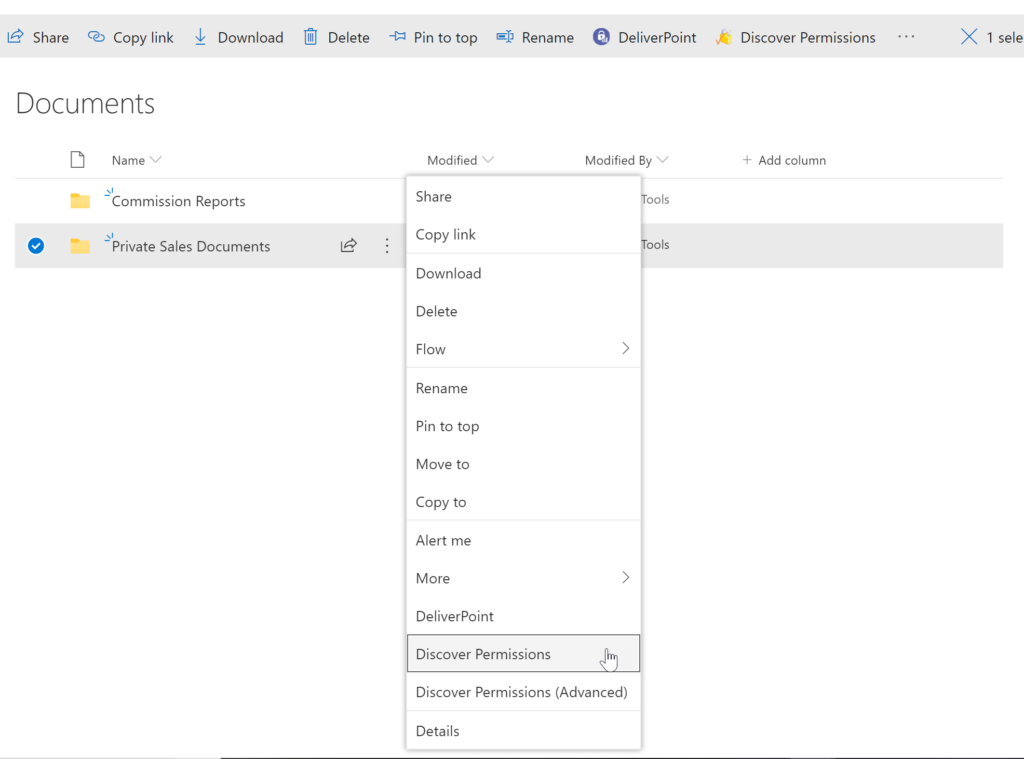
The DeliverPoint Discover Permissions report displays a full transparent report of all users that have permissions to the site, list/library or item. This displays what permissions each account has to the selected object, as well as how the permissions were assigned. Filter can be used for each user to check for duplicate permissions, filter by Permission Level to see which users are granted each permission level, and also filter by the ‘Permissioned Via’ column to see who has received permissions via a particular SharePoint, Microsoft 365 Group, or Azure AD Security group. The Discover Permissions report can be executed against multiple documents or items, lists and within the site or subsites.Screenshot of EXTERNAL SHARING LINKS REPORTING AND MANAGEMENT
Within SharePoint, users can share links with anyone, internal users and external users. DeliverPoint provides an External Sharing Links report that can be used within a site or across sites. The user can see who shared the link, when they shared the link, and optionally remove the link if it’s required.Screenshot of REPORT AND MANAGE PERMISSIONS FROM WITHIN MICROSOFT TEAMS
DeliverPoint is also available within Microsoft Teams. Team Owners can produce Microsoft Teams Permission reports within their Teams Channels and across Private Channels. The reports provide confidence and assurance that permissions are set correctly and that sharing isn’t out of control. Changes to permissions can be made contextually within a Team or centrally across multiple Teams should permissions need to be removed or managed.Screenshot of MANAGE SHAREPOINT PERMISSIONS
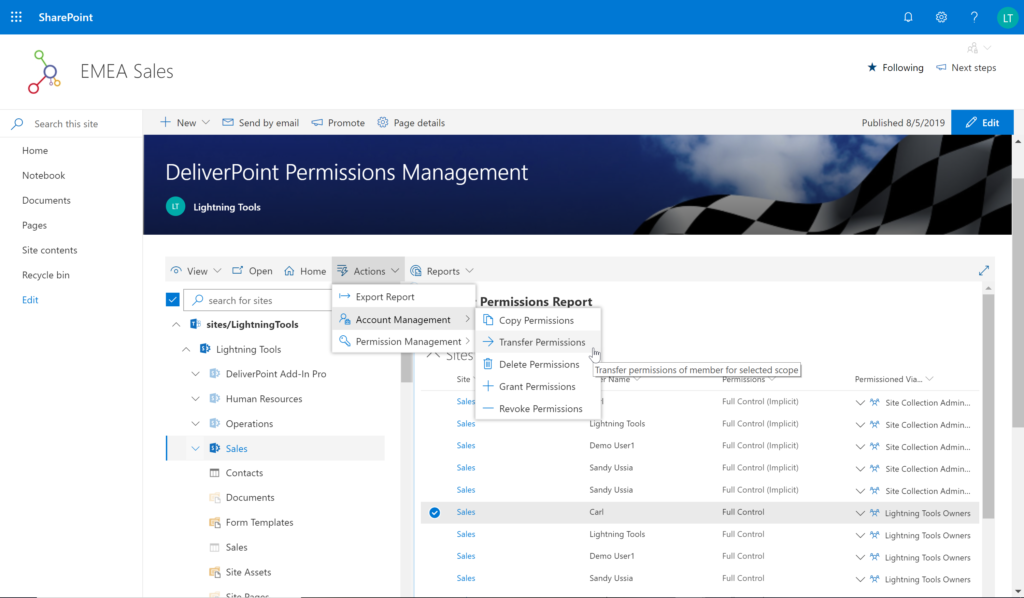
Using DeliverPoint, Site Owners, Site Collection Administrators and Tenant Administrators can manage permissions across the objects that they have Full Control to. Within organizations, users change roles, leave organizations, or join organizations. Making permission changes to accounts to reflect these changes is time consuming. DeliverPoint can be used to simply select the scope to change, and perform the change as one operation. The operations include Transfer, Delete, Copy or Revoke Permissions.Screenshot of UNIQUE PERMISSION REPORTING
The DeliverPoint Unique Permissions Report enables Site Collection Administrators or SharePoint Administrators to view the permissions assigned to a specific user account or group throughout site collections. The report includes all Microsoft 365 Groups, SharePoint Groups and Active Directory Security Groups that the user is a member of. A list of Site Permissions, List Permissions and Item Permissions that the user has been assigned permissions to are listed, allowing  the permissions to be removed or transferred if they are incorrect.