Desk.com (discontinued) vs. Vivantio

Overview
ProductRatingMost Used ByProduct SummaryStarting Price
Desk.com (discontinued)
Score 8.3 out of 10
N/A
Desk.com was a helpdesk, ticketing, and customer support product offered by Salesforce, and oriented towards the needs of small businesses. It is no longer sold and support has been discontinued. Salesforce recommends its modern Service Cloud as a replacement.N/A
Vivantio
Score 8.2 out of 10
Mid-Size Companies (51-1,000 employees)
Founded in 2003, Vivantio is a provider of customer service optimization software and solutions for B2B service teams. By combining enterprise-level software with the flexibility of a cloud-based solution, Vivantio provides a unified service management platform. The platform scales to meet the complex business needs of large, multi-site organizations, to optimize workflows across several departments including IT, operations and customer service.N/A
Pricing
Desk.com (discontinued)Vivantio
Editions & Modules
No answers on this topic
Offerings
Pricing Offerings
Desk.com (discontinued)Vivantio
Free Trial
YesYes
Free/Freemium Version
NoNo
Premium Consulting/Integration Services
NoNo
Entry-level Setup FeeNo setup feeRequired
Additional DetailsAccess to the Vivantio Platform always includes: 1) every available feature, 2) the user's choice of data centers, 3) in-house professional services, 4) a Customer Success Manager, 5) US and UK telephone, email, and self-service support. Pricing varies based on number of licenses: 500 system users - $59 per named license / $89 per concurrent license 200 users - $69 / $104 100 users - $78 / $118 50 users - $83 / $125 25 users - $91 / $137 15 users - $95 / $143 5 users - $99 / $149 Enterprise licensing available for teams >500. Volume discounts start at 15 users and continue to rise to 40%. Educational institutions automatically qualify for a 5% discount; non-profits for 10%. Pricing is per user, per month, paid annually.
More Pricing Information
Community Pulse
Desk.com (discontinued)Vivantio
Considered Both Products
Desk.com (discontinued)
Chose Desk.com (discontinued)
With the help of the Salesforce Desk, we can get smarter services, especially for small companies as a part of customer support. This leads to increased productivity. Adding applications from AppExchange is an awesome feature where we can integrate with a number of other …
Chose Desk.com (discontinued)
We have not used any products like Desk.com
Chose Desk.com (discontinued)
I would say it is a best product when you have to take up the customer calls as well as deep dive customer details while addressing their complaints and issues. It is one of the best tools out there in the market and so many multinational companies are taking benefit of the …
Chose Desk.com (discontinued)
Wix Answers was much better compared to Desk.com. It had more excellent and much better and more tools and was very customizable. Luckily it also had a search tool and also the sort and filter tools. The only thing better than Wix Answers on desk.com was that we could keep …
Chose Desk.com (discontinued)
We liked it as a tool because of the ease and advantages offered by the tool compared to the other solutions evaluated.Due to its ease of implementation and ease of use it adapted very well to the needs of the company, that was the reason why we chose desk.com.
Chose Desk.com (discontinued)
We would have stayed on desk.com if Salesforce did not force us to move off the platform. To be honest it was a great platform at a reasonable price. I was the administrator and our agents were very happy with how things worked. I would go back to them in a heartbeat if I …
Chose Desk.com (discontinued)
Zendesk is much more light and setup friendly. This system does not require a lot of Salesforce knowledge or certification to set it up. Zendesk is better suited to small to medium-sized businesses.
Chose Desk.com (discontinued)
Desk.com and Salesforce Service Cloud can be very easily implemented, administered, and scaled across support teams within the organization. It is truly an industry gold standard as it has a lot of great out-of-the-box functionality and does not require as much customization …
Chose Desk.com (discontinued)
This one seemed to have the best salesforce integration and seemed to be the best for having all of our different teams (sales, retention, support, marketing, SRM, etc.) in one place. Also, we were able to get a very good price. The other platforms seemed like they would be too …
Chose Desk.com (discontinued)
Desk connects directly with Salesforce with many other teams in the business use. This tool did take longer to set up because of all the customization possibilities. There is a good amount of customization that needs to be completed in order to make it function correctly and …
Chose Desk.com (discontinued)
Overall, it performs a lot better than all three combined, with a lot fewer glitches and a lot more user-friendly and user experience efficiency. Any new link that needs to be done, takes a lot less time to execute on desk compared to the three others. Simply advanced when it …
Chose Desk.com (discontinued)
We have used Amazon Connect and it's one of the worst systems we've ever used. It will hang up mid-call or just refresh the whole call and go mute the system was horribly designed we prefer Desk.com and will continue to use desk.com at this office company.
Chose Desk.com (discontinued)
Salesforce Desk is a lot easier to use than Zoho. Zoho has way too much going on, within the software, to be easily manageable. However, SysAid is the easiest, for users, to use because it is extremely basic and straightforward. Our users prefer the easiest method of opening an …
Chose Desk.com (discontinued)
In my opinion, Intercom is more customer oriented, using chat and real time marketing features. Desk.com is a more old school solution focused on tickets and cases. Desk.com does not have much integration capacities with your platform, Intercom has lots of features around this, …
Chose Desk.com (discontinued)
Lower pricing per user. That's about it! Other companies have all-around better features and easier user interfaces, but Desk can beat them on pricing even at higher account tiers. Included knowledgebase tools are a plus, and fairly easy to manage.
Chose Desk.com (discontinued)
The big turn off to this product was the price and poor integration to existing systems. We were in the process of launching a new CRM and needed a tool that would work well with this new tool. Desk.com is a partner and works closely where Zendesk did none of that
Chose Desk.com (discontinued)
We have not used any other products and probably will not. It's cost effective and easy to use.
Chose Desk.com (discontinued)
Desk.com is comparable, on a smaller scale. We went with Desk.com because it provided the functionality we needed and was more affordable.
Chose Desk.com (discontinued)
Originally, I was using Salesforce to keep track of students and their progress through the system (with an end goal in mind). It was really great for handling students on a case by case basis with the different fields and and sections for multiple people to complete as the …
Chose Desk.com (discontinued)
I was not involved in the selection process of Desk.com vs. competitors but we are discontinuing our Desk.com subscription this month and instead opting to use Service Cloud as our new ticketing system. It allows better integration with Salesforce.com and also is more client …
Chose Desk.com (discontinued)
  • Kayako
    • Interesting, but really clunky and unstable at the time.
Vivantio
Chose Vivantio
Vivantio's extensive customization features ensure it always balances in its favor by allowing businesses to tailor workflows, forms, and processes to their unique needs. This flexibility means the platform adapts to your organization, not the other way around, enabling …
Features
Desk.com (discontinued)Vivantio
Incident and problem management
Comparison of Incident and problem management features of Product A and Product B
Desk.com (discontinued)
-
Ratings
Vivantio
7.6
Ratings
8% below category average
Organize and prioritize service tickets00 Ratings8.20 Ratings
Expert directory00 Ratings6.40 Ratings
Subscription-based notifications00 Ratings8.20 Ratings
ITSM collaboration and documentation00 Ratings7.30 Ratings
Ticket creation and submission00 Ratings8.20 Ratings
Ticket response00 Ratings7.30 Ratings
Self Help Community
Comparison of Self Help Community features of Product A and Product B
Desk.com (discontinued)
-
Ratings
Vivantio
7.3
Ratings
9% below category average
Internal knowledge base00 Ratings7.30 Ratings
Multi-Channel Help
Comparison of Multi-Channel Help features of Product A and Product B
Desk.com (discontinued)
-
Ratings
Vivantio
6.2
Ratings
25% below category average
Customer portal00 Ratings6.40 Ratings
IVR00 Ratings4.50 Ratings
Social integration00 Ratings6.40 Ratings
Email support00 Ratings6.40 Ratings
Help Desk CRM integration00 Ratings7.30 Ratings
Best Alternatives
Desk.com (discontinued)Vivantio
Small Businesses
Agiloft Service Desk (discontinued)
Score 9.0 out of 10
Agiloft Service Desk (discontinued)
Score 9.0 out of 10
Medium-sized Companies
Agiloft Service Desk (discontinued)
Score 9.0 out of 10
Agiloft Service Desk (discontinued)
Score 9.0 out of 10
Enterprises
SysAid
SysAid
Score 8.9 out of 10
SysAid
SysAid
Score 8.9 out of 10
All AlternativesView all alternativesView all alternatives
User Ratings
Desk.com (discontinued)Vivantio
Likelihood to Recommend
8.2
(0 ratings)
8.2
(0 ratings)
Likelihood to Renew
8.4
(0 ratings)
-
(0 ratings)
Usability
8.3
(0 ratings)
9.1
(0 ratings)
Availability
1.0
(0 ratings)
-
(0 ratings)
Performance
10.0
(0 ratings)
-
(0 ratings)
Support Rating
8.2
(0 ratings)
-
(0 ratings)
Implementation Rating
10.0
(0 ratings)
-
(0 ratings)
User Testimonials
Desk.com (discontinued)Vivantio
Likelihood to Recommend
Desk.com and the Salesforce Service Cloud provide a sophisticated suite to easily create and track cases coming in, along with automatically routing and escalating issues as they arise. It allows me to configure my own workflows and customizes consoles with easy drag and drop functionality. It is the perfect help desk software, which integrates with the Salesforce Sales and Commerce clouds seamlessly. The in-app and mobile support is also very expedient and helpful.
Read full review
I’d recommend Vivantio as an ITSM platform because it combines powerful functionality with ease of use. Its customizable workflows and automation streamline IT service management, saving time and improving efficiency. The platform scales well, making it suitable for businesses of all sizes, and it integrates seamlessly with other tools, ensuring smooth operations. Vivantio also offers excellent reporting capabilities, helping teams track performance and identify areas for improvement. If you’re looking for a reliable, flexible, and user-friendly ITSM solution, Vivantio is a great choice.
Read full review
Pros
  • Help Center. Desk has worked endlessly with us to perfect our Help Center. They are dedicated and willing to work in order to make your product right.
  • Customization. Though we exceeded the rule limitation for Desk, they have still allowed us to take their product and make it our own. We have our own labeling, and priority system which help us hit important SLAs.
  • User education. Whenever there is a new feature released, I feel like I'm in the know about it which is extremely important when we've been requesting certain features for a long period of time. Their communication is on point.
Read full review
  • Incident Tracking
  • Reporting
  • Customisation
Read full review
Cons
  • Internal knowledge tools are clunky and annoying to access, outside the regular workflow of everyday staff
  • Arbitrary and confusing limitations in business rules and custom fields
  • Arbitrary and confusing limitations in case handling - for example, if you begin a case as a phone call you CANNOT email the customer from the case. As though no one working at Desk has ever sent a follow-up email...?
  • Not very good for B2B, mid-to-large businesses. Difficult to set business rules based on company information (for example, service level/tier) and nearly impossible to track key stakeholders and get clear insight into the relationship at a high level
  • Reporting tools are clunky, slow, and just all-around pretty useless
Read full review
No answers on this topic
Likelihood to Renew
We will be very likely to renew our contract with Desk.com. It is easy to use, and provides us with everything we need to keep our customers and employees happy. They have also been very helpful in catering the application to our specific and unique needs, including working across brands and adding specific content for our products
Read full review
No answers on this topic
Usability
Once it is fully set up with all of the unique and necessary customizations for your organization, it becomes easier to use, but before that, it is not very user-friendly and there are not a lot of training resources available. You likely need a Salesforce admin for initial set-up who is experienced with customization.
Read full review
i find the system easy to navigate and customise
Read full review
Reliability and Availability
We've never had a problem with Desk.com's availability.
Read full review
No answers on this topic
Performance
Fast, responsive, gorgeous, and fun. It's always run like a thoroughbred for me.
Read full review
No answers on this topic
Support Rating
I always get the support and needed answers in a timely manner. Whether by email, ticket, or call. There's always a solution available or a potential one available. Everything is clear and straight to the point in customer support from Desk. I didn't face any difficulty so far with that.
Read full review
No answers on this topic
Implementation Rating
As I stated earlier, implementation of Desk.com went more smoothly than most. The resources in the "Support Center" are fantastic, and I never ran into anything that left me stumped, angry, or disappointed.
Read full review
No answers on this topic
Alternatives Considered
Wix Answers was much better compared to Desk.com. It had more excellent and much better and more tools and was very customizable. Luckily it also had a search tool and also the sort and filter tools. The only thing better than Wix Answers on desk.com was that we could keep internal communication records by adding notes on tickets, and it saved a lot of time.
Read full review
Vivantio's extensive customization features ensure it always balances in its favor by allowing businesses to tailor workflows, forms, and processes to their unique needs. This flexibility means the platform adapts to your organization, not the other way around, enabling seamless alignment with changing requirements and maximizing efficiency over time.
Read full review
Return on Investment
  • It has definitely had a positive impact by helping our team quickly address issues people are having with our product.
  • Desk.com has helped our team and company get better by addressing customer and tester issues faster, and tracking data so that our team can improve the quality and speed of all of our outgoing communications.
Read full review
  • Positive - Reporting
Read full review
ScreenShots

Desk.com (discontinued) Screenshots

Screenshot of Desk.com ConsoleScreenshot of Desk.com Issue ScreenScreenshot of Desk.com Reporting and Analytics

Vivantio Screenshots

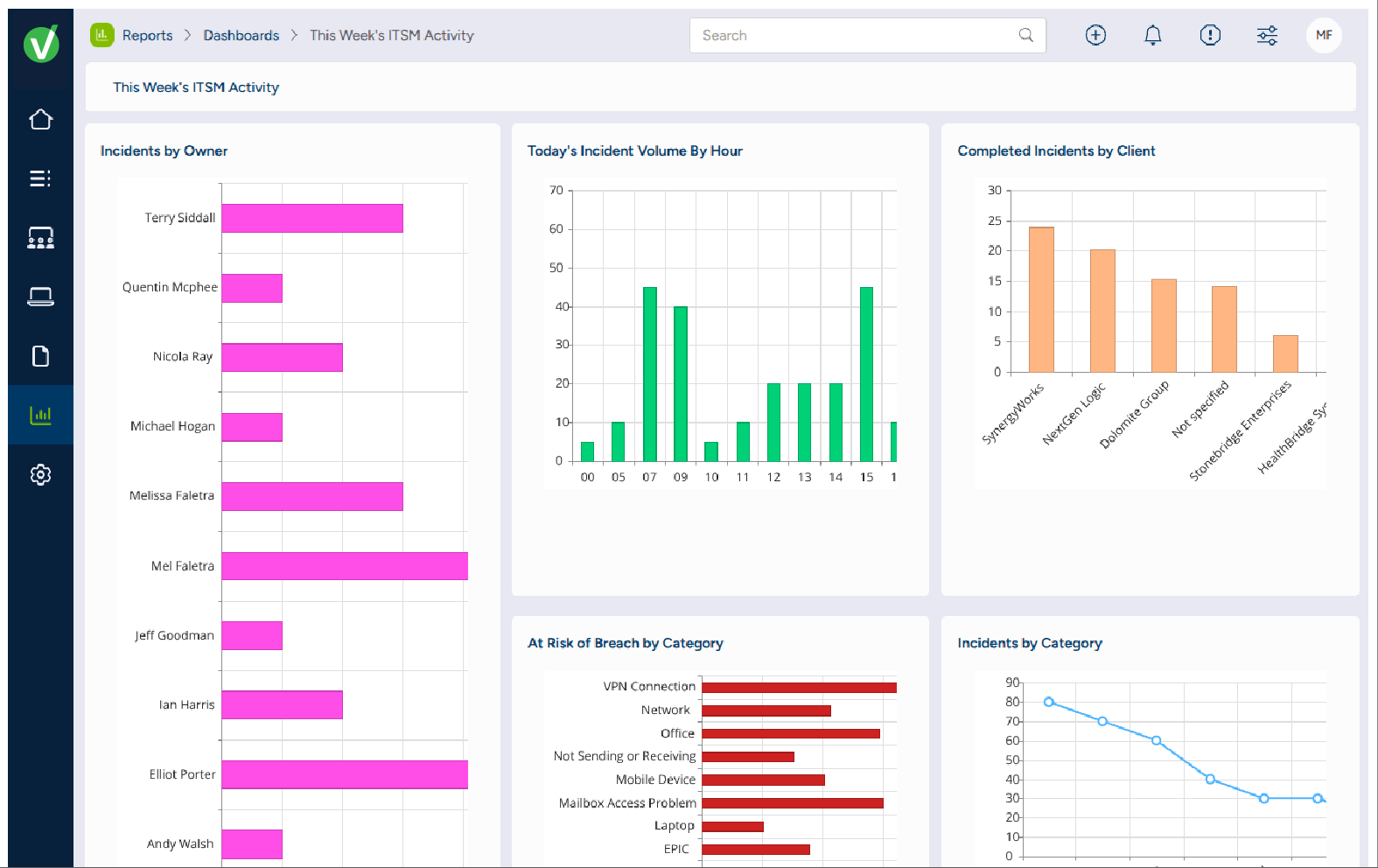
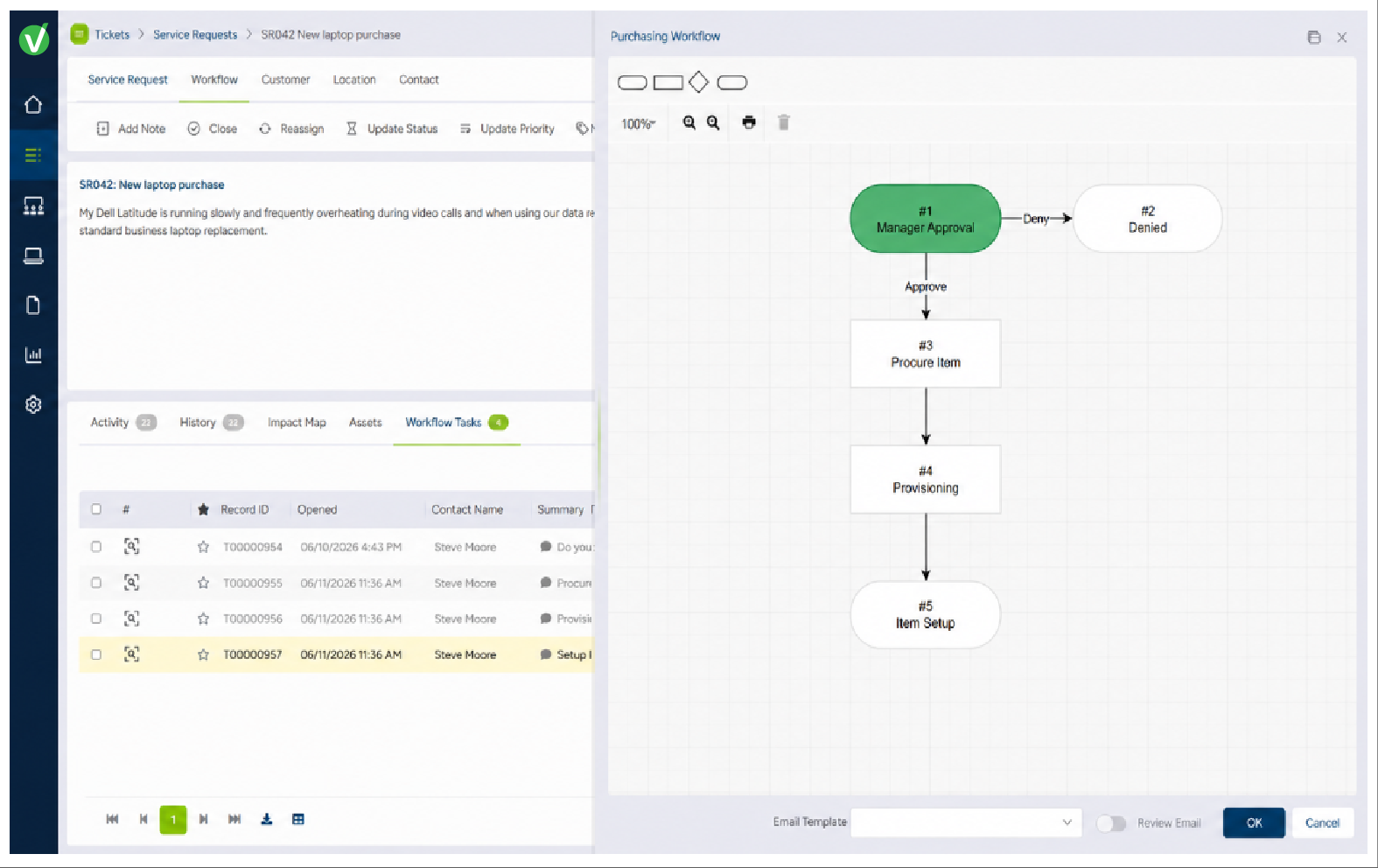
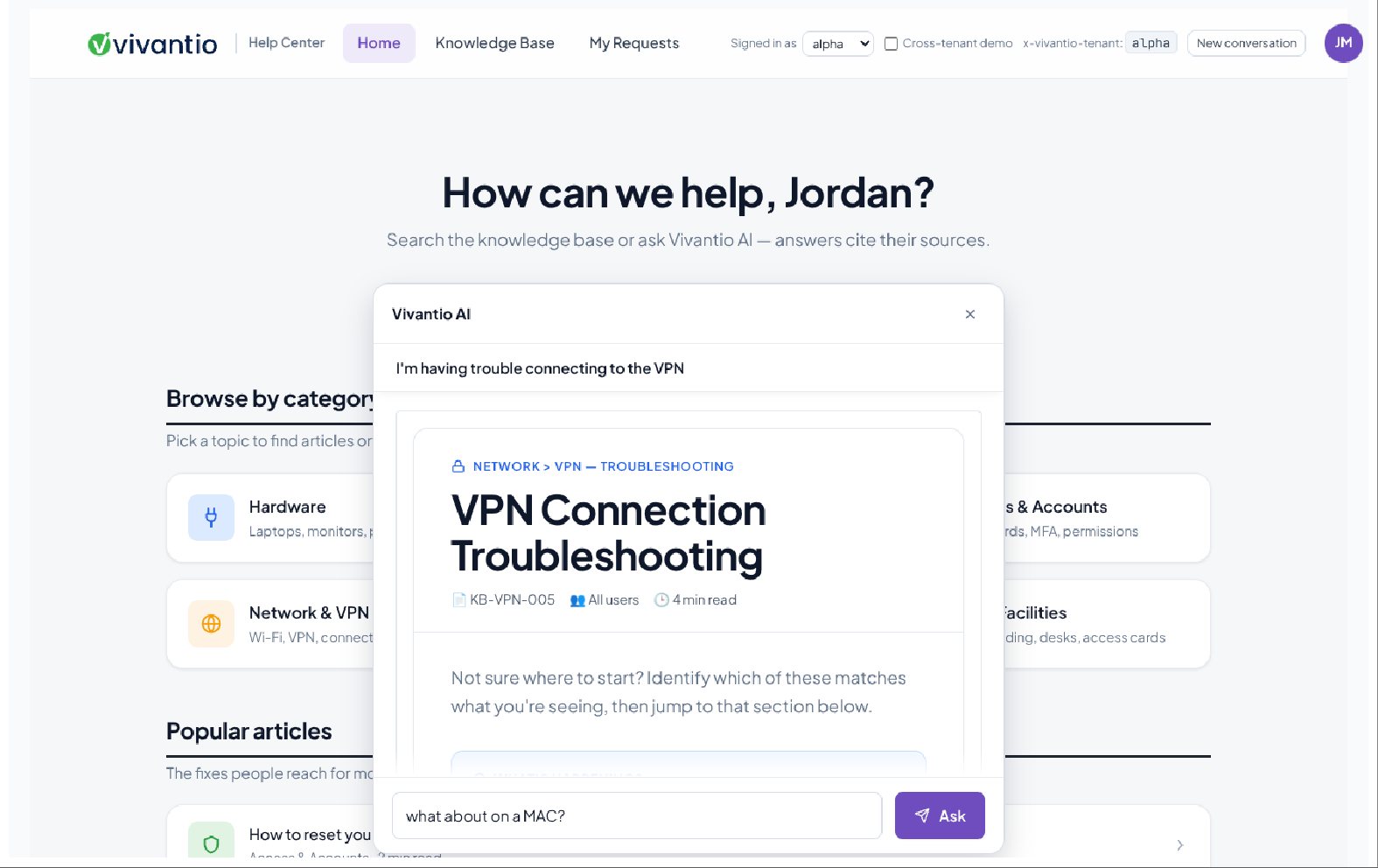
Screenshot of Reporting & Analytics: Reports surface business-critical insights like overall customer sentiment and expected EoL for employee machines using dashboards, reports, Vivantio FLEXGrid or through oDataScreenshot of Knowledge Base: For internal private articles to aid service delivery team, or public articles to help customersScreenshot of Integrated AI: Generates AI feedback from across the knowledge base, analyzes customer sentiment, or helps write detailed feedback to customersScreenshot of Queues: For managing incidents, problems, service requests, change management, and more in customized interfaces based on ticket type or team, ensuring the most important information is always at agents’ fingertipsScreenshot of Ticketing: For unlimited ticket types that can be used by teams, each with a dedicated configuration (categories, priorities, custom forms, and fields)