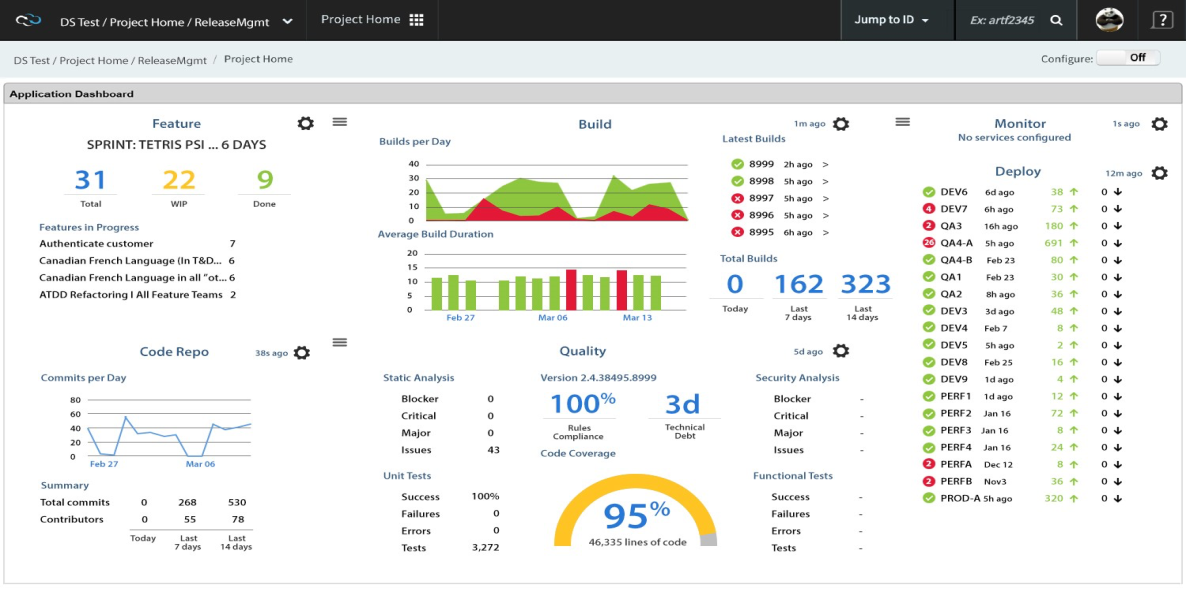
Digital.ai (formerly CollabNet) aims to help enterprises and government organizations deliver high-quality software at speed with TeamForge, its application lifecycle management suite. According to the vendor, Digital.ai offers innovative solutions, provides consulting and Agile training services, supports more than 10,000 customers with 6 million users in 100 countries, and has been recognized for 13 consecutive years as SD Times 100 “Best in Show” winner in the…
N/A
MindManager
Score 7.9 out of 10
N/A
MindManager is a mind mapping and project management tool that aims to boost users’ productivity. It is designed to facilitate a wide range of project types, and includes cross-platform functionality and 3rd party integrations.
$105
per year
Planview AgilePlace
Score 7.9 out of 10
N/A
AgilePlace is a project management solution built around flexibility, data-driven analytics, and workflow automation. The software was acquired by Planview in December 2017 to expand that company's capabilities.
CollabNet TeamForge is superior to Mercury mainly because it has a subversion change management tool integrated with the product. CollabNet TeamForge offers more complexity but with more flexibility for managing and tracking projects. I think
CollabNet TeamForge is more …
MindManager has helped me structure and visualize complex product development workflows more effectively. I’ve mapped out processes, linked documents and data, and tracked tasks across teams. For example, visualizing feedback loops improved collaboration, while task integration …
Previously we used and loved Microsoft Visio, but the product has not improved much. The subscription pricing also increased so Visio is only licensed to users who need it. Everybody else now uses MindManager.
MindManager succeeded in every aspect, there is no real comparison possible. The sum of features that can be used with the MindManager is not available in any other product on the market. Based on that and on the continuous improvement of the MindManager there can not really be …
Particularly in the area of development and joint collaboration with other customers, this enables us to show, explain and develop content directly to teams, for example. The advantage over other products. It is simply a great simplification in the context of collaboration with …
MindManager stands out for its wide range of export options, customization and how they have enriched the format over time. As a constantly evolving tool, and having tried others, I consider it superior for the abovementioned reasons. Its cross-platform nature has been …
I have known and followed MindManager developments since 2000 and maintain my knowledge base. I even used it to create my wheel of life based on the Indian model and would also like to use the MM in a VR version. No tool offers comparable holistic functions - as well as - 25 …
I used Freemind before. At home I use SimpleMind Pro. Both are not listed in your drop-down. MindManager is the most sophisticated tool I've been working with so far, but the most expensive one, as well.
The primary reason for the switch was that I needed a lighter, no-frills tool. I saved big time on the licensing cost. A major need was the cross-OS platform, and this tool works irrespective of MacOS and Windows. I could not have found a better tool. Lucidchart is the next …
The choice missing in the above is Lucidchart and Lucispark. These are powerful tools to brainstorm and map processes. We consider that MindManager is much better for brainstorming and strategic planning. Lucidspark would easily get cluttered and disorganized.
MindManager covers all our needs (information management, brainstorming and planning, project management, sharing and collaboration) in one tool, and we do not have to jump back and forth between different applications. It's a very flexible tool that can be customized to your …
- the feature which are relevant for the majority of users are available in MindManager, and these feature can be learned easily and quickly; the alternative tools are more powerful (but have a lot of feature the standard user does not need) and are more expensive and difficult …
We opted for MindManager many years ago. The main reasons are the product's stability, continuous development, general range of functions, and export options, especially for Office.
The continuity in the product maintenance of MindManager and the options offered by the API for add-ins, direct COM access and the use of macros are decisive for us. This allows us to automate business processes without being bound and limited in a universe of a specific …
As starte in 2010 as an "early adopter" a lot of experience with MindManager has been gained over time. MindManager is in use as a "working horse" in my environment. While MindManager has pretty well managed to further develop the technology and to adapt with fast changing IT …
I have used a few others in the past (not listed in your product search, such as Freemind). I don't recall all of the Mind Mapping products I've tried, but MindManager definitely felt the most complete as a product and had a much more professional feel.
AgilePlace is better than JIRA when it comes to ease of use and intuitiveness of the tool. Card based model and ability to customize/tailor the way you want makes AgilePlace is a great tool. Look and feel as well as colored cards, makes the board layout much more easier to …
All these tools are different and have different uses. Depending upon SDLC your organization uses, you would use any of these tools. They all have their plusses and minuses.
Originally, we had evaluated two other tools next to Planview LeanKit: Kanbantool and Kanbanflow. The latter was a close contestant for productive use, as it was also very customizable and a joy to work with and look at. It also had lower user fees and a mobile integration.
Front-End Web Developer, Office of Mediated Education
Chose Planview AgilePlace
I use Trello a bit for personal use. It's much less powerful than LeanKit, but it's also a better design and simpler to use. ServiceNow has some kanban board stuff built-in, but I wasn't super impressed with it. JIRA seemed to be even more complex than LeanKit for the short …
I think that LeanKit is very similar to Asana's Kanban feature and Trello, but is much less sleek looking than Asana. Asana's clean and sleek UI makes me enjoy project management much more than LeanKit. It might sound silly that the UI makes so much of a difference to me, but …
Our company uses LeanKit, Pivotal Tracker, and Trello. It all depends on what team you're on. There's even a team that just does KanBan on a whiteboard. In the end, I would tank LeanKit above Pivotal Tracker, but below Trello. The differences are relatively subtle between …
Both VersionOne and Trello are good products. VersionOne is for the real hardcore Agile shops who want to track and report on everything related to the Agile process. Trello is a tool that works for Agile, but really is just a simple list making/tracking tool. Both tools serve …
I have used Trello, which is not as robust for tracking and customizing workflows as LeanKit is. It does not scale well to big teams. JIRA is the standard project management software but does not support Kanban well.
Nearly all the other tools I evaluated against are free, so that's one area where LeanKit is not as competitive. LeanKit does allow the experience to be much more customizable, though.
Being from QA I prefer Spiratest and QC for the fact my team can do all our work in one program and it is linked. But the tech department as a whole prefers Leankit as it is the tool of choice based on ease of use and overall performance.
While LeanKit was not designed for project and task management, we selected it because of its collaborative nature as a project and task management platform for our marketing team. It was also selected because our engineering and product management teams were using Leankit. We …
As long as you are looking for a tool that segregates who can do what with a given repository and branch in GIT, and do not mind strictly using TeamForge's Agile tracking software that comes native to the application, this is the tool for you. The tool is fairly user-friendly, and they have an excellent support staff. You're really buying that support, more than anything else. If however, your company insists on using separated agile tracking software such as Version One, I would not recommend TeamForge. They prefer an all or nothing kind of deal.
It is well suited for a quick prototype of product/development planning to show relationships amongst the APIs used. This helps developers understand the impact of the product changes and identifies the need to update integration components to avoid erroneous deployments. I have not personally experienced a less appropriate scenario at the moment.
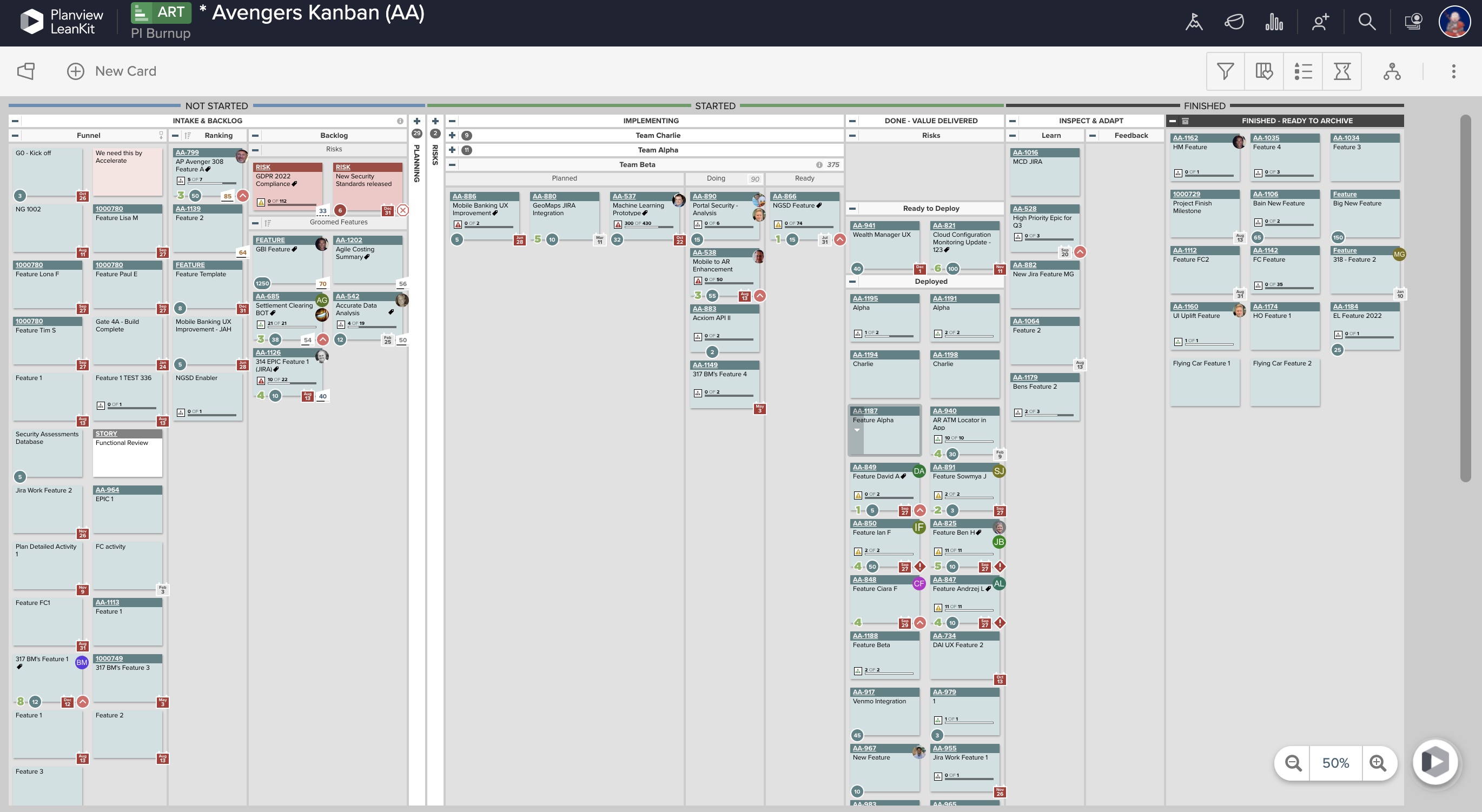
AgilePlace is a great way for teams, or individuals, to bring visibility to the work in process and in their backlog. The color coding and icon use helps to quickly analyze the type of work or status of the work. The product team is doing a good job at listening to their user's feedback and implementing improvements. Where it falls short is when reporting needs to occur.
Okta Integration: We love using SSO for all our SaaS apps, and as new team members join, they can be automatically joined to the appropriate LeanKit boards.
Filtering and viewing: Can filter and refine by several fields as well as custom fields. Assigned Users, Tagged, Card Type, Date, etc
Their analytics and reporting can be helpful for PMs, especially if they have several teams they oversee.
I would like to see personalization for managing artifacts, that is, allowing the user to customize pages and save personalized settings and then save them as bookmarks.
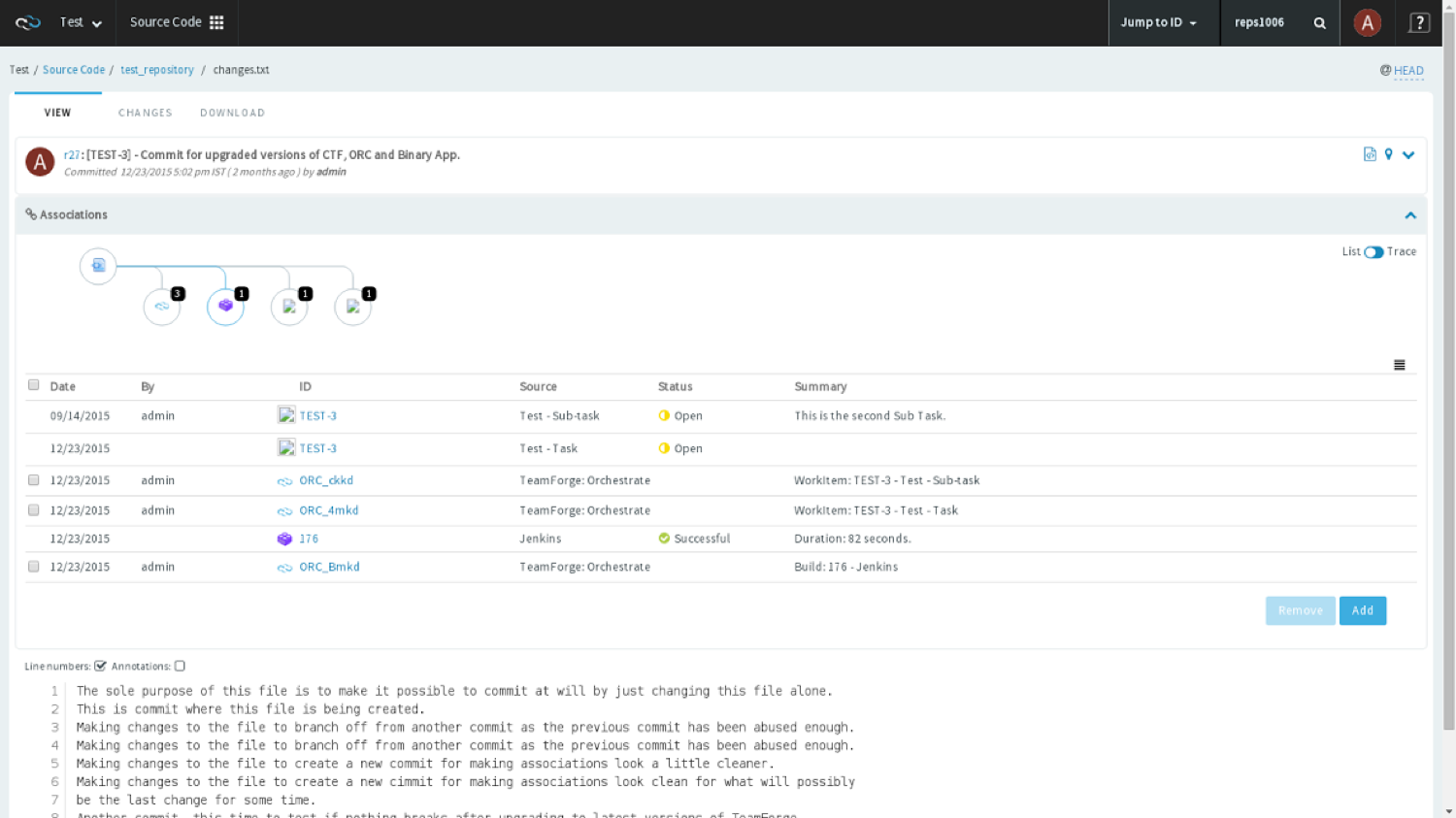
I would like an improved subversion browser such as a graphical user interface rather than a basic file explorer.
I would like built in features for CollabNet TeamForge integrated with subversion so that i can associate my private code branches and code changes.
There should be some more functionality in the Notes window, such as a "Paste Special " Icon in the notes area to maintain format control.
Although I create many of my own Web export templates, an add-on for web export design would be great, as I regularly create Interactive Electronic Technical Publications (IETP) in HTML export format.
The ability to sync Map shortcuts between devices would also be welcome. I use MM on three devices, and I have to add or amend the Map list individually. My maps are on OneDrive, so using them should not be that hard if they are cloud-based.
I feel the main issues of the old Mindjet seem to be gone with the Corel purchase. With the huge advance of sharing via browser HTML even 1 user can affect many. And, actually, using MM kind of forced my rigid brain to rethink how I categorize and classify information/projects.
The idea of paying $69USD for an annual cost is more than fair and a great model for Corel/Mindjet to keep rolling out improvements!
MindManager is very intuitive. The user interface is not cluttered and the ribbon icons are easy to understand. Several excellent "how-to" videos are available on the MindManager site as well as on YouTube. MindManager starts quickly and the user interface is very responsive. Launching other programs from MindManager such as Excel is very fast and issue free. The browsing feature is lightning fast. The drag-and-drop capability is also very fast and reliable.
LeanKit isn't the best designed Kanban system I've seen, but overall it's pretty usable. The boards I've used are pretty complex, so it can be difficult to find things. I found that searching and filtering for specific cards was somewhat of a challenge. Dragging a card from one lane to another is kind of a fun way to get things done though.
The application is quick and responsive. We are able to produce mindmaps and reports with ease. The program is not complicated at all and integrates well with software and programs like Microsoft Outlook and Teams, which we truly appreciate.
They always answer the phone when we put a call in, any time. They have consistently sent out contractors when needed and were there every step of the way when we switched over from ClearCase to TeamForge years ago. The support is what you really pay for when you buy into TeamForge.
I have called technical support a few times. During the COVID Crisis, I called a few times repeatedly due to a rush request. The technical support guy called me back in minutes. He somehow knew that I had called repeatedly and wanted to make sure my issue was resolved immediately
Every time I have reached out to the AgilePlace support team I have received a timely response in addition to professional & personal feedback. Their consultants are knowledgeable and the management team is happy to jump in and help when needed.
There is a wide range of online training through webinars led by expert users. They are particularly useful for explaining how to use new features and using MindManager 'in the real world' for projects, tasks etc.
CollabNet TeamForge is superior to Mercury mainly because it has a subversion change management tool integrated with the product. CollabNet TeamForge offers more complexity but with more flexibility for managing and tracking projects. I think CollabNet TeamForge is more comprehensive than either Mercury and JIRA. They're all user friendly tools with short learning curves but CollabNet TeamForge is most efficient in my experience. JIRA was recently adopted for particular applications and is currently being evaluated by various technology teams.
MindManager stands out for its wide range of export options, customization and how they have enriched the format over time. As a constantly evolving tool, and having tried others, I consider it superior for the abovementioned reasons. Its cross-platform nature has been decisive, and although there are many alternatives in the form of web applications or the like, MindManager presents itself as a more complete and robust option.
Originally, we had evaluated two other tools next to Planview LeanKit: Kanbantool and Kanbanflow. The latter was a close contestant for productive use, as it was also very customizable and a joy to work with and look at. It also had lower user fees and a mobile integration. In the end, we picked Planview LeanKit because of several reasons: Aesthetics: The look was much more clean and professional. Reporting: It was obvious from the start that we could use Planview LeanKit as a tool for improvement. API: We needed to integrate the Kanban into our central systems and Planview LeanKit API was (and still is) a way to do it. Card Headers: This sounds like a simple thing, but the headers above the titles fit our work perfectly and looked perfect, which helped the decision.
CollabNet TeamForge has had a positive impact on the efficiency and productivity of managing and completing projects from specifications to software enhancements and from production issues/defects to bug fixes.
As a developer, CollabNet TeamForge allows me to focus more on delivering projects accurately and timely while maintaining communications with the business.
CollabNet TeamForge Is an efficiency life-cycle management product that helps my team meet business objectives by quickly delivering quality software, documenting projects in a smart and organized way and updating project status to senior management.
CollabNet TeamForge Subversion meets developers needs for change management and improves overall software development process in all phases of software lifecycle.
MindManager allowed me to impress my audience by presenting complex cyber-security and information security concepts in a different and straightforward way. It meant income as instructor since I got the same diploma engagement three times in a row with the Mexico City government.
In March 2021, the CEO of GSB Solutions, a former employer, invited me to design an innovation program for the company. I used MindManager to create the program, explain the concepts, and the implementation plan. All in one mind map. After presenting it to the CEO, I was promoted from Operations Coordinator —a part-time position— to Innovation Manager —a full-time position— earning four times my initial salary. The same mind map served to visually manage the program for 18 months.