
MindManager Reviews

<a href='https://www.trustradius.com/static/about-trustradius-scoring#question3' target='_blank' rel='nofollow noopener noreferrer'>Customer Verified: Read more.</a>
246 Ratings
<a href='https://www.trustradius.com/static/about-trustradius-scoring' target='_blank' rel='nofollow noopener noreferrer'>trScore algorithm: Learn more.</a>
Score 8.5 out of 100

Do you work for this company? Learn how we help vendors

TrustRadius TRUE BadgeTrustRadius Top Rated for 2021

Overall Rating

Reviewer's Company Size

Last Updated

By Topic

Industry

Department

Experience

Job Type

Role

Reviews (1-25 of 132)

Companies can't remove reviews or game the system. Here's why.
March 19, 2021
Jeffrey Berman | TrustRadius Reviewer
Score 9 out of 10
Vetted Review
Verified User
Review Source
I am currently the only MindManager user at our organization. I use it for all of my meeting notes, project management and process planning. When presenting to colleagues I use it instead of PowerPoint. After presentations I share the HTML version for users to reference.

I am able to link to all of my disparate data/files related to a project, for easy retrieval on-demand. Others in the organization have many different tools for project management, strategic planning etc., but MindManager brings everything into one workspace for me.

I've tried to use MindManager for task management, but the tools are not fully matured to compete with Jira/Trello, Microsoft Planner. The introduction of Kanban boards is a good first step, and I look forward to continued development in the area of the application. It would be great to keep all of my project management in one application!
  • Organizing & reorganizing ideas into actionable plans: the mapping workflow makes it incredibly easy to get ideas onto the page, and then group or reorganize topics.
  • Integration with Outlook: calendar items are fully linked and searchable. I use the Resource list to find notes related to a specific person instantly, even years in the past!
  • Smart filters by tags, icons or label: instantly filter down to specific types of information using a nearly limitless variety of word or icon tags.
  • Task roll-up: quickly see progress on multi-step projects.
  • Kanban view: needs more work to compete with establish task management apps.
  • Cross-map dashboards, to collect specific markers together on master map.
  • Flowcharting capabilities: still hard to use for formal flowcharts compared to other tools (e.g. Lucidchart).
  • Tech support response time: it took a very long time to get technical support on a recent ticket.
Well suited for all business planning: strategic, project and brainstorming. I have not used MindManager collaboratively, so I don't know how well it works across multiple team members for project management. Groups always appreciate when I run meeting or presentation in MindManager: all types of employees naturally understand the mapping workflow, although some prefer when I use the Outline View when I share notes.

I use MindManager to successfully manage large projects, from initial ideation and scoping, to discovery and requirements, and to follow the project through to completion and retrospective. Budgets are easy to track inside the app, but the specific day-to-day tasks are usually handled in other applications, leaving the higher-level (milestones) to be tracked in MindManager. I haven't been able to replicate the flexible of applications specifically designed for task management inside MindManager.
Our cloud data initiative, is a massive project, encompassing data governance, culture and technology across the organization. MindManager allows us to plan and share our vision with all staff levels, from c-suite to front line staff, by showing only relevant details for each audience. We are able to focus on high level topics, and drill down on the fly to a very granular level when needed.

For technical process documentation, MindManager's ability to link to external documents allows us to create a comprehensive knowledge base, accessible to all staff and external partners without a license, using the HTML export!
Read Jeffrey Berman's full review
January 26, 2021
Nancy Mejias | TrustRadius Reviewer
Score 10 out of 10
Vetted Review
Verified User
Review Source
I used MindManager to create maps and charts for my teaching curriculum. It allows me to visualize all the content I need to teach and the time it will take me to accomplish the schedule. I have to change several times because of COVID-19, I could not teach certain topics, and it was easy to modify everything needed without starting a new plan and charts. I am the first one in my organization to use it.
  • Helps you to focus.
  • Good for time management.
  • Easy to visualize progress, awesome selection of diagram, charts, etc.
  • Training is required to get the most of the program.
  • Most of the functionality that I need to accomplish my goal was given.
  • More example of the use of the program for education will be helpful.
I use the program to create several curriculums with the frame. It was great. However, I am the only one using the program. Spring Education Group is managing schools nationwide, and The Sagemont School is one of them. I do not know if Spring Education Group is going to use this program. I use it as a free version.
Definitely, the visualization and structure of the information is amazing. I was able to create my curriculum and visualize the changes that I need to make without delay. Because I create three levels of the curriculum with the same content and the modification that I need to do was simple. If I use another program, it will probably take me hours to do the same.
Read Nancy Mejias's full review
February 22, 2021
Chetana Kakade | TrustRadius Reviewer
Score 10 out of 10
Vetted Review
Verified User
Review Source
MindManager is being used across the whole Organization. It helps in planning the projects and helps us see where the project is heading. It is well structured and is user friendly. I need not take any course to learn MindManager. It explains and gets explored itself while using it.
  • Mind Manager is very well structured.
  • It is user friendly and gets explored when used.
  • The color and line effect adds to visual effects.
  • Can add more icons.
  • Make the above Ribbon smaller.
  • Make the play area bigger.
I develop Database for my Organization. It helps me a lot in planning the tables along with its primary and foreign keys. I also use this software in planning the project. It helps me visualize the next steps and helps me planning see the project running ahead. The curved lines make it more useful while connecting different parts of the project segments.
Read Chetana Kakade's full review
October 21, 2020
Robert Gates | TrustRadius Reviewer
Score 10 out of 10
Vetted Review
Verified User
Review Source
We use MindManager to diagram cloud networks for customers. MindManager allows us to provide the customer with a high-level overview of their AWS or Azure systems and drill-down into specific services. We also use MindManager to diagram the security components of the systems. Compliance mandates are identified and outlined at a high-level with drill-down or linking to specific policies.
  • Excellent big picture overview with easy expansion and contraction of map
  • Detailed drill-down capability into separate line-items and notes
  • Publishing capability to share MindManager with other connected or interested parties
  • Convenient and easy to use hyperlink capability that can be launched within MindManager or in a separate window
  • Ability to link to and launch another MindManager from within current one
  • Excellent integration with Outlook
  • Drag and drop within the map sometimes is tricky, making placement, or rearrangement of items frustrating. Maybe a "snap to" type feature could help.
  • Photoshop integration would be great. Specifically, adding a quick insert button to add a Photoshop image and/or a video.
  • Microsoft Project integration would be very helpful.
MindManager is best for an integrated management environment or "IME." I develop code in an IDE, but use MindManager as my single source/pane for project management. My MindManager is architected to provide me with fast, easy access to all my important information. I can also keep track of my Outlook email and calendar and generate reports from my map.
MindManager provides easy-to-understand and use tools that allow me to organize my work in a way that I find beneficial. Starting with a concept, I can brainstorm in various directions by quickly and easily inserting ideas into a map. I can add, move, modify, or delete these ideas until I find the combination that works for me. I can link to outside data sources, launch programs such as Excel or even link to other maps for more information. The ease and convenience of performing these tasks from the map is invaluable.
Fast courteous and meaningful responses to questions I have submitted either via phone or email. The online resources are also very helpful and easily accessible.
MindManager is very intuitive. The user interface is not cluttered and the ribbon icons are easy to understand. Several excellent "how-to" videos are available on the MindManager site as well as on YouTube. MindManager starts quickly and the user interface is very responsive. Launching other programs from MindManager such as Excel is very fast and issue free. The browsing feature is lightning fast. The drag-and-drop capability is also very fast and reliable.
Read Robert Gates's full review
January 05, 2021
Phil Fuster | TrustRadius Reviewer
Score 10 out of 10
Vetted Review
Verified User
Review Source
I utilize MindManager to build templates and tools for my business. Everything from strategic business plans to product/offering roadmaps starts on MindManager. It is an excellent tool for organizing thoughts and building outlines, and then dropping in the content necessary to complete the plan. It is one of the better tools I have come across. I started using MM back in 1998 when I was building the business plan for funding of my internet startup. I raised $8m in funding with the business plan I built. I have used it ever since!
  • Brainstorming: Best tools for organizing ideas.
  • Business Plan/Strategic Plan development: Develop a full document by dropping in content.
  • Meeting Management: Great for capturing thoughts and tasks.
  • Product Development: Tasks, milestones, and ideas all in one map.
  • Could be improved with templates for things like proposals.
  • Direct integration into tasks on Outlook.
Strategic plan development and proposal development. It allows you to visually organize your document and manage the content sent to you but multiple users.
I have benefited throughout the last 22 years from using MindManager in building great business plans for myself or the companies I have worked for. From FedBid to Dell to Rackspace, I have used this tool to improve and refine ideas and business outcomes.
Read Phil Fuster's full review
December 02, 2020
Scott E. Miller | TrustRadius Reviewer
Score 10 out of 10
Vetted Review
Verified User
Review Source
I personally use MindManager. Visualization is critical to help understand complex systems and issues. MindManager provides an easy to use interface that helps me organize and communicate business processes and systems.
  • Visualization - You must 'see it' to 'understand it'.
  • Organization - the ability to expand and contract tree branches is extremely important. You just want to show only the data that is relevant.
  • Sorting and Filtering - Being able to sort and filter content prevents 'information overload'.
  • Better integration with Microsoft Teams.
  • Having the ability to import your entire 'File Explorer' in Microsoft Windows so you can better visualize and organize your files.
I consider MindManager one of the most important software applications I use. It is extremely helpful to visualize complex systems or problems to ensure better understanding.
Every time I start a new project, I first use MindManager to visualize the current system. Once I document the current system, I have a client meeting and communicate my understanding of their current system with the MindManager Visualization. On most occasions, clients want to know what software I used for the visualization. People love it!
I have called technical support a few times. During the COVID Crisis, I called a few times repeatedly due to a rush request. The technical support guy called me back in minutes. He somehow knew that I had called repeatedly and wanted to make sure my issue was resolved immediately.
Ease of use is one of the best traits of the software. The ability to easily expand and contract trees is awesome.
Read Scott E. Miller's full review
November 18, 2020
Michael Howard | TrustRadius Reviewer
Score 8 out of 10
Vetted Review
Verified User
Review Source
I am using MindManager for project management. Its functionality, easily integrating ideation and managing workflow is amazing.
  • Embedded files.
  • Flow chart.
  • Time Lines and Gantt Chart.
  • Process mapping.
  • The many bells and whistles in the note function are not intuitive enough to be used easily.
  • The color choices for concept are not as designer friendly as they could be.
  • Adding images to the background and maneuvering the whole mind map is a bit clunky.
Designing and creating charts to share with others. Sharing functional html versions of the map is really an amazing feature.
I use MindManager for ideation, strategic planning, and project management. Though there are already a number of templates that are easy to use, I often use templates that come in the style of a "canvas," such as Strategyzer's Business Model Generation Canvas, the Value Proposition Canvas, or even a pitch canvas. I paste the canvas in the background and increasing the transparency of it so that it is light enough not to be distracting, I then place a map of the topic and subtopics so that they can collapse. This allows me to seamlessly move from the ideation stage into the project management stage.
I haven't needed to use customer support very much. The one time I ran into problems, I ended up having to uninstall an older version so that the upgrade would work. I did not find the support very helpful at that time. Otherwise, the support has been mostly intuitive—especially with learning new functions within the program.
One of the main challenges I have faced is changing concepts into topics or other elements easily.
Read Michael Howard's full review
February 21, 2021
Donald Holmes | TrustRadius Reviewer
Score 10 out of 10
Vetted Review
Verified User
Review Source
I am using MindManager to create Taxonomies for Pharmaceutical and Finance companies. It is quick and easy to use. I use the software in workshops with the clients and it produces amazing results. I use it also on a daily basis to organize my thoughts for the day. I cannot stress how much this has helped the creative process.
  • Organizes thoughts
  • Creates amazing visualizations.
  • Powers the brainstorming process.
  • I like the software as it is.
Taxonomies, Brainstorming, Process Flows, Organization, Filtering, and General goodness.
I am able to quickly create impressive visualizations for my clients. My clients benefit from the organization that the tool brings to the table.
Read Donald Holmes's full review
December 27, 2020
Clint Rankin | TrustRadius Reviewer
Score 7 out of 10
Vetted Review
Verified User
Review Source
A couple of our depts use this for tracking progress on various projects.
  • Cost effective
  • Works well
  • Intuitive
  • Cost in some scenarios can add up.
  • Fast support can sometimes be a negative experience.
  • Updates sometimes create new issues.
It's well suited for organizations that want a cloud-based solution. Probably less appropriate for tiny companies that don't have complex processes that they need to track. Perhaps a spreadsheet or another less robust piece of software would be more appropriate
We are generally visual creatures and it's not secret that the majority learn through visual contexts. MindManager helps in this regard since it works almost solely through visual/graphical representation.
Read Clint Rankin's full review
February 10, 2021
Anonymous | TrustRadius Reviewer
Score 10 out of 10
Vetted Review
Verified User
Review Source
I use MindManager routinely to organize and develop ideas for grant proposals, research manuscripts, and project activities. It is the software with which I usually begin each project because it helps create a coherent framework for a range of considerations on any given project. For some projects, I use the task features in MindManager to set due dates, allocate tasks to team members, and indicate progress on tasks. I usually do the bulk of my actual writing for grant proposals, technical reports, and scholarly manuscripts using MindManager.
  • Unlike working in a wordprocessing document, MindManager allows the user to easily navigate from section to section and reorganize these as needed.
  • MindManager's exporting function allows the user to send the work to other formats, such as Microsoft Word, for final formatting and dissemination.
  • MindManager allows easy placement of links and other external content into maps.
  • The one area where I'd like to see improvement in MindManager is the availability of tutorials on higher-level functions. There seem to be an awful lot of buttons that I don't know how to use, and the existing tutorials tend to jump into these functions assuming that I know things that I do not yet know. I'd like to be walked through from beginner-level tutorials to more advanced levels.
MindManager is ideal for preparation of grant proposals, in which you have specific criteria outlined by a sponsor and then need to basically "fill out" these different areas with your text argument.
I'm a visual thinker, and so the branched structure and ability to reorganize sections of my proposals, reports, and plans really helps me gain a better grasp on the overall task at hand.
Read this authenticated review
March 24, 2021
Anonymous | TrustRadius Reviewer
Score 10 out of 10
Vetted Review
Verified User
Review Source
Used for product development roadmap; software functional map; documentation, idea presentation via walkthru. I reuse the content in downstream project documents and documentation.
  • Freeform idea gathering followed by linking for organization of thoughts and software features
  • Minimizes repetition of thought nuggets
  • Allows for great extended attributes for tasking
  • Full support for markdown documents
  • More right-click intuitive suggestions for actions you might take having rt clicked on an object
Has eliminated many repetitive steps in different products to organize and flesh out details. Software functional design outlines are easy to start from basic and freeform topics that may be presented in different styles as your thought process continues. If your desired output is a markdown document then there are challenges with MindManager that require me to export to WORD and then again from WORD into a markdown document. I want a product that allows me abstract thought gathering then the ability to reorganize and add rich content to thought topics (MindManager does this very well) followed by a comprehensive export directly to a Markdown document that becomes the basis for presentations and documentation.
Dynamic ability to freely add topics as they occur to me followed by easy organization (and re-organization) into linked topics is a major time saver and does not get in the way of creative thinking. MindManager has almost eliminated the need for me to use multiple other apps to handle the creative-to-production cycle of topics and topic content.
Read this authenticated review
March 05, 2021
Anonymous | TrustRadius Reviewer
Score 10 out of 10
Vetted Review
Verified User
Review Source
Using MindManager was vital to me to organize my thoughts and ideas, and for planning systems architectures for information technology, which can get very complicated. MindManager is useful in business and personal contexts. I always use it as an initial organizing tool and use it throughout a project to manage all of the details in an immensely accessible way.

Most importantly, the nature of this tool improves my thinking process.
  • Tremendously good at brainstorming ideas
  • Great at organizing and outlining plans and information
  • Great at tracking details and links to resources
  • Brings order and organization to all of your rabbit holes
  • The base ideas are very easy to use; some of the advanced ideas require training
  • Sometimes you have to watch tutorials on features not often used
MindManager is excellent for
  • brainstorming
  • organizing thoughts for a talk or presentation
  • linking to files on your computer or URLs on the internet
It is also very easy to reorder and reorganize minor or major areas of an outline.
I have organized major consulting presentations. I have used MindManager to give dynamic presentations instead of MS PowerPoint and to track details in research. MindManager has made me a better thinker, more efficient, and more organized.
Read this authenticated review
February 24, 2021
Anonymous | TrustRadius Reviewer
Score 6 out of 10
Vetted Review
Verified User
Review Source
MindManager helps organize site maps and other critical elements of our projects. This reduces the time it takes during QA as well. We primarily use the tool for planning projects and expanding our web offerings in an easy to read visualization. Huge time saver and easy to use.
  • Ease of use.
  • Functionality.
  • Integration across teams.
  • More layouts for visualization.
  • Template Sharing.
Great for building up ideas and client feedback in an organized visual environment. Not so great for project management or trying to standardize workflow for dynamic positions. If you are building websites and planning site maps this software makes a huge difference during the strategy meetings. Easy to use for communicating concepts.
Visual enhancements are critical when communicating across creative and development teams. By having software that benefits both types of users, it works as a nexus for creative and practical thinking to collaborate where otherwise would be impossible or difficult at best. Saving time and having fun is what makes this mind map software unique.
Read this authenticated review
February 22, 2021
Anonymous | TrustRadius Reviewer
Score 5 out of 10
Vetted Review
Verified User
Review Source
Project management tool for various departments including PMO. It is being used with other software which makes it possible for them to properly visualize the presentations as well as the documentation in knowledge base. My department uses it to update articles and create video icons for newly implemented software. Other departments use it to manage full projects. I haven't seen it being used for large projects though. Process flows are perhaps the element I have seen done most in MindManager.
  • Process flows.
  • Icon creation.
  • Visualization.
  • Project planning.
  • Interface looks older than alternatives.
  • Data integration is limited.
  • Setting up processes can be more automatized.
Where Visio is not good enough or where simple charts are required. It can be really good in situations where super simple charts are to be made with little data. Purchasing the software was very easy and limited version can be used to check whether it is a good fit for the organization. It also depends on the departments, if the users are not very tech savvy MindManager can significantly increase productivity. It seems to be designed for the people with little experience in project management.
We benefitted from this as a team, since it helped us in training new recruits. Our ticket numbers have been growing rapidly and without adequate knowledge base, we would not be as efficient or generate as good slas as we have been. I'd also say that the project management team have improved their processes. Some of them used to use Excel for all visualizations. MindManager is a significant upgrade.
Read this authenticated review
February 11, 2021
Anonymous | TrustRadius Reviewer
Score 7 out of 10
Vetted Review
Verified User
Review Source
It was really important for us to have information shared across our multiple locations, each with multiple teams doing roughly the same processes across our company. Institutional knowledge alone was costing us lots of money to replace. MindManager helped us create processes for retaining and multiplying the information across our company.
  • The workflow and process management functions of MindManager are the most valuable tools for us. MindManager does a remarkable job of creating clearly outlined institutional knowledge processes.
  • The mapping for planning and strategy is incredibly easy to use and the user interface made it easy to demonstrate and train it across our company.
  • The idea of putting things in the “parking lot” (important things we’d come back to) became a term we used around the office. “Let’s put that in the parking lot!” MindManager did a great job of making things visually appealing and easy to use.
  • Could be a little grilling at times to build everything. I would love to see some great integrations that would allow for some imports of some (simple) data.
  • The MindManager task (or “project”) management was very antiquated and needs to be improved.
  • Visually, the icons and graphics are a little tired and outdated.
MindManager is great for organizations with lots of people that will be using the same information. If you have multiple locations or departments or people who do things in a variety of ways, MindManager would not be easy administratively. The ability for anyone down the chain to speak into the process inside of MindManager would be an additional great feature. User credentialing could also be easier.
Many people are visually driven. So, allowing what would normally be text or buttons to be converted into visually appealing processes and structures is good. We had a few KPIs that were directly tied to labor efficiently. When we put the challenge to all locations to meet a specific goal, MindManager was the primary tool we used to make it happen.
Read this authenticated review
December 13, 2020
Anonymous | TrustRadius Reviewer
Score 10 out of 10
Vetted Review
Verified User
Review Source
I have been using MindManager for over 10 years at various companies. It helps me with the critical analysis of both product management and product marketing. I use it to poll problems and symptoms out of stakeholder groups then structure complicated projects in to actionable phases. I also use it to develop product messaging source documents as well as product roadmaps
  • Structuring problem symptoms into actionable groups
  • Gaining messaging clarity
  • Taking notes on the fly
  • Please turn off the spam asking me to upgrade once a week. This is very irritating and I love this product
Developing product messaging me up’s and product roadmap.
Illicitly and driving org alignment
Read this authenticated review
December 02, 2020
Anonymous | TrustRadius Reviewer
Score 9 out of 10
Vetted Review
Verified User
Review Source
A few individuals in our sales and operations groups use the product. It is being used as a brainstorming tool, and a tool to capture the current state of complex clients. It particularly helpful mapping and communicating a strategy that a team of individuals can easily follow across the many departments that support our largest cleints.
  • SWOT analysis.
  • Gap analysis.
  • Customer retention strategy analysis.
  • Make it easier to cut and paste items from one branch to another.
  • Make it easier to reformat many branches simultaneously.
  • Easier to send out versions that people can with edit or make up.
  • Increase the flexibility of the Org Charts.
It's the best tool for brainstorming and getting all the conditions that make up a current state of a business relationship into a single view. Its difficult to use for Org Charts and when collaborations are necessary and a license is not available for the recipient.
I use MindManager to me visualize a strategy I want to use with a client or present a broad range of facts about a current state to others in order to get them up to speed or solicit their perspective on how to best address a problem.
I have never had to use support.
Overall is very user-friendly and intuitive, especially the latest versions. It needs an easier large area formatting functionality. It would be great if it could integrate with Grammarly.
Read this authenticated review
March 13, 2021
Anonymous | TrustRadius Reviewer
Score 7 out of 10
Vetted Review
Verified User
Review Source
[MindManager is used for] strategic thinking.
  • Plans
  • Flexible
  • Bowtie diagrams
Life and work, shopping, planning, writing a publication, sorting data, MindManager works in all parts of my life. Just please, please give me the bowtie template so I can get rid of the other stupid [software.] How hard can it be? I have already given [MindManager] this feedback. Why send out surveys when [they do] not fix the last to-do list. Just make those bowtie risk assessment templates for me. It [takes] a million [years] and a lunch pack for me in powerpoints.
Read this authenticated review
November 10, 2020
Anonymous | TrustRadius Reviewer
Score 8 out of 10
Vetted Review
Verified User
Review Source
MindManager is helping our reseachers plan and brainstorm on complicated reserach projects. Currently, one department is using the software to help plan multiple projects in energy-efficiency in buildings. We have expanded the use of MindManager and hoping to implement it across other research departments as well.
  • Works great across Windows and Mac OSs.
  • Visually appealing and user friendly.
  • Several great features for project planning and visualizations.
  • While the visuals are engaging, some of the graphics can feel overwhelming. Simplification of project maps would be great.
  • Continue update support on Macs more regularly.
If you need to plan complicated projects that can be daunting at the planning phase, MindManager will make this task quite easy. MindManager has helped us draw the complete picture of some of the most challenging pictures. Once you have a big picture of your project, keeping track of deadlines and deliverables becomes more obtainable. It saves a lot of time on projects, especially those involving cross department collabs.
MindManager was recently used to map and visualize info of energy-efficiency project in commercial buildings. The project relied heavily on key info and many small tasks that would have been challenging without the use of software. Luckily, MindManager helped put all that info together in a visually appealing fashion. It helped visualize key deliverables and project goals, along with key info.
Communicating with MindManager support can be slow at times. However, the software is reliable enough that you won't need to bother with support, except when maybe ordering the software and getting your license info. Other than that, we haven't encountered a technical issue that would require MindManager support.
Quite user friendly.
Read this authenticated review
November 05, 2020
Anonymous | TrustRadius Reviewer
Score 7 out of 10
Vetted Review
Verified User
Review Source
I am really only using MindManager as an organizational tool. I wrote a book using MindManager years ago. But currently using it as a brainstorming tool.
  • As a suppository of ideas
  • Move information from one theme to another very easily
  • Getting organized
  • I liked it when it was more interactive (online). For me, it is difficult to collaborate with others with MindManager (who have never used it before)
As mentioned, good at organizing thoughts, ideas, and concepts. Less helpful when attempting to use it to collaborate with people who haven't used it before.
I am just starting out a coaching service and MindManager has allowed me to plug in ideas of how I can serve coaching clients... and then later organize those ideas (potential services) into categories. Very useful and simple (drag and drop).
I've never used the support, so not sure. I thought the buying process was good and the person on the line was helpful.
Very easy and intuitive. I really use it in it's basic form, however. Don't use the more sophisticated bits.
Read this authenticated review
October 30, 2020
Anonymous | TrustRadius Reviewer
Score 8 out of 10
Vetted Review
Verified User
Review Source
We are currently using MindManager to organize and maintain records on our efforts to select partner organizations. Maps are shared online for team members' use (read-only at this time).

We conduct ongoing search efforts to identify candidate organizations to partner with on our annual blitz builds. We have been operating for over 20 years and have built more than 75 homes in total. As Site Selection Director, I use MindManager to keep track of potential partner organizations and progress through our evaluation and vetting processes. I am able to share the maps with my team, which contain links to files they can update regarding contacts, information gained, and status.
  • Easy to manage and use links to pertinent files (Google Drive worksheets, Gantt Charts, Process & Procedure Documentation, Contact Logs, etc.)
  • Visual clarity of viable candidate status
  • Simple filtering based on a variety of inputs (Team Member, Partner Status, Check List Items completed, etc.)
  • Not experiencing any shortcomings at this time
  • I would like to set up a shortcut to invoke a power filter and/or a macro--not sure how
I find MindManager to be very versatile.
With MindManager, processes have been developed, captured, and documented for future use.
No issues, non-profit support has been good.
I find it fairly intuitive but have used it for a long time.
Read this authenticated review
August 31, 2020
Andrew Pike | TrustRadius Reviewer
Score 6 out of 10
Vetted Review
Verified User
Review Source
We are using MindManager for our project teams that work on new business initiatives and development to conceptualize their ideas, present to senior executives, and track project progress.
  • Familiar user interface made with Microsoft style sheets
  • Native support for cloud and local storage options
  • Provides pre-built templates to help users get started
  • Easily accessible help resources
  • No support for team-based project files. Multiple people can only edit simultaneously during pre-scheduled meetings.
  • A project file can be opened by 2 users at the same time, but when they try to save, a conflict is generated and the project file is duplicated with unmergeable changes.
  • Published projects should have some kind of queue on save to ask the owner if they want to also update their changes on the published version.
MindManager is a well developed, excellent tool for individuals that want to visually conceptualize a project, track tasks, and monitor project progress. I have found that MindManager offers more features and more design flexibility than most of the other cloud-based options that I evaluated.

The software is not well suited to environments where there are project teams that work independently and need the ability for multiple people to update the project file. Collaboration on the same file is only possible through a paid add-on feature, and even then these sessions must be scheduled. Team members cannot work at their own pace from 1 central MindManager project file.
MindManager has helped the efficiency of our project teams, highlight workflow/project dependencies, and help us to more accurately predict project timelines. Another great advantage we have found is the ability to clearly communicate to all stakeholders what a project is, and how it is planned. The mind map visual representation is a communication tool uncomparable to any proposal document or slide presentation. Everyone feels they have a better understanding of what is happening now.
Read Andrew Pike's full review
September 30, 2020
Michael Graff | TrustRadius Reviewer
Score 10 out of 10
Vetted Review
Verified User
Review Source
I use MindManager on my team for brainstorming in team meetings, making project plans, timelines and org charts. One of the most intuitive, user-friendly tools I've ever used.
  • MindManager can help you put thought to screen much quicker than you ever thought possible. Others can view these ideas in a way that makes sense to others who aren't in your head.
  • Mind Manager's ability for complex topic mapping (utilizing icons, tags, embedding files) is extremely robust and useful.
  • The program gets out of the way of the having formatting take up precious time in brainstorming and gives you visually aesthetic diagrams that will be the envy of your colleagues.
  • The integration with Outlook could be improved. This is the least intuitive feature in my opinion but the has the most potential.
  • The SharePoint integration is not as clear to utilize as I'd hoped.
Well suited for brainstorming, team meetings, strategic planning.
The dynamic ways of visualizing complex relationships and dependencies are the driving value within Mind Manager.
Read Michael Graff's full review
September 30, 2020
Robert Klein | TrustRadius Reviewer
Score 10 out of 10
Vetted Review
Verified User
Review Source
All projects are mapped and all meetings are planned and conducted using MindManager to develop the agenda and keep the meetings on track. Tracking assignments and maintaining a record of activities is an essential use of MindManager.
  • Tracks daily task and achievements.
  • I use it for objectives and key results.
  • I use it to prepare myself and others for more productive meetings.
  • I use it for historical records of what occurred in projects and meetings.
  • I used to use a program called MacProject which is no longer supported by Mac. It automatically changed the dates in the progress of project planning when you made adjustments to a scheduled.
MindManager is especially well suited for meeting planning and meeting records. I don't see any scenarios where it is not useful.
Keeping my tasks organized and preventing me from forget key issues makes MindManager indispensable.
Read Robert Klein's full review
September 20, 2020
Martin Steinbereithner | TrustRadius Reviewer
Score 9 out of 10
Vetted Review
Verified User
Review Source
I use it for outlining problems; I put all my talk outlines on MindManager. When we brainstorm as a team, I always take notes with it. And for challenging decisions, a mindmap is my go-to tool. Finally, when we come up with a structure of a project, the tree/mindmap is a perfect way to map it.
  • For big projects, making sure we see all the ramifications of the timeline.
  • When we break down a paper/book, this allows us to outline all the chapters and sub-sections.
  • This is a better way to get a talk outline for a 50 min talk onto one page.
  • The integration with Powerpoint is still a bit clunky.
  • The maps work great - the other diagrams I find much less intuitive.
  • A bit more graphic flexibility with maps would be nice
I love the various levels of mindmaps, which allows you to stay general or go very granular. So I outline most complex things on a mindmap. For things that are two-dimensional, such as timelines, I don't find it so useful.
I write book chapters or whole books, and there is no better way than via a Mindmap to visualize the hierarchic nature of ideas in a book (chapter). It also makes it a lot easier to then divide up the work and give each person a chunk and they immediately see how it fits into the overall project.
Read Martin Steinbereithner's full review

What is MindManager?

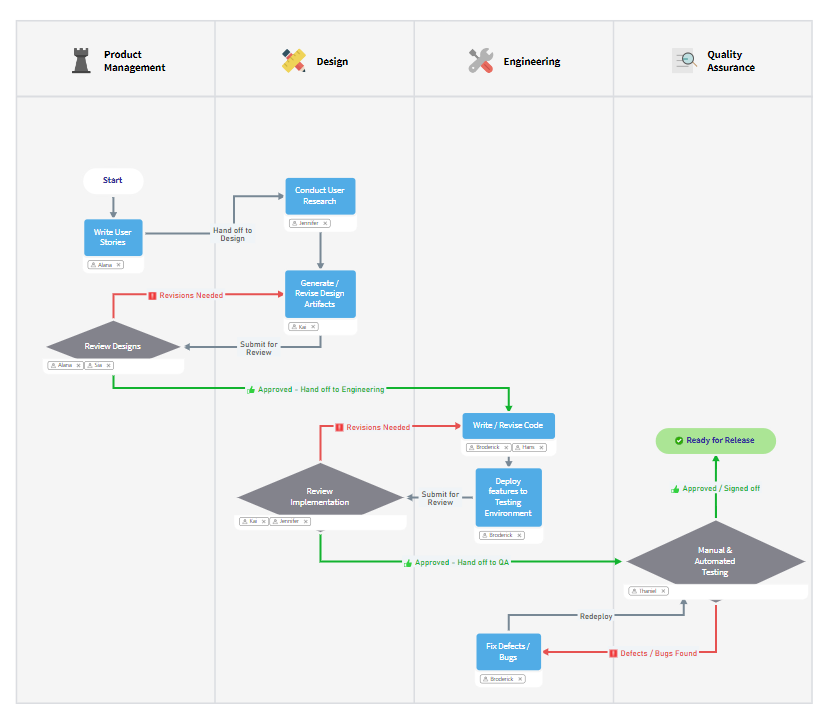
MindManager aims to bring clarity and structure to plans, projects, and processes.

With it, the vendor says users can transform scattered ideas and information into dynamic visual mind maps, flowcharts, concept maps, matrices and other diagrams. They state users can also take control of their work, synthesize vast amounts of data, collaborate and communicate more effectively, and boost productivity to gain a competitive edge.

MindManager is presented as a suite of intuitive visualization products that helps individuals and teams think more clearly, make better decisions, and get on the path to personal and organizational success.

MindManager Features

Additional Features
Has featureInformation Visualization
Has featureBrainstorming
Has featureProblem Solving
Has featureCollaboration
Has featureKnowledge Management
Has featureProcess Design & Documentation
Has featureProject Management
Has featureStrategic Planning
Has featureTask Management
Has featureWorkflow Management

MindManager Screenshots

MindManager Video

MindManager Downloadables

MindManager Integrations

Zapier, MS SharePoint, Microsoft Teams, MS Outlook, MS Word, MS Excel

MindManager Competitors

Xmind, iMindMap, iThoughts

MindManager Pricing

  • Has featureFree Trial Available?Yes
  • Does not have featureFree or Freemium Version Available?No
  • Does not have featurePremium Consulting/Integration Services Available?No
  • Entry-level set up fee?No
EditionPricing DetailsTerms
One-Time Cost$349per perpetual license
Annual Subscription$169per year
OrganizationsContact sales team

MindManager Support Options

 Paid Version
Phone
Live Chat
Email
Forum/Community
FAQ/Knowledgebase
Social Media
Video Tutorials / Webinar

MindManager Technical Details

Deployment Types:SaaS
Operating Systems: Unspecified
Mobile Application:Apple iOS, Android
Supported Languages: English, French, German, Japanese, Russian, Chinese
